Win
Mac
StreamFab ARD Downloader
Save your favorite ARD Mediathek and ARD Plus videos in 1080p with AAC 5.1/2.0 audio and enjoy smooth, unrestricted offline viewing on any device.
Last Update: Sep 22, 2026
100% Safe & Clean
4.8(176)

Download ARD Mediathek videos from any supported region.

Automatically download new episodes of scheduled ARD series.

Save videos in 1080p HD quality with AAC 5.1 or AAC 2.0 audio.

Search and download directly with the built-in browser.
StreamFab ARD Downloader: Must-Have for ARD Binge-Watching & Archiving!
Advanced Technology
Industry’s Leading ARD Downloader Solution
StreamFab ARD Downloader effectively bridges the gap created by the restrictions of the official ARD Mediathek and ARD Plus platforms. Although the ARD app permits temporary offline viewing on mobile devices, users are constrained by strict viewing windows before the cached content expires, and you cannot change the storage location to an external SD card. Furthermore, PC users are left with no official method to download videos, and even mobile downloads cannot be transferred to other devices or stored permanently.
StreamFab ARD Downloader empowers you to bypass these limitations completely. You can download your cherished ARD news, local broadcasts from the 9 regional stations, and documentaries directly to your PC in permanent MP4 or MKV formats. With support for 1080p video and up to AAC 5.1 audio, you can archive high-quality files for personal backup. Transfer your collection to any device—be it a TV, tablet, or smartphone—and curate a lifelong library of German media that never expires or disappears.
StreamFab ARD Downloader empowers you to bypass these limitations completely. You can download your cherished ARD news, local broadcasts from the 9 regional stations, and documentaries directly to your PC in permanent MP4 or MKV formats. With support for 1080p video and up to AAC 5.1 audio, you can archive high-quality files for personal backup. Transfer your collection to any device—be it a TV, tablet, or smartphone—and curate a lifelong library of German media that never expires or disappears.

Reliable and Verified
Reliable & Trusted by Millions of Users Worldwide
StreamFab ARD Downloader is backed by a professional team that ensures consistent performance, unlike free online tools like MediathekViewWeb or open-source scripts that often have less intuitive interfaces or break when ARD updates its streaming protocols. We monitor platform changes around the clock to keep the downloader functional and efficient.
Once downloaded, your ARD videos are yours to keep. They play smoothly on phones, laptops, tablets, smart TVs, and media servers, without expiration timers or app-only playback restrictions. Whether you download a few movies for travel or build a long-term archive from ARD Plus, StreamFab ARD Downloader is designed to be a reliable companion for your German TV collection.
Once downloaded, your ARD videos are yours to keep. They play smoothly on phones, laptops, tablets, smart TVs, and media servers, without expiration timers or app-only playback restrictions. Whether you download a few movies for travel or build a long-term archive from ARD Plus, StreamFab ARD Downloader is designed to be a reliable companion for your German TV collection.
Enjoy Flexible Output with StreamFab ARD Downloader
Excellent Downloading Quality
Download ARD Videos in 1080p with AAC 2.0 or ARD Plus in AAC 5.1
ARD's diverse programming, renowned for its comprehensive news coverage, engaging series, and premium ARD Plus content, demands the highest possible viewing quality. StreamFab ARD Downloader ensures you experience this by downloading videos in up to 1080p Full HD. From the intricate details of local cultural broadcasts to the dynamic scenes of blockbuster movies, the picture quality remains sharp, vibrant, and true to the source, making it ideal for large-screen playback.
Complementing the high-definition visuals are the tailored audio tracks. Enjoy standard ARD Mediathek broadcasts with clear AAC 2.0 audio, or experience the cinematic surround sound of AAC 5.1 when downloading premium content from ARD Plus. Whether you are absorbed in the narration of a deep-dive documentary or enjoying the immersive nuances of a dramatic series, the audio fidelity ensures a perfect audiovisual journey on any device.
Complementing the high-definition visuals are the tailored audio tracks. Enjoy standard ARD Mediathek broadcasts with clear AAC 2.0 audio, or experience the cinematic surround sound of AAC 5.1 when downloading premium content from ARD Plus. Whether you are absorbed in the narration of a deep-dive documentary or enjoying the immersive nuances of a dramatic series, the audio fidelity ensures a perfect audiovisual journey on any device.
MP4/MKV Output
Support Downloading ARD Videos as Compatible MP4 or MKV Format
StreamFab ARD Downloader allows you to save videos in either MP4 or MKV format, the two most universally compatible video container formats. This ensures that your downloads will play on virtually any device without the need for additional codecs or players.
Whether you use an iPhone, iPad, Android device, game console, or a dedicated home theater PC, the files you download are ready to watch immediately. You can choose MP4 for maximum compatibility across older devices or MKV for more advanced playback features, giving you full control over your media library.
Whether you use an iPhone, iPad, Android device, game console, or a dedicated home theater PC, the files you download are ready to watch immediately. You can choose MP4 for maximum compatibility across older devices or MKV for more advanced playback features, giving you full control over your media library.

Subtitle Download
Download ARD Subtitles as SRT or Remux into the Video
Subtitles are essential not just for accessibility, but also for language learners improving their German skills. StreamFab ARD Downloader can detect and download available subtitles from ARD Mediathek, giving you the option to save them as separate SRT files. This allows you to load them in external players or use them for language study.
If you prefer a cleaner file management system, you can remux the subtitles directly into the MP4 or MKV video file. This ensures the subtitles are always available when you play the video on your TV or mobile device, perfectly synced and ready to toggle on or off as needed.
If you prefer a cleaner file management system, you can remux the subtitles directly into the MP4 or MKV video file. This ensures the subtitles are always available when you play the video on your TV or mobile device, perfectly synced and ready to toggle on or off as needed.

Perfect ARD Downloading Experience You Get

Auto-Download New Episodes
Automatically download new episodes of your scheduled ARD series as soon as they air.

Batch Download
Download multiple ARD movies or entire series seasons simultaneously at high speed.
More Than Downloading
Save Metadata
Download media-server-friendly metadata info of ARD videos
Downloaded ARD videos can include metadata such as show title, episode title, season number, synopsis, and cover art. This makes it easy to build a personal German TV archive that stays tidy, consistent, and ready to browse on media-server apps like Plex or Kodi.

80+ Millions of People Like Us

M
Mark
Photographer1080p lessons look clean and readable, which is great for reviewing details in news broadcasts. Being able to pause and zoom into ARD footage offline helps me analyze framing, and the AAC 5.1 tracks stay clear and in sync across all my devices.
A
Alice
CopywriterExternal SRT subtitles are perfect for quoting key terms and learning new German vocabulary. The downloaded subtitles match the video perfectly, and the MP4 outputs play on every device I use without extra tools.
J
Jacob
EditorBatch mode lets me pull whole seasons of ARD series at once and keep working on other projects. Files stay organized across my NAS and media server, and long programs with remuxed subtitles remain smooth and perfectly synced.
M
Mark
Photographer1080p lessons look clean and readable, which is great for reviewing details in news broadcasts. Being able to pause and zoom into ARD footage offline helps me analyze framing, and the AAC 5.1 tracks stay clear and in sync across all my devices.
A
Alice
CopywriterExternal SRT subtitles are perfect for quoting key terms and learning new German vocabulary. The downloaded subtitles match the video perfectly, and the MP4 outputs play on every device I use without extra tools.
J
Jacob
EditorBatch mode lets me pull whole seasons of ARD series at once and keep working on other projects. Files stay organized across my NAS and media server, and long programs with remuxed subtitles remain smooth and perfectly synced.
M
Mark
Photographer1080p lessons look clean and readable, which is great for reviewing details in news broadcasts. Being able to pause and zoom into ARD footage offline helps me analyze framing, and the AAC 5.1 tracks stay clear and in sync across all my devices.
A
Alice
CopywriterExternal SRT subtitles are perfect for quoting key terms and learning new German vocabulary. The downloaded subtitles match the video perfectly, and the MP4 outputs play on every device I use without extra tools.
J
Jacob
EditorBatch mode lets me pull whole seasons of ARD series at once and keep working on other projects. Files stay organized across my NAS and media server, and long programs with remuxed subtitles remain smooth and perfectly synced.
M
Mark
Photographer1080p lessons look clean and readable, which is great for reviewing details in news broadcasts. Being able to pause and zoom into ARD footage offline helps me analyze framing, and the AAC 5.1 tracks stay clear and in sync across all my devices.
A
Alice
CopywriterExternal SRT subtitles are perfect for quoting key terms and learning new German vocabulary. The downloaded subtitles match the video perfectly, and the MP4 outputs play on every device I use without extra tools.
J
Jacob
EditorBatch mode lets me pull whole seasons of ARD series at once and keep working on other projects. Files stay organized across my NAS and media server, and long programs with remuxed subtitles remain smooth and perfectly synced.
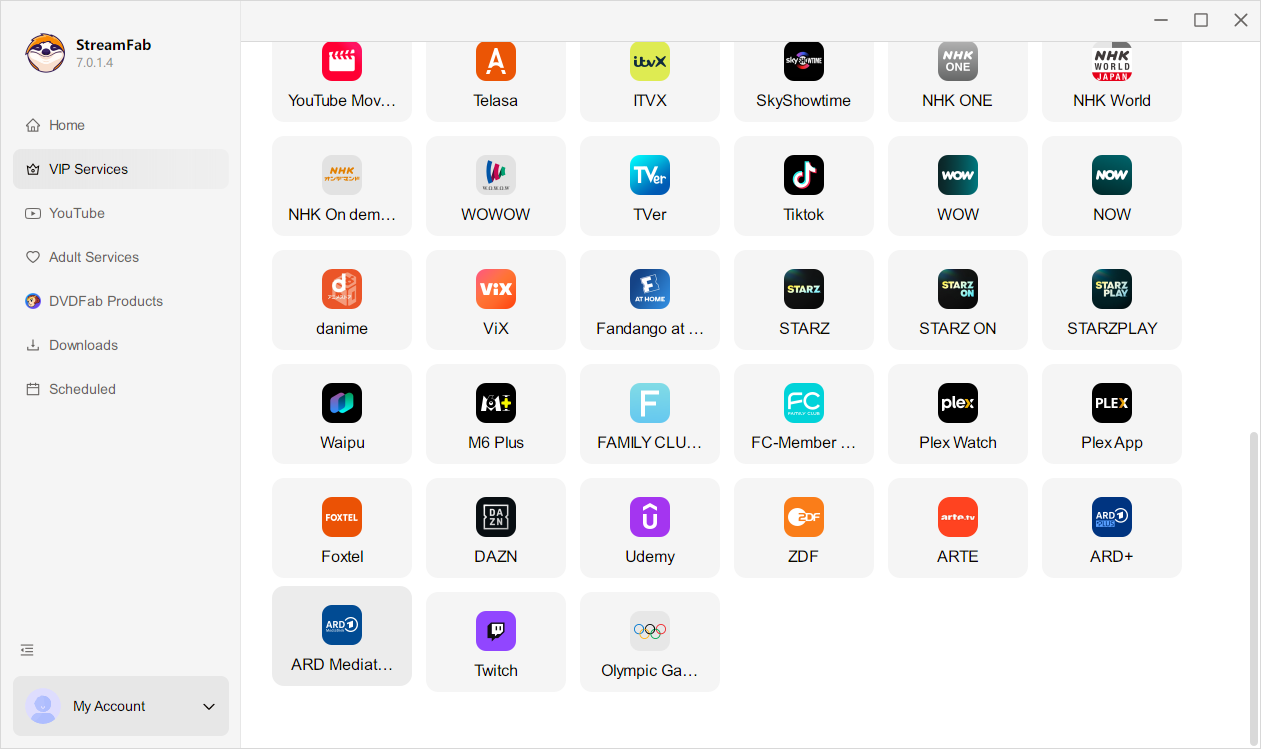
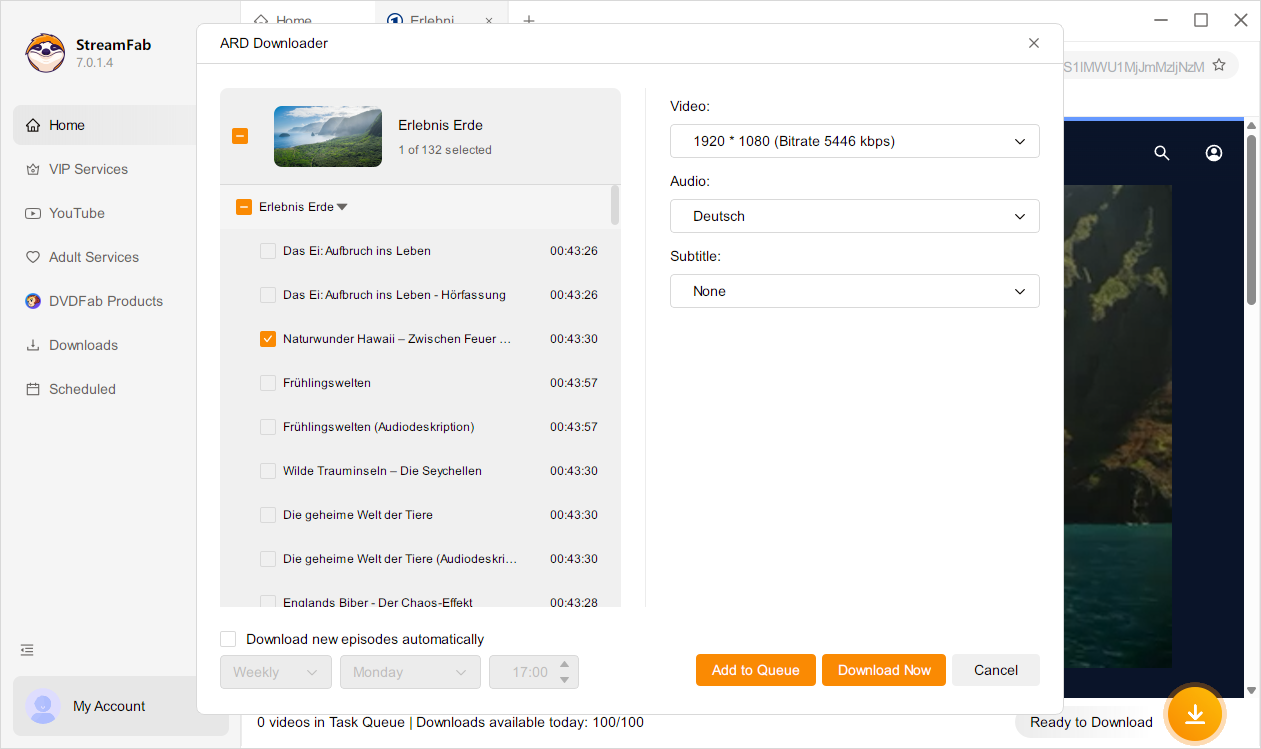
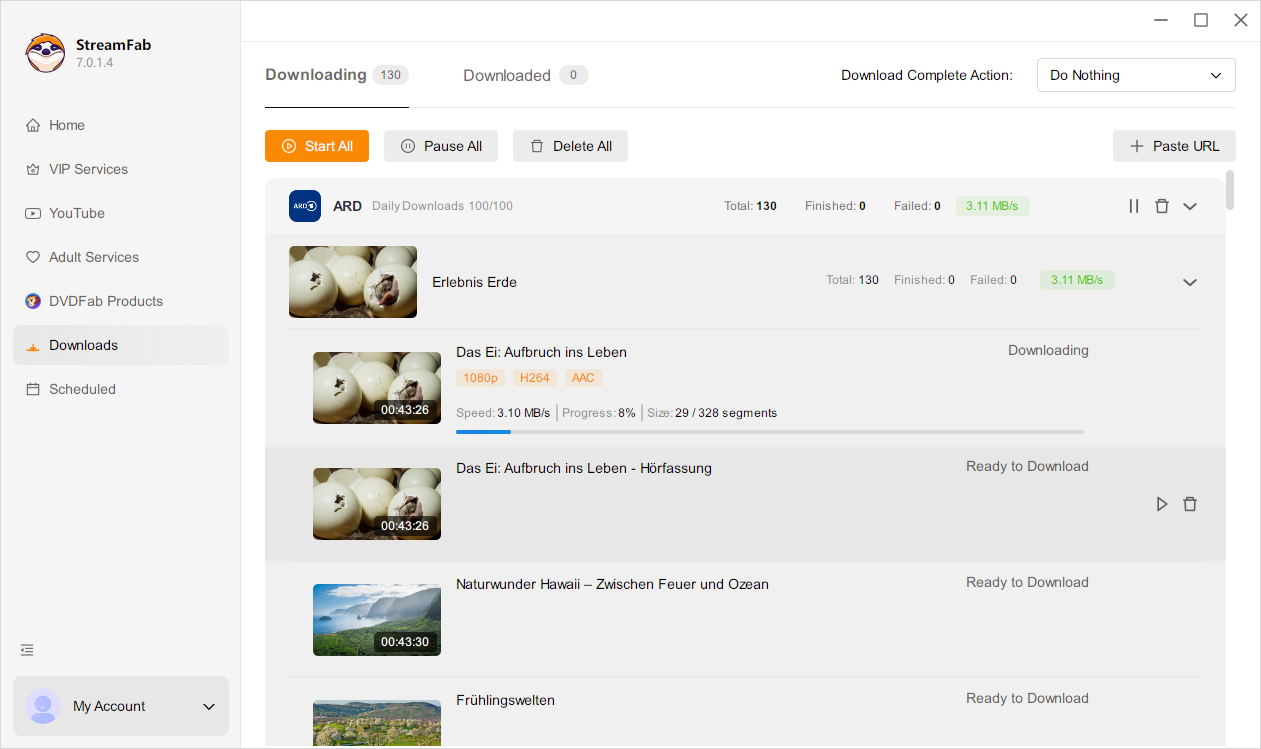
Step 1. Launch the software
Open StreamFab ARD Downloader and select the ARD Mediathek icon from the supported websites list or simply type the ARD URL into the built-in browser.
Step 2. Play and Configure
Play the video you want. StreamFab ARD Downloader analyzes it and shows a download window. Choose 1080p quality, subtitles, and batch options.
Step 3. Start Downloading
Click "Download Now". The video will download in the background. Once finished, enjoy your permanent offline ARD copy on any device.
System Requirements
Windows 11/10 (32/64 bit)
Intel i3 or above
4GB of RAM or above
40GB of free hard disk space or above
Live Internet connection required