Win
Mac
StreamFab Channel 5 Downloader
Get your next Channel 5 catch-up ready offline. Save available programmes in up to 1080p as MP4 or MKV on Windows or Mac, with no advert breaks in the downloaded file.
Last Update: Sep 24, 2026
100% Safe & Clean


Save available Channel 5 programmes for offline viewing

Schedule downloads of new episodes from supported series

Choose up to 1080p with AAC 2.0 audio

Browse Channel 5 within StreamFab and choose a programme
Make room for the programmes you want to watch
Offline Catch-Up
A train journey is a good time to catch up
Turn your next train journey into time for a Channel 5 drama or documentary. StreamFab Channel 5 Downloader saves currently playable programmes from the UK service to your Windows PC or Mac. Prepare a local copy while connected, then watch it offline in a compatible player. Choose a single programme or several available episodes to get your viewing list ready before you leave.

Proven Software Experience
Choose a familiar name, then try it for yourself
Choose a downloader backed by experience, and try it with the programmes you enjoy. StreamFab is part of DVDFab, which has developed multimedia software since 2003. The 30-day trial includes 3 successful Channel 5 downloads on Windows or Mac, so you can try your preferred picture, sound and subtitle settings before buying. Failed or cancelled downloads do not use up your trial allowance.

Set up a download that suits your screen
Picture and Sound
Enjoy the details in up to 1080p
Enjoy your next drama or documentary with H.264 video in up to 1080p and AAC 2.0 stereo sound. StreamFab also supports 720p, with the available resolutions shown for each Channel 5 programme. Choose the quality that suits your screen, save the episode, and watch the finished file offline.

Your File Format
Save a file for the player you already use
Keep using the player you already enjoy. StreamFab saves Channel 5 programmes as MP4 or MKV files on Windows and Mac, ready for personal offline playback in compatible players. Choose your preferred format and take your viewing list offline.

Subtitle Options
Keep the dialogue close at hand
Follow every line of dialogue with the subtitles your Channel 5 programme provides. Choose a subtitle track during analysis, then include it in the video file or export it separately. Keep everything together for easier file management, or use an external subtitle file with a compatible player.

Flexible Channel 5 Downloads
Auto-Download New Episodes
Follow a Channel 5 series without selecting every new episode. Schedule automatic downloads for supported shows, keeping your next catch-up ready with less manual setup.

Batch Download Episodes
Prepare a longer catch-up by selecting available seasons and episodes together. Add them to one download queue and let StreamFab save each episode in turn.

Choose Audio and Subtitle Languages
Watch in the language that suits you. Select your preferred audio and subtitle tracks from those available for each programme before saving your offline copy.

Ad-Free Offline Playback
Stay with the story from start to finish. Save supported Channel 5 on-demand programmes without advert segments, ready to watch offline in your favourite player.
What viewers say about StreamFab Channel 5 Downloader

J
Jacob
Graphic designerThe train home is usually my chance to catch up on a Channel 5 drama, but the connection drops along the way. With StreamFab, I can save an episode on my laptop before leaving and watch it without relying on train Wi-Fi. I choose MP4 because it works with the player I already use, and add subtitles when the programme offers them. Having the episode ready makes the journey feel less like wasted time. I just need to remember to download it while I am still connected at home.
A
Alice
NurseAfter a late shift, I want to put my feet up with a programme, not keep stopping for advert breaks. I use StreamFab to save Channel 5 episodes ahead of time, so the downloaded programme is ready to watch without those interruptions. For a series I am following, I can select a few available episodes together instead of setting up every download separately. That suits a week when my shifts keep changing. I prepare the queue on a day off and choose what to watch when I get home.
M
Mark
Café ownerRunning a café means my evenings rarely start at the same time. I often miss the chance to sit down with a documentary when I first spot it on Channel 5. StreamFab lets me save an available programme for a quieter evening and choose the picture quality before downloading. I like being able to keep subtitles with the video file, too. When I finally have time, I open the file on my laptop and settle in. It fits my routine better than planning the evening around a reliable connection.
J
Jacob
Graphic designerThe train home is usually my chance to catch up on a Channel 5 drama, but the connection drops along the way. With StreamFab, I can save an episode on my laptop before leaving and watch it without relying on train Wi-Fi. I choose MP4 because it works with the player I already use, and add subtitles when the programme offers them. Having the episode ready makes the journey feel less like wasted time. I just need to remember to download it while I am still connected at home.
A
Alice
NurseAfter a late shift, I want to put my feet up with a programme, not keep stopping for advert breaks. I use StreamFab to save Channel 5 episodes ahead of time, so the downloaded programme is ready to watch without those interruptions. For a series I am following, I can select a few available episodes together instead of setting up every download separately. That suits a week when my shifts keep changing. I prepare the queue on a day off and choose what to watch when I get home.
M
Mark
Café ownerRunning a café means my evenings rarely start at the same time. I often miss the chance to sit down with a documentary when I first spot it on Channel 5. StreamFab lets me save an available programme for a quieter evening and choose the picture quality before downloading. I like being able to keep subtitles with the video file, too. When I finally have time, I open the file on my laptop and settle in. It fits my routine better than planning the evening around a reliable connection.
J
Jacob
Graphic designerThe train home is usually my chance to catch up on a Channel 5 drama, but the connection drops along the way. With StreamFab, I can save an episode on my laptop before leaving and watch it without relying on train Wi-Fi. I choose MP4 because it works with the player I already use, and add subtitles when the programme offers them. Having the episode ready makes the journey feel less like wasted time. I just need to remember to download it while I am still connected at home.
A
Alice
NurseAfter a late shift, I want to put my feet up with a programme, not keep stopping for advert breaks. I use StreamFab to save Channel 5 episodes ahead of time, so the downloaded programme is ready to watch without those interruptions. For a series I am following, I can select a few available episodes together instead of setting up every download separately. That suits a week when my shifts keep changing. I prepare the queue on a day off and choose what to watch when I get home.
M
Mark
Café ownerRunning a café means my evenings rarely start at the same time. I often miss the chance to sit down with a documentary when I first spot it on Channel 5. StreamFab lets me save an available programme for a quieter evening and choose the picture quality before downloading. I like being able to keep subtitles with the video file, too. When I finally have time, I open the file on my laptop and settle in. It fits my routine better than planning the evening around a reliable connection.
J
Jacob
Graphic designerThe train home is usually my chance to catch up on a Channel 5 drama, but the connection drops along the way. With StreamFab, I can save an episode on my laptop before leaving and watch it without relying on train Wi-Fi. I choose MP4 because it works with the player I already use, and add subtitles when the programme offers them. Having the episode ready makes the journey feel less like wasted time. I just need to remember to download it while I am still connected at home.
A
Alice
NurseAfter a late shift, I want to put my feet up with a programme, not keep stopping for advert breaks. I use StreamFab to save Channel 5 episodes ahead of time, so the downloaded programme is ready to watch without those interruptions. For a series I am following, I can select a few available episodes together instead of setting up every download separately. That suits a week when my shifts keep changing. I prepare the queue on a day off and choose what to watch when I get home.
M
Mark
Café ownerRunning a café means my evenings rarely start at the same time. I often miss the chance to sit down with a documentary when I first spot it on Channel 5. StreamFab lets me save an available programme for a quieter evening and choose the picture quality before downloading. I like being able to keep subtitles with the video file, too. When I finally have time, I open the file on my laptop and settle in. It fits my routine better than planning the evening around a reliable connection.
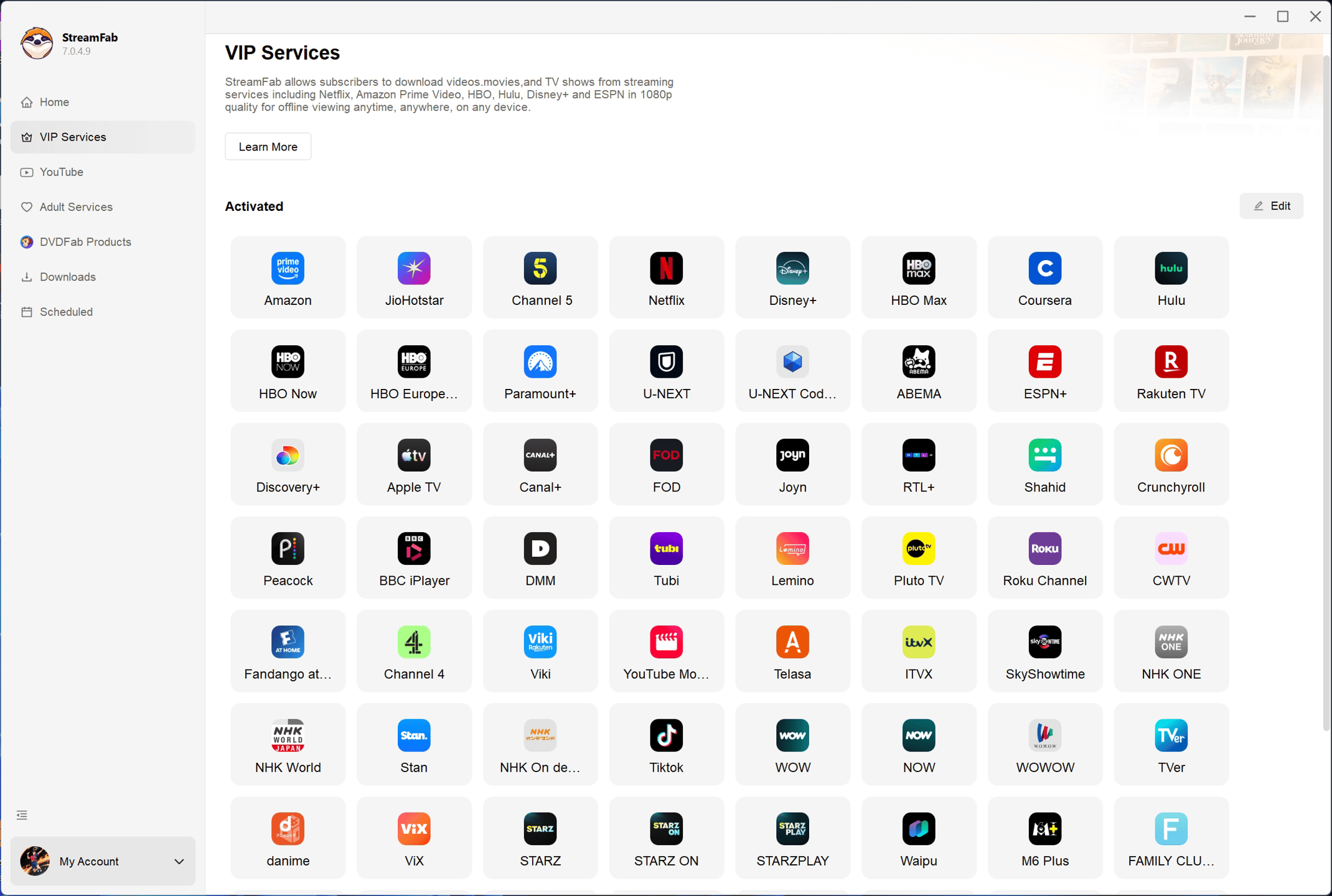
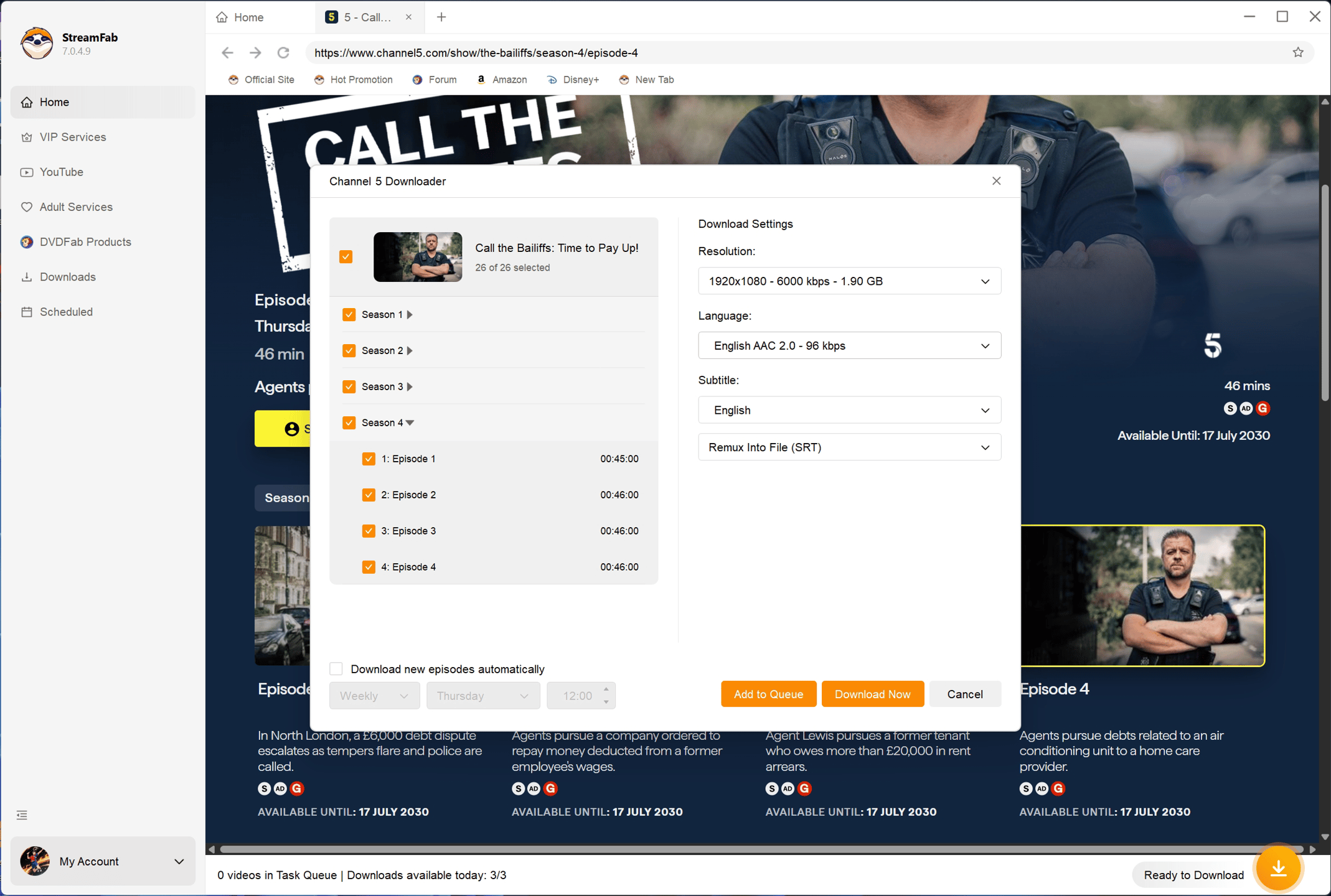
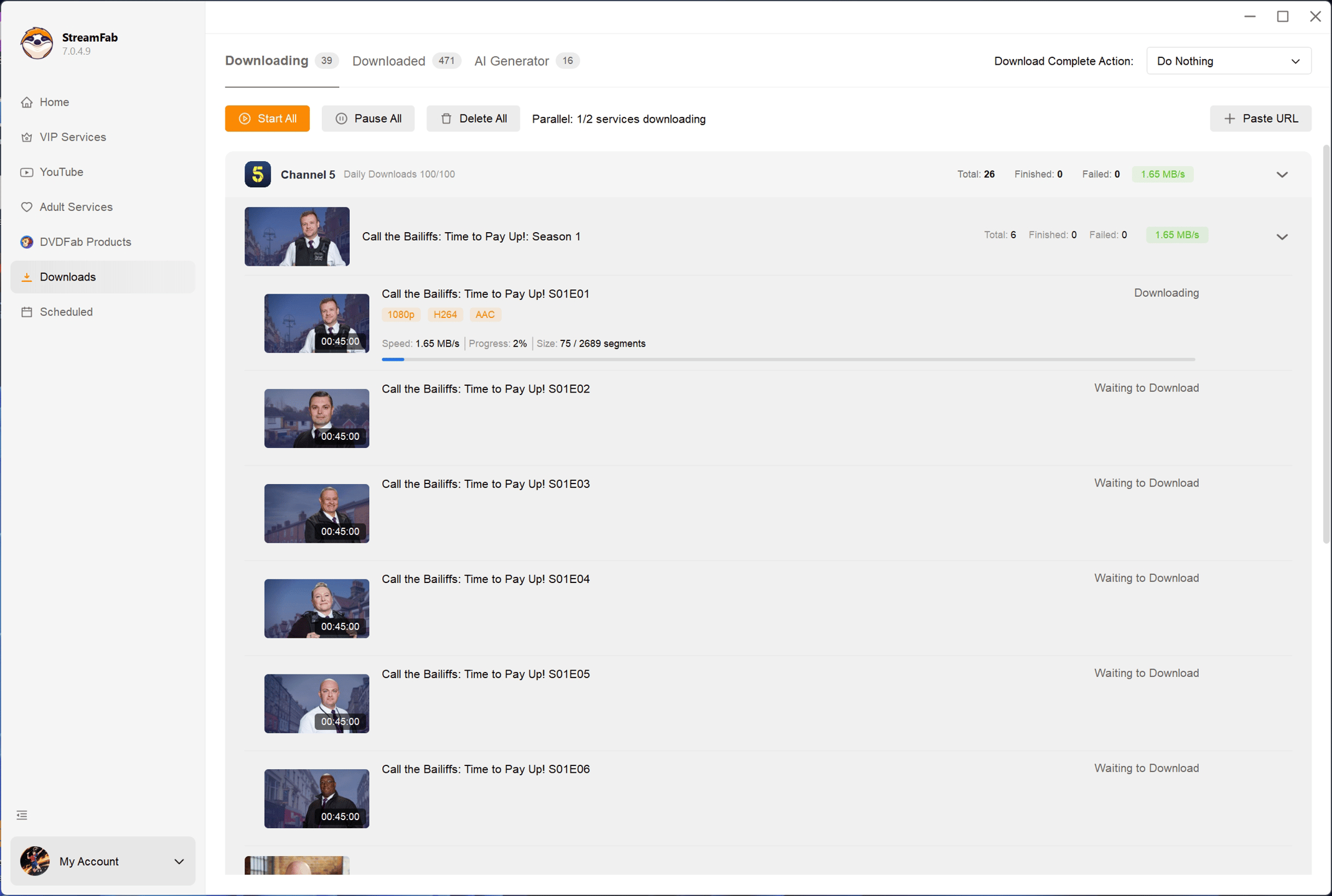
Step 1. Open Channel 5 in StreamFab
Install StreamFab on your Windows PC or Mac. Open Channel 5 from the VIP Services section.
Step 2. Find the programme you want to watch
Sign in to Channel 5 if prompted, then choose a programme and start playback. The programme must be available to your current account and location.
Step 3. Choose your options and download
Select the available quality, output format, audio and subtitle options. Download now or add your selection to the queue, then open the finished file for personal offline viewing.
Frequently Asked Questions
- Does Channel 5 offer an official offline download feature?
- What video quality and formats are supported?
- Can StreamFab give me access to Channel 5 outside the UK?
- Are downloaded Channel 5 programmes advert-free?
- Can I try the downloader on Windows or Mac before buying?
- How do batch and scheduled downloads work?
System Requirements

Windows 11/10 (32/64 bit)
Intel i3 or above
4GB of RAM or above
40GB of free hard disk space or above
Live Internet connection required