Win
Mac
StreamFab Coursera Downloader
You've built your learning library on Coursera — don't let expiring access or an unreliable internet connection interrupt that momentum. StreamFab Coursera Downloader saves your course lectures in 1080p MP4 or MKV, complete with your chosen subtitles, ready for offline learning anywhere.
Last Update: Oct 21, 2026
100% Safe & Clean
4.8(176)

Save courses from Coursera's global library

Download entire course series with one click

1080p Full HD video with AAC 2.0 audio

Built-in browser for easy Coursera access
Why Serious Learners Choose StreamFab
Leading Technology
A Download Engine Built on 20+ Years of Video Software Expertise
You know the feeling. You're making real progress in a Coursera course, building momentum — and then you lose your connection mid-lecture. Or your access period expires before you've finished a module. Or your subscription is up for renewal and you want to preserve what you've already paid for before the window closes. Whatever the scenario, the result is the same: your learning gets interrupted.
Coursera Downloader is built on StreamFab's proprietary download engine — the same technology trusted by tens of millions of video software users worldwide, continuously refined over 20+ years of development. Featured in reviews by leading technology publications, the engine detects Coursera lectures automatically through the built-in browser, captures them in their native 1080p quality with full AAC 2.0 audio, and delivers completed downloads to your chosen folder. No manual tinkering. No broken saves. Just your courses, ready when you are.
Coursera Downloader is built on StreamFab's proprietary download engine — the same technology trusted by tens of millions of video software users worldwide, continuously refined over 20+ years of development. Featured in reviews by leading technology publications, the engine detects Coursera lectures automatically through the built-in browser, captures them in their native 1080p quality with full AAC 2.0 audio, and delivers completed downloads to your chosen folder. No manual tinkering. No broken saves. Just your courses, ready when you are.
Safe & Trusted
Security You Can Count On When Your Account Is Involved
Logging into Coursera through a third-party tool raises a fair question: is my account safe? It's a concern every careful learner should have, and it's one StreamFab takes seriously. DVDFab, the company behind StreamFab, has been building trusted video software since 2003 — over two decades of consistent development, a strong Trustpilot reputation, and tens of millions of active users worldwide.
Your Coursera credentials are never transmitted to external servers. The built-in encrypted browser handles login entirely on your machine, protected by SSL/TLS throughout. The download engine has been verified safe by major antivirus platforms and never accesses your browsing history or personal files. You get 3 completely free downloads to test everything before spending a penny. And if you subscribe and aren't satisfied, lifetime plans come with a 14-day money-back guarantee. StreamFab earns trust through how it works, not just what it promises.
Your Coursera credentials are never transmitted to external servers. The built-in encrypted browser handles login entirely on your machine, protected by SSL/TLS throughout. The download engine has been verified safe by major antivirus platforms and never accesses your browsing history or personal files. You get 3 completely free downloads to test everything before spending a penny. And if you subscribe and aren't satisfied, lifetime plans come with a 14-day money-back guarantee. StreamFab earns trust through how it works, not just what it promises.
Everything Your Courses Deserve
Full HD Quality
1080p Video and Clear AAC 2.0 Audio — Every Lecture
You signed up for Coursera because the content is genuinely good — world-class instructors, carefully produced lectures, detailed visual aids and screen recordings that matter when you're learning something complex. Settling for a pixelated, muffled download that loses critical detail defeats the entire purpose.
StreamFab Coursera Downloader captures lectures in true 1080p Full HD resolution, preserving every whiteboard illustration, slide transition, and code snippet exactly as presented. Audio comes through in AAC 2.0 stereo at 192 kbps — whether it's an instructor's voice, a live demonstration, or narrated explanation, the clarity stays fully intact. There's no re-encoding, no forced compression, no quality trade-off. The quality you watch on Coursera is the quality that lands on your hard drive, ready for distraction-free learning on your laptop, your second monitor, or your next commute.
StreamFab Coursera Downloader captures lectures in true 1080p Full HD resolution, preserving every whiteboard illustration, slide transition, and code snippet exactly as presented. Audio comes through in AAC 2.0 stereo at 192 kbps — whether it's an instructor's voice, a live demonstration, or narrated explanation, the clarity stays fully intact. There's no re-encoding, no forced compression, no quality trade-off. The quality you watch on Coursera is the quality that lands on your hard drive, ready for distraction-free learning on your laptop, your second monitor, or your next commute.
Universal Formats
MP4 & MKV — Your Lectures on Any Screen
Learning doesn't happen in one place anymore. Maybe you start a lecture on your desktop in the morning, continue it on your laptop at lunch, and finish it on your tablet in the evening. The last thing you need is a file format that plays fine on one device but throws an error on another.
StreamFab Coursera Downloader gives you a clear choice. Select MP4 for maximum device compatibility — it plays natively on Windows PCs, phones, tablets, smart TVs, and most media players without any conversion required. Or choose MKV if you're building a structured course library and want richer metadata handling and flexible subtitle support in a single container. Either way, your Coursera lectures are saved in a format ready to watch on any screen, without extra steps or manual conversion.
StreamFab Coursera Downloader gives you a clear choice. Select MP4 for maximum device compatibility — it plays natively on Windows PCs, phones, tablets, smart TVs, and most media players without any conversion required. Or choose MKV if you're building a structured course library and want richer metadata handling and flexible subtitle support in a single container. Either way, your Coursera lectures are saved in a format ready to watch on any screen, without extra steps or manual conversion.

Full Subtitle Support
Keep the Subtitles That Help You Actually Learn
Coursera reaches learners around the world, many of whom rely on subtitles not just for accessibility but as a core part of their learning strategy. Following along in a second language, reviewing technical vocabulary as it's spoken aloud, or making sure you catch every step in a fast-paced data science lecture — subtitles aren't optional for serious learners, they're essential.
StreamFab Coursera Downloader downloads subtitle tracks alongside the video and lets you choose from available language options before saving. Keep them as external SRT files for maximum flexibility — compatible with any media player on any device. Or embed them directly into the video container for a self-contained file that plays with subtitles already in place, no extra setup needed. Your lectures come with the language support you depend on, built right in.
StreamFab Coursera Downloader downloads subtitle tracks alongside the video and lets you choose from available language options before saving. Keep them as external SRT files for maximum flexibility — compatible with any media player on any device. Or embed them directly into the video container for a self-contained file that plays with subtitles already in place, no extra setup needed. Your lectures come with the language support you depend on, built right in.

Built Around How Learners Actually Study

Download Your Enrolled Courses Automatically
StreamFab detects your enrolled Coursera courses and saves lectures automatically — so offline access to your active learning plan is always ready and waiting.

Batch Download Entire Courses at Once
Select an entire course or multiple modules and download them all in one session — no repetitive clicking or waiting between individual lectures.

Choose Your Language for Every Lecture
Pick your subtitle language and preferred audio track before downloading — whether studying in English, reviewing in your native language, or switching between both to reinforce understanding.
Your Course Library — Organized the Way You Want
Smart Metadata
Automatic Metadata — Course Info That Travels with Your Files
When you're building an offline library of Coursera lectures — module by module, week by week — organization matters. A folder full of generic filenames like "video_001.mp4" tells you nothing useful when you return three months later to review a particular topic.
StreamFab Coursera Downloader automatically fetches metadata alongside each video: course title, instructor name, module number, episode sequence, and lecture description. Your files arrive in your media library already correctly labeled and sorted, readable natively by compatible media players and library managers. Your offline courses look and browse just as clearly structured as they do on the Coursera platform itself. You've invested serious time in learning — your file library should reflect that commitment.
StreamFab Coursera Downloader automatically fetches metadata alongside each video: course title, instructor name, module number, episode sequence, and lecture description. Your files arrive in your media library already correctly labeled and sorted, readable natively by compatible media players and library managers. Your offline courses look and browse just as clearly structured as they do on the Coursera platform itself. You've invested serious time in learning — your file library should reflect that commitment.

What Our Users Are Saying

J
Jacob
Software DeveloperI travel frequently for work and reliable Wi-Fi isn't something I can always count on. I enrolled in a machine learning certificate program on Coursera, and constantly buffering lectures mid-session was derailing my progress completely. A colleague mentioned StreamFab, and it changed how I study. I now download each week's lectures on Sunday evening and work through them offline — on flights, in hotel rooms, on the train. The 1080p quality means every code demonstration and slide detail comes through perfectly sharp. I've actually completed two full certifications this year. Can't imagine going back to streaming everything.
A
Alice
High School TeacherI use Coursera for professional development during school holidays. Connectivity at school is unpredictable and my evenings at home aren't always uninterrupted. Downloading lectures in advance made an immediate, noticeable difference. The subtitle feature is especially valuable for me — I'm also learning Spanish on the side, so being able to download with Spanish subtitles for self-study was an unexpected bonus. The MP4 files work perfectly on my laptop and my classroom projector. Setup was much simpler than I expected for something this capable.
M
Mark
IT Project ManagerMy team uses Coursera for professional certifications, with both group study sessions and individual self-paced learning. Before StreamFab, people were trying to stream on mobile data or unreliable office Wi-Fi — the experience was inconsistent and frustrating. Now I batch-download the relevant course videos ahead of time and we use the local files for our group sessions. The batch download feature alone saves significant time every week. Audio and video quality are excellent — crisp and clear even in noisy conference rooms. It's become a standard part of our team training and certification workflow.
J
Jacob
Software DeveloperI travel frequently for work and reliable Wi-Fi isn't something I can always count on. I enrolled in a machine learning certificate program on Coursera, and constantly buffering lectures mid-session was derailing my progress completely. A colleague mentioned StreamFab, and it changed how I study. I now download each week's lectures on Sunday evening and work through them offline — on flights, in hotel rooms, on the train. The 1080p quality means every code demonstration and slide detail comes through perfectly sharp. I've actually completed two full certifications this year. Can't imagine going back to streaming everything.
A
Alice
High School TeacherI use Coursera for professional development during school holidays. Connectivity at school is unpredictable and my evenings at home aren't always uninterrupted. Downloading lectures in advance made an immediate, noticeable difference. The subtitle feature is especially valuable for me — I'm also learning Spanish on the side, so being able to download with Spanish subtitles for self-study was an unexpected bonus. The MP4 files work perfectly on my laptop and my classroom projector. Setup was much simpler than I expected for something this capable.
M
Mark
IT Project ManagerMy team uses Coursera for professional certifications, with both group study sessions and individual self-paced learning. Before StreamFab, people were trying to stream on mobile data or unreliable office Wi-Fi — the experience was inconsistent and frustrating. Now I batch-download the relevant course videos ahead of time and we use the local files for our group sessions. The batch download feature alone saves significant time every week. Audio and video quality are excellent — crisp and clear even in noisy conference rooms. It's become a standard part of our team training and certification workflow.
J
Jacob
Software DeveloperI travel frequently for work and reliable Wi-Fi isn't something I can always count on. I enrolled in a machine learning certificate program on Coursera, and constantly buffering lectures mid-session was derailing my progress completely. A colleague mentioned StreamFab, and it changed how I study. I now download each week's lectures on Sunday evening and work through them offline — on flights, in hotel rooms, on the train. The 1080p quality means every code demonstration and slide detail comes through perfectly sharp. I've actually completed two full certifications this year. Can't imagine going back to streaming everything.
A
Alice
High School TeacherI use Coursera for professional development during school holidays. Connectivity at school is unpredictable and my evenings at home aren't always uninterrupted. Downloading lectures in advance made an immediate, noticeable difference. The subtitle feature is especially valuable for me — I'm also learning Spanish on the side, so being able to download with Spanish subtitles for self-study was an unexpected bonus. The MP4 files work perfectly on my laptop and my classroom projector. Setup was much simpler than I expected for something this capable.
M
Mark
IT Project ManagerMy team uses Coursera for professional certifications, with both group study sessions and individual self-paced learning. Before StreamFab, people were trying to stream on mobile data or unreliable office Wi-Fi — the experience was inconsistent and frustrating. Now I batch-download the relevant course videos ahead of time and we use the local files for our group sessions. The batch download feature alone saves significant time every week. Audio and video quality are excellent — crisp and clear even in noisy conference rooms. It's become a standard part of our team training and certification workflow.
J
Jacob
Software DeveloperI travel frequently for work and reliable Wi-Fi isn't something I can always count on. I enrolled in a machine learning certificate program on Coursera, and constantly buffering lectures mid-session was derailing my progress completely. A colleague mentioned StreamFab, and it changed how I study. I now download each week's lectures on Sunday evening and work through them offline — on flights, in hotel rooms, on the train. The 1080p quality means every code demonstration and slide detail comes through perfectly sharp. I've actually completed two full certifications this year. Can't imagine going back to streaming everything.
A
Alice
High School TeacherI use Coursera for professional development during school holidays. Connectivity at school is unpredictable and my evenings at home aren't always uninterrupted. Downloading lectures in advance made an immediate, noticeable difference. The subtitle feature is especially valuable for me — I'm also learning Spanish on the side, so being able to download with Spanish subtitles for self-study was an unexpected bonus. The MP4 files work perfectly on my laptop and my classroom projector. Setup was much simpler than I expected for something this capable.
M
Mark
IT Project ManagerMy team uses Coursera for professional certifications, with both group study sessions and individual self-paced learning. Before StreamFab, people were trying to stream on mobile data or unreliable office Wi-Fi — the experience was inconsistent and frustrating. Now I batch-download the relevant course videos ahead of time and we use the local files for our group sessions. The batch download feature alone saves significant time every week. Audio and video quality are excellent — crisp and clear even in noisy conference rooms. It's become a standard part of our team training and certification workflow.
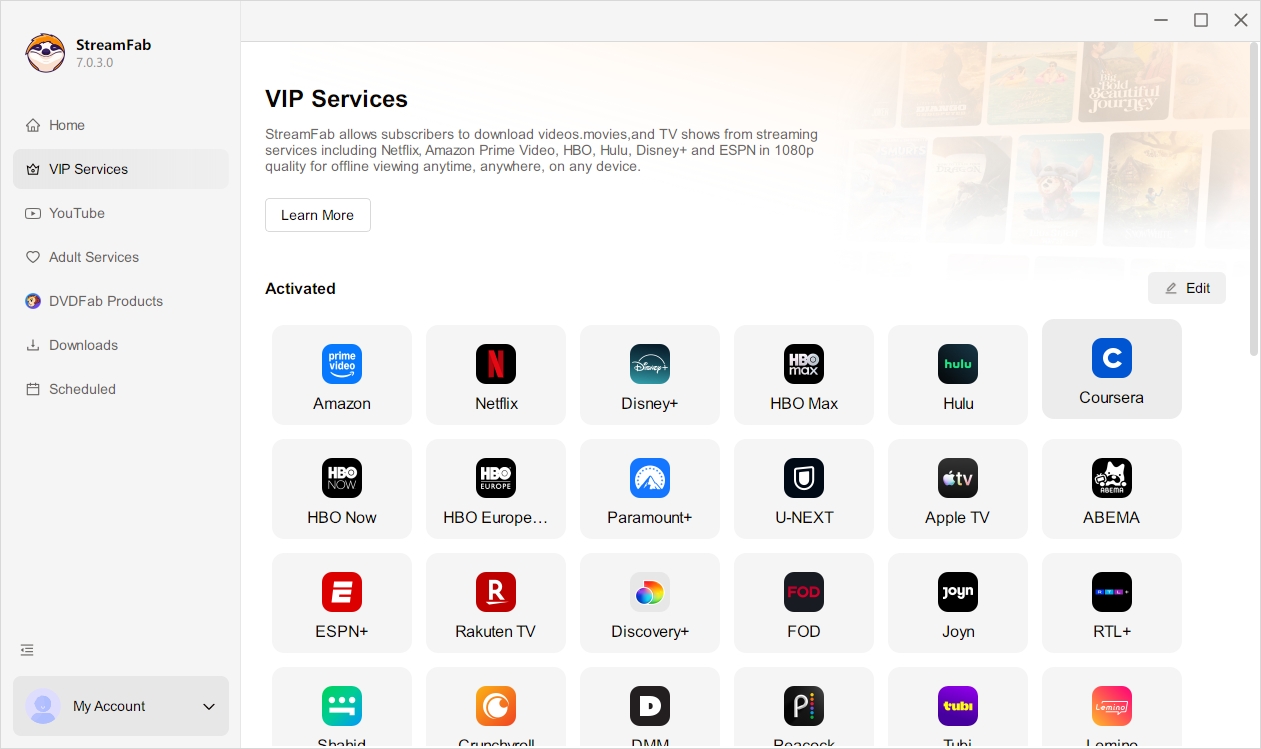
Step 1. Download and Install StreamFab
Download StreamFab from the official DVDFab website and install it on your Windows PC. Open the Coursera Downloader from the main module menu.
Step 2. Sign In and Open Your Course
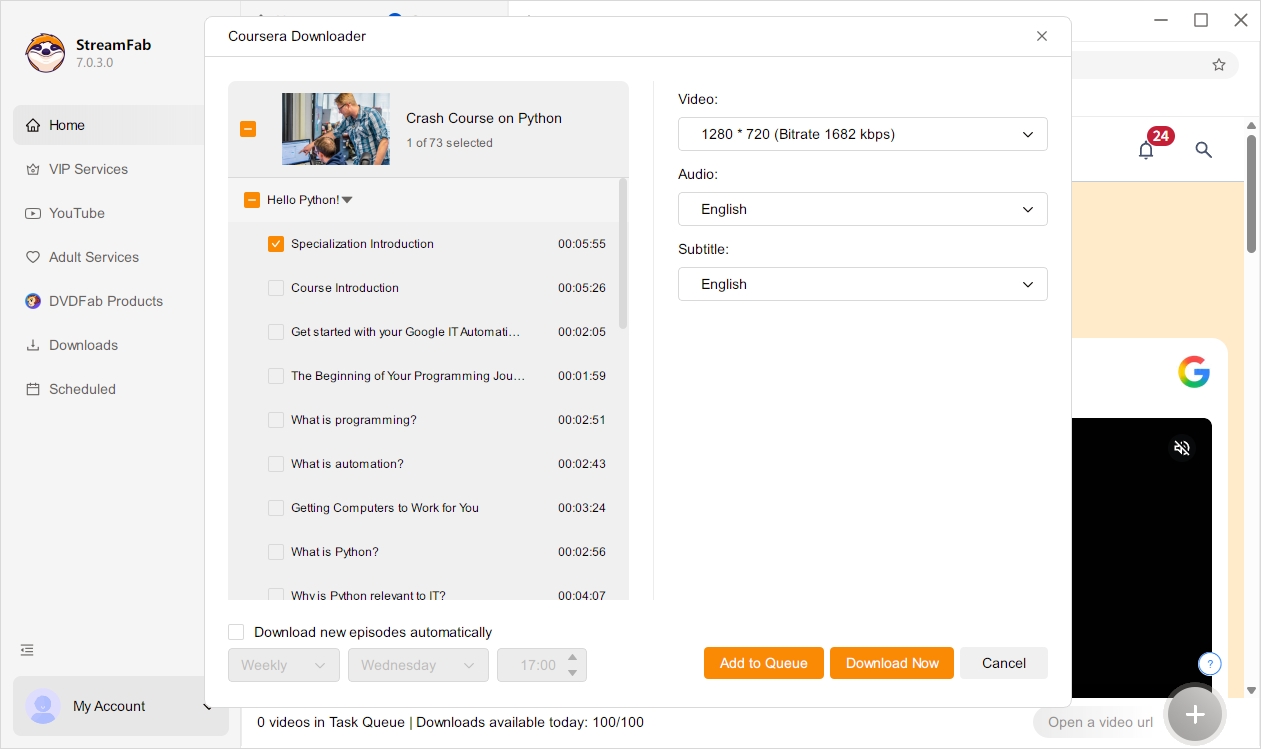
Use StreamFab's built-in browser to sign in to your Coursera account, then navigate to the course or specific lecture you want to save offline.
Step 3. Set Your Format and Download
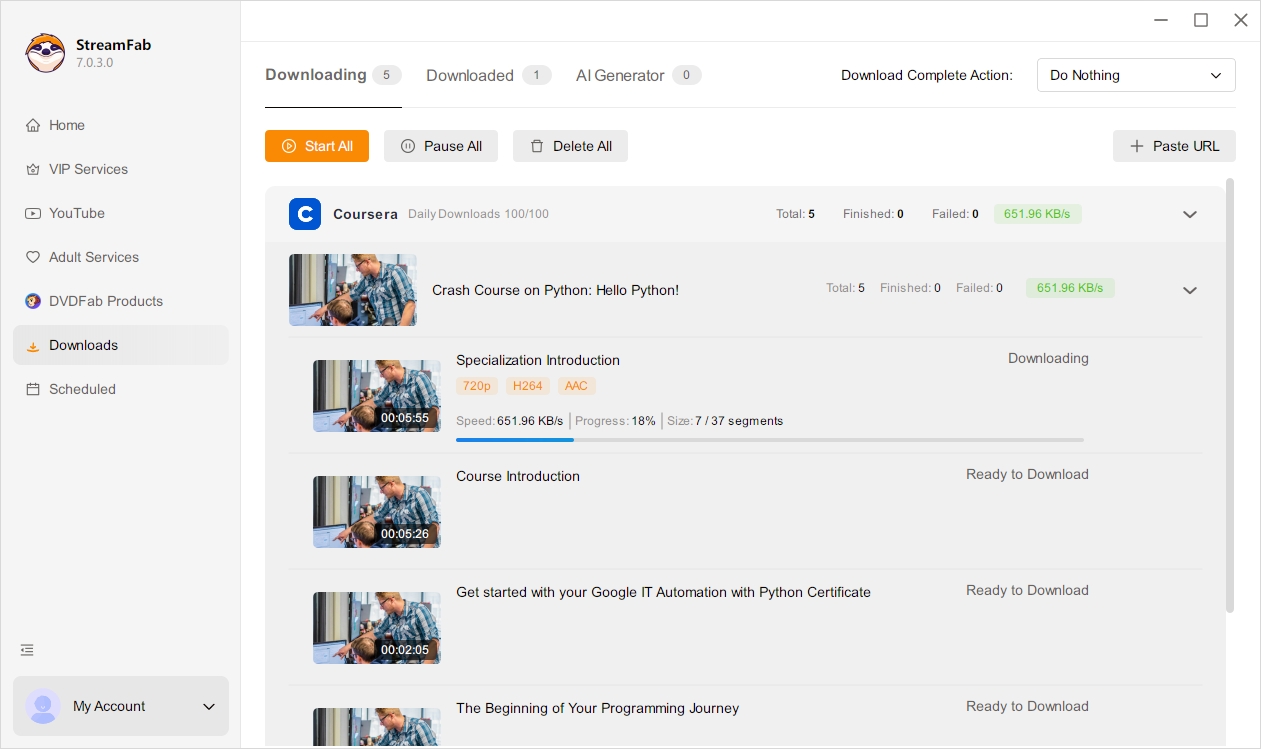
Choose your preferred resolution (up to 1080p), output format (MP4 or MKV), and subtitle language — then click download. Lectures save to your local drive automatically.
System Requirements

Windows 11/10 (32/64 bit)
Intel i3 or above
4GB of RAM or above
40GB of free hard disk space or above
Live Internet connection required