StreamFab DAZN Downloader
Save DAZN matches and replays in 1080p MP4 or MKV with AAC 2.0 audio. Remove ads automatically, batch download full match days, and keep metadata for a tidy personal sports library — ready offline, on any device. Start with 3 free downloads, protected by 256-bit SSL encryption.

Save DAZN sports content for offline viewing

Download DAZN replays in crisp 1080p quality

Browse DAZN seamlessly in the built-in browser
Why Sports Fans Trust StreamFab for Their DAZN Library
DAZN's restrictions mean you never truly own the sports moments you paid to watch
Imagine this: it is Saturday evening in Munich and you have just watched an incredible Bundesliga match on DAZN — a last-minute winner that you want to relive again and again. But when you open the app the following week, the replay has been rotated out or moved behind a different subscription tier. This is the reality for millions of DAZN subscribers across the DACH region, where monthly costs range from approximately €14.99 to €44.99 depending on the package, yet the platform offers virtually no permanent download capability for its core sports content. Only a fraction of NFL Game Pass titles support official offline downloads, and even those expire after a set period.
Developed by the StreamFab team with over 8 years of video software expertise and trusted by tens of millions of users worldwide, StreamFab DAZN Downloader solves this by creating permanent 1080p MP4 or MKV copies with AAC 2.0 audio that you keep on your own drives, free from expiry dates, device locks, or buffering interruptions.

Reliable weekly updates keep your DAZN downloads working through every platform change
Sports fans build libraries across entire seasons, and the last thing you need is a download tool that breaks every time DAZN updates its app or delivery infrastructure. The StreamFab engineering team has maintained video software for over two decades, and the StreamFab engine receives weekly compatibility updates — typically resolving new platform changes within 24 to 48 hours.
Your account credentials are never stored by StreamFab, and all communication with StreamFab servers is secured with 256-bit SSL encryption. Featured and reviewed by technology publications including PCMag and TechRadar, StreamFab is built for sports viewers who want a tool that works as consistently as their passion for the game. Try it risk-free with 3 free downloads, backed by a 7-day money-back guarantee on monthly plans or 14 days on annual and lifetime licenses.
Your DAZN Content — Your Way
Every goal and knockout captured in full 1080p with crystal-clear AAC 2.0 audio
DAZN's adaptive bitrate streaming adjusts quality in real time based on your connection, which means peak-hour congestion or a momentary signal dip can reduce a crisp broadcast to unwatchable mush at the worst possible moment. StreamFab captures the native 1080p stream directly, bypassing the adaptive quality ladder entirely. The downloaded file retains the full resolution and original H.264 encoding, so every scoreboard graphic, tactical overlay, and slow-motion replay stays sharp enough to analyze frame by frame.
The AAC 2.0 audio track preserves the full commentary mix — crowd roar, pitch-side microphones, and analyst commentary stay balanced and clear whether you are watching on a living room TV, a laptop during your commute, or headphones on a flight. For a standard 90-minute football match, your offline file delivers the same visual and audio fidelity from first whistle to final whistle, completely independent of your internet connection.
Save DAZN sports as MP4 for maximum compatibility or MKV for media server archives
Your living room setup and your on-the-go routine demand different things from a video file, and StreamFab accommodates both. MP4 is the universal choice — it plays natively on iPhones, Android devices, Windows laptops, smart TVs, PlayStation, Xbox, and virtually every media player without requiring additional codecs or software. When you want to watch a downloaded Bundesliga match on a hotel television via USB or AirPlay it to an Apple TV, MP4 ensures zero friction.
MKV is the format of choice for dedicated media library builders. It supports chapter markers for jumping between match halves or rounds, rich metadata embedding, and integrates cleanly with server platforms like Plex, Jellyfin, and Emby, where your sports archive can be browsed by league, season, and competition just like a professional streaming interface. Whether you transfer files by USB stick, cloud storage, or network share, both formats preserve the full 1080p resolution and AAC 2.0 audio quality without any re-encoding or conversion step.

A Downloading Experience Built for Sports Fans

Batch Mode and Fast Speed
Queue an entire Champions League match day or a full UFC fight card and let StreamFab handle the rest. Fast batch processing means your weekend sports lineup is ready in one go.

Remove Ads for Clean Playback
StreamFab strips pre-roll and mid-roll ads during download, so your saved matches play from kickoff to final whistle without a single commercial interruption.
More Than Downloading
Save metadata so your DAZN library stays organized for years
After a few months of downloading matches, finding a specific Champions League quarterfinal or a memorable boxing bout in a folder of generic filenames becomes a real headache. StreamFab solves this by embedding comprehensive metadata with every download — event title, competition name, season, broadcast date, synopsis, and cover artwork.
Feed these properly tagged files into Plex, Jellyfin, or PlayerFab and your personal sports archive organizes itself: browse by competition, filter by date, and enjoy professional cover art that makes your local library look and feel as polished as DAZN's own interface. For fans who build multi-season archives spanning Bundesliga campaigns, Champions League runs, and UFC cards, this metadata preservation means your collection stays navigable and orderly for years to come — long after the original content has cycled off DAZN's streaming catalog.

What DAZN Fans Say About StreamFab

Mark
PhotographerAlice
Fitness InstructorJacob
Sports EditorMark
PhotographerAlice
Fitness InstructorJacob
Sports EditorMark
PhotographerAlice
Fitness InstructorJacob
Sports EditorMark
PhotographerAlice
Fitness InstructorJacob
Sports Editor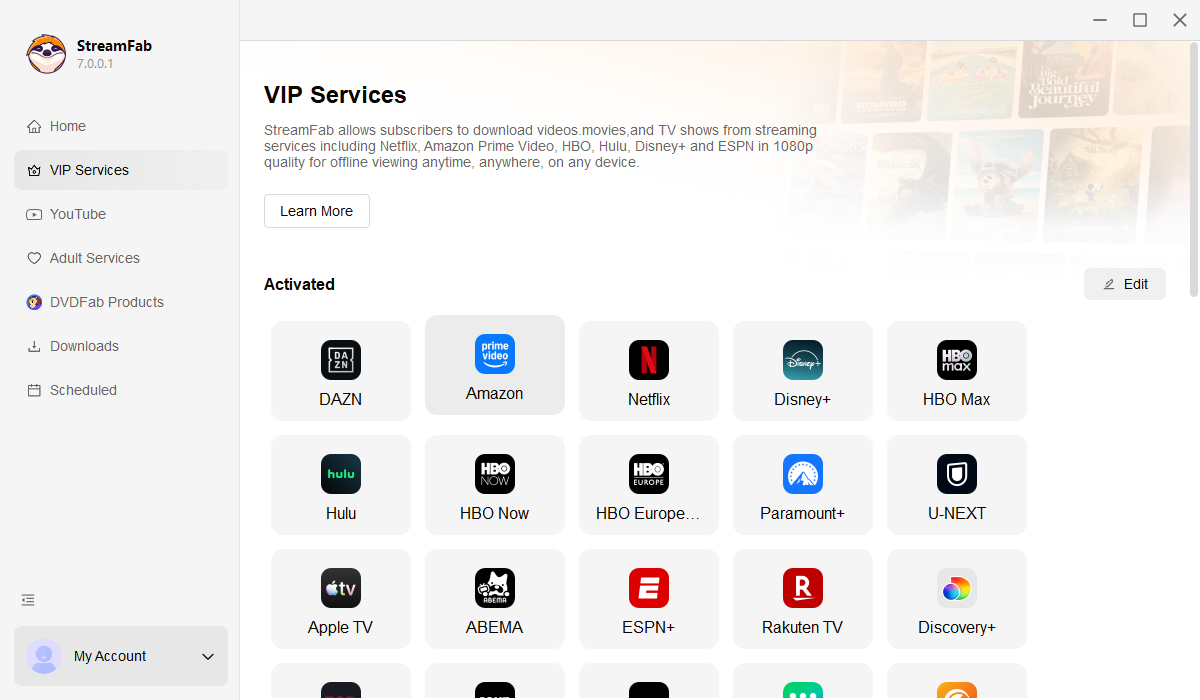
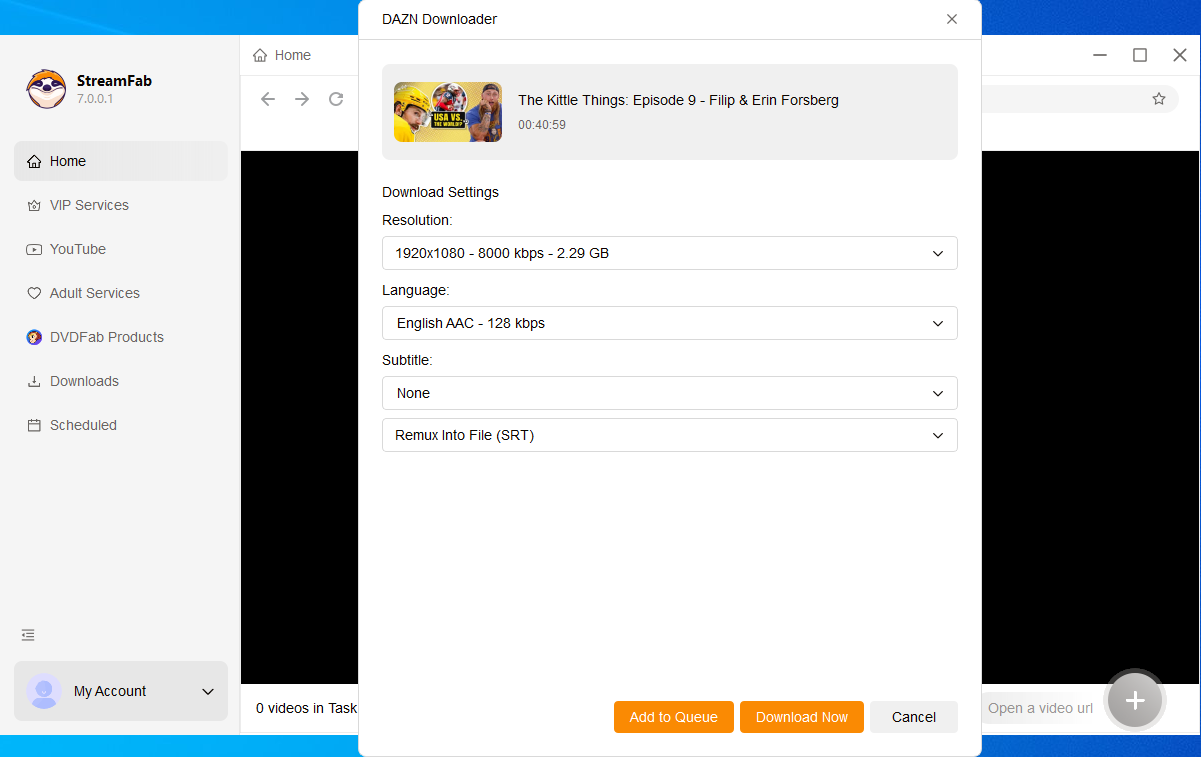
Open StreamFab DAZN Downloader and click on DAZN from the VIP Services panel. Sign into your DAZN account within the built-in browser.
Navigate to the match, replay, or highlight you want to save and begin playback. StreamFab automatically detects the stream and displays download options — select 1080p quality, MP4 or MKV format, and queue additional titles for batch downloading.
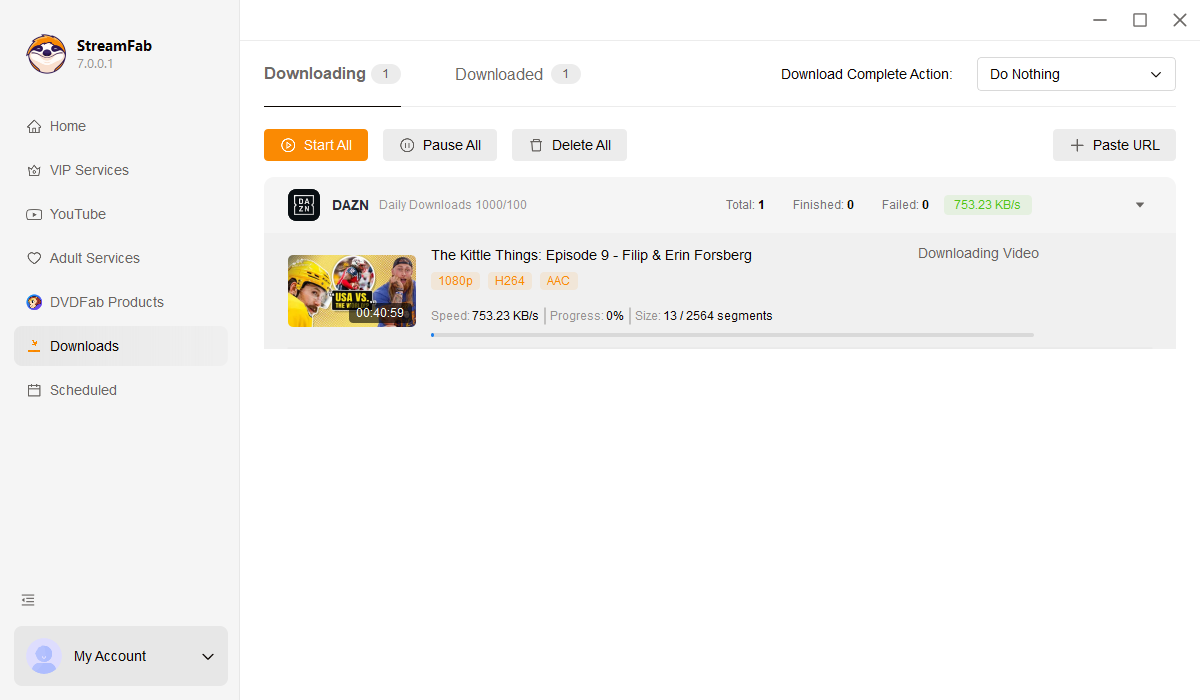
Click Download Now and monitor progress in the task list. Finished files are saved to your local storage with ads removed, ready for offline playback on any device.
System Requirements