StreamFab Hulu Downloader for Browser
That series you've been binging, the drama you rewatch every season — it shouldn't vanish when Hulu rotates its catalog. StreamFab Hulu Downloader for Browser saves your shows in up to 4K quality directly from Chrome or Edge.
Also Available on:Desktop SoftwareLast Update: Jul 8, 2026
100% Safe & Clean



Save any video from Hulu and Hulu JP

Up to 4K video with EAC3 5.1 surround sound

Download directly from Chrome or Edge
Why StreamFab Is the Smart Choice for Hulu
Trusted by Millions
A Download Engine Built on 20+ Years of DVDFab Expertise
You’ve probably tried other methods to save Hulu content before. Maybe a screen recorder that chewed through hours and delivered choppy, pixelated footage. Maybe a free browser tool that worked once, then broke after a platform update — leaving you with nothing to show for it. When it comes to shows and movies you’re actually paying for, unreliable workarounds are more than just frustrating — they waste your subscription money.
StreamFab Hulu Downloader for Browser is built by DVDFab, a video software company trusted by tens of millions of users with over 20 years of continuous development. The same battle-tested download engine now lives inside your browser, capturing Hulu streams at their native resolution — up to 4K — with EAC3 5.1 surround or AAC 2.0 stereo audio in full fidelity. The lightweight CoApp companion handles video processing invisibly in the background.
StreamFab Hulu Downloader for Browser is built by DVDFab, a video software company trusted by tens of millions of users with over 20 years of continuous development. The same battle-tested download engine now lives inside your browser, capturing Hulu streams at their native resolution — up to 4K — with EAC3 5.1 surround or AAC 2.0 stereo audio in full fidelity. The lightweight CoApp companion handles video processing invisibly in the background.

Full Platform Coverage
Every Hulu Show — Including Hulu JP — Ready to Save
Hulu and Hulu Japan together cover a massive entertainment library — US originals, Hollywood blockbusters, classic TV series, and premium Japanese dramas. The problem? They’re two separate platforms with different content libraries, and your collection shouldn’t have to stop at one.
StreamFab Hulu Downloader for Browser handles both without switching tools or changing settings. Whether it’s a Hulu Original you want to keep before it exits the platform, a seasonal drama on Hulu JP, or a show you’ve rewatched enough times to want offline — the extension detects and downloads it all with consistent quality. If it plays in your browser, StreamFab saves it in up to 4K resolution with your chosen audio track and subtitles intact.
StreamFab Hulu Downloader for Browser handles both without switching tools or changing settings. Whether it’s a Hulu Original you want to keep before it exits the platform, a seasonal drama on Hulu JP, or a show you’ve rewatched enough times to want offline — the extension detects and downloads it all with consistent quality. If it plays in your browser, StreamFab saves it in up to 4K resolution with your chosen audio track and subtitles intact.

Browser-Native
Download Right Where You Watch — No Extra App Windows
Remember the old way of downloading streaming videos? Copy a URL, open a separate desktop application, paste the link, dig through settings, hit download, then flip back to the browser to find the next episode. When you’re working through a full season, that constant back-and-forth becomes genuinely exhausting.
StreamFab Hulu Downloader for Browser works differently. It lives right inside Chrome or Edge as a lightweight extension — no separate app window to manage, no URLs to paste. Browse Hulu the way you always do, and when you find something worth keeping, the download option is right there on screen. The CoApp desktop companion processes video quietly in the background while you keep watching, queuing, and browsing. Downloading, made invisible.
StreamFab Hulu Downloader for Browser works differently. It lives right inside Chrome or Edge as a lightweight extension — no separate app window to manage, no URLs to paste. Browse Hulu the way you always do, and when you find something worth keeping, the download option is right there on screen. The CoApp desktop companion processes video quietly in the background while you keep watching, queuing, and browsing. Downloading, made invisible.

Quality That Does Justice to Your Hulu Subscription
Cinema-Grade Quality
Up to 4K Video + EAC3 5.1 Audio — Every Detail Preserved
You’re paying for Hulu to enjoy exclusive originals with vivid colors, crisp Hollywood productions, and immersive soundtracks. The last thing you want is a downloader that strips all of that away — blurry visuals, flat mono audio, compression artifacts that weren’t there in the original stream.
StreamFab Hulu Downloader for Browser preserves the full viewing experience. Videos save in up to 4K (2160p) resolution when the source supports it, or in sharp 1080p Full HD. Audio comes through in EAC3 5.1 surround sound for a theater-like experience, or AAC 2.0 stereo at full 192 kbps clarity. No re-encoding, no forced compression, no quality trade-offs. What plays on Hulu is exactly what ends up on your drive — ready for your big screen or headphones.
StreamFab Hulu Downloader for Browser preserves the full viewing experience. Videos save in up to 4K (2160p) resolution when the source supports it, or in sharp 1080p Full HD. Audio comes through in EAC3 5.1 surround sound for a theater-like experience, or AAC 2.0 stereo at full 192 kbps clarity. No re-encoding, no forced compression, no quality trade-offs. What plays on Hulu is exactly what ends up on your drive — ready for your big screen or headphones.

Universal Formats
MP4 & MKV — Plays on Any Screen, Any Device
You’ve downloaded a full season of a Hulu Original, you’re ready to watch on your tablet during a commute — and the video player says ‘format not supported.’ That small frustration can ruin an evening, especially when all you wanted was to relax with your saved content.
StreamFab gives you two battle-tested format options. Choose MP4 for maximum compatibility — it plays natively on Windows PCs, phones, tablets, smart TVs, and gaming consoles. Or pick MKV for a container format with richer metadata support, multiple audio tracks, and embedded subtitle streams — perfect for building a well-organized show library. Select your format before each download, and your files are immediately ready on any screen — no conversion tools, no compatibility headaches.
StreamFab gives you two battle-tested format options. Choose MP4 for maximum compatibility — it plays natively on Windows PCs, phones, tablets, smart TVs, and gaming consoles. Or pick MKV for a container format with richer metadata support, multiple audio tracks, and embedded subtitle streams — perfect for building a well-organized show library. Select your format before each download, and your files are immediately ready on any screen — no conversion tools, no compatibility headaches.

Advanced Codecs
H.264 & H.265 with Dolby Vision & HDR10+ — Smart Storage, Premium Quality
A single season of a Hulu Original in 4K takes up serious storage. Multiply that across several shows and movies, and your hard drive fills up faster than you’d expect. The codec your downloader uses has a real impact on how far your storage budget goes.
StreamFab Hulu Downloader for Browser supports both H.264 (AVC) and H.265 (HEVC) encoding. Choose H.264 for universal hardware compatibility — virtually every device and media player supports it without issues. Or select H.265 for significantly smaller file sizes at the same visual quality, cutting storage needs by up to 50%. HDR fans get Dolby Vision and HDR10+ preserved in every compatible file — the same dynamic range that Hulu’s engineers intended.
StreamFab Hulu Downloader for Browser supports both H.264 (AVC) and H.265 (HEVC) encoding. Choose H.264 for universal hardware compatibility — virtually every device and media player supports it without issues. Or select H.265 for significantly smaller file sizes at the same visual quality, cutting storage needs by up to 50%. HDR fans get Dolby Vision and HDR10+ preserved in every compatible file — the same dynamic range that Hulu’s engineers intended.

Subtitle Support
Save Subtitles Your Way — SRT Files or Embedded Tracks
Subtitles are more than a nice extra for Hulu content — they’re often essential. Whether you’re following along with closed captions, watching foreign-language Hulu Originals, or learning English with subtitle support, losing subtitles in a download defeats the point of saving the video at all.
StreamFab Hulu Downloader for Browser preserves subtitles exactly as they appear on the platform. Save them as standalone SRT files that load into any media player and can be freely edited, translated, or swapped. Or choose remux to embed subtitle tracks directly into the video container — no extra files to manage, no risk of subtitles getting lost when you reorganize your library. Either way, every subtitle option stays intact.
StreamFab Hulu Downloader for Browser preserves subtitles exactly as they appear on the platform. Save them as standalone SRT files that load into any media player and can be freely edited, translated, or swapped. Or choose remux to embed subtitle tracks directly into the video container — no extra files to manage, no risk of subtitles getting lost when you reorganize your library. Either way, every subtitle option stays intact.

Built for the Way You Actually Watch Hulu

Batch Download — Save Entire Seasons at Once
Queue up an entire season and download every episode in one go. Build your Hulu library in minutes, not hours of tedious one-by-one clicking.

Choose Your Subtitle & Audio Language
Set your preferred audio and subtitle language. StreamFab defaults to your system language automatically — no manual setup required every time.

Remove Pre-Roll Ads — Watch Uninterrupted
Local backup copies are free from Hulu ads — even on the ad-supported plan. Pure content, zero interruptions, every time you watch.
Keep Your Hulu Collection Organized Effortlessly
Download Metadata
Auto-Save Metadata — Titles, Covers, and Episode Info
A few weeks of downloading Hulu shows and your video folder becomes a wall of cryptic filenames — ‘video_001.mp4,’ ‘download_20250618.mkv’ — impossible to navigate without opening each file individually. Manually renaming hundreds of episodes is the kind of tedium nobody has time for.
StreamFab Hulu Downloader for Browser automatically saves rich metadata alongside every download. Each file comes tagged with its original title, episode number, series name, and description — exactly as it appears on Hulu. Cover art and thumbnails are preserved too, so your library looks polished and professional in any metadata-aware media player — VLC, Plex, Kodi, and beyond. From the first download, your Hulu collection stays organized, searchable, and visually clean without any manual effort.
StreamFab Hulu Downloader for Browser automatically saves rich metadata alongside every download. Each file comes tagged with its original title, episode number, series name, and description — exactly as it appears on Hulu. Cover art and thumbnails are preserved too, so your library looks polished and professional in any metadata-aware media player — VLC, Plex, Kodi, and beyond. From the first download, your Hulu collection stays organized, searchable, and visually clean without any manual effort.

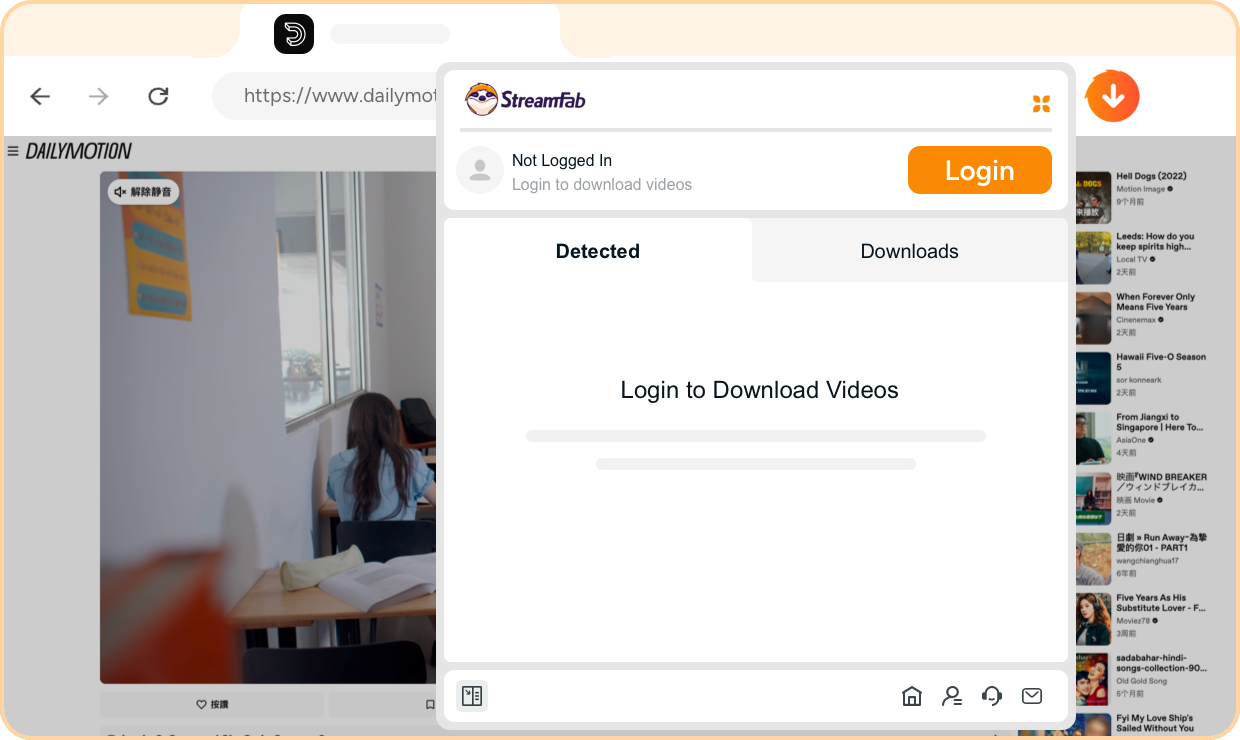
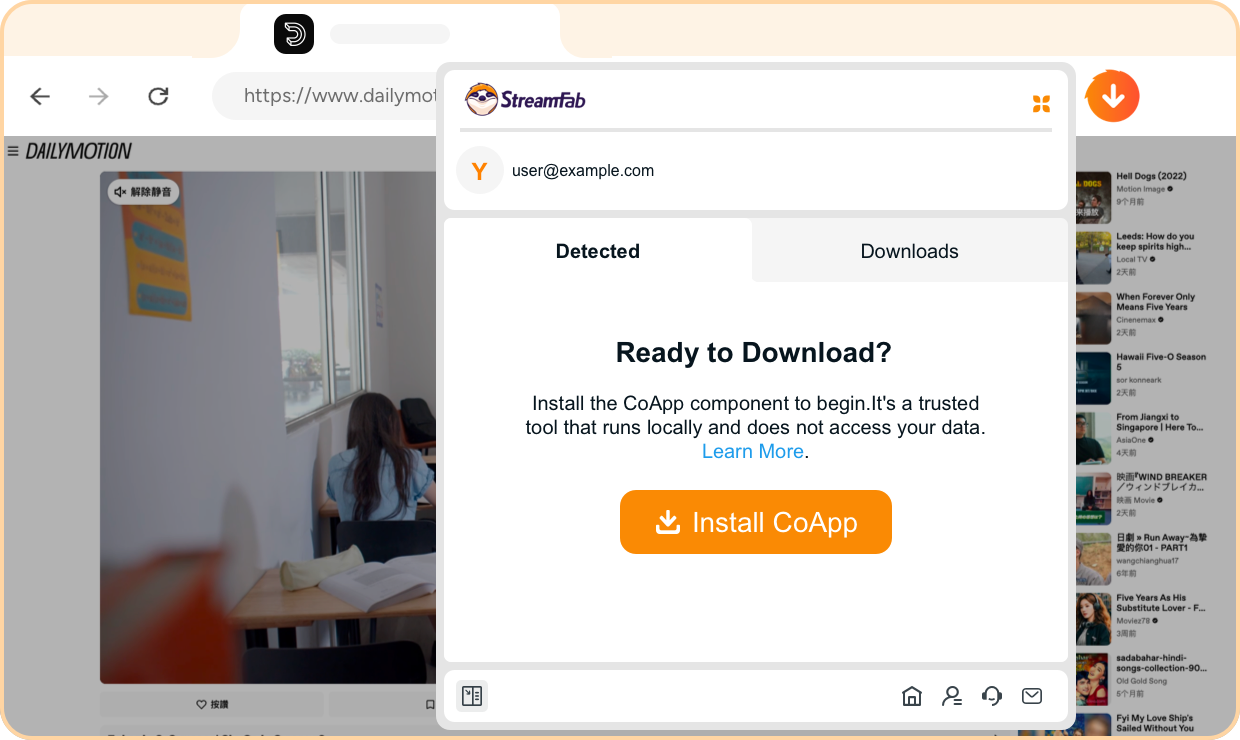
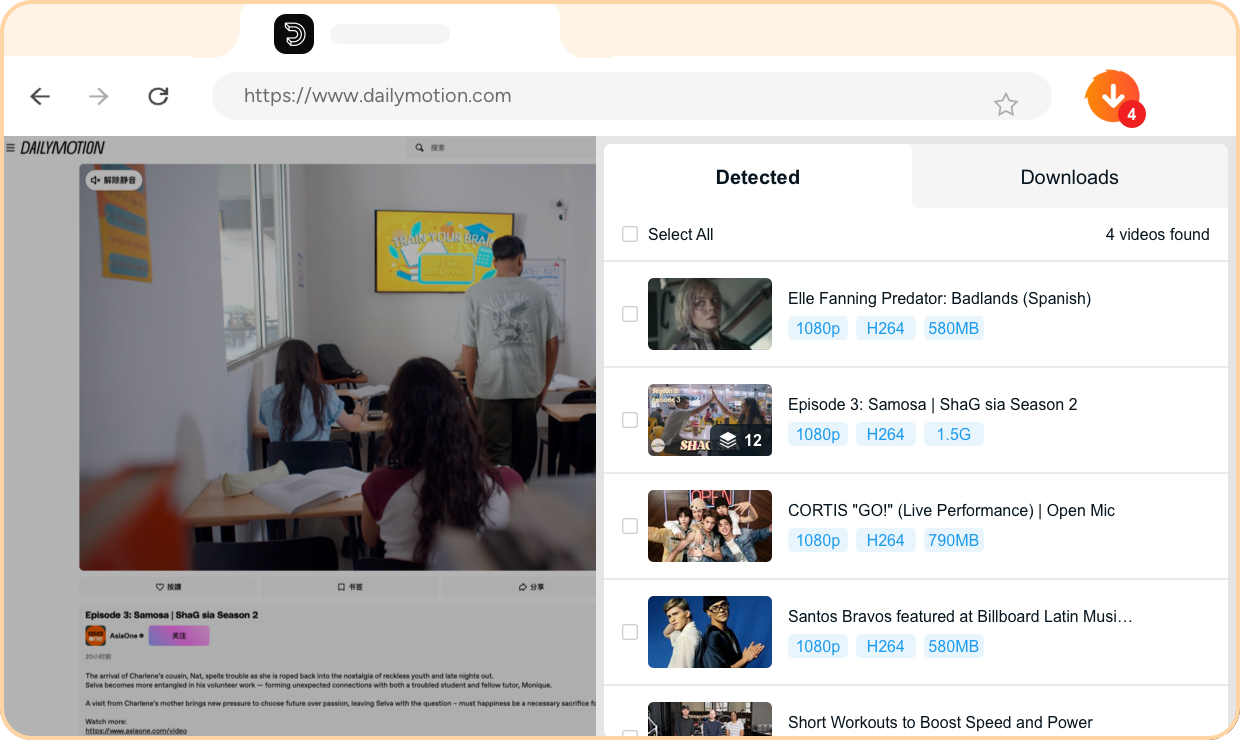
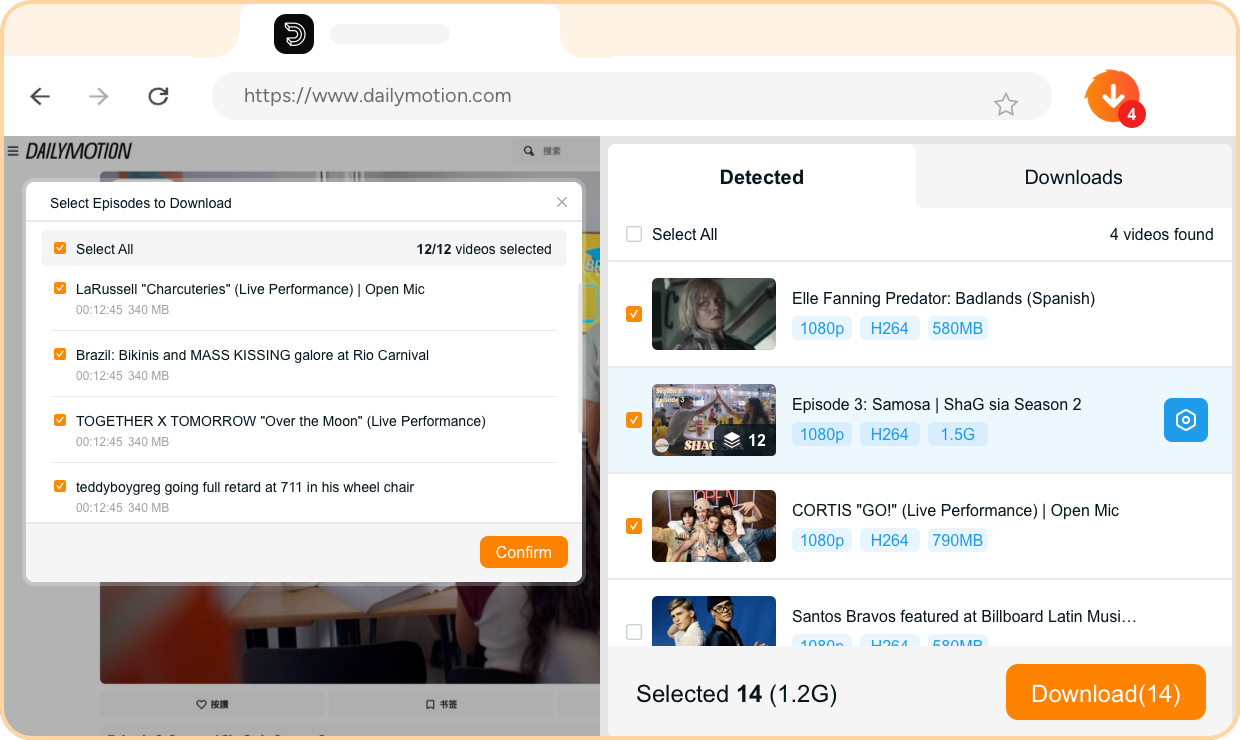
Step 1. Install the Extension & Sign In
Add StreamFab Hulu Downloader for Browser to Chrome or Edge from the official extension store, then sign in with your StreamFab account.
Step 2. Install the CoApp Companion
Download and install the lightweight CoApp — StreamFab’s official desktop companion that securely handles video downloading and decoding in the background.
Step 3. Browse Hulu — Videos Detected Automatically
Visit any Hulu or Hulu JP page as usual. The extension automatically detects all downloadable content on the page — no manual URL copying needed.
Step 4. Pick Your Videos & Start Downloading
Choose the videos you want, select your preferred quality, format, and subtitle options, then hit download. Your content saves to your local drive while you keep browsing Hulu.
System Requirements

Windows 11/10 (32/64 bit)
Intel i3 or above
4GB of RAM or above
40GB of free hard disk space or above
Live Internet connection required
Microsoft Edge 88 or above
Google Chrome (Chromium) 88 or above