StreamFab Twitch Downloader
Download Twitch videos and VODs in 1080p 60fps with StreamFab.
Save streams as MP4 with metadata. Batch download support. 3 free downloads to try, 14-day money-back guarantee on all licenses.

Download any Twitch content globally

1080p 60fps with original quality

Browse & download via built-in browser
Why You Need StreamFab Twitch Downloader
Capture What Twitch's Native Options Cannot
Twitch's built-in clip feature limits you to 60-second segments, and VODs automatically expire after 14 to 60 days depending on your broadcaster tier. StreamFab bypasses these limitations entirely, capturing full-length streams in their original 1080p 60fps quality before they vanish.
When your favorite streamer's 8-hour marathon session disappears from Twitch's servers, your local copy remains permanently accessible. The software works with the platform's delivery system to extract the actual source video, not a re-encoded lower-quality version.

Proven Technology Backed by DVDFab's Two Decades of Experience
StreamFab is developed by the DVDFab team, a video software company with over 20 years of experience serving tens of millions of users worldwide. The installer is certified virus-free with no bundled adware, toolbars, or third-party software. Your Twitch account credentials stay on your device and are never transmitted to StreamFab servers.
The software includes 3 free downloads to test before purchasing, and all paid licenses come with a 30-day money-back guarantee. The Twitch module receives weekly compatibility updates, typically resolving any platform changes within 24 to 48 hours.
What StreamFab Delivers for Twitch Users
1080p High-Definition Resolution & Encoding
On major platforms like Twitch, 1080p (1920 x 1080 pixels) represents 'Full HD' or 'Source' quality, the ultimate benchmark for visual clarity. For Partners or Affiliates, 1080p is the standard to show details. However, such high resolution requires heavy bandwidth; Twitch sets its recommended bitrate cap at 6000 kbps. This data rate ensures that even during intense battles, the video remains sharp without macroblocking.
StreamFab matches this tier by grabbing the raw stream from Twitch servers, keeping the native H.264 encoding to eliminate any artefacts from re-encoding.
Universal MP4 and MKV Format Options
StreamFab outputs your Twitch downloads in either MP4 or MKV container format. MP4 offers maximum compatibility across devices from smartphones to smart TVs to media players, while MKV provides a more flexible container for preserving all stream metadata.
For most users, MP4 represents the practical choice: a 3-hour stream at 1080p 60fps typically produces a 7 to 10 GB file that plays natively on virtually any modern device without transcoding.

60 FPS High Frame Rate & Motion Fluidity
While resolution defines static sharpness, 60 FPS dictates dynamic smoothness. In fast-paced streams like FPS or MOBAs, the leap from 30 to 60 FPS is revolutionary. Technically, 60 FPS cuts frame time to 16.67ms, compared to 33.33ms at 30 FPS. During rapid camera pans, 30 FPS introduces motion blur and ghosting, causing eye strain. Conversely, 60 FPS slices motion finely, making rapid transitions fluid.
StreamFab inherits this high-spec frame rate, accurately locking and capturing every frame. The resulting file maintains a constant 60 FPS, eliminating judder to preserve pro-level plays.

Perfect Downloading Experience You Get
Exclusive & Efficient Feature

Queue Multiple VODs for Efficient Downloading
Downloading Twitch videos one by one is time-consuming. This Twitch downloader supports batch downloads and fast speeds, saving you time and effort.
Perfect Downloading Experience You Get
Complete Stream Information Preserved in Every Download
StreamFab embeds essential metadata directly into your downloaded files: stream title, channel name, broadcast date, game category, and thumbnail artwork. This information becomes invaluable when organising a large collection.
Media server applications like Plex, Jellyfin, and Kodi automatically read this metadata to create a visually organised library complete with cover art and categorisation. Six months from now, you can browse your Twitch archive the same way you would browse any streaming service.

Feedbacks on StreamFab Twitch Downloader

David
Gaming Content CreatorSarah
Esports AnalystMike
Stream ArchivistDavid
Gaming Content CreatorSarah
Esports AnalystMike
Stream ArchivistDavid
Gaming Content CreatorSarah
Esports AnalystMike
Stream ArchivistDavid
Gaming Content CreatorSarah
Esports AnalystMike
Stream Archivist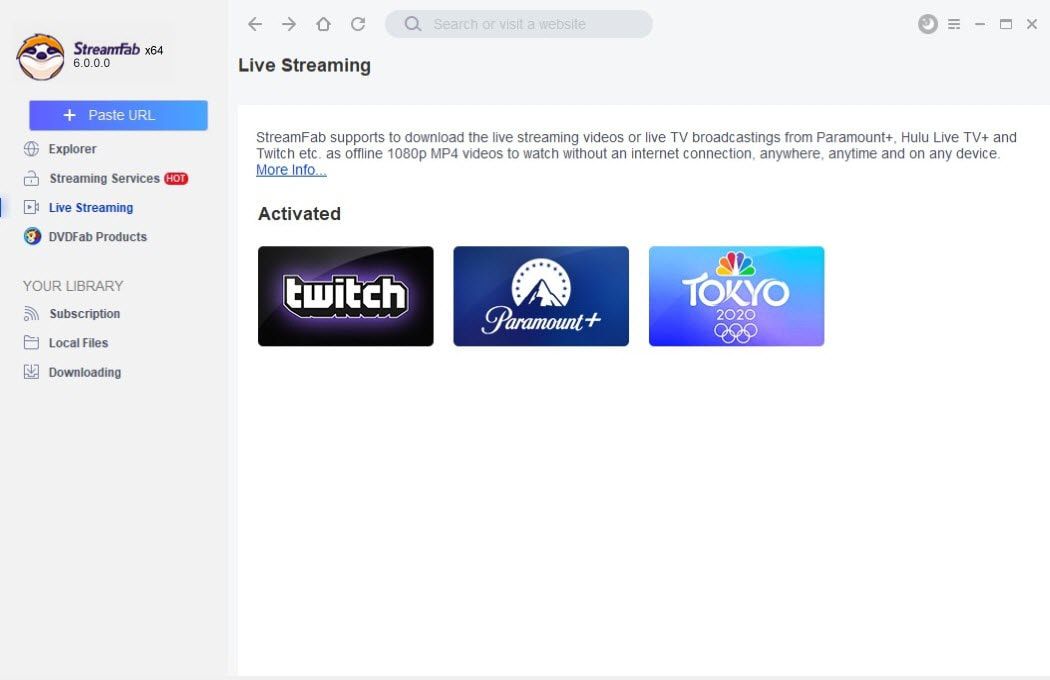
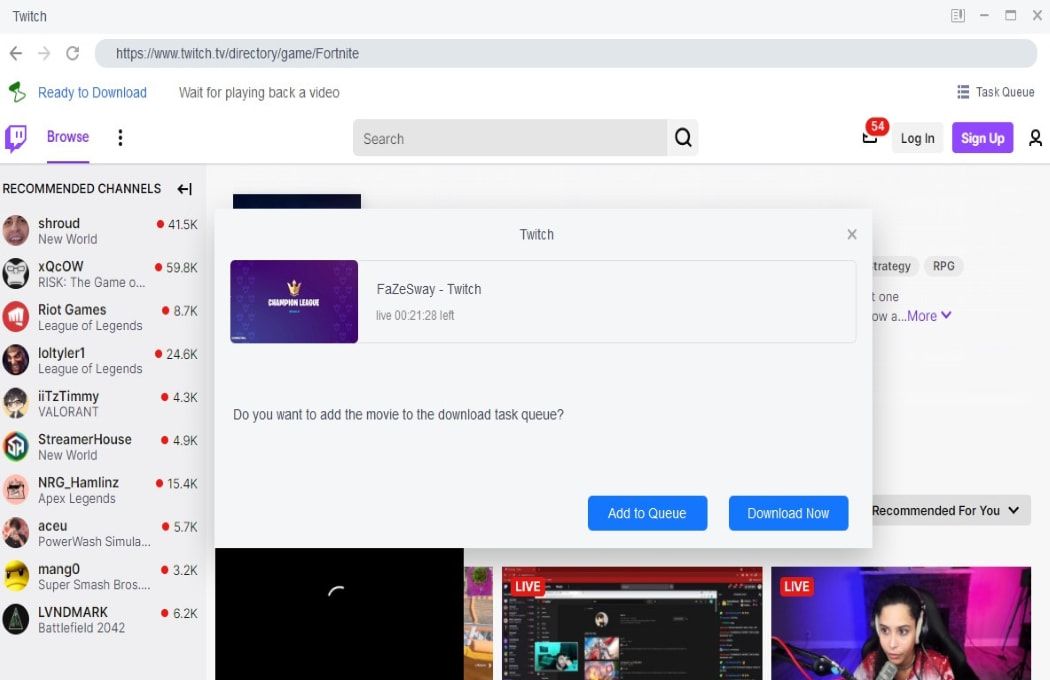
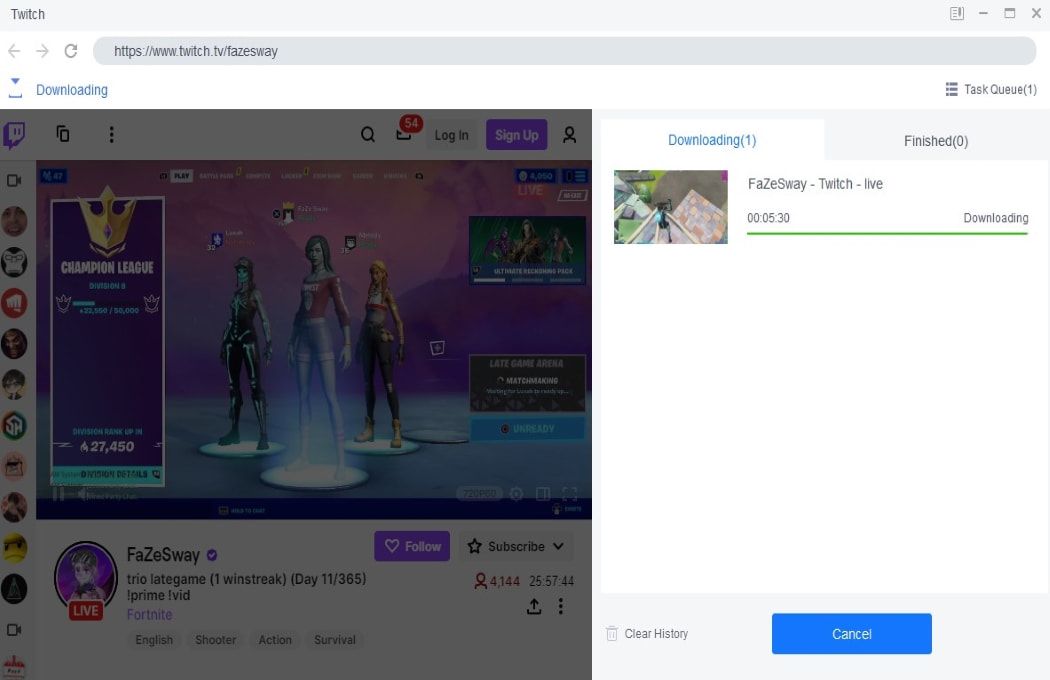
Open StreamFab and click on the Twitch icon in the streaming services panel. The built-in browser loads the Twitch interface directly within the application.
Use the integrated browser to navigate to any VOD, past broadcast, or clip you want to download. Log into your Twitch account if needed to access subscriber-only content.
Click the download button when it appears. Choose your preferred quality (up to 1080p 60fps) and output format (MP4 or MKV). StreamFab begins downloading immediately and saves the file to your designated folder.
System Requirements

To avoid being blocked by streaming providers, a StreamFab licensed account has a quota of 100 downloads per day, and 700 downloads per week from each supported streaming service. Whenever some of it is used up, it will refill during the next time cycle.