
Download CW Shows for Offline Viewing: 3 Practical Options

Summary: While the CW TV shows are fun to stream, you cannot watch them outside the US. Let us see the best way to download CW shows and enjoy them offline anywhere.
Table of Contents
CW Shows Downloads vs. Offline Episodes
Short answer: The official CW app is free to install, but it does not add native offline episode downloads. If you want CW shows offline, you're choosing between three routes: streaming on a service that carries CW titles, recording playback, or a Windows/Mac local-file workflow for content you're authorized to access.
Search "download CW shows" and you'll find two very different questions tangled together: how do I install the CW app, and how do I actually keep an episode offline. They aren't the same thing. The app is free, but tapping a download button inside it isn't part of the experience.
That's where the story gets interesting. Once I stopped treating this as a single problem and started treating it as three separate routes, the choice got clearer, and so did the tradeoffs. Below I walk through what the free CW app actually gives you, why episodes lack a native download, and the three practical ways readers land here to save or watch CW shows.
What the Free CW App Includes
The CW app is free to install on iOS, Android, and most major TV platforms, and it streams full episodes without a subscription paywall. What it doesn't include is a native offline download button — you can't tap a cloud icon on an episode and take it on a plane the way you would on Netflix or Disney+.
Why Episodes Lack Native Downloads
CW's business model runs on ad-supported streaming, and title availability shifts as licensing deals rotate. As of August 2026, where a CW title can be streamed or downloaded natively varies by show, service, device, region, and licensing — the announced Fall 2026 Roku Channel next-day arrangement is one example of how quickly the map is redrawn. Native offline downloads simply weren't built into the app, and there's no setting hiding that feature.
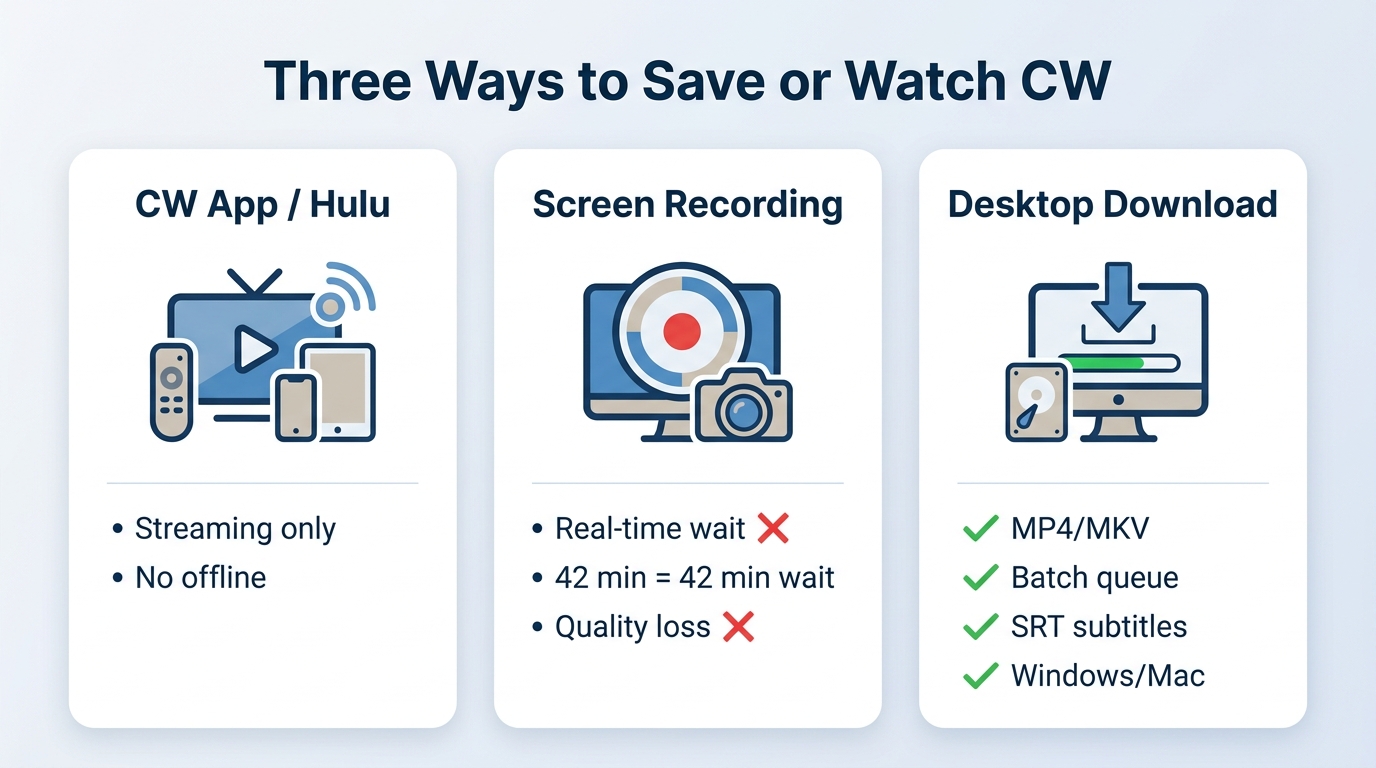
Three Ways to Save or Watch CW Shows
Official Streaming on Supported Services
The most straightforward route is streaming, either in the CW app or on a service that has licensed specific CW titles. Hulu carries a rotating slate of current and past CW series, and select shows land on Amazon Prime Video or Paramount Plus depending on licensing Windows. A few of those services do offer native offline downloads inside their own apps for eligible titles — worth checking before assuming CW content is undownloadable everywhere.
Screen Recording Tradeoffs
Screen recording feels like the obvious workaround, and for short clips it can work. For full episodes, my honest take: recording a 42-minute broadcast in real time is where the wheels come off. Community threads describe recordings that cut off midway, ads that loop over a black playback area, or audio that survives while the video layer goes dark. Even when a capture completes, you're paying with real-time duration and a re-encoded file rather than the source stream.
Local MP4 or MKV Workflow
The third option is a desktop tool that saves CW playback to a local MP4 or MKV file on Windows or Mac, for content you're authorized to access, where permitted by platform terms and applicable law. It's the route I use when I want batch queues and separate SRT subtitle files rather than a real-time recording, and it's the one this article breaks down in detail below. CW delivery uses MPD-based adaptive streaming under the hood, which is why a general-purpose approach to download MPD video maps cleanly to how these desktop tools operate.
| Dimension | Official CW app or service | Screen recorder |
|---|---|---|
| Where it fits | Streaming ad-supported episodes online | Capturing short clips for personal reference |
| Native offline downloads | Not offered in the CW app; some licensed services offer it for select titles | Not applicable — captures live playback |
| Output | In-app playback only | Re-encoded video file, often with quality loss |
| Ad handling | Ads play as inserted by the service | Ads captured alongside the episode unless manually trimmed |
Where does the desktop route sit against the first two? Different job entirely. Instead of streaming in a browser or racing a stopwatch with a recorder, it treats the CW playback session as a source and writes a local MP4 or MKV file with subtitles attached. Best for readers on Windows or Mac who want a personal offline library and are comfortable working outside their phone; not ideal for anyone hoping to tap a download icon inside the CW mobile app itself.
StreamFab CW Downloader at a Glance
If you've decided the desktop route is the one that matches how you actually watch — sitting down at a laptop, wanting episodes queued up before a flight — this section is for you. For content you're authorized to access, where permitted by platform terms and applicable law, here's what the tool does and, just as importantly, where it isn't the answer. StreamFab is a third-party desktop app relative to CW's official experience, subject to each service's terms and local law.
Designed for digital archivists, this tool processes CW content directly into highly compatible MP4/MKV formats, avoiding the pitfalls of real-time screen capture.
Quality, Audio, and File Formats
Output lands as MP4 or MKV, up to the resolution the platform and your plan make available — for CW that typically caps at 1080p. Original audio tracks come through without a re-encode when the source supports it, which matters if you care about anything beyond stereo. No proprietary container, no walled-garden player: the file plays in VLC, Plex, or whatever you already use.
Subtitles, Ads, and Batch Queues
SRT subtitles download as separate files rather than getting burned into the picture, which is the setup I want for a Plex library — external subtitles avoid forced transcoding. Ad handling is service and title dependent, so treat it as generally cleaner than a real-time recorder rather than a guaranteed clean file. Batch queues and scheduled overnight downloads are the features that turn a season pass into a fire-and-forget job.
Best Fit and Limitations
Best for: authorized Windows or Mac users who want a local MP4 or MKV library with real subtitle files and batch handling. Not ideal for: readers looking for a native download button inside the CW mobile app, iPhone or iPad-only users (there's no iOS build), or anyone who expects an app on a smart TV. It's a desktop workflow, and if that's not where you watch, one of the first two routes is a better fit.
How to Download CW Shows on Windows or Mac
Here's the flow I use to queue CW episodes for offline viewing:
Step 1: Open CW in the Built-In Browser
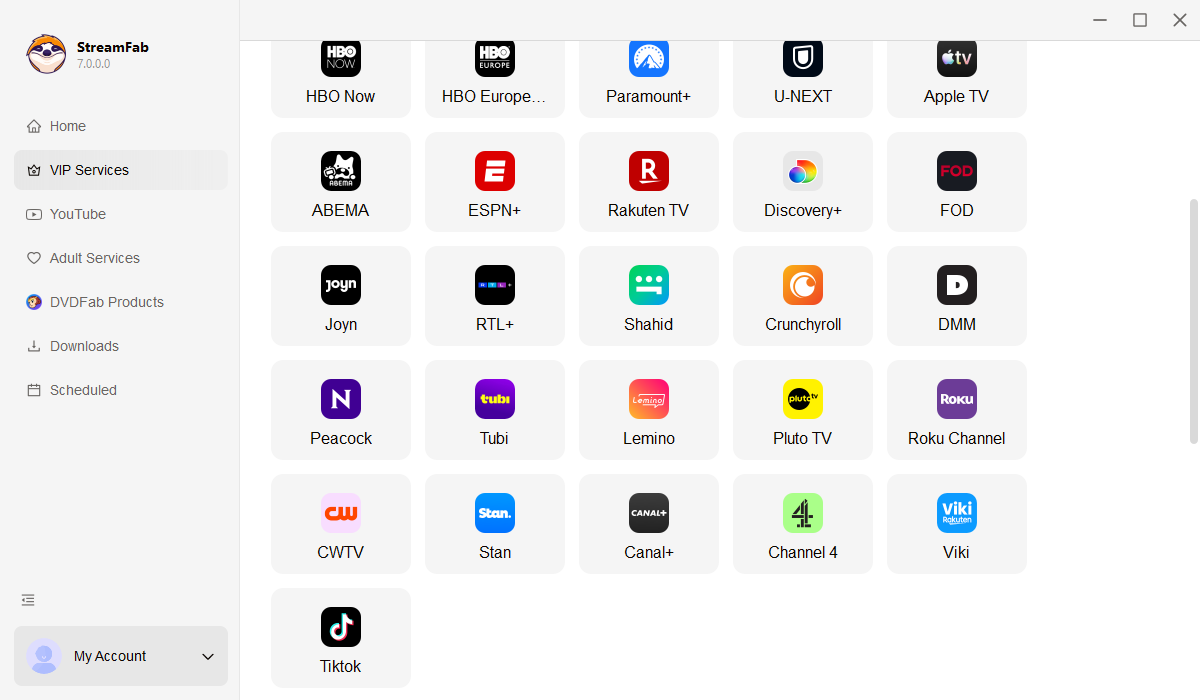
Launch StreamFab and open the Streaming Services panel. Select the CW icon to load the built-in browser, then sign in with your CW account the same way you would in Chrome.
Step 2: Choose Video, Audio, and Subtitles
Search for the show you want and start playback. A settings prompt appears where you pick resolution (up to 1080p on CW), audio track, and subtitle format — I keep subtitles as SRT so they land as separate files.
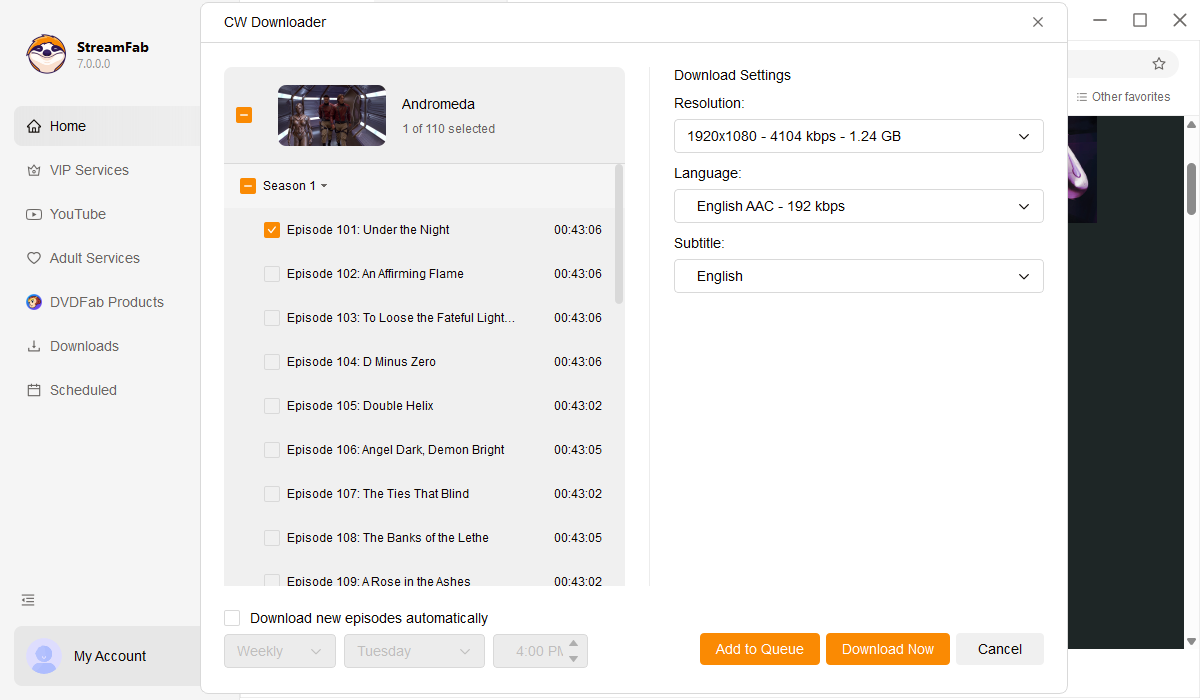
Step 3: Queue Episodes for Offline Viewing
Add the episodes to your queue and click "Download Now." The tool saves each episode as a local MP4 or MKV file in the background, which is easier on your CPU than a real-time screen recording.
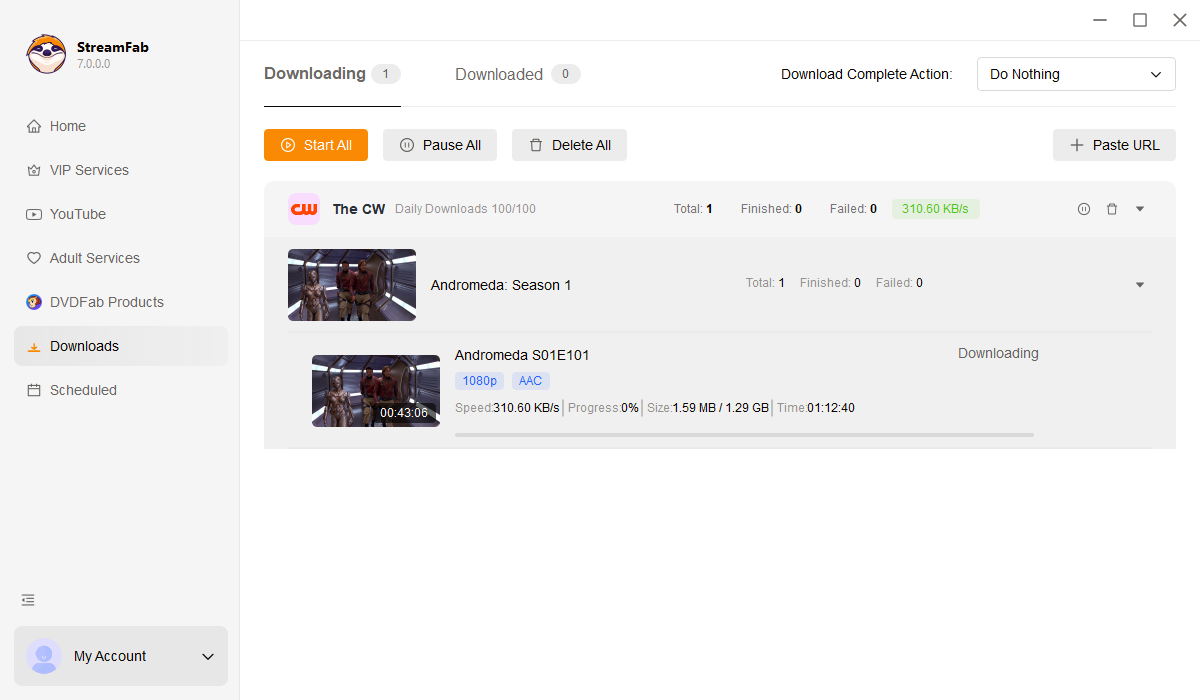

Fix CW Access and Playback Problems
Once you've picked a route, most of the real friction shows up here — install questions, black screens, and regional walls. These are the three failure modes readers write in about most often.
App Installation and Device Support
The CW app installs on iOS, Android, Apple TV, Roku, Fire TV, and Chromecast; on Samsung Tizen and LG webOS TVs, availability depends on your model and region. If your TV can't find the app, the mobile browser at cwtv.com works without any install and casts to most TVs. Installing the app on a supported device still doesn't unlock native offline episode downloads.
Black Screens and Playback Errors
Black screens usually trace back to browser rendering rather than something you did wrong. Community threads describe ads playing over a dark video layer, or episodes cutting off partway through. Try a different browser, disable extensions that touch video (ad blockers, some privacy tools), and update graphics drivers before assuming the app is broken. If you're on Chromium and stuttering, toggling Hardware Acceleration off in browser settings sometimes helps — expect higher CPU load in exchange.
Regional and VPN Error Limits
CW checks region on the account and network side. A "proxy detected" message means the service sees a datacenter IP; changing VPN servers may or may not clear it, and I'd stop short of recommending any specific bypass tactic. What's worth saying plainly: switching location tools does not create offline-download support inside the CW app, and if a title isn't licensed in your region, no amount of network fiddling will change that.
FAQs
Is the CW app free to download?
Yes. The official CW app is free to install and streams full episodes with ads. What free installation doesn't include is a native offline download button — the app streams, it doesn't save episodes to your device.
Which streaming services carry CW shows?
It varies by title, service, and licensing window. Hulu carries a rotating slate of current and past CW series, and select shows appear on Amazon Prime Video or Paramount Plus depending on the deal in force. Some of those services offer native offline downloads inside their own apps for eligible titles, so check the specific show before assuming.
Why can't I install the CW app on my Samsung TV?
Samsung Tizen support depends on the model year and region — older sets often can't run the current app. As a workaround, cast from the CW mobile app or a browser, or use a supported streaming stick like Roku or Fire TV. Getting the app installed is a separate question from offline downloading, which the app doesn't offer natively anyway.
Can I watch legacy CW Seed shows in the CW app?
CW Seed was folded into the main CW app in 2022, so it's no longer a separate platform. Some legacy Seed titles show up in the current CW catalog, but whether a specific classic or digital-exclusive show is still available depends on current licensing.
Conclusion
Coming back to where we started: three routes, three different jobs. Official streaming inside the CW app or a service like Hulu is the answer if you mostly watch online and don't need a file on disk. Screen recording still works for short clips, though I'd think twice before trusting it with a 42-minute episode. The desktop MP4 or MKV workflow makes sense for authorized Windows or Mac viewers who want batch queues and separate SRT subtitles, and it plainly doesn't help if you're looking for a native download button on your phone.
Pick the route that matches how you actually watch — that's the honest answer, even if it means the tool section above isn't for you.
Note: Saving content is intended for personal, offline viewing with a valid subscription where applicable. Distributing or monetizing saved content violates terms of service and copyright laws. Please comply with your local regulations.
