StreamFab TVer Downloader for Browser
Your favorite TVer shows disappear after just 7 days. StreamFab TVer Downloader for Browser saves them in 1080p directly from your browser — no time pressure, no desktop app, no hassle.
Also Available on:Desktop SoftwareLast Update: Jun 23, 2026
100% Safe & Clean


Save any TVer show before it expires

1080p Full HD video with AAC 2.0 audio

Download videos right from your browser
Why You Need StreamFab TVer Downloader for Browser
Leading Technology
A Download Engine Built on 20+ Years of Expertise
You’ve probably been there — scrambling to watch a TVer episode before it vanishes from the platform. Maybe you tried a random screen recorder only to get choppy footage and distorted audio. Or perhaps a free browser tool that worked once, then broke the very next time TVer updated its player.
StreamFab TVer Downloader for Browser is powered by StreamFab’s proprietary download engine — the same core technology refined over 20+ years of continuous development and trusted by tens of millions of users worldwide. Featured in reviews by leading technology publications, the engine captures TVer video streams at their native 1080p resolution with AAC 2.0 stereo audio at full 192 kbps clarity. The browser extension detects downloadable content automatically when you visit TVer, and the lightweight CoApp handles the download process in the background — every save completes quickly, cleanly, and without interrupting your browsing.
StreamFab TVer Downloader for Browser is powered by StreamFab’s proprietary download engine — the same core technology refined over 20+ years of continuous development and trusted by tens of millions of users worldwide. Featured in reviews by leading technology publications, the engine captures TVer video streams at their native 1080p resolution with AAC 2.0 stereo audio at full 192 kbps clarity. The browser extension detects downloadable content automatically when you visit TVer, and the lightweight CoApp handles the download process in the background — every save completes quickly, cleanly, and without interrupting your browsing.

Trusted & Secure
Security and Privacy You Can Count On
Downloading content from any platform raises fair questions. Is this tool safe? Will it collect my data? Will my account be affected? When free tools from unknown developers fill the internet, those concerns are perfectly reasonable.
StreamFab comes from StreamFab, a software company with over 20 years of development heritage, a strong Trustpilot reputation, and tens of millions of active users worldwide. The CoApp companion — needed for processing downloads — has been verified safe by major antivirus platforms and never touches your browsing history, personal files, or account credentials. All download connections are protected by SSL/TLS encryption. You get 3 completely free downloads to test everything before spending anything, and if you subscribe, the refund policy is clear: 7 days for monthly plans, 14 days for annual and lifetime subscriptions. Weekly updates and responsive customer support round out a product built to earn your trust.
StreamFab comes from StreamFab, a software company with over 20 years of development heritage, a strong Trustpilot reputation, and tens of millions of active users worldwide. The CoApp companion — needed for processing downloads — has been verified safe by major antivirus platforms and never touches your browsing history, personal files, or account credentials. All download connections are protected by SSL/TLS encryption. You get 3 completely free downloads to test everything before spending anything, and if you subscribe, the refund policy is clear: 7 days for monthly plans, 14 days for annual and lifetime subscriptions. Weekly updates and responsive customer support round out a product built to earn your trust.

Browser-Native
Download Where You Browse — No Desktop App Required
Remember the old workflow? Find a show on TVer, copy the URL, open a desktop download app, paste the link, configure settings, start the download, then switch back to the browser for the next episode. All that app-switching killed the flow and made saving shows feel like a chore.
StreamFab TVer Downloader for Browser lives right inside your browser as a lightweight Chrome or Edge extension. Browse TVer normally, and when you find a show worth keeping, the download option appears instantly — no URLs to copy, no separate windows to juggle. The CoApp desktop companion runs silently in the background, handling video processing and file saving while you continue browsing. It’s downloading made invisible — fast, simple, and built right into the way you already watch Japanese TV online.
StreamFab TVer Downloader for Browser lives right inside your browser as a lightweight Chrome or Edge extension. Browse TVer normally, and when you find a show worth keeping, the download option appears instantly — no URLs to copy, no separate windows to juggle. The CoApp desktop companion runs silently in the background, handling video processing and file saving while you continue browsing. It’s downloading made invisible — fast, simple, and built right into the way you already watch Japanese TV online.

Quality That Does Justice to Japanese TV
Full HD Quality
1080p Video + AAC 2.0 Audio — Every Detail Preserved
Japanese dramas and variety shows are known for their meticulous production quality — vivid sets, nuanced performances, and carefully mixed audio. The last thing you want is a downloader that crushes all that into a blurry, muffled mess with compression artifacts that weren’t there in the original broadcast.
StreamFab TVer Downloader for Browser preserves the full viewing experience. Videos save in genuine 1080p Full HD resolution, capturing every visual detail exactly as TVer streams it. The audio track comes through in AAC 2.0 stereo at 192 kbps — delivering natural clarity for dialogue, background music, and sound effects without compression loss. No re-encoding, no forced quality reduction. What plays on TVer is what lands on your hard drive, ready to enjoy on your laptop, tablet, or living room TV anytime you choose.
StreamFab TVer Downloader for Browser preserves the full viewing experience. Videos save in genuine 1080p Full HD resolution, capturing every visual detail exactly as TVer streams it. The audio track comes through in AAC 2.0 stereo at 192 kbps — delivering natural clarity for dialogue, background music, and sound effects without compression loss. No re-encoding, no forced quality reduction. What plays on TVer is what lands on your hard drive, ready to enjoy on your laptop, tablet, or living room TV anytime you choose.

Universal Formats
MP4 & MKV — Play on Any Device, Anytime
You’ve saved a TVer episode for a long train ride, pull out your phone or tablet, and the file won’t play. The device says “format not supported” — and you’re stuck with nothing to watch for the next two hours. That tiny compatibility issue can ruin your whole plan.
StreamFab gives you two proven format options that work on virtually any device. Choose MP4 for maximum compatibility — it plays natively on Windows PCs, iPhones, Android phones, tablets, smart TVs, and gaming consoles without any extra software. Or select MKV if you prefer a container format that supports richer metadata, ideal for organizing larger media libraries with tools like Plex or Kodi. Pick your preferred format before each download, and your files are instantly ready to play wherever you go — no conversion tools needed.
StreamFab gives you two proven format options that work on virtually any device. Choose MP4 for maximum compatibility — it plays natively on Windows PCs, iPhones, Android phones, tablets, smart TVs, and gaming consoles without any extra software. Or select MKV if you prefer a container format that supports richer metadata, ideal for organizing larger media libraries with tools like Plex or Kodi. Pick your preferred format before each download, and your files are instantly ready to play wherever you go — no conversion tools needed.

Subtitles Included
Save Subtitles for Complete Offline Viewing
Subtitles aren’t just nice to have — for many viewers, they’re essential. Whether you’re a Japanese learner using subtitles to follow along, a hard-of-hearing viewer who relies on captions, or simply someone who watches in noisy environments, losing subtitles in a download means losing part of the experience.
StreamFab TVer Downloader for Browser saves subtitles right along with your video. You can download them as separate SRT files — perfect for loading into any media player and switching between subtitle tracks on the fly. Or choose to remux subtitles directly into the video file so they travel together as one package, no extra files to manage. Either way, your offline TVer library stays fully accessible, complete with every word of dialogue captured exactly as broadcast.
StreamFab TVer Downloader for Browser saves subtitles right along with your video. You can download them as separate SRT files — perfect for loading into any media player and switching between subtitle tracks on the fly. Or choose to remux subtitles directly into the video file so they travel together as one package, no extra files to manage. Either way, your offline TVer library stays fully accessible, complete with every word of dialogue captured exactly as broadcast.

Built for How You Actually Watch TVer

Batch Download — Save an Entire Series at Once
Select multiple episodes from a series page and download them all at once. Build your offline drama collection in minutes, not hours.

Ad-Free Downloads — Watch Without Interruptions
TVer is free but ad-heavy. StreamFab removes those ads during download, so your saved episodes play clean from start to finish.
Organize Your TVer Library Like a Pro
Download Metadata
Auto-Save Show Details for Effortless Library Management
After downloading a dozen episodes from different TVer shows, things get messy fast. Generic filenames like ‘video_001.mp4’ tell you nothing, and manually renaming and sorting files is tedious work that piles up quickly.
StreamFab TVer Downloader for Browser automatically saves rich metadata with every download — show title, episode number, episode name, and cover art are all captured and embedded into the file. When you add these files to a media server like Plex, Kodi, or Emby, they organize themselves automatically with proper titles, artwork, and episode ordering. Your offline TVer collection looks and feels like a professional streaming library, complete with beautiful cover images and organized season structures. No manual renaming, no hunting for artwork online — just download and everything falls into place.
StreamFab TVer Downloader for Browser automatically saves rich metadata with every download — show title, episode number, episode name, and cover art are all captured and embedded into the file. When you add these files to a media server like Plex, Kodi, or Emby, they organize themselves automatically with proper titles, artwork, and episode ordering. Your offline TVer collection looks and feels like a professional streaming library, complete with beautiful cover images and organized season structures. No manual renaming, no hunting for artwork online — just download and everything falls into place.

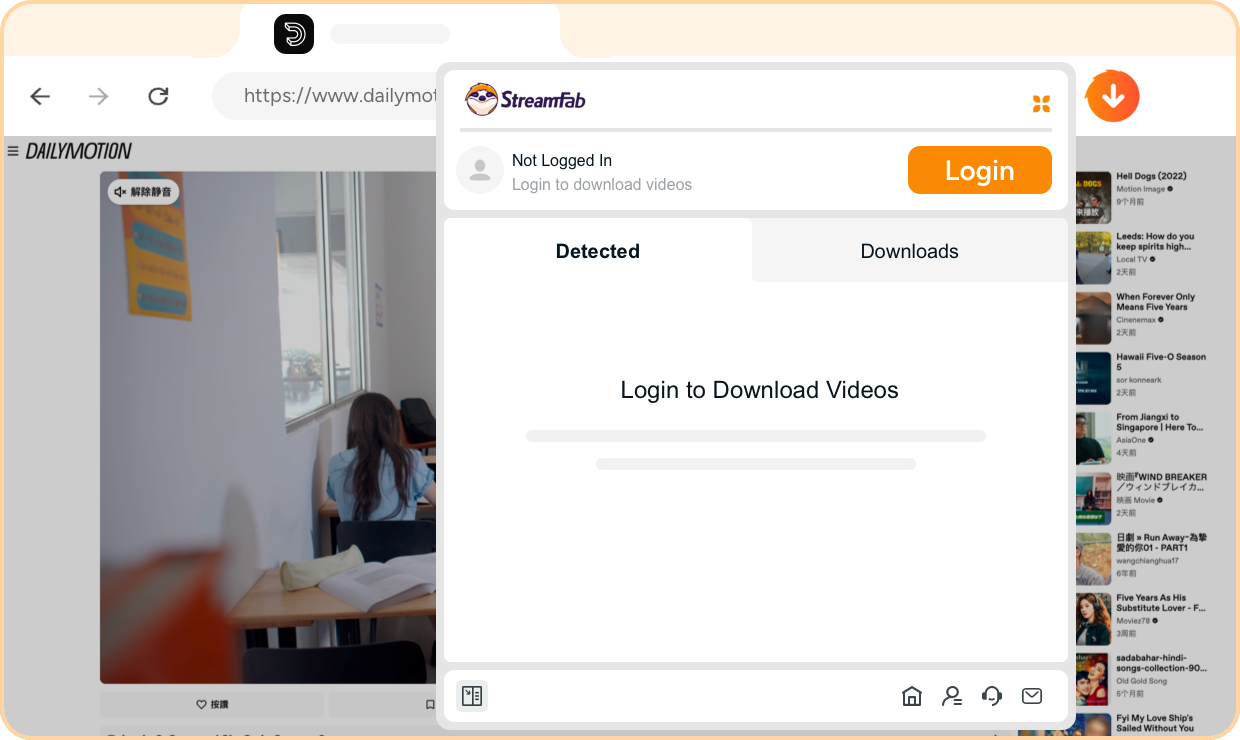
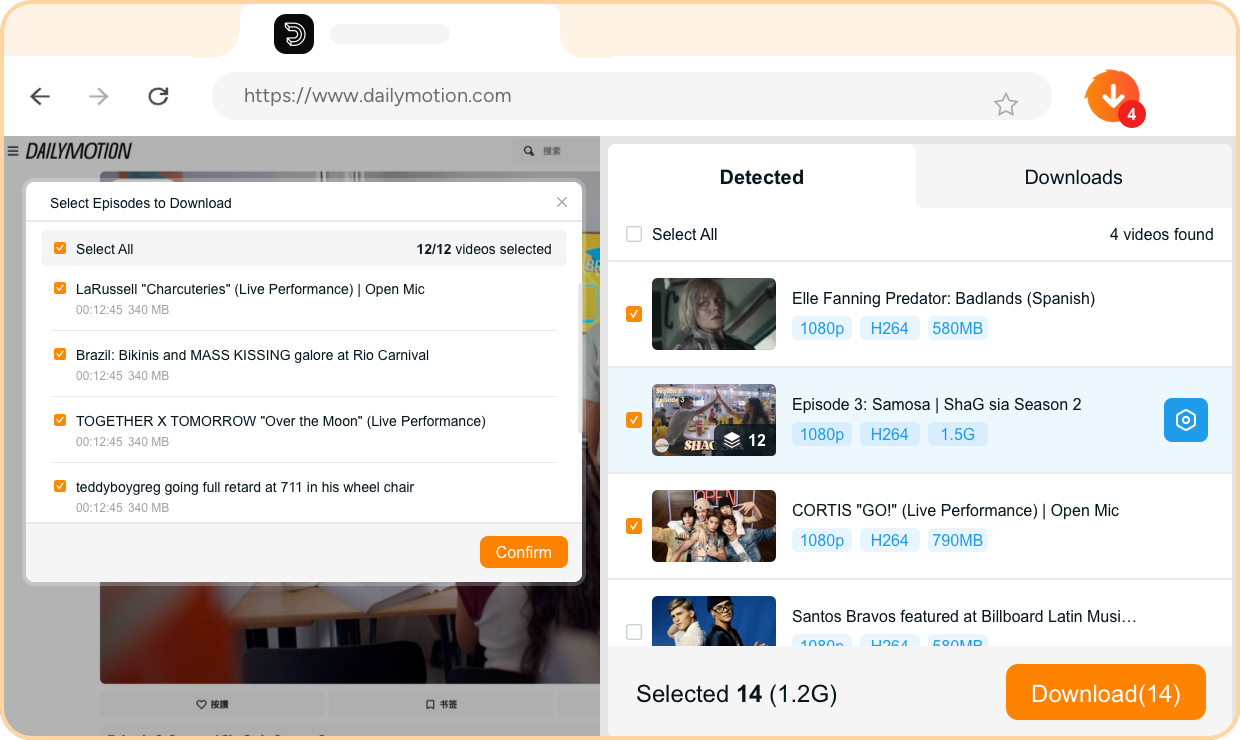
Step 1. Install the Extension & Log In
Add StreamFab TVer Downloader for Browser to Chrome or Edge from the extension store. Click the StreamFab icon and log in with your account.
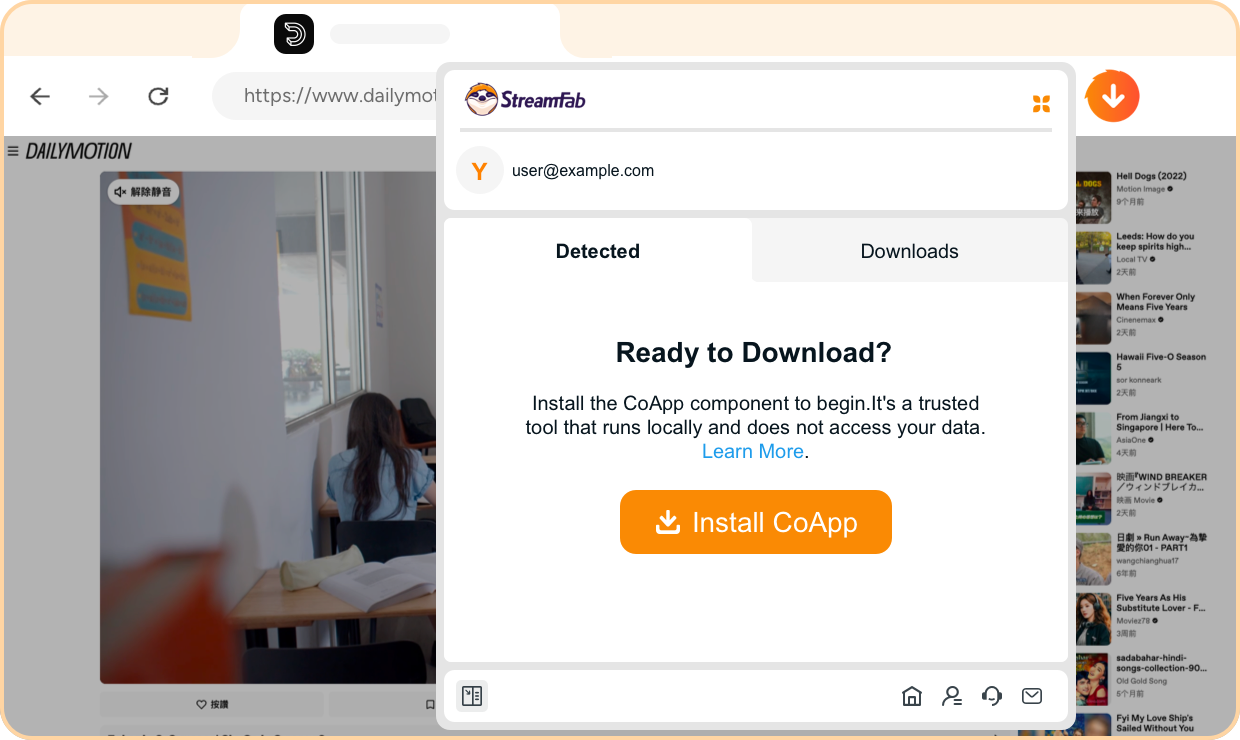
Step 2. Install CoApp
When prompted, install the lightweight CoApp companion. It runs locally on your computer to handle video processing — no data leaves your machine.
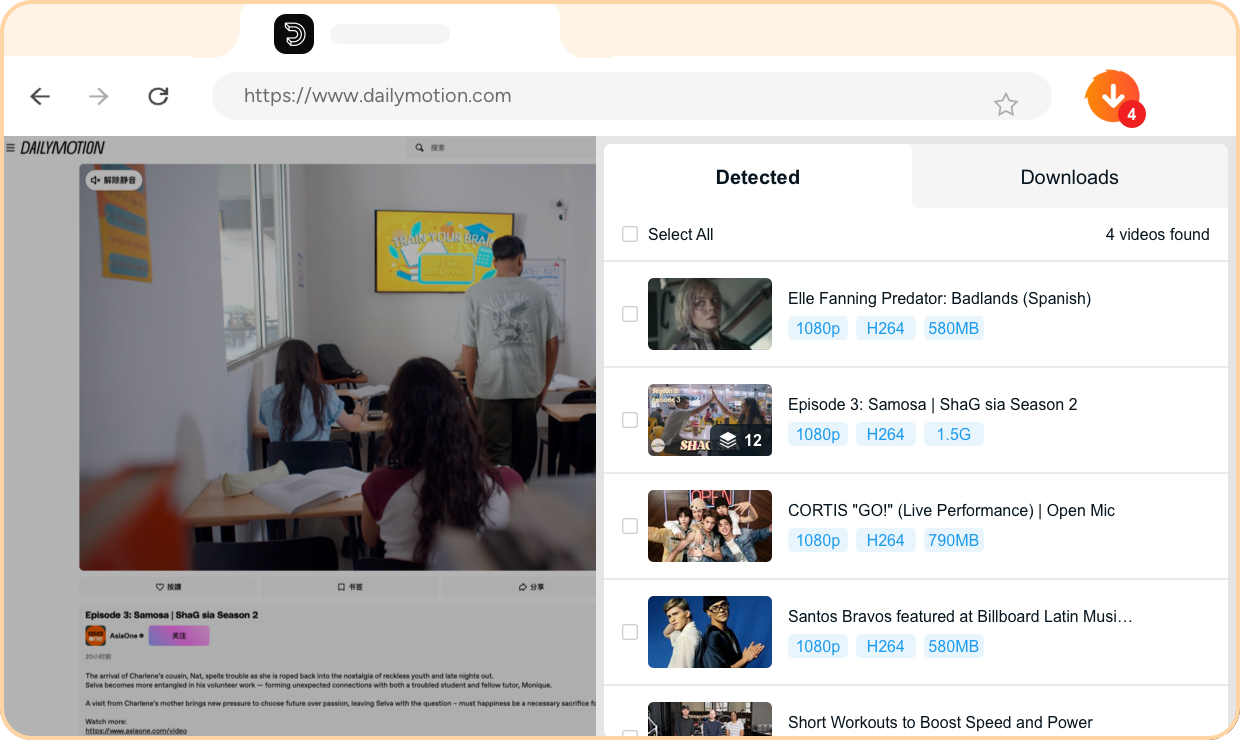
Step 3. Browse TVer & Auto-Detect Content
Navigate to TVer and play any show. StreamFab automatically detects the video stream and shows a download prompt in the extension popup.
Step 4. Choose Your Settings & Download
Select your preferred resolution, format (MP4 or MKV), and subtitle options, then click download. Your saved episode is ready to watch offline.
System Requirements

Windows 11/10 (32/64 bit)
Intel i3 or above
4GB of RAM or above
40GB of free hard disk space or above
Live Internet connection required
Microsoft Edge 88 or above
Google Chrome (Chromium) 88 or above