
How to Download CBS Videos on PC in MP4 or MKV (Up to 1080p)

Summary: This guide separates official CBS app viewing from local-file workflows, compares five computer-based options, and explains where each one falls short. It then shows how StreamFab handles authorized MP4 or MKV downloads and provides concise fixes for analysis and quality problems.
To download CBS video on a computer, use an official app for supported in-app viewing, a desktop CBS video downloader when you need an authorized local MP4 or MKV, and screen recording only as a slower fallback when direct analysis is unavailable.
CBS pages, CBS News clips, Paramount-linked titles, and app-based viewing do not all expose the same path. The guide below compares the practical routes, explains the StreamFab workflow, and shows what to check when playback works but analysis or quality does not.
CBS Download Options at a Glance
The right CBS download option depends on the source and the result you need. Official apps keep viewing inside the app, while online tools, desktop software, technical workflows, and recording each trade convenience for file control.
CBS.com, CBS News, and App Scope
A CBS.com show page, a CBS News video URL, a Paramount-linked title, and a CBS download app can expose different playback and offline controls. A method that recognizes one source may fail on another, even when both play in a browser.

- CBS.com shows: Browser playback may be available without a local-file button.
- CBS News: Public clips can be easier for link-based tools to recognize, but support varies by URL.
- Paramount-linked content: Account access and the current delivery path can affect analysis.
- Official apps: The simplest route for supported in-app viewing, not a promise of a standalone MP4 or MKV.
Official app availability can change by device, account, and title. That is why the source URL should be identified before choosing a workflow.
The distinction that matters most is ownership of the playback environment. An app-managed download remains tied to that app's controls, storage rules, and supported devices. A local file gives the user more choice over storage and compatible players, but it also adds setup and a responsibility to keep the copy within personal-use boundaries.
Public CBS News clips are usually a different case from signed-in entertainment pages. A URL-based tool may recognize a public clip yet fail on a title that depends on account access or a Paramount delivery path. Treat “it plays in my browser” as a playback check, not proof that another method can analyze the same source.
- Identify the page type: Note whether the title comes from CBS.com, CBS News, a Paramount-linked page, or an official app.
- Define the outcome: Decide whether in-app viewing is sufficient or a standard local file is essential.
- Check the access path: Confirm that the account can open and play the selected title before troubleshooting another tool.
- Set the fallback: If direct analysis is unavailable, decide whether real-time recording is worth the time and possible interface interruptions.
Which Method Fits Your Goal
Choose the official route when in-app viewing is enough. Choose a desktop workflow when the actual goal is a personal offline copy in a standard format; use recording as the fallback when direct analysis is unavailable.
Compare methods on the outcome first, then on speed and effort. A fast method that leaves the video locked inside an app does not solve a local-file request. Conversely, installing desktop software adds unnecessary work when the official viewing mode already meets the need.
Online tools are convenient for compatible public URLs, but their detection can be fragile. Technical extraction requires more manual work and is a poor fit when the delivery path is not directly accessible. Screen recording is broad but slow because the program must play from start to finish.
| Method | Works on a computer | Creates local MP4 or MKV | Quality ceiling | Speed | Viewing model | Best fit | Main limitation |
|---|---|---|---|---|---|---|---|
| Official CBS or CBS News app | Varies by supported app or browser | No; viewing stays in the app | Controlled by the app and source | No separate file-transfer speed when viewing stays inside the app | In-app | Supported offline or on-demand viewing with minimal setup | No standard local file, and availability varies by device, account, and title |
| Online link tool | Yes, through a browser | Sometimes, when the URL is recognized | Depends on the source and tool | Variable; URL recognition can add retries before transfer begins | Local file if supported | A public CBS News clip that the tool can parse | Login pages, Paramount-linked titles, and delivery changes often reduce compatibility |
| Desktop downloader | Yes, on Windows or Mac | Yes, when the title is supported | Up to the available source quality, with a product ceiling of 1080p | Variable; source, connection, and analysis determine completion time | Local MP4 or MKV | Authorized local files with format, subtitle, and batch controls | Requires installation, account access, and current compatibility with the source |
| Technical extraction | Yes | Possible after manual processing | Source-dependent | Variable; setup and manual processing add time | Local files or media segments | Technical users working with directly accessible media | Not appropriate when access controls or technical protections block the workflow |
| Screen recording | Yes | Yes, in the recorder's available format | Limited by playback, display, and recorder settings | Real time | Local recording | A fallback when direct analysis is unavailable | Can capture interface interruptions and requires the full playback time |
My decision rule is simple: if supported viewing can stay inside the official app, keep it there. A desktop route earns the extra setup when file format, subtitles, storage location, or batch handling is the actual requirement.
Do not choose on resolution language alone. Source availability, output format, subtitles, completion time, and the main limitation are more useful predictors of whether a workflow will fit. This is especially important when a CBS video downloader can analyze one URL but not another from the same broader service.
A CBS downloader should be judged against the exact page and desired output, not the network name alone.
The “local MP4 or MKV” column separates app convenience from file control. Official viewing can be the cleanest answer for a short trip or a supported device. A local-file workflow is more useful when the reader must choose the storage drive, move the file between compatible players, or retain separate subtitle tracks.
Speed also means different things here. An official app can begin playback quickly without creating a separate file. An online tool may spend time recognizing the URL. A desktop downloader adds analysis before transfer, technical extraction adds manual processing, and a recorder cannot finish faster than the program's playback duration.
The main limitation should carry more weight than a feature list. If a method cannot access the source, does not create the requested format, or requires more technical effort than the task justifies, its theoretical quality ceiling does not help. Start with the narrowest method that meets the real outcome.
- Short-term supported viewing: Start with the official app and avoid unnecessary file management.
- Public news clip: An online tool may be sufficient if it recognizes the exact CBS News video URL.
- Standard file and subtitle control: A desktop option is the practical middle ground for Windows or Mac.
- Direct analysis unavailable: Use screen recording as the time-intensive fallback, not the default.
Storage planning matters before the download begins. In-app viewing delegates storage and playback rules to the official application. A local CBS video MP4 or CBS video MKV requires enough disk space, a compatible player, and a deliberate destination. If those controls are not useful to you, the simpler app route remains the better match.
This source-first check prevents wasted setup and keeps the method decision tied to a specific viewing or file outcome.
Use local-copy workflows for personal offline viewing of material you can legitimately access, and keep the resulting files private under the platform terms and applicable law.
StreamFab CBS Downloads: Setup, Steps, and Output
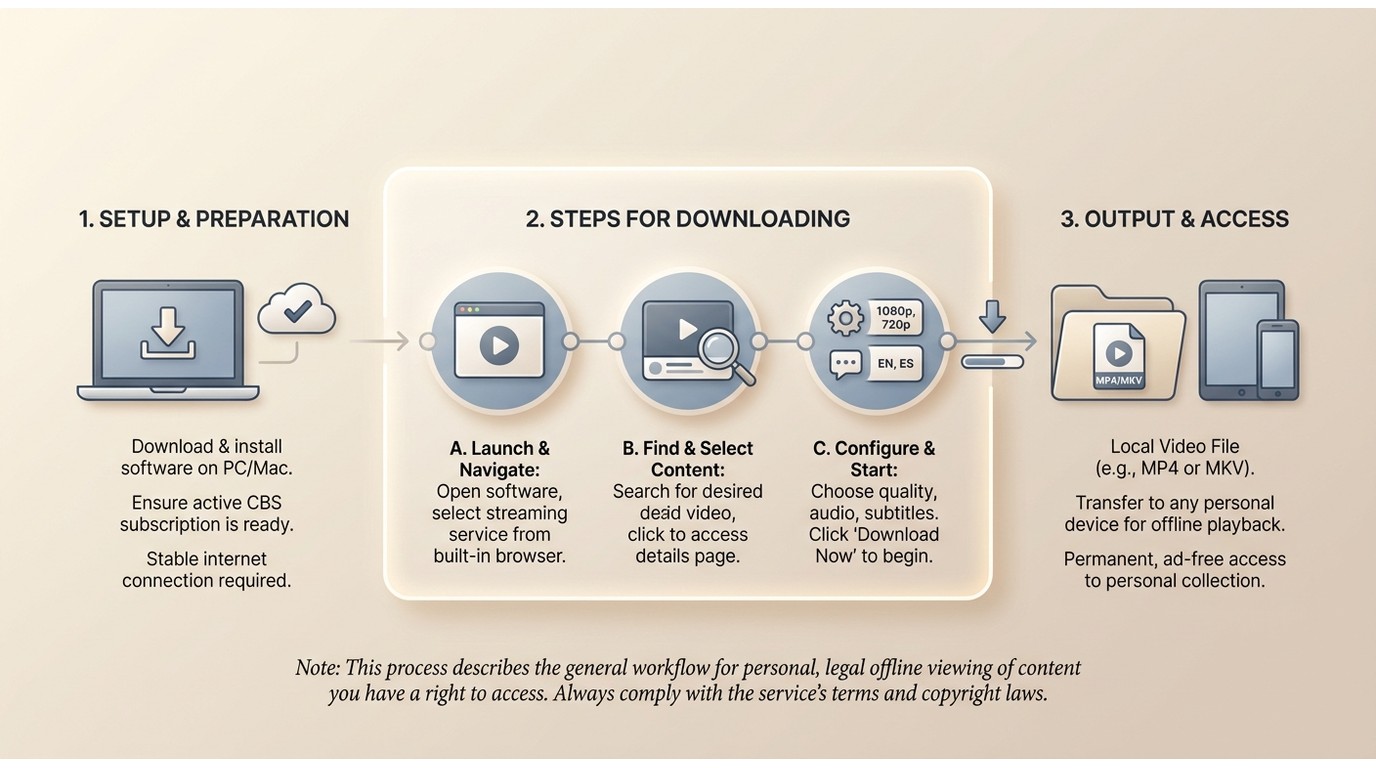
StreamFab is one Windows and Mac option for a CBS video download that needs a local file. It combines analysis, format selection, subtitles, and batch handling, but the available result still depends on the source title and current compatibility.
When StreamFab Fits
For content you're authorized to access, where permitted by platform terms and applicable law.
StreamFab DRM MPD Downloader fits readers who need MP4 or MKV output, selectable tracks, subtitles, or batch CBS downloads. It is less suitable when supported in-app viewing is enough or when the account does not have access to the selected title.

Losslessly download streaming videos from the CBS service in 1080P resolution & AAC 2.0 audio track and save the CBS video in the compatible MKV or MP4 format.
- Good fit: You need a standard local file on Windows or Mac.
- Better official-app fit: You only need supported viewing inside the CBS or CBS News app.
- Format priority: Choose MP4 for broad playback or MKV for flexible track handling.
- Access boundary: Keep authorized local copies private and follow platform terms and applicable law.
CBS Download Settings and Formats
For CBS video MP4 output, prioritize broad player compatibility; CBS video MKV output is useful when flexible track handling matters. The source, title, account access, and current compatibility determine which video, audio, and subtitle choices appear.
| Setting | Available choice | Practical boundary |
|---|---|---|
| Video and audio | Up to 1080p FHD and available audio up to EAC3 5.1 | The actual CBS result depends on the source stream and available tracks |
| File format | MP4 or MKV | Choose based on the players and track controls you need |
| Subtitles | Embedded soft subtitles or external SRT files | Language and delivery options depend on what the source supplies |
| Detected ads | Detected ad segments can be omitted | The result depends on how the selected title delivers its ads |
| Metadata | Title, series, episode, or cover details where supplied | Missing source metadata cannot be created reliably |
| Batch handling | Up to five simultaneous episode downloads | Limited to 100 downloads per day and 700 per week per service, plus source availability |
| Playback destination | Compatible desktop players and external storage | Playback support still depends on the selected format and destination device |
Download CBS Videos in Four Steps
Before you download from CBS, install the current official desktop release, confirm that your account can play the selected title, and choose a storage location with enough space. The managed step card below keeps the workflow in four clear stages.
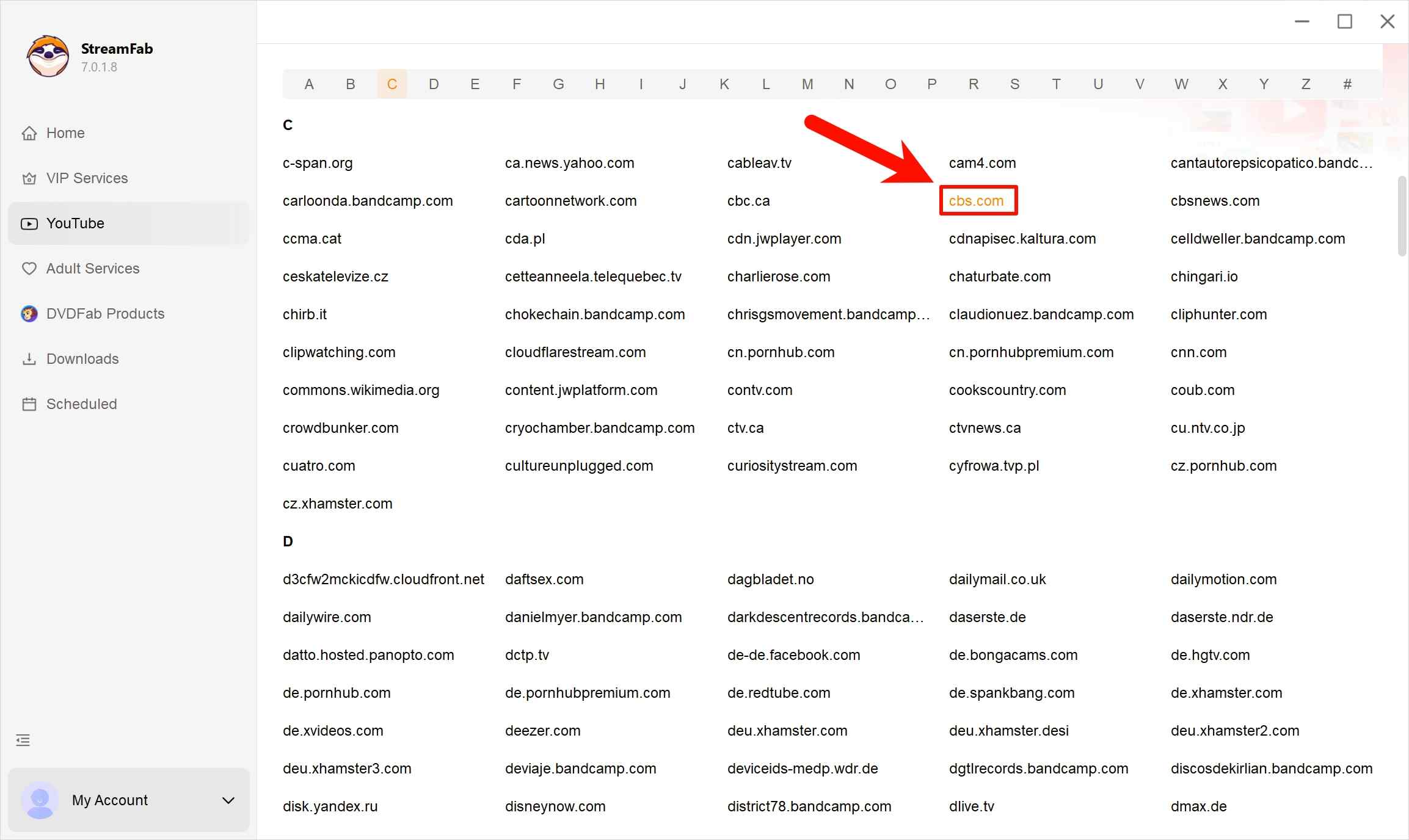
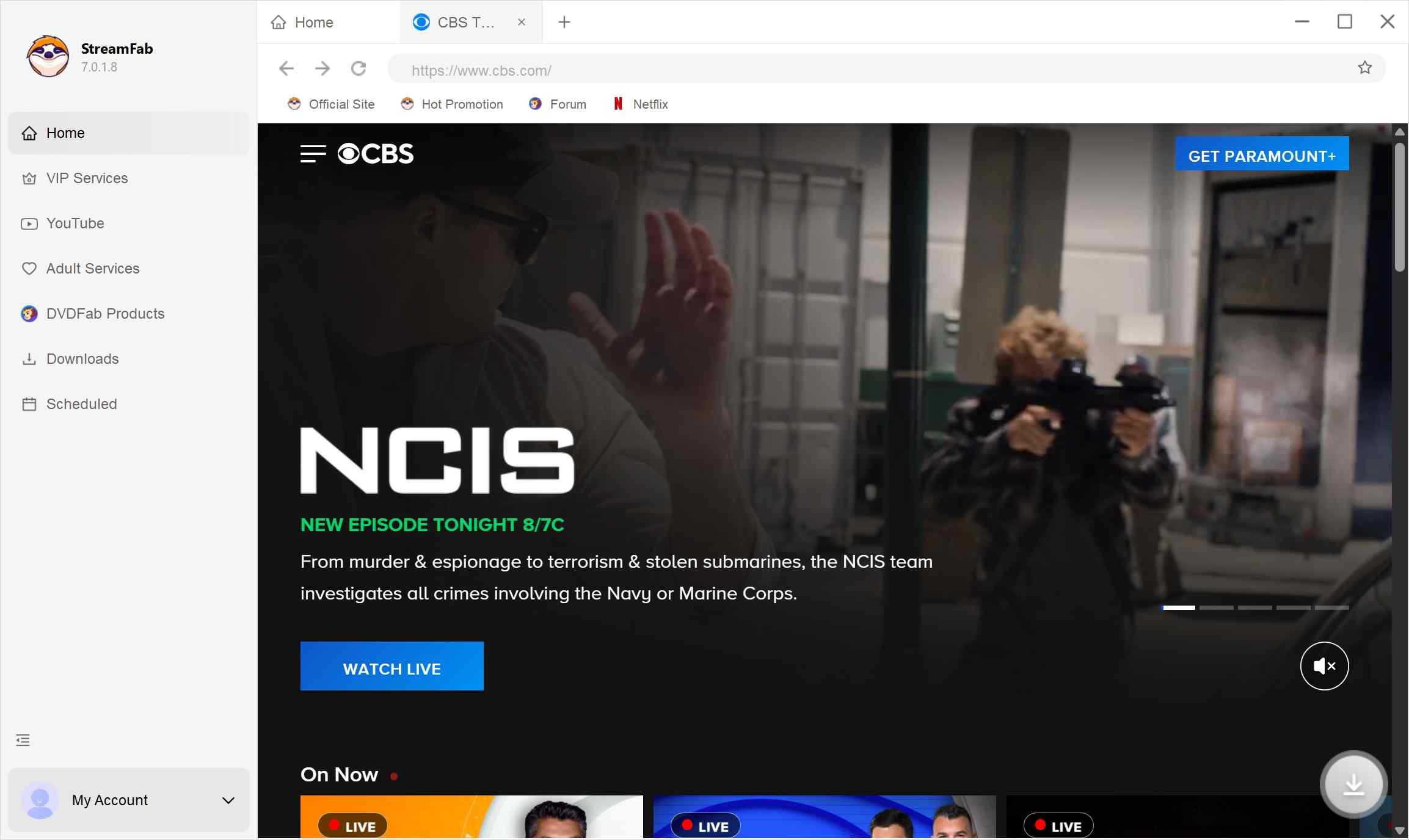
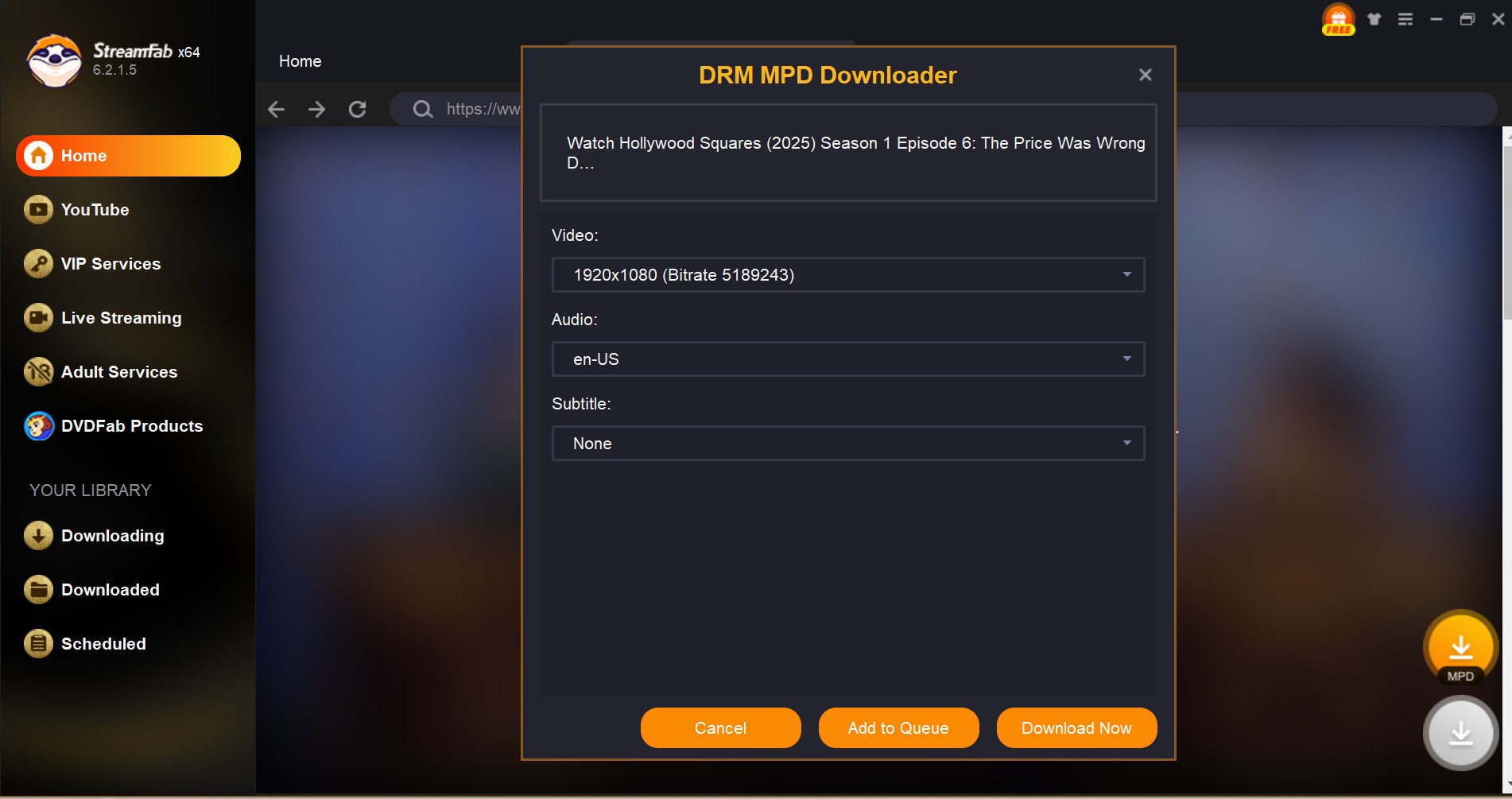
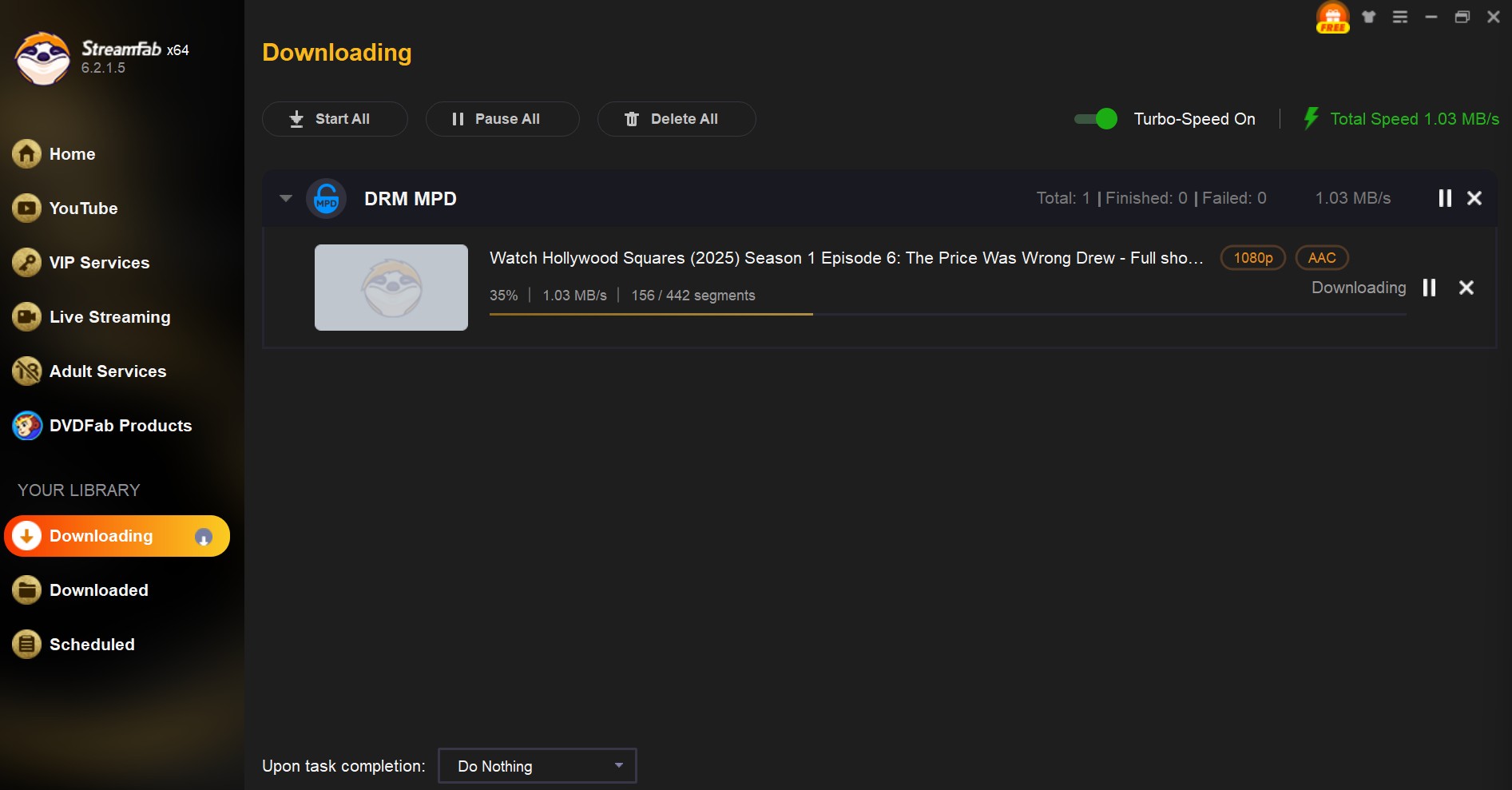

I prioritize available format and subtitle controls over a blanket resolution promise. A CBS title can expose different tracks after a delivery change, so the honest decision is based on what the analysis panel offers for that title.

Fix Analysis or Quality Problems
As of August 2026, a CBS or Paramount delivery change can affect analysis or available quality even when browser playback still works. Start with the current release and a fresh analysis before changing formats or falling back to recording.
- Reopen: Load the CBS title again.
- Reanalyze: Start a fresh task.
- Inspect: Confirm the available quality and tracks.
- Compare: Check regular browser playback.
Diagnose: Send diagnostics if the failure continues.
This CBS download troubleshooting path separates a temporary analysis problem from ordinary browser playback.
I treat browser playback and download analysis as separate checks; one can succeed while the other needs a compatibility update.
FAQs
Conclusion
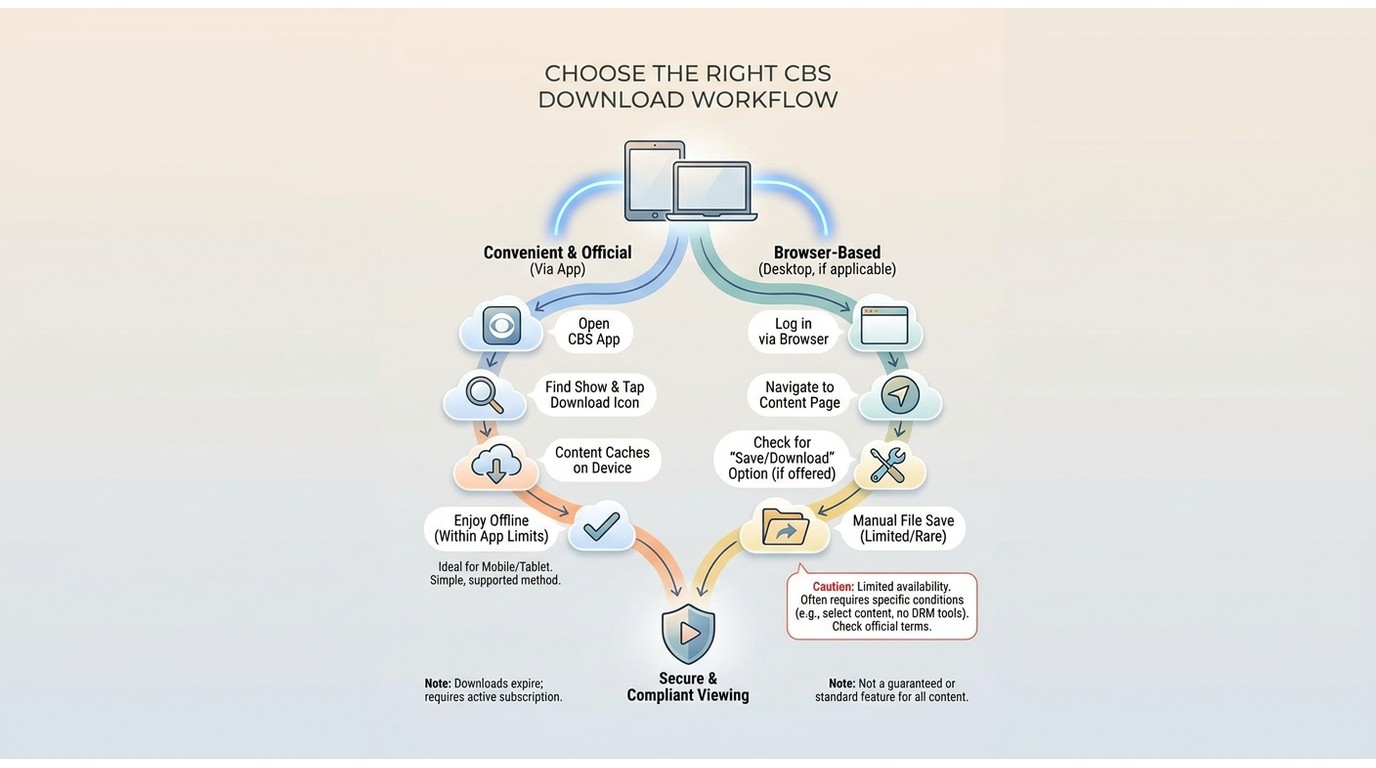
Use an official app for supported in-app viewing, a desktop workflow when an authorized local MP4 or MKV is the goal, and screen recording only as a slower fallback when direct analysis is unavailable.
I would start with the least complicated route that delivers the result you actually need. Keep official viewing inside the app when possible; choose local-file tools for a specific authorized offline need, and keep personal copies private.

The Criterion Channel is full of classic movies, and there is no official way to get them. This article introduced several third-party tools to help you dealing with this problem. And the downloader is the best one with advanced functions and outstanding quality.
By Nicole Lopez - Sep 16, 2026
Looking to download ctv video content for unrestricted offline viewing? Based on my 2026 technical tests, here is the ultimate guide to permanently archive CTV videos in crisp 1080p MP4 formats.
By Erika Leen - Aug 19, 2026
Can you watch Udemy offline? How to watch Udemy courses offline on PC? This guide covers everything you want to know about Udemy offline viewing on different devices.
By Jacob Harrison - Aug 19, 2026
Can you save Udemy DRM videos as a local personal backup? Why do you only get a black screen file? This guide addresses the technical hurdles of creating a personal backup, specifically explaining the latest methods in 2026.
By Jacob Harrison - Aug 18, 2026