Download TVer Videos as 1080p MP4 on PC (2026)

Summary: TVer allows you to watch missed broadcasts for free, but the advertisements can be quite irritating. Therefore, in this instance, we shall elucidate on how to permanently save ad-free videos during your catch-up time on TVer, as well as how to search for programs on TVer. Downloading/recording TVer onto your computer or smartphone will enable you to enjoy content comfortably even offline!
Table of Contents
To download TVer videos from the United States, you first need reliable Japan-region access, then a workflow that fits TVer’s short viewing window. Installing the TVer app is not the same as saving a program as an MP4 file. This guide compares TVer downloader options and explains a PC workflow.
For repeat TVer downloads, a maintained desktop downloader can reduce technical setup, while official streaming is usually simpler when you only need to watch one available episode online.

TVer Access and Download Limits in 2026
App Installation vs. Video Downloads
TVer is a Japan-focused, ad-supported streaming service from major commercial broadcasters. From the United States, access may require a Japanese IP address, and regional app-store availability can create a separate hurdle. Installing the TVer app lets you use the service where it is available; it does not create a local MP4 file.
Personal Offline Viewing and Usage Limits
Many TVer programs have short availability windows, and ad-supported playback can be inconvenient when a connection is unstable. Availability, supported devices, and regional access may change. For content you’re authorized to access, where permitted by platform terms and applicable law, a local-file workflow can support personal offline viewing.
Personal Offline Viewing and Usage Limits
Do not share, redistribute, or use local copies commercially. Keep any saved TVer content within personal-use boundaries.
Download TVer Videos as 1080p MP4
What U.S. Viewers Need First
Before starting a TVer download on PC, confirm that TVer opens reliably in your browser. U.S. viewers may need Japan-region access, and unstable VPN routing can affect streaming, login, and download analysis.
TVer Download Methods Compared
| Method | Japan access | Common failure | Skill level | Output |
|---|---|---|---|---|
| Official TVer streaming | Required | Region or viewing window | Basic | Managed playback |
| Online URL tool | Usually required | Format analysis fails | Basic | Varies |
| yt-dlp or FFmpeg | Usually required | Identifiers or metadata change | Advanced | Local file |
| Screen recording | Required | Black-video failures | Intermediate | Recorded file |
| Desktop downloader | Usually required | Login compatibility changes | Low | MP4 or MKV |
Command-line tools can be useful for technical experimentation, but TVer delivery, identifiers, and metadata can change. Screen recording can also produce black video; the difference between downloading and recording matters when you need a repeatable local-file workflow.
My practical take is straightforward: a desktop option fits recurring downloads with lower technical overhead, but it is not ideal if you simply want to watch one episode during its normal TVer availability window.
StreamFab Output, Devices, and Trial Limits
For content you’re authorized to access, where permitted by platform terms and applicable law, StreamFab TVer Downloader is a desktop workflow for Windows and macOS that can save TVer videos at up to 1080p where the source supports it, with MP4 or MKV output, subtitle options, and metadata support. Android availability is listed for StreamFab, while iOS is not listed as a native downloader platform.
MP4 is the practical choice for broad player compatibility, while MKV can suit viewers who want a different container option. Subtitle handling supports embedded or external files, and StreamFab subtitle download options explain those choices in more detail.

- Batch downloading entire series or multiple episodes simultaneously
- Scheduled automatic downloads for recurring programs
- Support for HDR and VR content when available
- Built-in browser with current engine technology
- Consistent 1080p output regardless of source DRM protection
The 30-day trial includes up to three downloads per VIP service. It is most useful for checking whether the workflow fits a recurring series; a one-off viewer may not need batch or scheduling features.
Batch and Scheduled Episode Downloads
For an ongoing series, you can queue multiple available episodes and schedule new-episode downloads. That workflow makes sense when you regularly follow TVer programming, not when you need a single episode and can watch it through official streaming services.
Download Steps on Windows or Mac
Before Step 1: Open TVer in your browser and confirm that your Japan-region access, account status (where applicable), and connection are working normally. Then use the three steps below to select an available program and start the local-file workflow.
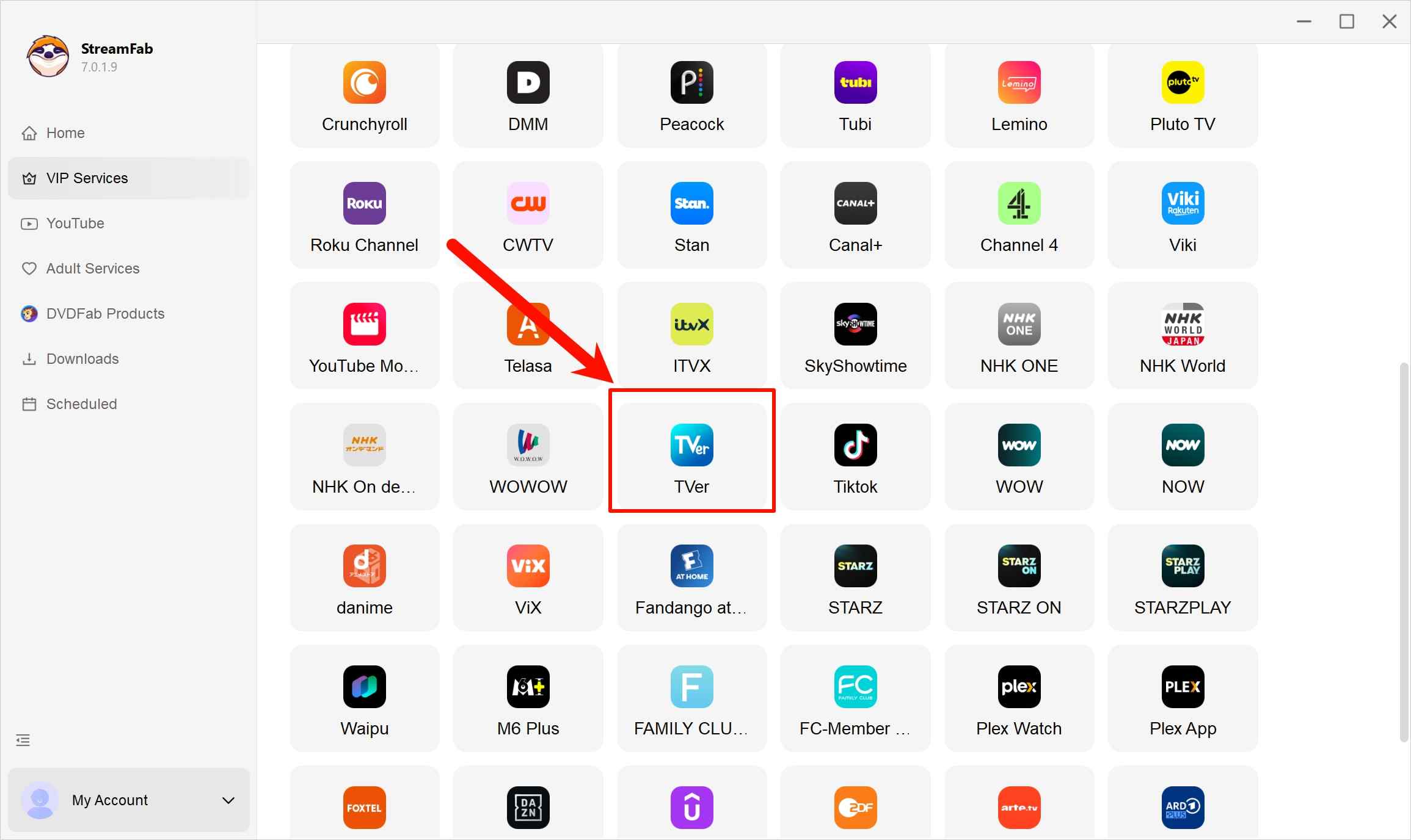
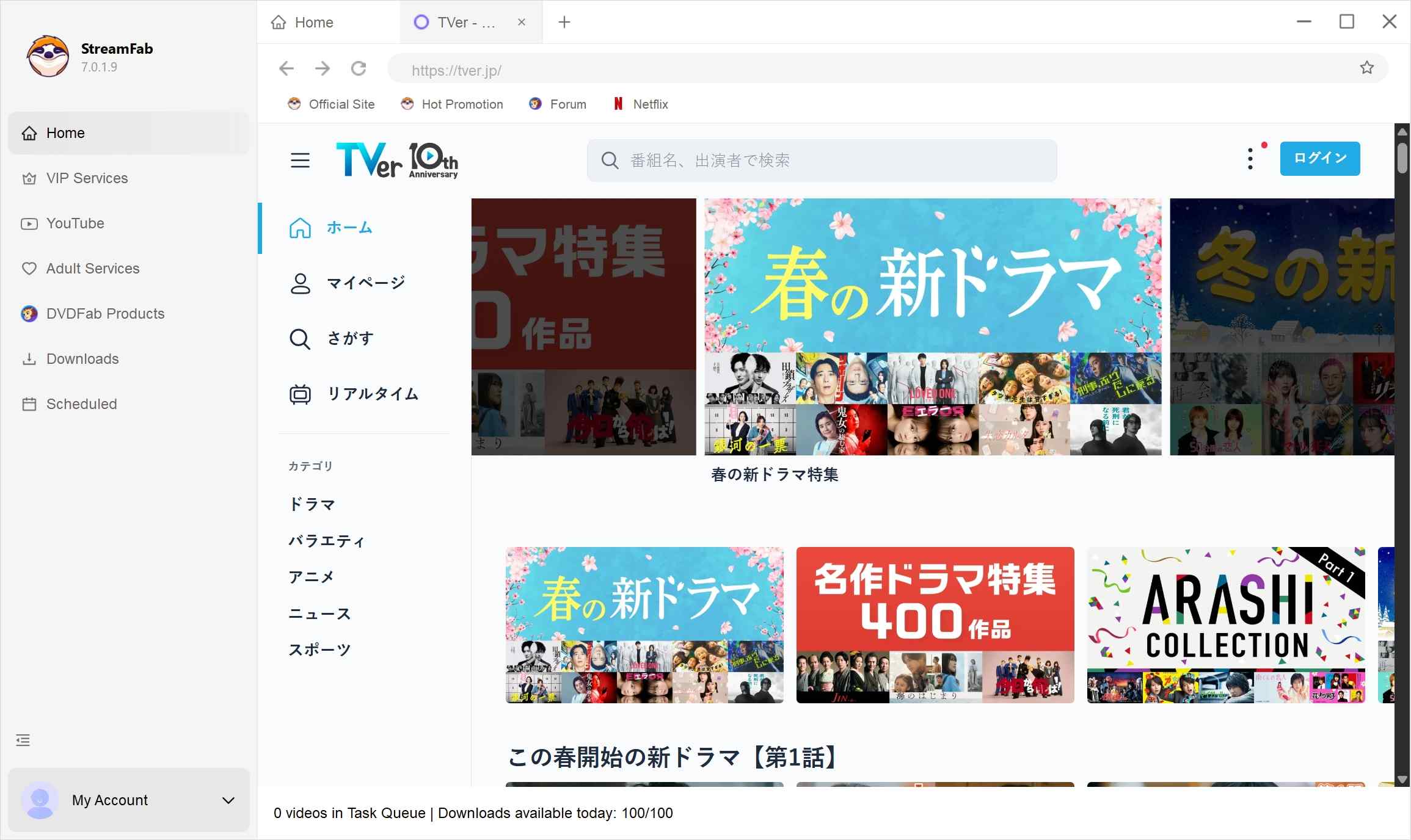
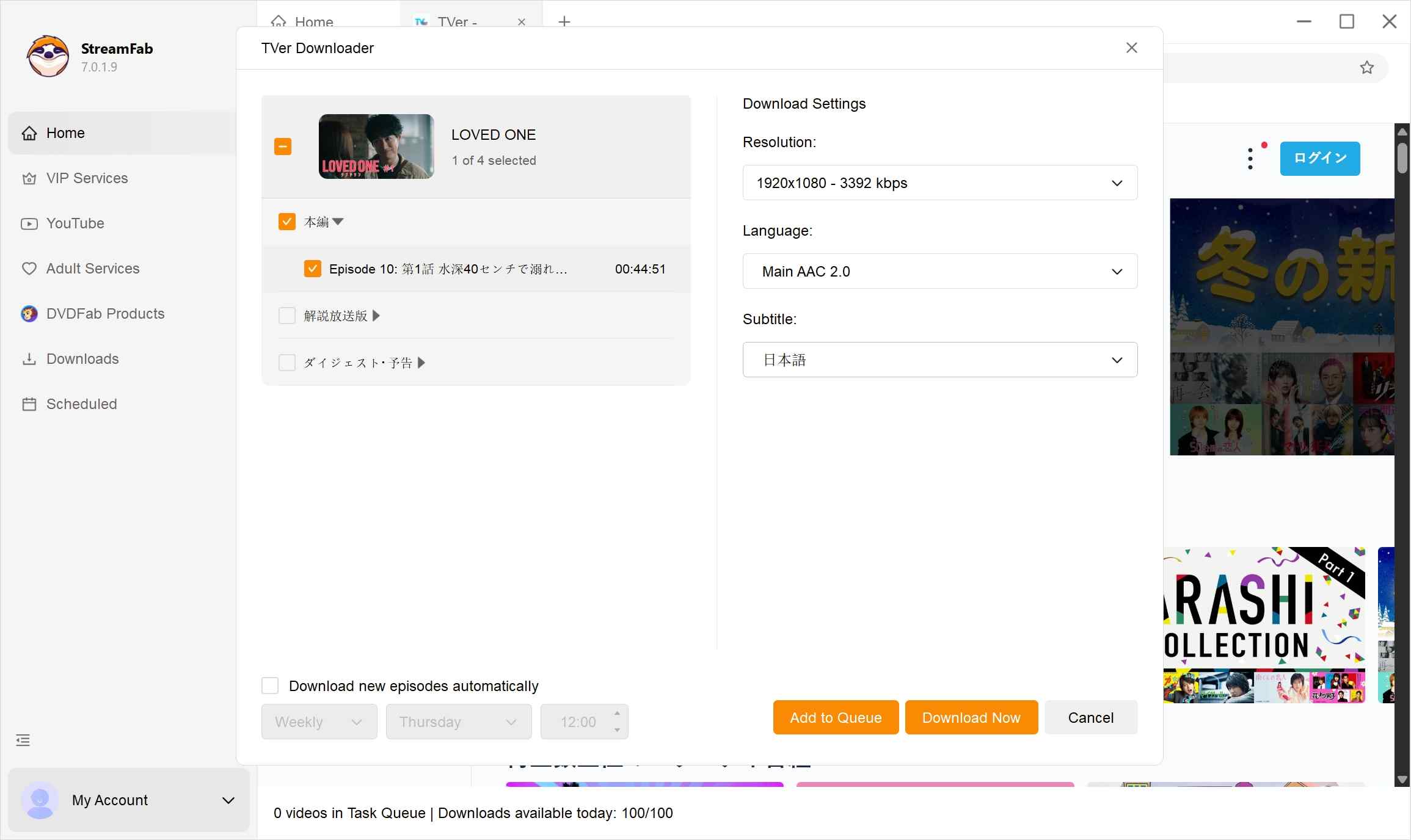
If the title does not load, the format is unavailable, or metadata is missing, refresh the TVer page and confirm your login and regional connection before trying again. TVer changes can affect format analysis and compatibility, so a result is not guaranteed for every title.

For recurring TVer series, I would prioritize a workflow that can queue episodes and keep the output in a standard MP4 or MKV file. For a single episode that is still available through TVer, official streaming is often the simpler choice.
TVer Download FAQs
Why do TVer tools report unavailable formats?
Unavailable formats can result from changing identifiers, metadata retrieval issues, regional access, login compatibility, or current delivery behavior. Start by reopening the title in TVer, confirming your connection, and trying again after the service page loads normally.
What quality and formats can StreamFab save?
StreamFab TVer Downloader can save video at up to 1080p, where the source supports it. Available resolution depends on the title and selected settings, and you can choose MP4 or MKV output.
Can I move a TVer MP4 to an iPhone?
A TVer MP4 created through a supported StreamFab workflow can be transferred to a compatible phone player by USB, cloud storage, or another file transfer method. StreamFab lists Windows, macOS, and Android support; readers comparing Android video downloaders can review those options separately.
What affects TVer download time?
Download time varies with episode length, connection quality, regional routing or VPN overhead, and current platform compatibility. Queueing multiple episodes can be convenient for a series, but completion time still depends on those conditions.
What does the StreamFab TVer trial include?
The trial lasts 30 days and allows up to three downloads per VIP service. Use any local TVer copies only for personal offline viewing of content you’re authorized to access, where permitted by platform terms and applicable law.
Conclusion: What Works Best for TVer Downloads
Official TVer streaming is the simplest option when your connection and the viewing window work. Online and command-line tools can suit technical experimentation, but changing formats, identifiers, and metadata can interrupt them. A maintained desktop downloader is a practical option for repeat local-file workflows when those alternatives do not fit.
Choose StreamFab TVer Downloader if you regularly follow available TVer series and want MP4 or MKV output with queueing and scheduling. Skip it if you only need to watch one episode online or do not have authorized access to the content.
