
StreamFab Subtitles: Fix Missing SRT Files and MP4 Tracks

Summary: StreamFab subtitles are saved either as an embedded subtitle track inside an MP4 or MKV file, or as a separate SRT file in the output folder. If you have missing subtitles, first check source-track availability, the selected output mode, and player support.
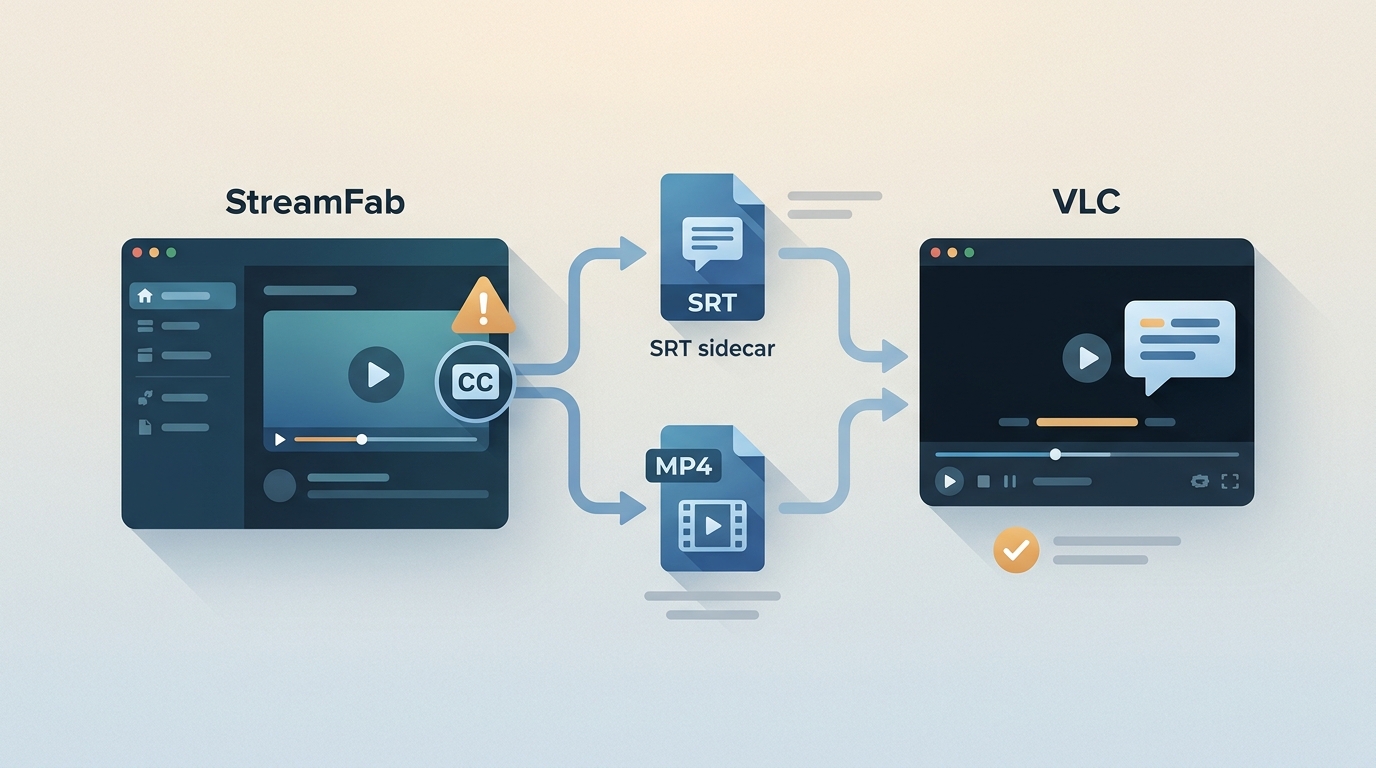
Table of Contents
Finding an MP4 with no visible subtitle, or no SRT file beside it, is frustrating because the problem can occur before or after the download. This guide explains how to choose remuxed tracks or an SRT file, then verify what was actually saved.
Find Missing StreamFab Subtitles
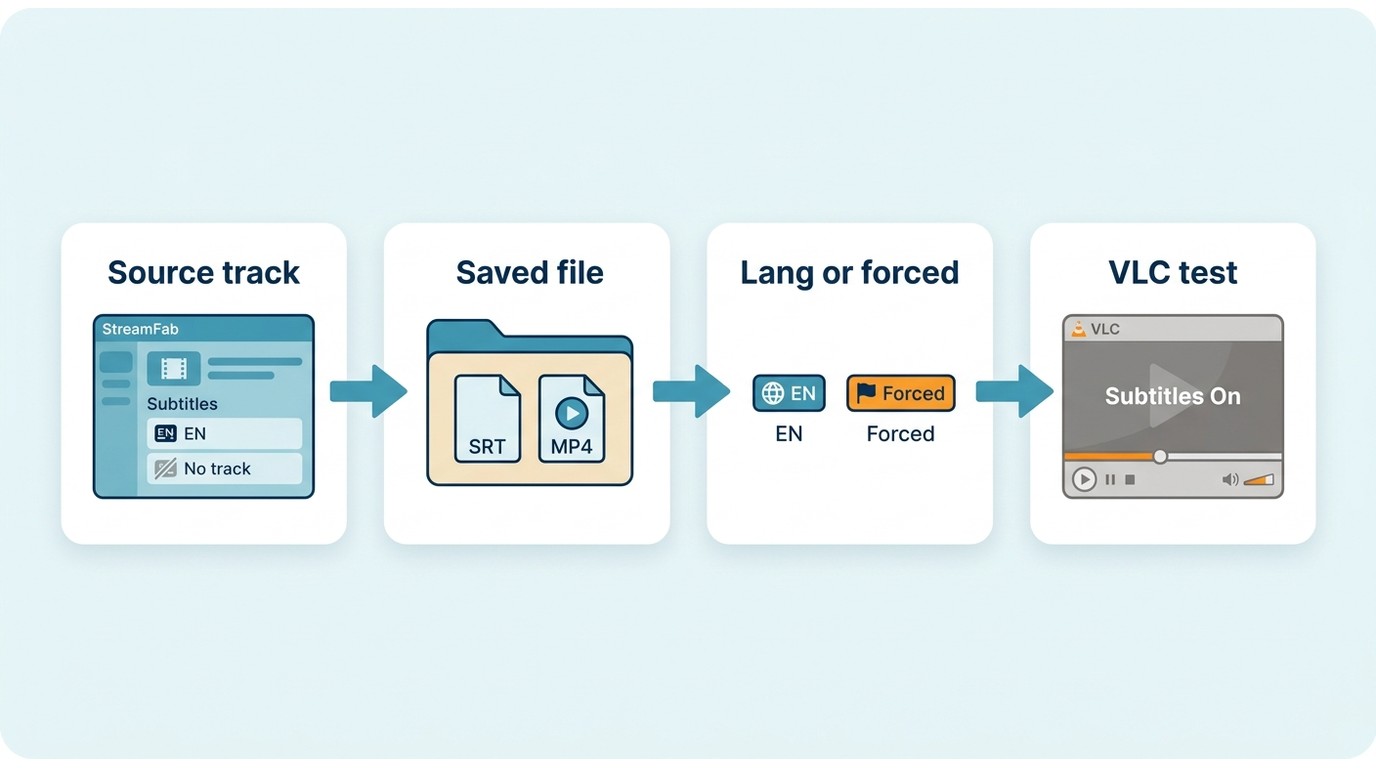
Missing subtitles usually require four checks in order: confirm that the source offered the track, confirm whether it was saved inside the video or beside it, inspect its language and display flags, then test it in the intended player.
If the title itself cannot be analyzed, a No Valid Sources Are Available for This Video error may need to be resolved before subtitle settings can be evaluated.
Check Embedded and Sidecar Files
Start in the subtitle output folder. A separate SRT file should normally share the video’s base filename, while remux subtitles appear as an embedded subtitle track inside the MP4 or MKV. Soft subtitles are selectable tracks; burned-in subtitles are part of the picture. My editorial preference is to confirm the actual saved track before changing player settings, because that check separates a missing file from a playback issue.
- Open the output folder and look for a matching .SRT, .vtt, .ass, or .ssa file.
- Inspect the MP4 or MKV in a player or media-information tool for embedded subtitle tracks.
- Check the track language plus its default and forced flags.
- Play a short section in VLC and on the device you plan to use.
Test Player, Container, and Flags
If the file contains a subtitle track but it is invisible, check the subtitle codec and flags before treating the player as the cause. MP4 subtitle compatibility can be narrower than MKV subtitle support, and a forced track may not auto-display consistently across players. Subtitle rendering is separate from video hardware acceleration, so acceleration settings are a later troubleshooting step.
| Subtitle format | Typical playback fit | What to check |
|---|---|---|
| Embedded MP4 subtitles | Often suitable for VLC and newer media apps | Codec support and forced/default flags |
| Embedded MKV subtitles | Often more flexible in VLC and Plex | Target TV or Apple TV app support |
| SRT | Broad text-subtitle support across many players | Matching filename and language code |
| VTT, ASS, SSA, TTML, or PGS | Depends on the player and subtitle codec | Styling, positioning, and conversion needs |
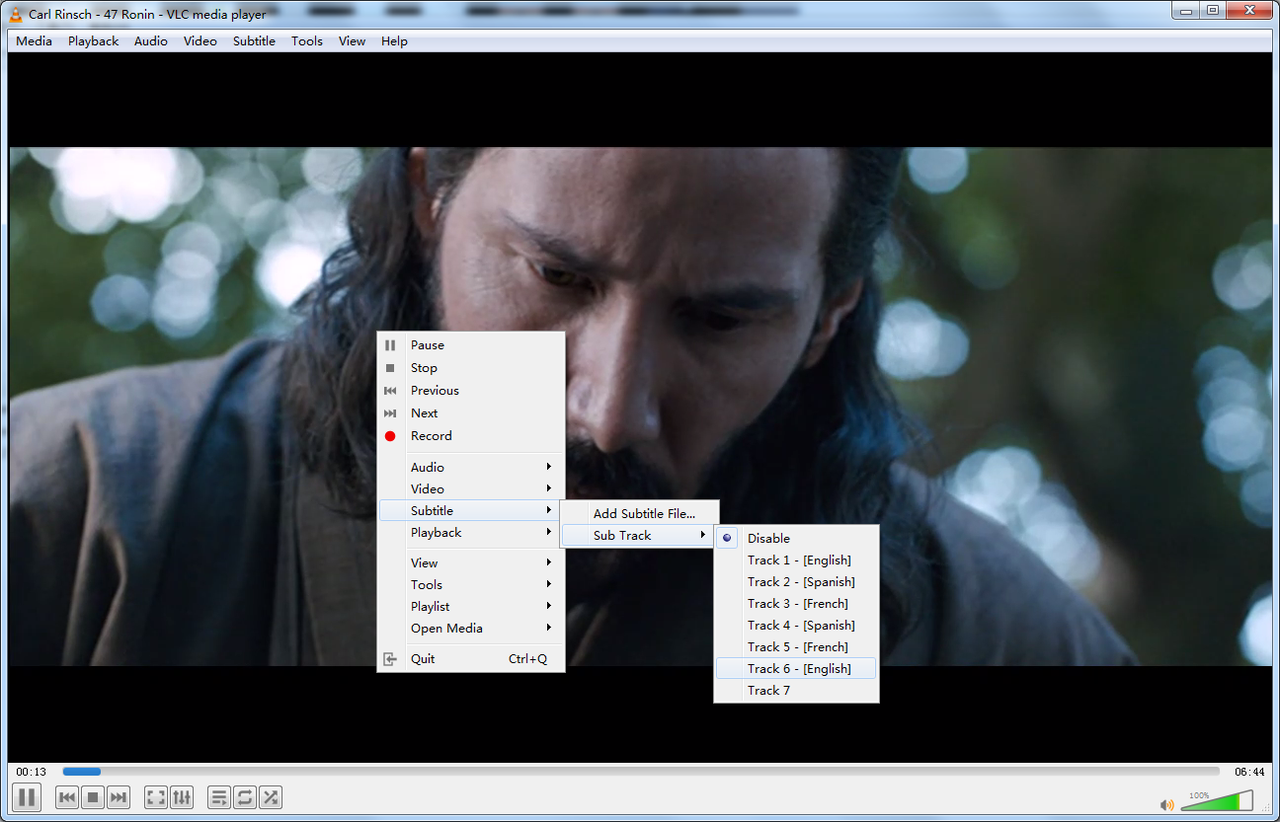
In VLC, navigate to Subtitle > Subtitle Track and select the detected track. If no track appears, return to the output folder and inspect the file before changing VLC settings. If a confirmed track still causes playback problems, you can then try disabling hardware-accelerated decoding in Input/Codecs as a device-specific troubleshooting step.
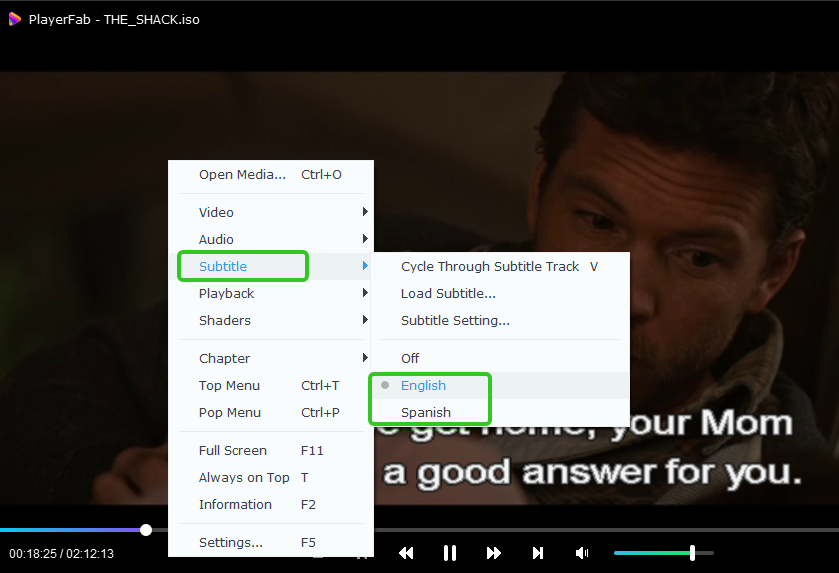
In PlayerFab, right-click during playback, select Subtitles, and choose an available language track. If a track is listed but does not render, test the same file in another player to determine whether the issue is the subtitle format, the container, or the target device.
Choose StreamFab Subtitle Output
For content you’re authorized to access, where permitted by platform terms and applicable law, StreamFab is a desktop option for saving a local copy for personal offline viewing with available subtitle tracks. StreamFab subtitle download settings determine whether a selected track is remuxed into an MP4 or MKV, saved as a separate SRT file, or retained in an available source format.
Before downloading, use this short checklist:
- Confirm that the selected title exposes the subtitle language you need.
- Choose MP4 or MKV based on the player and device you plan to use.
- Choose remux, a separate SRT file, or the available original subtitle format.
- Select forced subtitles only when the source offers them.
- Select multiple audio and subtitle tracks only when they are available; readers comparing language-track choices can also review how to download audio tracks for movies in multiple languages.
- Run one short test download before starting a season or batch queue.
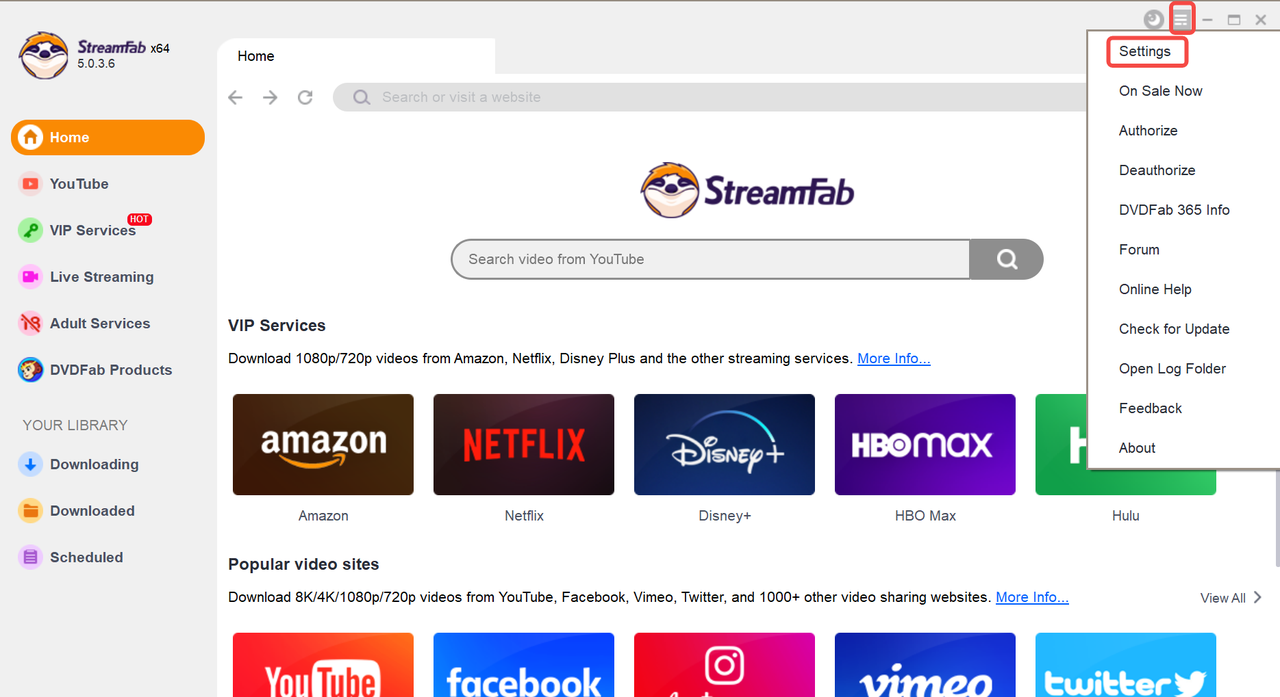
To access the global settings, launch the software, click the Navigation Menu (☴) at the top right, and enter Settings.
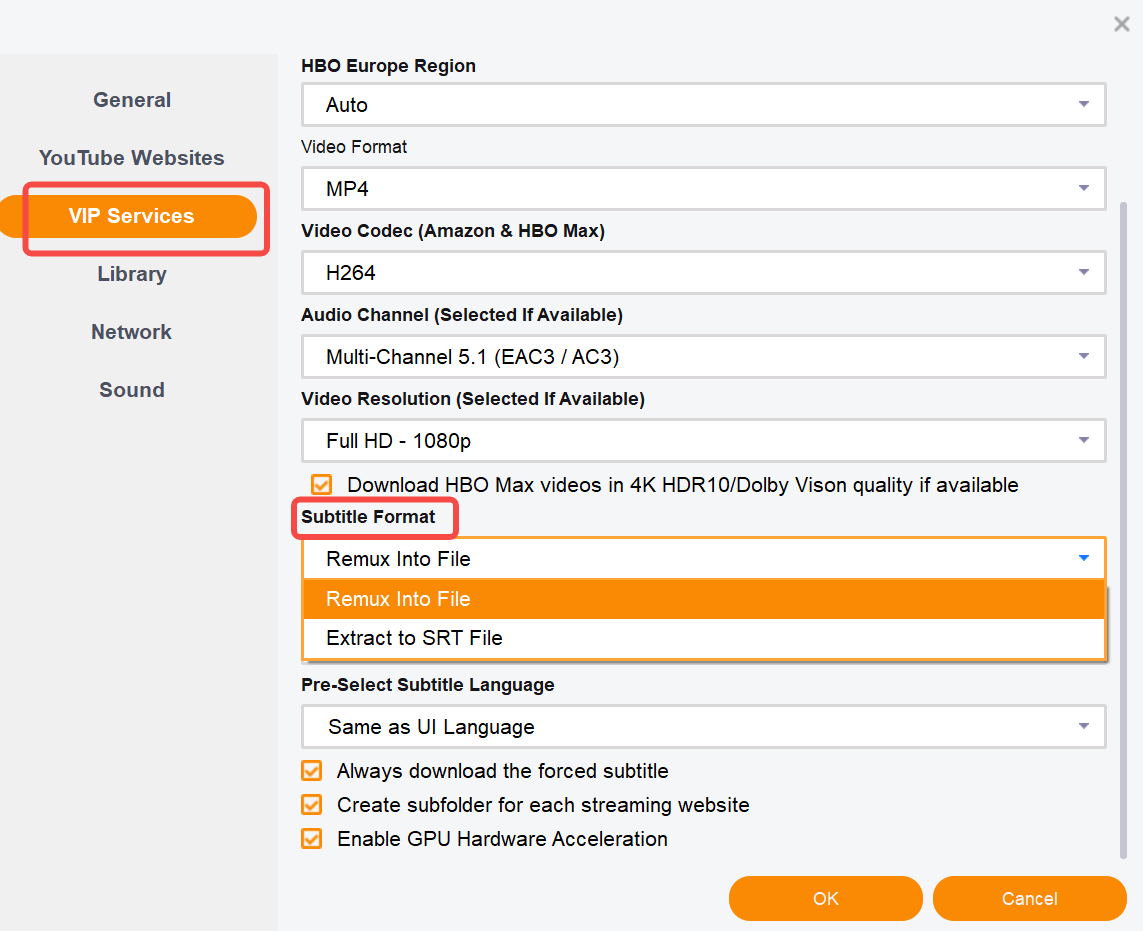
Navigate to VIP Services > Subtitle Format. Current labels and choices can vary by service, source format, and app version. Similar remux options may produce SubRip, SSA/ASS, TTML, or another available subtitle codec, so inspect one test file in a player or media-information tool before starting a batch.
| Source type | Subtitle availability | Language and forced-track choices | Output result |
|---|---|---|---|
| Subscription streaming title | Varies by service and title | Limited to tracks exposed for that title | Depends on the source format and selected mode |
| YouTube video | Depends on uploaded or available caption tracks | Depends on the video’s available captions | May retain the available caption format or use a compatible output option |
| Title with no exposed subtitle track | No source track is available to save | No language selection appears | Choose another title or use official in-app viewing if that meets your needs |
Remux Subtitles into MP4 or MKV
Remux subtitles are stored inside the final MP4 or MKV as selectable tracks. This is a practical choice for a single-file library and can retain source details that a plain SRT cannot, including some styling or flag information. It is less suitable when your target device has limited support for the chosen container or subtitle codec, so test the exact playback app before committing to a large queue.
Save a Separate SRT File
A separate SRT file is usually easier to edit, rename, and load in players that support text subtitles. It is a good fit when you want a visible sidecar file in the subtitle output folder, but it may not preserve the styling or positioning available in ASS, SSA, TTML, or image-based subtitles. For broader guidance on how to download subtitles for movies, use the format that matches the source and your playback device rather than treating SRT as the universal choice.
| Subtitle workflow | Best fit | Not ideal for | Format and device notes |
|---|---|---|---|
| Remux into MP4 or MKV | A single-file library with selectable tracks | Devices with limited container or subtitle-codec support | Support depends on the player, codec, and forced/default flags |
| Separate SRT file | Easy editing and broad text-subtitle playback | Preserving source styling or positioning | Original formats or burn-in may fit better when styling or soft-subtitle support matters |
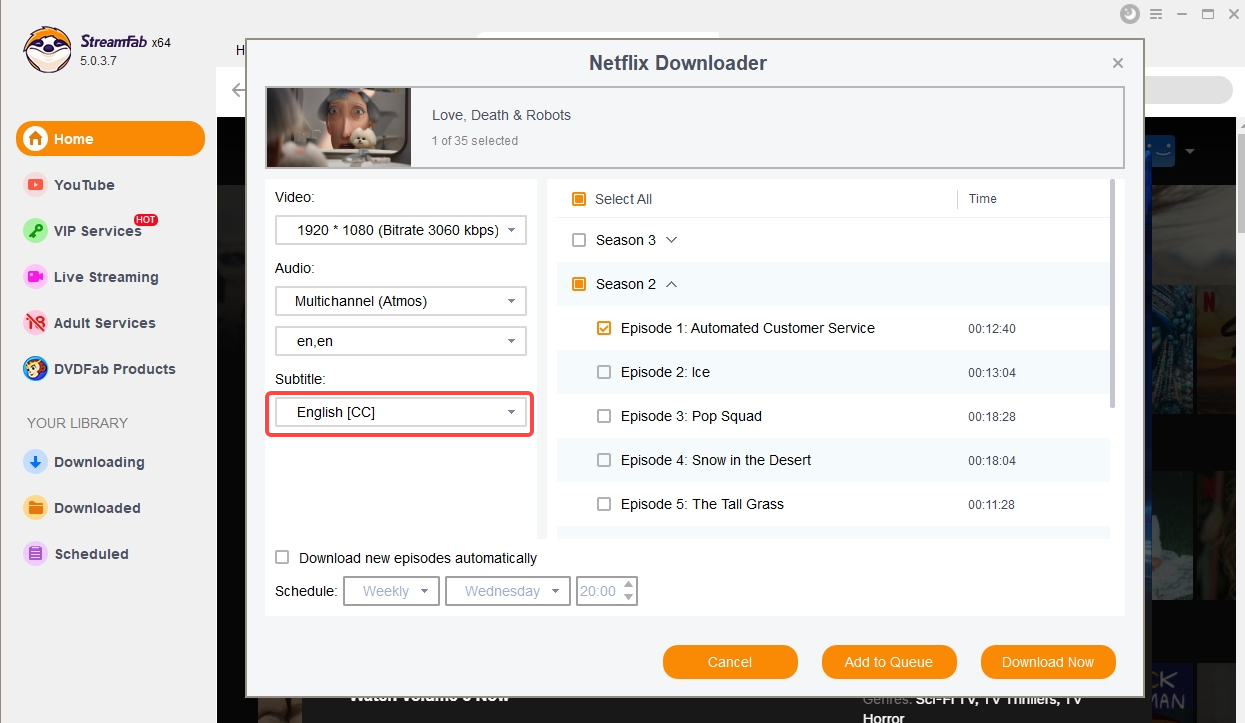
Check the subtitle language selection before starting the task. If the language is not listed, first confirm that the service and title expose that track, refresh the analysis, check the current app version, and test another title. A missing selector does not necessarily mean a download failure.
YouTube Captions in StreamFab
YouTube captions follow the same basic rule as other subtitle sources: the workflow starts with caption tracks the video makes available. A YouTube caption download can include selectable captions when they appear during analysis, but an unavailable source track cannot be created by the output setting.
Save Available Caption Tracks
When captions are available, select the language track shown for the video and confirm it with a short test file. Availability can differ by upload, language, and caption type, so a title with no selectable caption is a source-availability limitation rather than proof that a subtitle file was lost after download.
Convert VTT Only When Needed
Convert VTT to SRT when the target player handles SRT more reliably or when you need a simple editable text file. Keep the original format when styling, positioning, or source-specific cues matter. In my view, preserving the source format is the safer first choice when those visual details are important.
FAQ
Can StreamFab create subtitles if the service has none?
No. StreamFab can save subtitle or caption tracks that the service exposes for the selected title, but an empty subtitle selection is not the same as an available track. Check the title’s language menu, refresh the analysis, confirm the current app version, and try another title before assuming the download failed.
Why can similar remux options create different subtitle codecs?
The source subtitle format, service, and current app version can affect the result. Similar labels may lead to SubRip, SSA/ASS, TTML, or another available format, and those codecs can retain different styling and flag behavior. Inspect one completed file in a player or media-information tool before starting a batch.
Can VLC download a subtitle that StreamFab did not save?
VLC can load an external subtitle file or help you inspect an embedded track, but it cannot recover a track that was never selected or was not available from the source. First verify the output folder and the video’s embedded tracks, then use VLC to test the saved subtitle format.
Can I select multiple audio and subtitle languages in one StreamFab download?
When the service exposes multiple tracks, the analysis window may let you select more than one audio and subtitle language for a job. The available choices depend on the service and title, so confirm the selected output with one episode before adding a full season to the queue.
Conclusion
When subtitles are missing, check source-track availability, the selected output mode, the saved sidecar file or embedded track, and player compatibility in that order. This sequence is more useful than assuming a single technical cause, and it keeps the decision focused on what you can verify in the completed file.
Choose a separate SRT file when easy editing and broad text-subtitle support matter most. Choose remux when you prefer a cleaner single-file library, and keep an available original format when styling or positioning matters. The most practical next step is one short test download on the device you actually use before building a larger queue.

Staring at an error code and wondering what StreamFab is actually telling you? In July 2026, I mapped every code against the real failure it represents — here's the reference guide that skips the corporate jargon and tells you exactly what to do in under 2 minutes.
By Erika Leen - Oct 12, 2026

StreamFab 7 marks the first major update in nearly three years. This review looks beyond surface-level changes and examines what actually matters in everyday use based on real testing, community feedback
By Erika Leen - Sep 28, 2026
Choose between StreamFab’s local file workflow, Audials’ Windows recording and editing, and PlayOn’s local or cloud recording. Compare queue behavior, picture quality, audio and subtitles, and recurring costs, with a repeatable way to check one authorized title before building an offline library.
By Marcia Hatcher - Sep 28, 2026

This article is an official response to users asking regarding the safety and legality of StreamFab. Written by StreamFab team, it moves beyond simple assurances to provide a transparent technical and legal analysis.
By Nicole Lopez - Sep 24, 2026