
Download Channel 4 Programmes to Watch Offline on PC & Mac

Summary: Learn how to download Channel 4 shows for offline viewing through a hands-on comparison of the official app, online tools, screen recorders, and a dedicated PC downloader. This guide covers common download limits, video quality, subtitles, batch downloads, and saving shows as MP4 or MKV files for personal use.
Table of Contents
If you want to download Channel 4 programmes to watch offline, the official app lets you save titles on a phone or tablet for a limited time, but there's no Windows or Mac download option — which is why so many people end up looking for another way to keep a personal copy on a computer. I hit that same wall in March 2026 while trying to archive a season of Married at First Sight Australia for a long flight, and I'll walk you through both routes below: what the official app actually allows, and how I saved episodes to my PC for personal offline viewing.

Can You Download Channel 4 Programmes to Watch Offline?
Yes — but only inside the Channel 4 mobile and tablet apps. The service doesn't offer a Windows or Mac download option, and there's no official web downloader either. If you want to watch Channel 4 offline on a computer, you're choosing between the official app (phone/tablet only, time-boxed) and a desktop app that saves a local MP4/MKV copy for personal offline viewing.
Official Channel 4 Downloads: What the App Allows
The official Channel 4 app on iOS and Android lets signed-in viewers store programmes for up to 30 days per Channel 4's Help Center. Many titles can be re-downloaded once they expire, and downloads you've already saved can still be played offline when you travel abroad. A shorter viewing window applies to certain programmes rather than every download, so check the download screen for the title's own expiry note before you fly.
In my experience, the honest limits of the official route are elsewhere: it's mobile-only, storage is capped, and titles can quietly drop out of Downloads when the underlying rights change.
Why a Programme May Be Missing from Downloads
A show that streams fine in the Channel 4 player sometimes has no download button at all. That usually isn't a bug — it's a rights setting. Channel 4 licenses download rights title by title, so films and third-party co-productions are the most common gaps. If a programme has no download option in the app today, refreshing or reinstalling won't change that; it comes back only if Channel 4 renews the download licence.
Official App vs Desktop Alternative at a Glance
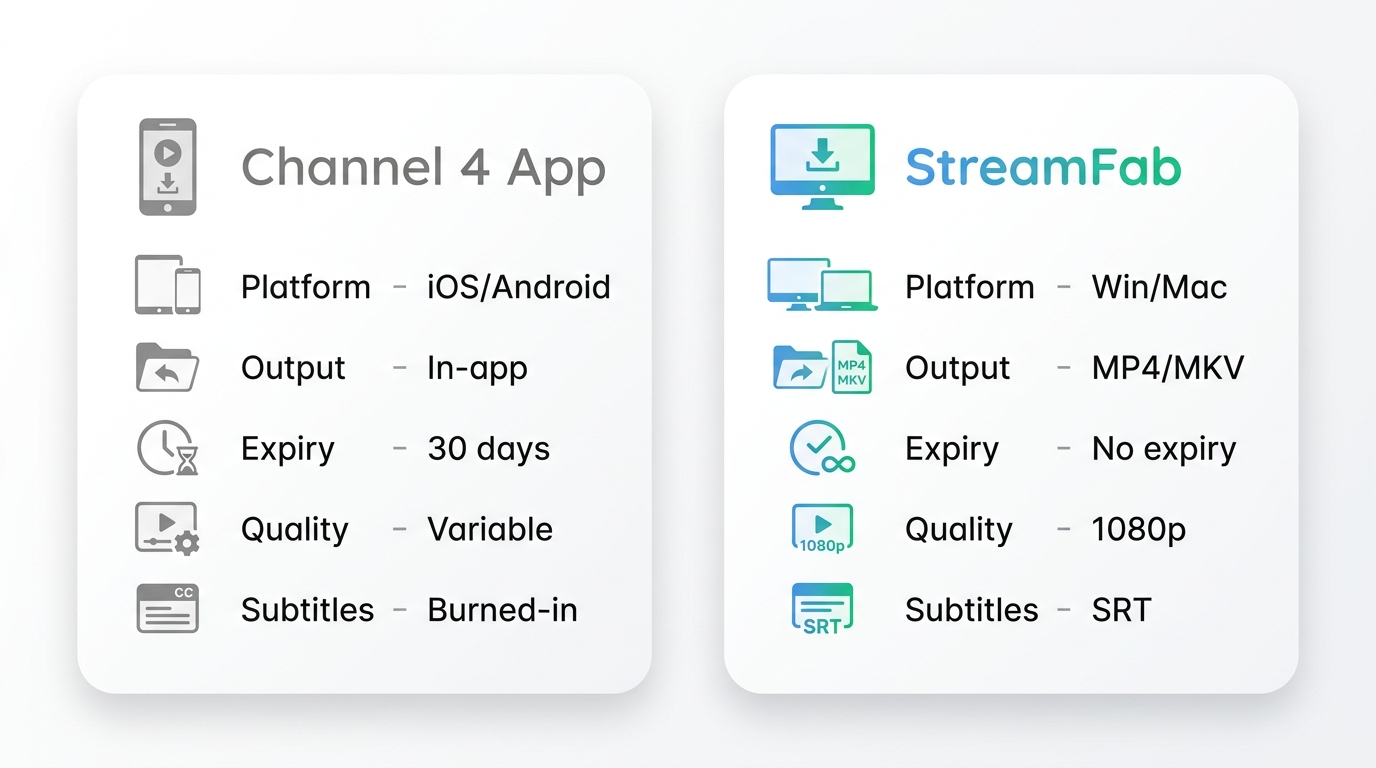
If the app's mobile-only limit is the real friction for you, a desktop app is the other route. Here's how the two compare on the things viewers actually ask about:
| What viewers ask about | Channel 4 official app | StreamFab Channel 4 Downloader (desktop) | PC Hardware Decryption (StreamFab) |
|---|---|---|---|
| File format | Proprietary app cache (in-app only) | Standard MP4 or MKV local file | 1:1 Bitstream MP4/MKV |
| Viewing window | Stored in the app for up to 30 days | A local copy on your own drive | Permanent |
| Where it plays | Channel 4 app on phone or tablet | Any player on your computer, plus Plex or NAS | Any Device / Plex / NAS |
| Watching abroad | Already-downloaded titles play offline overseas | Plays as an ordinary local file | 100% Safe (No internet needed) |
Why Channel 4 Has No Windows App or Web Downloader
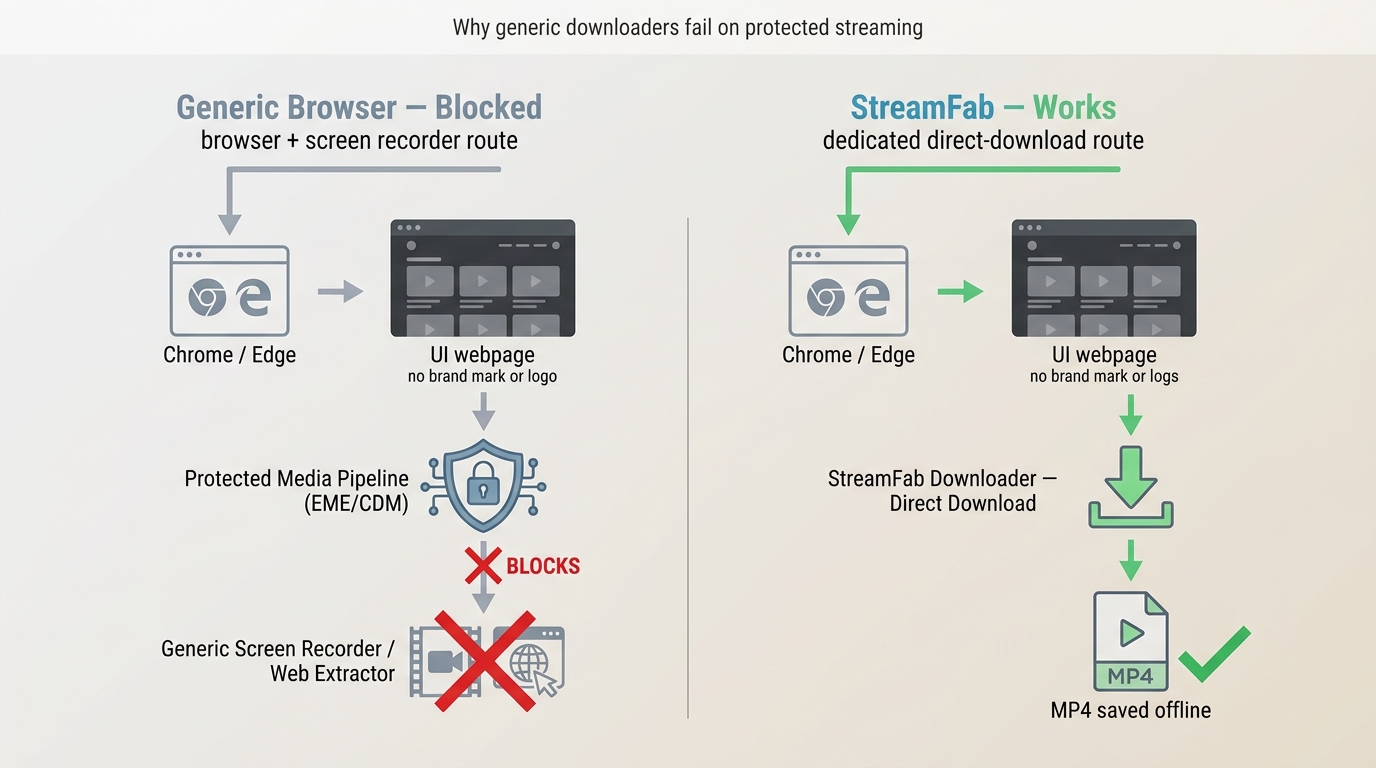
Channel 4 publishes native apps for iOS, Android, smart TVs and consoles, but there's no official Channel 4 app for Windows or Mac. On a computer, the only sanctioned way to watch is the browser player at channel4.com — and the browser player has no download button. That's why a search for a Channel 4 downloader online keeps turning up empty: web-based parsers and generic screen recorders have to fight the browser's protected-media pipeline, which is designed to keep video off casual capture tools. In my testing through 2026, the usual copy-paste web extractors either return nothing or hand you an audio track with a black picture.
Command-line utilities like the ones that still work for BBC iPlayer or ITVX also come up short on Channel 4 — the protected streams the site uses aren't a target those projects support. That gap between mobile downloads and a working desktop option is exactly the space a dedicated Channel 4 desktop app was built to fill for viewers who prefer to watch on a laptop.
Saving Channel 4 to Your PC With StreamFab
For Windows and Mac viewers who've already exhausted the official app's mobile-only route, StreamFab Channel 4 Downloader is the desktop app I settled on after trying the usual grab-bag of extensions and command-line scripts. It's a third-party tool relative to Channel 4's own service, intended for content you have authorized access to and where platform terms and applicable law allow — you sign in with your own Channel 4 account through its built-in browser, and it saves the show as a standard MP4 or MKV local file for personal offline viewing.
What the Saved File Includes
The saved file covers what most people actually need for a personal library: up to 1080p video with the original AAC 2.0 audio, MP4 or MKV output, and closed captions embedded in the file or exported as SRT. Batch mode lets you queue a full season overnight, and because the output is an ordinary local video file, it plays in any player, Plex or a home NAS included.
Best for: building a personal offline library on a computer, or watching on devices that aren't a phone.
Not ideal for: viewers who only ever watch inside the Channel 4 app on a phone — the official download flow is simpler for that.

Download on-demand content from Channel 4 streaming service in 1080p resolution with AAC 2.0 at high speed and even in batches.
- Save Channel 4 videos for personal offline viewing at up to 1080p with the original AAC 2.0 stereo audio.
- MP4 or MKV output for the saved file, plus embedded or SRT subtitles.
- Because the saved file is a standard local video, personal rewatching isn't tied to the Channel 4 app's 30-day storage window.
- Batch mode to queue a whole season overnight.
- Pre-roll ads on the platform are handled at capture time; results depend on the service.
Please note that you must have a legitimate Channel 4 account f or most videos, and its use must be strictly for personal/offline viewing, of course.
Step-by-Step: Saving a Channel 4 Show
Here's how I save Channel 4 shows for personal offline viewing with StreamFab, based on my own runs.
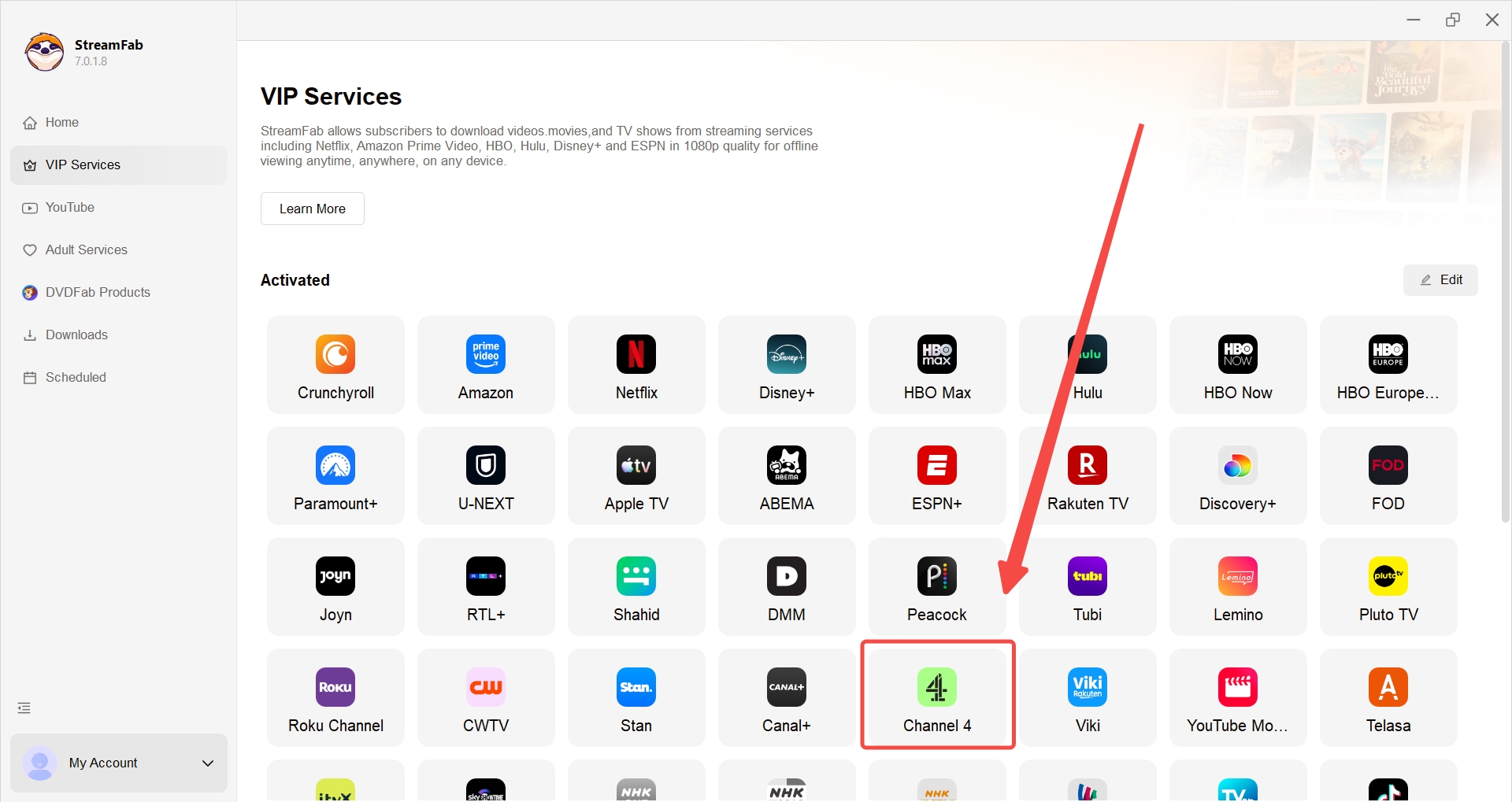
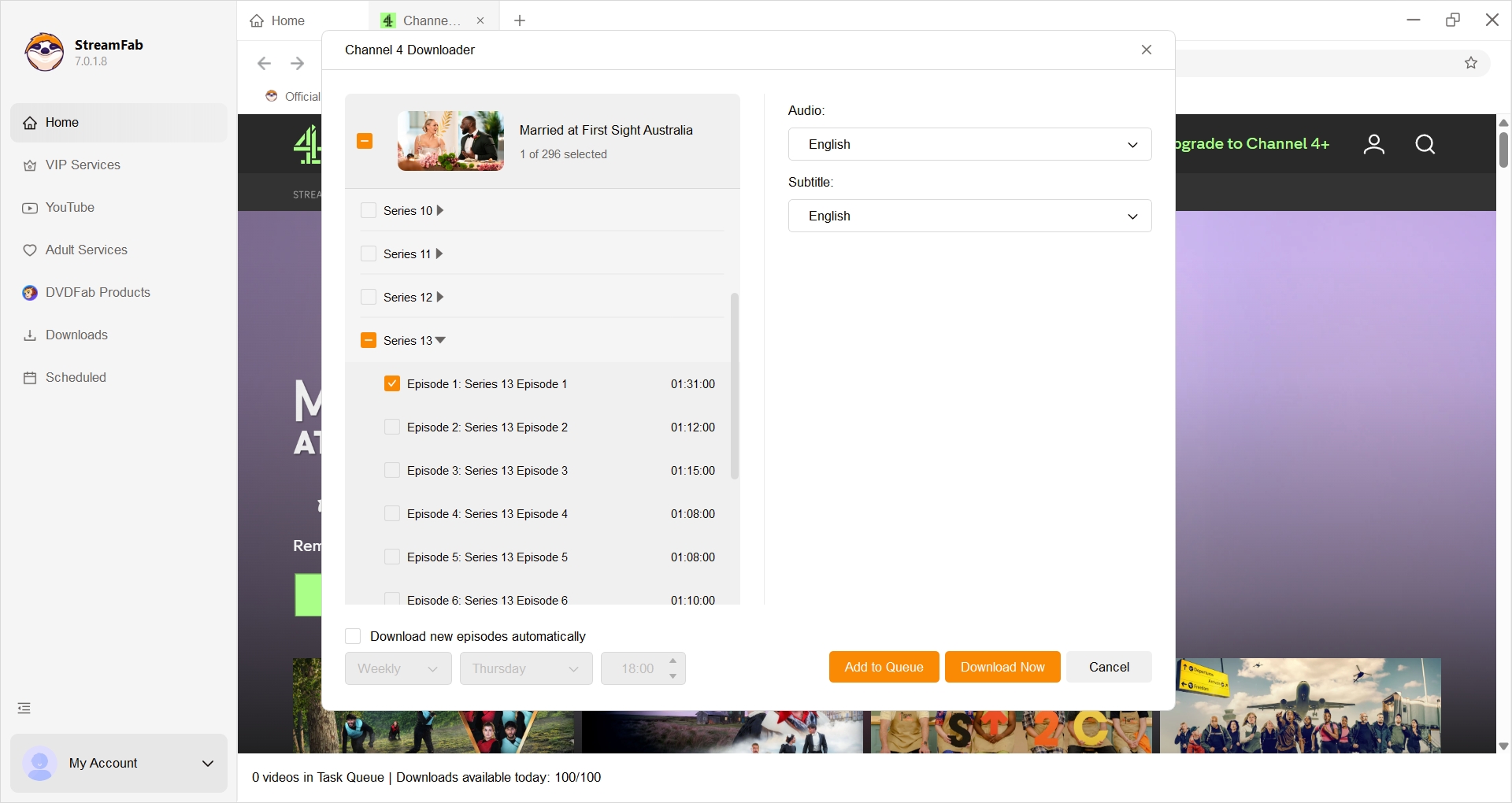
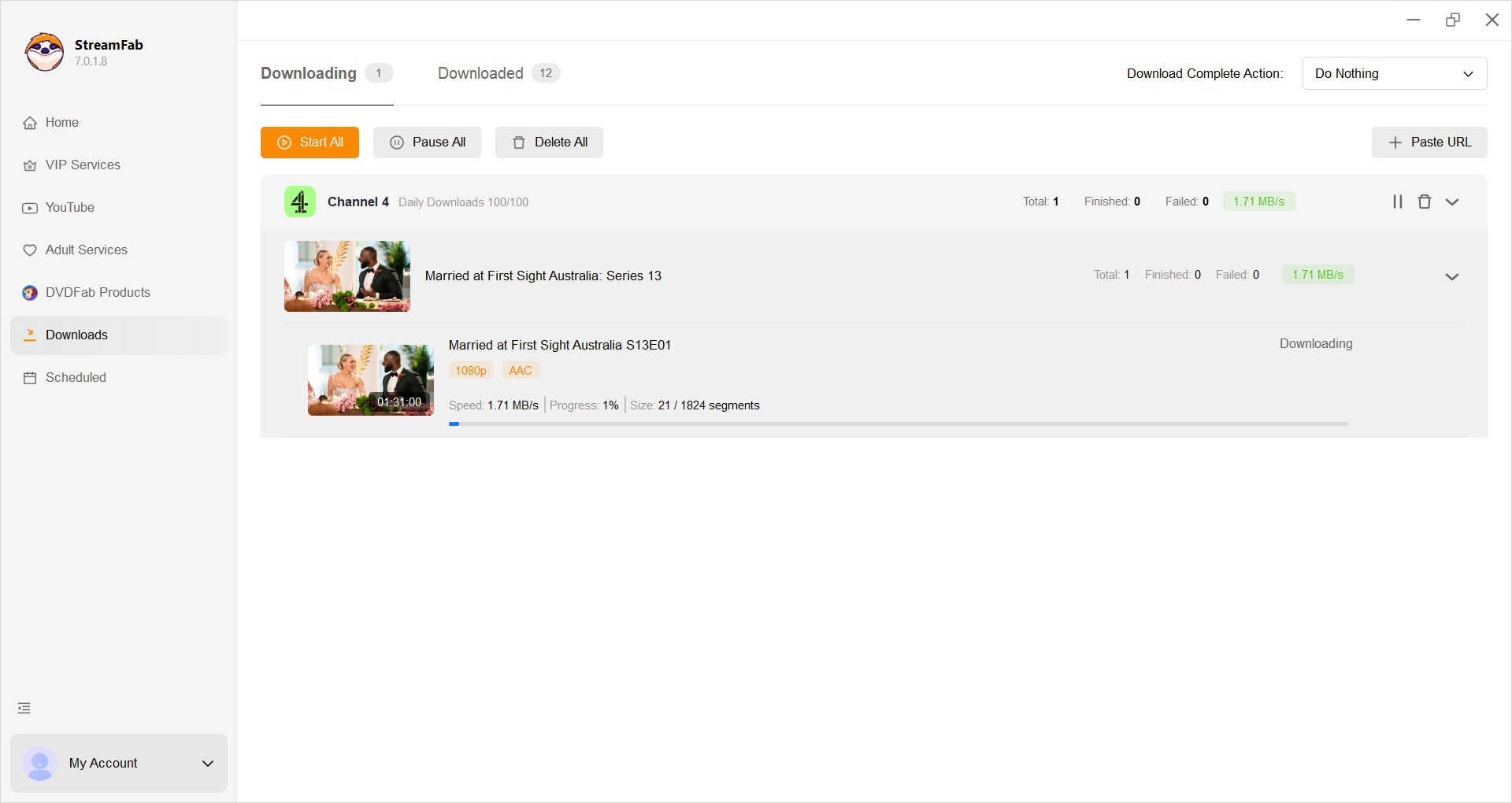
I queued the full season of Married at First Sight Australia overnight. Each episode landed as a neat MP4, named by season and episode, and later streamed cleanly to my TV via Plex — no in-app expiry counter counting down at me, which was the whole point.
Troubleshooting Channel 4 Downloads That Fail
When an official Channel 4 download misbehaves, the fix is almost never a magic setting — it's figuring out which of a small number of causes you're actually hitting. In my experience, the most common reason a title disappears from Downloads is rights, not a bug.
- There's no download button on a computer. Channel 4 doesn't publish a Windows or Mac app, and the browser player at channel4.com doesn't include a download option. If you want a file on your PC, you'll need a desktop app rather than the official route.
- A programme streams fine but has no Downloads entry. That's the rights case above — the licence for offline saving wasn't granted for that title. Re-installing the app won't change it.
- Sign-in loops or the download stalls. Sign out, force-quit the Channel 4 app, and sign back in. If storage on the device is tight, free some space first — the app needs headroom to finish writing the file.
- A saved title expired. Downloads sit in the app for up to 30 days; once they expire, most titles can simply be re-downloaded from the same programme page while the rights window is still open.
- Older command-line tools and browser extensions don't work. Utilities that reliably grab BBC iPlayer or ITVX don't currently support Channel 4's protected streams, and generic screen-capture extensions typically return a black picture. If you keep chasing them, you'll spend more time debugging than watching.
- You're using a VPN. If your VPN's IP is flagged, the video may fail to load in the first place, which stops any downloader further along the chain. Try disconnecting the VPN to confirm before blaming the tool.
My rule of thumb: if a specific title is missing from Downloads, that's a rights call and there's nothing to fix on your end; if the app itself is misbehaving, it's usually sign-in or storage. Anything past that — especially the recurring "black screen on a computer" problem — is a sign the browser route isn't going to work and it's time to save a local copy from a desktop app instead.
FAQs
Does the downloader still work now that All4 is called Channel 4?
Yes. Channel 4 rebranded its streaming service from All4 back to Channel 4, and older searches for All4 or 4od land on the same site. The desktop app follows the current Channel 4 URLs, so nothing on your side needs to change.
How long do the files I save stay watchable?
A local copy you save for personal offline viewing isn't tied to the Channel 4 app's 30-day storage window, so you can rewatch it on your own devices for as long as the file sits on your drive. You still need authorized access to the underlying programme, and playback quality depends on your player and device.
Are the original subtitles and audio kept?
Yes. It saves the original AAC 2.0 audio and preserves closed captions, which you can embed in the file or export as external SRT — handy if you feed a Plex or NAS library that reads subtitle sidecars.
Can I use a VPN while saving Channel 4 shows?
You can, but if the VPN IP is flagged the show won't play in the first place, and a saver further down the chain has nothing to work with. Confirm the programme plays normally in your browser or app first; a reliable streaming IP usually does the trick.
Do you need a paid Channel 4 account to save shows?
Channel 4 streaming itself is free with a registered account, so you don't need a paid subscription just to watch. Either way, you need a legitimate signed-in account and lawful access to the programme before saving a personal copy.
Conclusion
The honest summary after a year of trying every route: for Windows and Mac viewers, a dedicated desktop app for downloading Channel 4 videos is one of the more practical ways to keep a personal offline copy when the official app's downloads are limited to phones and tablets. The official mobile route works well for a weekend on the train; a computer-side workflow is what makes sense if you're feeding a Plex server or a NAS. Neither is the "right" answer for everyone — pick the one that matches where you actually watch.
Note: This software is intended only for personal backups of content you have a lawful right to access. Unauthorized redistribution of copyrighted programmes is not permitted.


Channel 4 does not offer official offline downloads due to its service model. This guide will help you overcome this challenge by using some trusted tools for personal offline viewing.
By Marcia Hatcher - Jul 24, 2026