
Download Videos from The Roku Channel: 3 Offline Paths That Actually Work

Here's the short answer: The Roku Channel does not document a native way to save its programs as ordinary MP4 or MKV files for offline playback. If buffering keeps ruining movie night, you have three realistic paths — install The Roku Channel app for online viewing, use a maintained desktop downloader on Windows or Mac to save an authorized copy as a local file, or play a compatible local file on a Roku TV through Roku Media Player. This guide walks each one, and tells you which reader each path actually fits.
I ended up here the same way most readers do. Projector screen down, popcorn hot, hit play on The Roku Channel — buffering, black screen, audio lag. When your Wi-Fi decides tonight isn't the night, the fix isn't a better ISP rant; it's preparing the file in advance. The tricky part: "download Roku Channel videos" means two different things depending on the reader (installing an app vs. saving a real video file), and mixing them up is why most guides feel unhelpful.
Table of Contents
Can The Roku Channel Download Videos?

Installing the App vs. Saving a Video
This is where most "Roku downloader" searches go sideways. Installing The Roku Channel app (or an app literally named "Downloader" on Roku OS) lets your device access online content — nothing about that installation produces a video file you can move, back up, or watch when the Wi-Fi is down. Saving a video means a real local file (MP4 or MKV) sitting on your computer, playable in any compatible player, no sign-in required to start playback. Different jobs, different tools.
Roku's official materials cover installation and streaming for The Roku Channel; they do not document a native path that exports programs as ordinary local video files. FAST (free ad-supported) content in particular is licensed to stream, not to retain. So when a guide promises "download from Roku," ask which of the two things it actually means before you spend an evening on it.

A quick map of what Roku's various content tiers actually allow for offline access — worth a glance before you assume any single "download" button will work across the board:
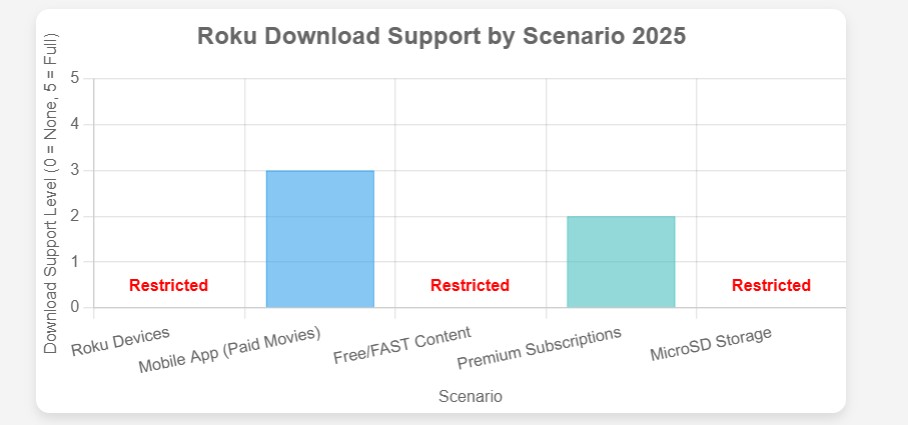
Bottom line: the native answer is "mostly no." Which sends you to the next question — which offline route actually fits your setup?
Finding a Practical Way to Download Roku Channel Content for Offline Viewing
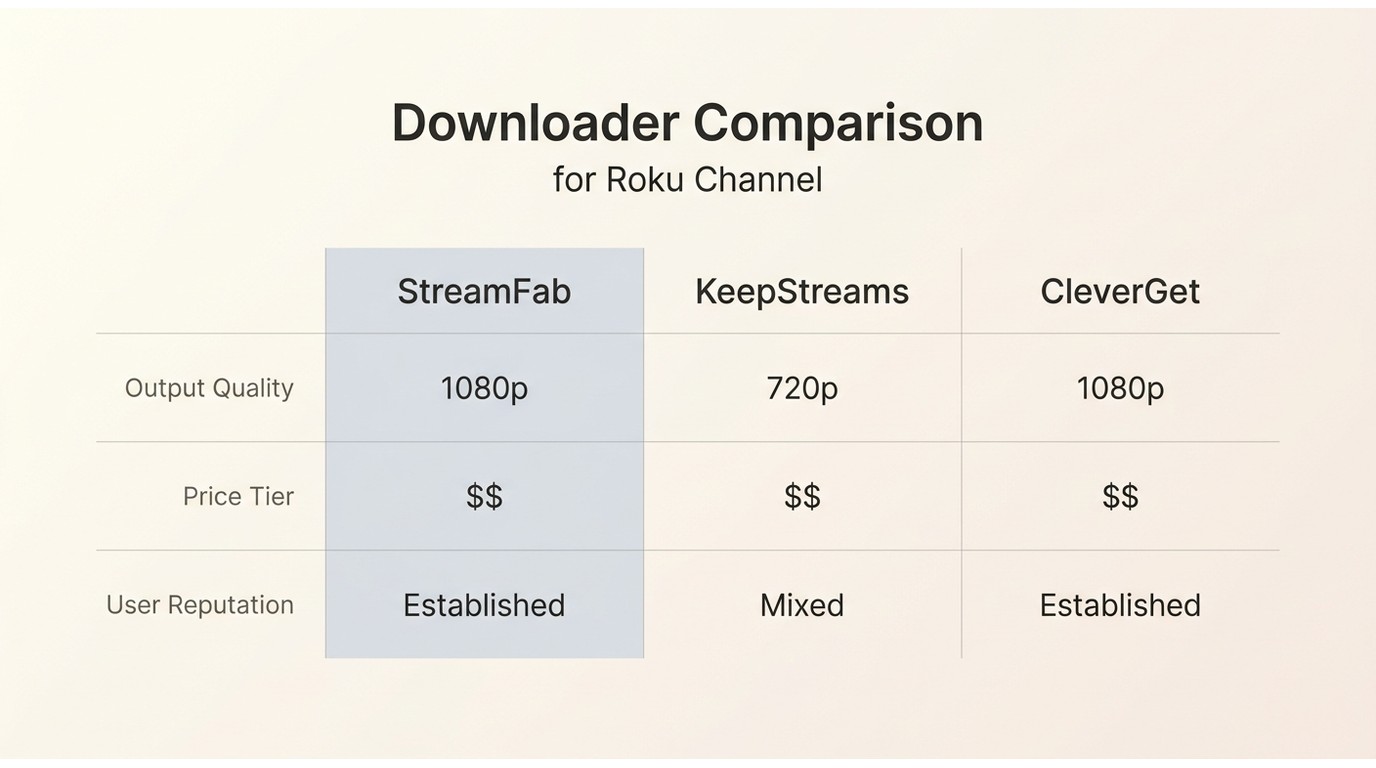
I looked for third-party tools, searched for relevant posts on forums, and asked AI to give me suggestions. Three tools appeared frequently in the answers: StreamFab, KeepStreams, and CleverGet. Interestingly, Canadian users often face the same issue when they want to download CTV video for offline viewing.
1. Solution Reviews and Comparisons
I don't have a Kardashian-sized budget to blow on software, so I tested and compared them, hoping to choose the one that suits me best. I am primarily concerned about output quality, price, and user reputation:
| Capability | StreamFab Roku Channel Downloader | Trustpilot rating (as of August 2026) | 4.5 / 5 across 749 reviews |
|---|---|---|---|
| Max resolution | Up to 1080p | Audio | AC3 5.1 or AAC 2.0 where available |
| Video codec | H.264 | Container / output | MP4 or MKV |
| Subtitles | SRT sidecar or embedded, multiple languages | Batch and scheduling | Batch queue plus scheduled overnight runs |
What StreamFab Saves and Supports
Before the spec sheet, the honest fit statement: this section is only useful if you decided on the desktop-file route above. If you just want the free Roku Channel app, skip ahead. What follows is a reader-side selection reference, not a product page — the numbers exist so you can match them to your device, TV, and playback plan.
For content you're authorized to access, where permitted by platform terms and applicable law, StreamFab Roku Channel Downloader is a Windows and Mac desktop app that saves an authorized copy as MP4 or MKV up to 1080p, keeps AC3 5.1 or AAC 2.0 audio where available, and exports subtitles as SRT sidecars or embedded tracks. It uses screen-recording / stream-capture technology, not DRM decryption. Fit: readers who need a controllable file for offline playback on personal devices. Not ideal for: readers who only want to install the free Roku app, or who can't prepare files on a computer.
My Choice: StreamFab Roku Channel Downloader
I ultimately chose StreamFab as my tool to download and manage offline viewing for Roku Channel content on my setup. The output quality I get is 1080p resolution with AC3 5.1 audio tracks.
- Up to 1080p video with AC3 5.1 or AAC 2.0 audio where the source supports it.
- MP4 or MKV files that play on your own compatible devices without a proprietary player.
- Subtitles as SRT sidecars or embedded tracks in multiple languages.
- Batch queues and scheduled overnight runs for full seasons.
- Uses screen-recording / stream-capture technology, not DRM decryption; requires a valid subscription and personal offline use.
Download Roku Videos on Windows or Mac
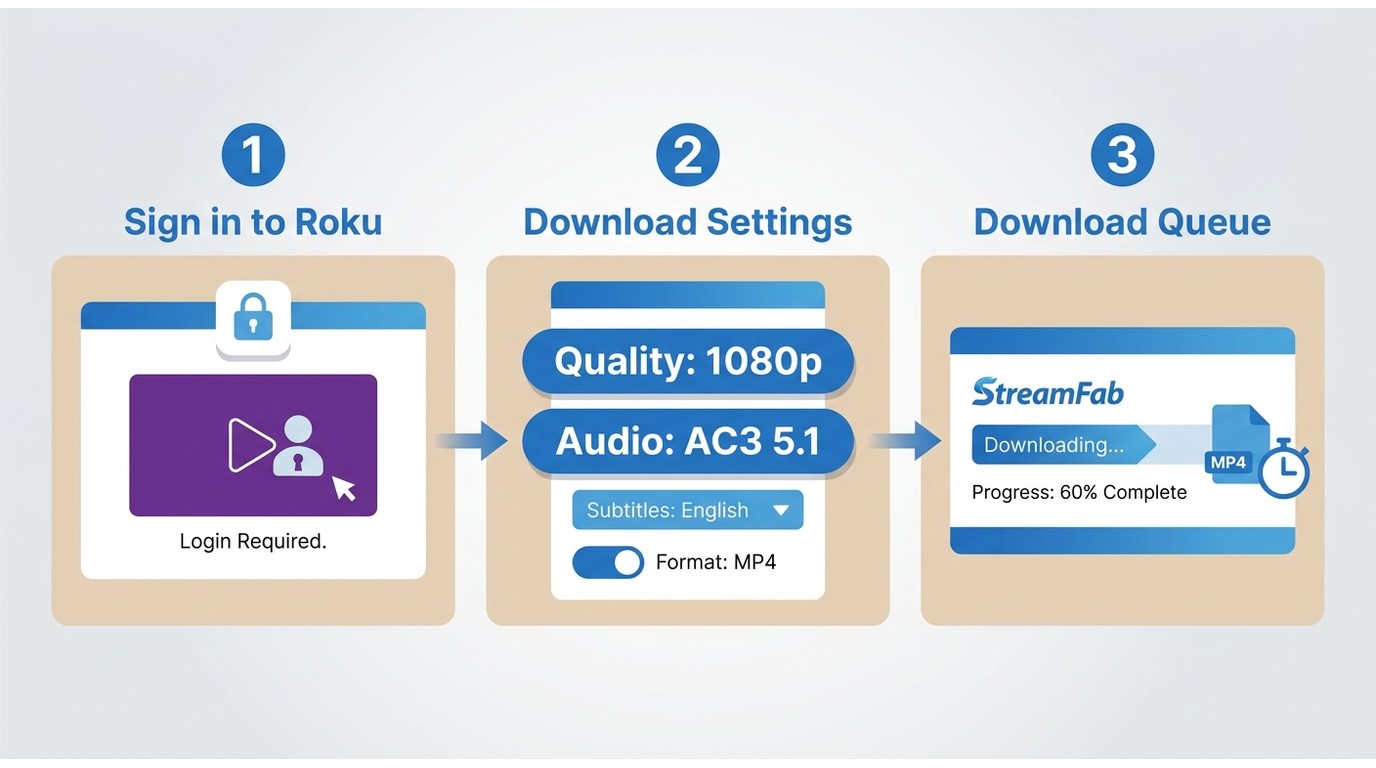
Three decisions, in order — and getting them right before you press download saves you the frustration of finding out at playback time that your file won't open on your TV. Deciding output and destination up front, not mid-download, is the difference between one clean file and three do-overs.
Open The Roku Channel and Sign In
Launch StreamFab, open The Roku Channel inside the built-in browser, and sign in with your own account. Detection depends on being signed in on the right regional account for the title you're after.
Choose Video, Audio, and Subtitles
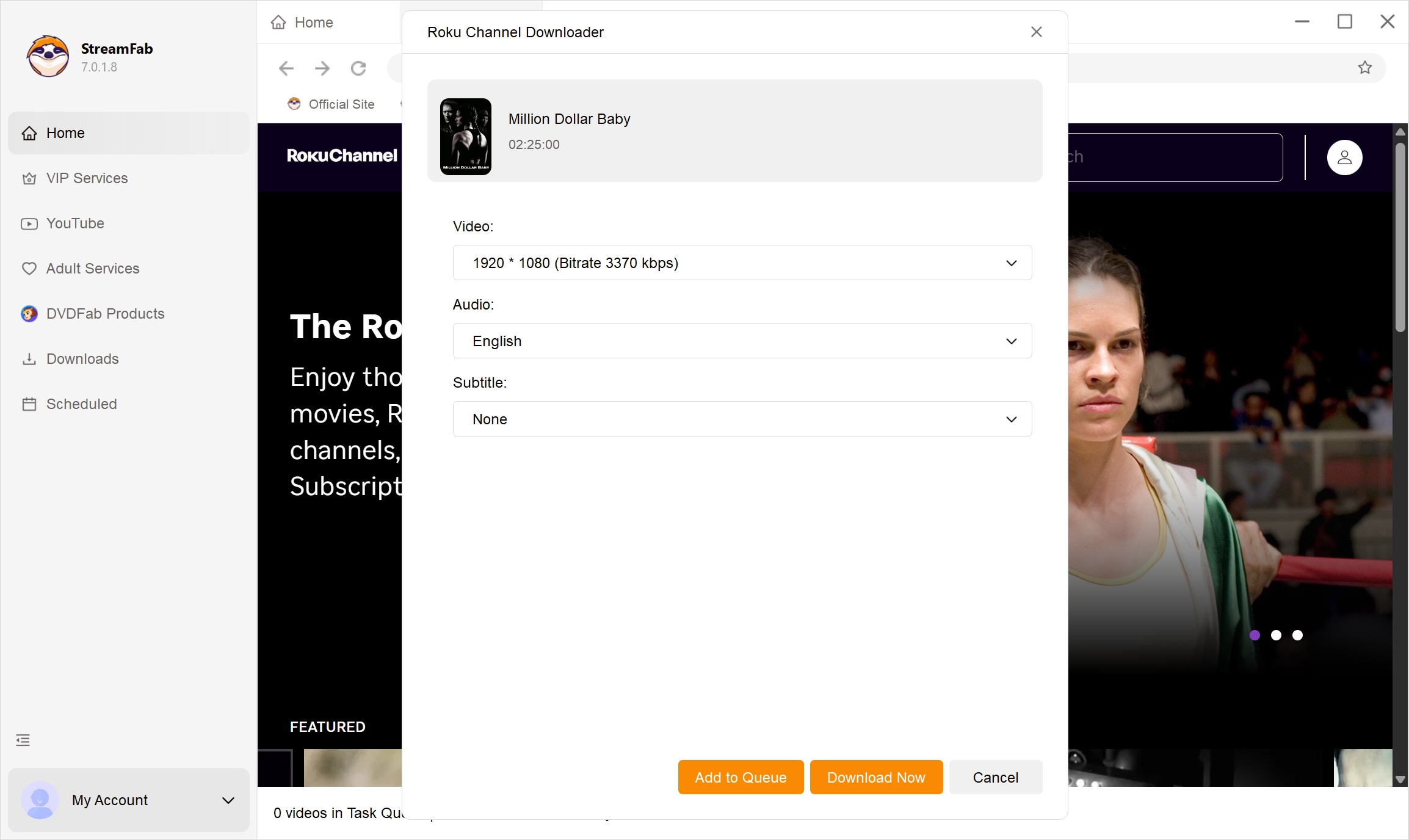
Pick resolution up to 1080p, the audio track (AC3 5.1 where the source supports it, otherwise AAC 2.0), the subtitle language, and MP4 or MKV. Match this to where you'll play it: MP4 for the widest device compatibility, MKV when you want multiple audio or subtitle tracks in one file.
Start or Schedule the Download
Download now, or queue a full season and schedule it for overnight when the network is quiet. Interface strings inside the installer (including any "safe & clean" marketing text on the download page) are the vendor's UI wording — treat them as buttons, not editorial claims.
Go to the official StreamFab site and install the downloader
Install the software on your device and open the interface.
Free Download Windows 11/10/8.1/8/7
Free Download macOS 12.0 or newer
Find Roku Channel under VIP Services
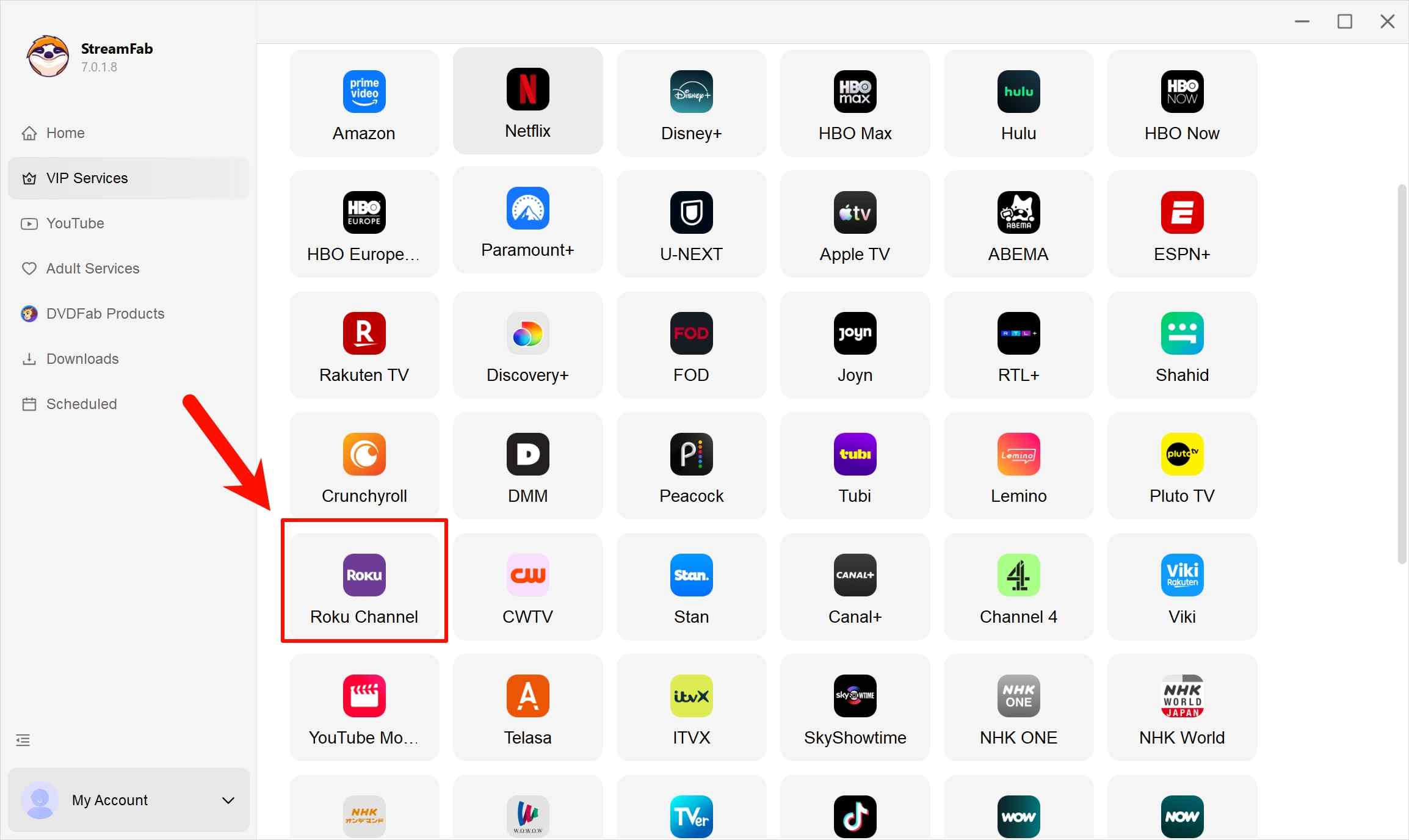
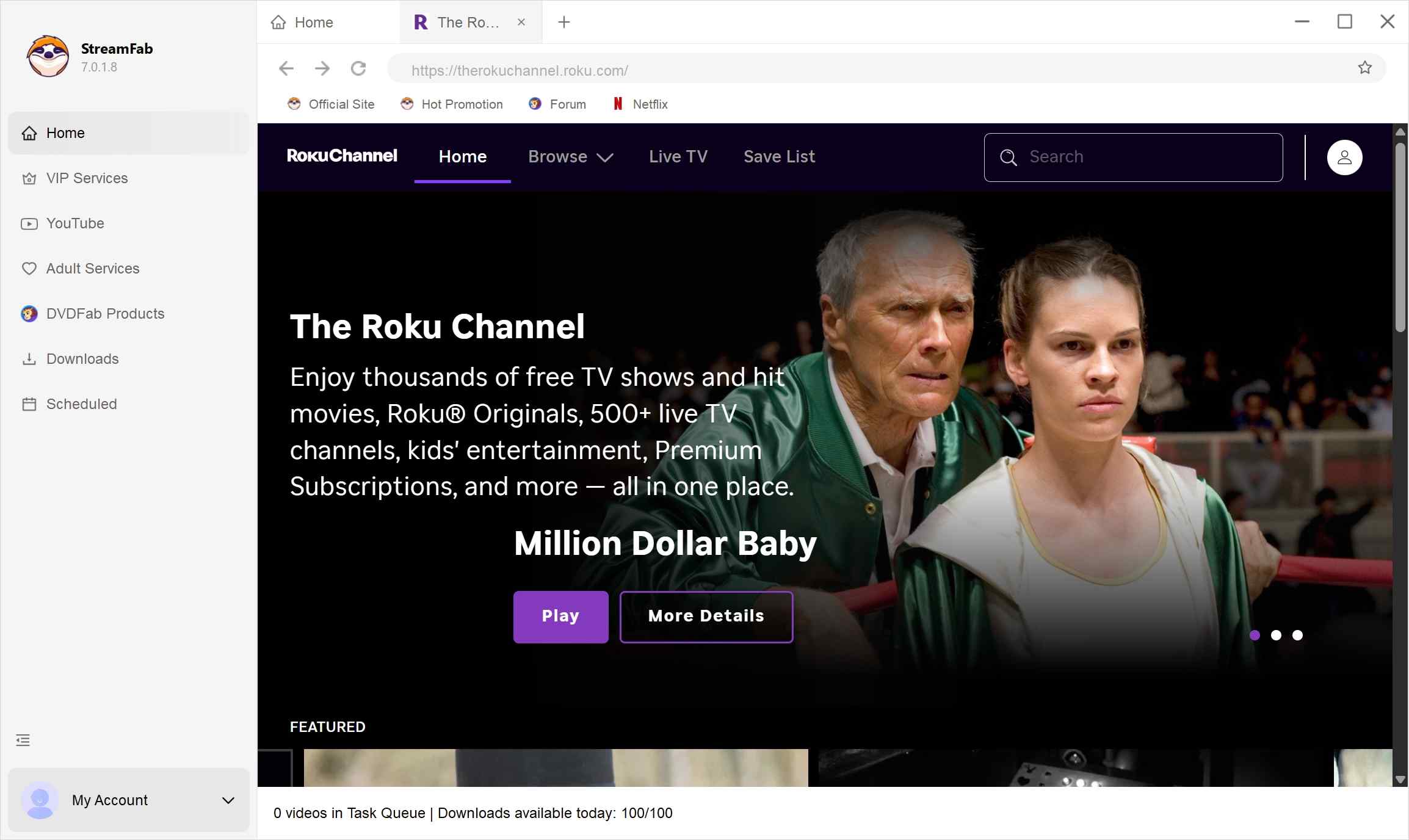
Sign into your Roku Channel account
Fill in the same account credentials that you normally use to log in to the website.
Just wait for the episodes to download, and they will be sorted into different categories on your computer.
Enjoy the simple joy of having everything perfectly prepared.
Note: prices, service policies, and platform support can change; spec figures reflect the product's current documented capabilities.
Play Saved Videos on a Roku TV
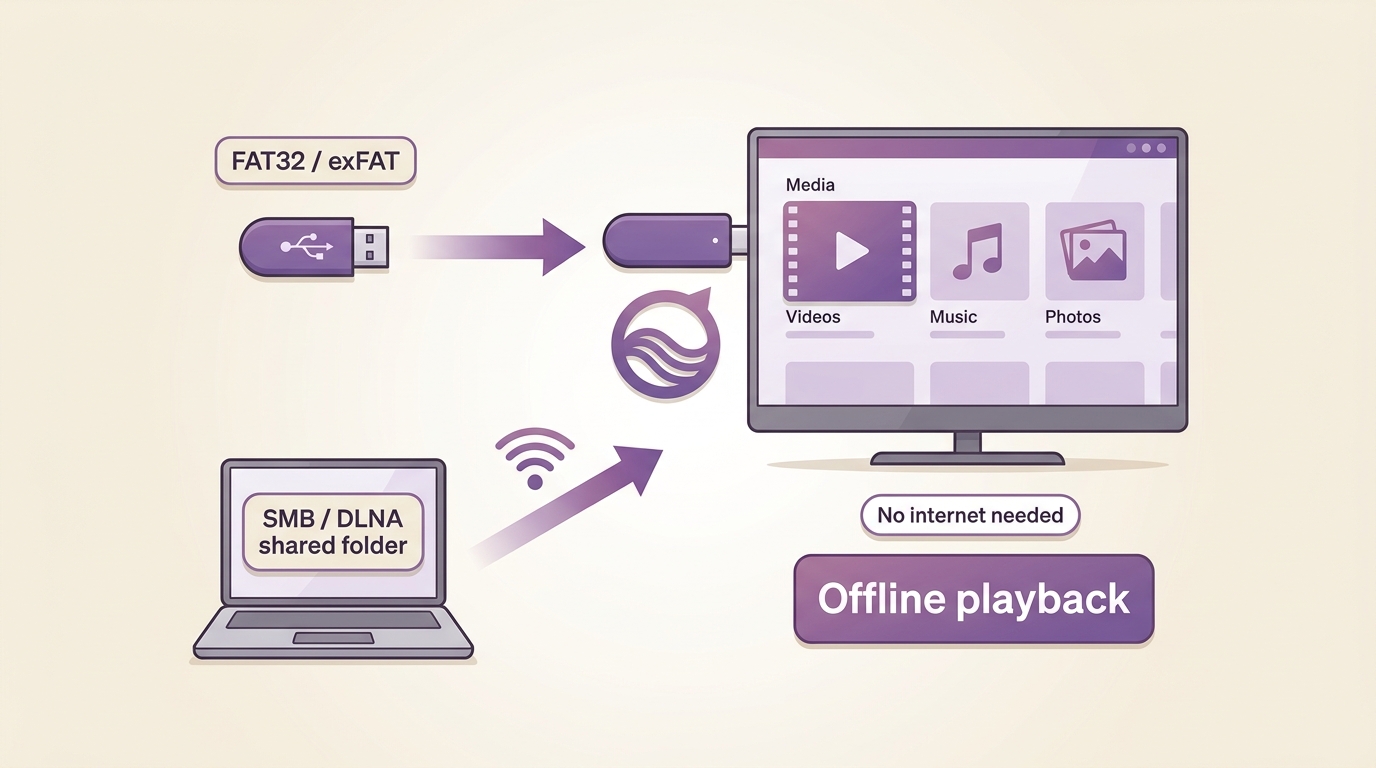
Once you have a file, getting it onto the big screen is a separate job from downloading. Roku Media Player (a preinstalled channel on most Roku devices) reads compatible files from two sources: a USB drive plugged directly into the TV or player, and a shared folder on your local network. Casting from a phone is a third, unrelated route — it needs internet on both ends and doesn't help during an outage.
USB and Local Network Options
Format the drive as FAT32 or exFAT, drop the MP4 or MKV on it, plug it in, and open Roku Media Player. For LAN playback, share the folder via SMB or DLNA from a computer that's on when you want to watch. Compatibility hinges on the container, video codec, audio codec, and subtitle track all being supported — check Roku's supported-formats list before you commit to a specific encoder setting. This is the setup that actually holds up during Wi-Fi outages, RV trips, and travel.
Fix Detection and Download Problems
Downloads from evolving streaming services fail sometimes — that's the honest truth, and any tool that claims otherwise is selling you the claim, not the outcome. When a title won't detect or a task stalls, work through these in order:
- Update the app first. Platform changes are the number-one reason parsing suddenly breaks; a patched version usually restores it.
- Reopen the title in the built-in browser. Confirm you're signed in, and confirm the account region matches the title's licensed region.
- Check the queue. Daily/weekly download caps exist for account safety (100/day, 700/week per service on paid plans); if you've hit one, the queue resumes on the next cycle.
- Contact support when parsing stays broken. Service updates sometimes require a targeted patch — a maintained tool with responsive support handles this better than a one-time speed claim ever will.
Editorially, this is the part that separates workable tools from abandoned ones. A tool that fails transparently and ships a fix beats a tool that claims 100% success and quietly stops working after the next platform update.
Personal Offline Viewing Boundaries
Legality depends on your region's rules and the platform's terms, and it can vary by content type and how it's used. A conservative approach is to keep offline use strictly personal and non-commercial, avoid sharing or redistribution, and check the applicable terms for the specific service and content you're watching. A saved copy presupposes a valid subscription and personal offline use — it's not a workaround for canceling the service.
FAQs
Conclusion
Who this actually helps: readers with an active Roku Channel subscription who need a controllable local file for travel, RVs, low-connectivity homes, or nights when the Wi-Fi decides otherwise — the desktop-file route on Windows or Mac. Who should skip this: readers who only want the free Roku Channel app for online viewing (just install it), and readers who can't prepare a file on a computer first.
The real limits worth knowing: 1080p max output, container and codec must match your playback destination (especially Roku Media Player), and the whole thing presupposes a valid subscription and personal use. Plan the output before you press download, and movie night stops depending on your router's mood.
