 What Is MyFans? Safety, Pricing, and Accounts Explained.
MyFans is a Japanese fan-club platform where creators share exclusive posts, photos, videos, and member access. For US readers, the key point is that MyFans is not an adult-only service, although adult material can be one category, and its Japanese-language interface can make pricing, account controls, and payment steps harder to assess.
By Erika Leen - Aug 11, 2026 How to Download MyFans Videos in 2026: 5 Options Compared
This guide compares five ways to download MyFans videos for authorized offline viewing, from desktop software to screen recording. It explains StreamFab's Windows and Mac workflow, verified output limits, trial boundaries, troubleshooting, and phone transfer options.
By Erika Leen - Aug 18, 2026 5 MyFans Video Downloaders Compared for Offline Viewing in 2026
In this article, I tested and compared five popular MyFans video downloaders—StreamFab, StreamGaGa, BBFly, Y2Mate, and KeepStreams—to help you find the safest and most efficient solution.
By Erika Leen - Aug 18, 2026
StreamFab myfans Downloader
Imagine discovering that your favorite myfans creator has deleted their entire library overnight — months of subscription payments and every exclusive video gone without warning. StreamFab myfans Downloader captures creator content in 1080p with AAC 2.0 audio and saves it as MP4 or MKV files that never expire — permanently yours on any device.

Save exclusive myfans creator content

Auto-download new creator posts

Download in full 1080p HD quality

Private built-in browser for myfans
Why myfans Subscribers Need StreamFab
You paid for it — your myfans content should not have an expiry date
Picture this: you have spent months building subscriptions to your favorite Japanese creators on myfans — paying monthly fees to access their exclusive video content. Then one day, you open the app and discover a creator has deleted half their library, or worse, deactivated their entire account. myfans is a subscription-based Japanese creator platform where content exists entirely at the discretion of each creator. Posts can be removed at any time, creators can close their accounts without notice, and if your subscription lapses even briefly, you lose access to everything instantly.
The platform provides no native download option and requires constant internet connectivity for all viewing. StreamFab myfans Downloader, built on StreamFab's 8+ years of media technology expertise, captures creator content at 1080p with AAC 2.0 audio and saves it as permanent MP4 or MKV files. No expiry, no creator dependency, no streaming requirement — your content stays yours.

A downloader millions trust for their myfans collection
When a myfans creator you have followed for months suddenly removes their content or closes their account, you need a tool you can trust to have captured everything correctly while it was still available. StreamFab's download engine, refined over 8+ years and trusted by millions of users worldwide, receives weekly engine updates resolving myfans content delivery changes within 24 to 48 hours.
The platform has been reviewed by technology publications with a 4.9-star Trustpilot rating. The H.264 capture preserves the original encoding without re-compression, and the built-in browser provides a private environment where your myfans activity stays separate from your system browser history. This is not experimental software — it is a mature platform built for reliable, long-term personal archiving of subscription content. Not sure yet? 3 free downloads are available to test before purchase.

Flexible Output for Every Viewing Scenario
Full 1080p that preserves every frame of your myfans content
You are watching an exclusive myfans video on your large display and every visual detail matters at that screen size — that is exactly where resolution makes a noticeable difference. StreamFab captures myfans streams at up to the full 1080p ceiling using the H.264 codec, preserving the original bitrate profile and encoding structure frame for frame without re-compression.
Unlike screen recorders that introduce compression artifacts and progressive quality degradation, StreamFab's direct H.264 capture maintains every visual nuance at the native resolution the creator produced it in. The AAC 2.0 audio is preserved without transcoding, delivering clear sound reproduction whether you are watching through headphones for a private session or through speakers in your room. StreamFab offers 3 free downloads to verify the quality meets your standards before purchasing a license.
MP4 and MKV files that play on every device you own
myfans locks all content to its web player — no external media players, no offline viewing, no portable storage flexibility. You pay the subscription but cannot watch content the way you prefer. StreamFab saves your downloads as standard MP4 or MKV files that play everywhere. MP4 works natively on iOS, Android, Windows, macOS, smart TVs, and portable players without additional software.
MKV provides a flexible container format ideal for organized long-term archiving on external drives or personal media servers. Whether you want to watch on a large monitor at home, a laptop during travel, or transfer files to an external drive for secure backup, the format flexibility ensures your myfans content plays wherever the official web player cannot reach.

The Complete myfans Downloading Experience
Schedule Mode and Auto-Download
Set your preferred creators and download schedule once, and StreamFab monitors their myfans pages automatically — capturing new posts as soon as they appear, regardless of your time zone. For international subscribers following Japanese creators across significant time differences, this feature is indispensable.

Batch Mode and 10X Turbo Speed
Queue every available video from a creator's page with a single selection and processes downloads sequentially without manual monitoring. A standard myfans video at 1080p typically downloads within minutes, meaning an entire creator's library can be archived efficiently in a single session.
What myfans Subscribers Say About StreamFab

Mark
Freelance Illustrator, TokyoAlice
Project Manager, OsakaJohn
IT Consultant, SapporoMark
Freelance Illustrator, TokyoAlice
Project Manager, OsakaJohn
IT Consultant, SapporoMark
Freelance Illustrator, TokyoAlice
Project Manager, OsakaJohn
IT Consultant, SapporoMark
Freelance Illustrator, TokyoAlice
Project Manager, OsakaJohn
IT Consultant, Sapporo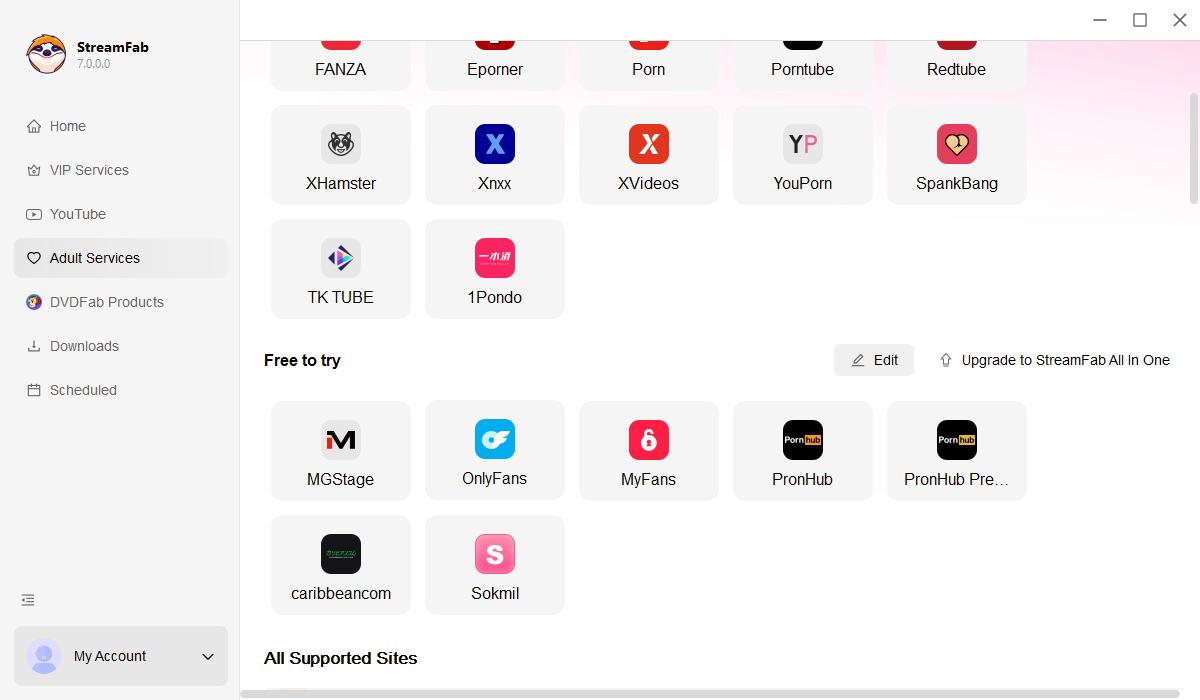
Download and install StreamFab on your PC or Mac. Go to Settings and check "Display adult websites on homepage" to enable the myfans option.
Navigate to the Adult Services section in the left panel and click the myfans card to open the built-in browser. Log in with your account.
Play the video you want to save. A download dialog appears — select resolution and output format, then click Download Now. Use batch mode to queue multiple videos at once.
System Requirements

To avoid being blocked by streaming providers, a StreamFab licensed account has a quota of 100 downloads per day, and 700 downloads per week from each supported streaming service. Whenever some of it is used up, it will refill during the next time cycle.