
How to Download Bilibili Videos in High Quality: 2026 Practical Guide

Summary: Downloading Bilibili videos in 2026 requires tools that handle 1080p/4K stream. I have tested these workflows to ensure you get high-bitrate local backups
Table of Contents
Download Bilibili Videos in 3 Steps
To download Bilibili videos, match the method to the job: use a desktop app for longer files or queues, an online downloader for an occasional public clip, and a mobile workflow for quick gallery saves. Save only content you are authorized to access.
The hard part is not finding a download button. Bilibili can provide separate audio and video streams, so the method needs to combine them into a playable file and preserve subtitles when those tracks are available.
For long videos, playlists, subtitles, or higher-quality output, I favor a desktop workflow because it gives you clearer control over the file, login state, and output choices. An online tool is more practical for an occasional public clip.
- Copy the Bilibili video link from the app or browser.
- Choose desktop, online, or mobile based on video length, access permissions, and whether you need a queue, subtitles, or a gallery save.
- Select an available quality, confirm that sound is included, and save the playable local file.
How to Download 1080p and 4K Videos From Bilibili on Desktop
Desktop tools are usually the more practical route for long Bilibili videos, playlists, subtitles, and repeat downloads. Available quality depends on the source stream, account entitlement, region, cookies or login state, and the downloader’s current parser support.
Use this comparison to choose by task complexity, not by tool name. Status and capabilities can change with platform or parser updates (as of July 2026).
| Method | Supported devices | Best for | Not ideal for | Quality | Sound and subtitles | Batch support |
|---|---|---|---|---|---|---|
| StreamFab Video Downloader | Windows, Mac | Long videos, playlists, subtitles, and repeat downloads | One short public clip when you do not want desktop software | Depends on the source, entitlement, and available stream | Can save original audio and subtitles when available; MP4 or MKV output | Queue-based workflow available |
| KeepVid | Browser-based | Simple public clips | Long videos, queues, or access-restricted streams | Varies by source and service support | Check the resulting file for merged sound and subtitle options | Not a practical choice for batches |
| TubeOffline | Browser-based | Basic link downloads | Subtitle-sensitive, long-form, or repeat-download workflows | Varies by source and service support | Confirm the downloaded file includes the needed audio track | Not designed around queues |
| Mobile app or browser workflow | Android, iPhone | Occasional clips saved to Gallery or Photos | Hour-long videos, large queues, or storage-heavy files | Depends on the app, browser, source, and device storage | Sound and subtitle handling vary; inspect the saved file before deleting the source | Usually limited |
StreamFab for High-Quality Local Files

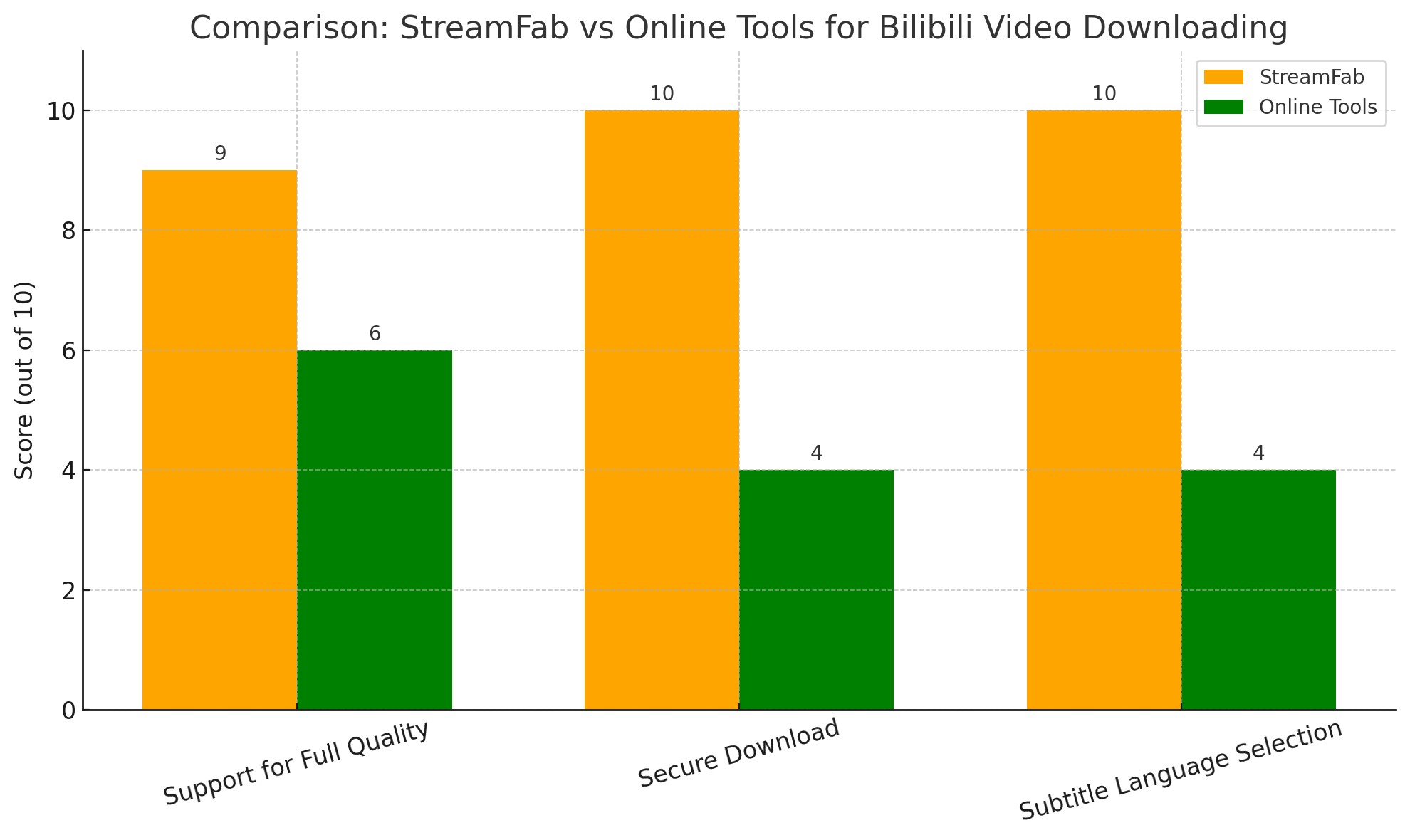
StreamFab Video Downloader is a Windows and Mac desktop option for authorized personal offline viewing where permitted by platform terms and applicable law. It can save Bilibili files as MP4 or MKV, with original audio and subtitles when those streams are available, and its queue-based workflow suits longer videos and playlists better than one-off browser downloads.
When I assess a Bilibili desktop workflow, I start with a public link that plays in the same browser session, note the selected quality, audio, and subtitle options, then reopen the saved file before moving on. That repeatable check separates an access or stream-selection issue from a file-output issue, instead of treating one successful save as a guarantee.
- Choose from the quality options the video and your authorized account can access; availability varies by stream and region.
- Select the available original audio track and play the finished file once before clearing the browser session.
- Use the queue workflow when you need multiple videos instead of copying links one at a time.
- Choose embedded or external subtitles when the source provides them.
- Compatible with Windows and macOS.
Desktop Download Workflow
Launch the software and access the built-in browser
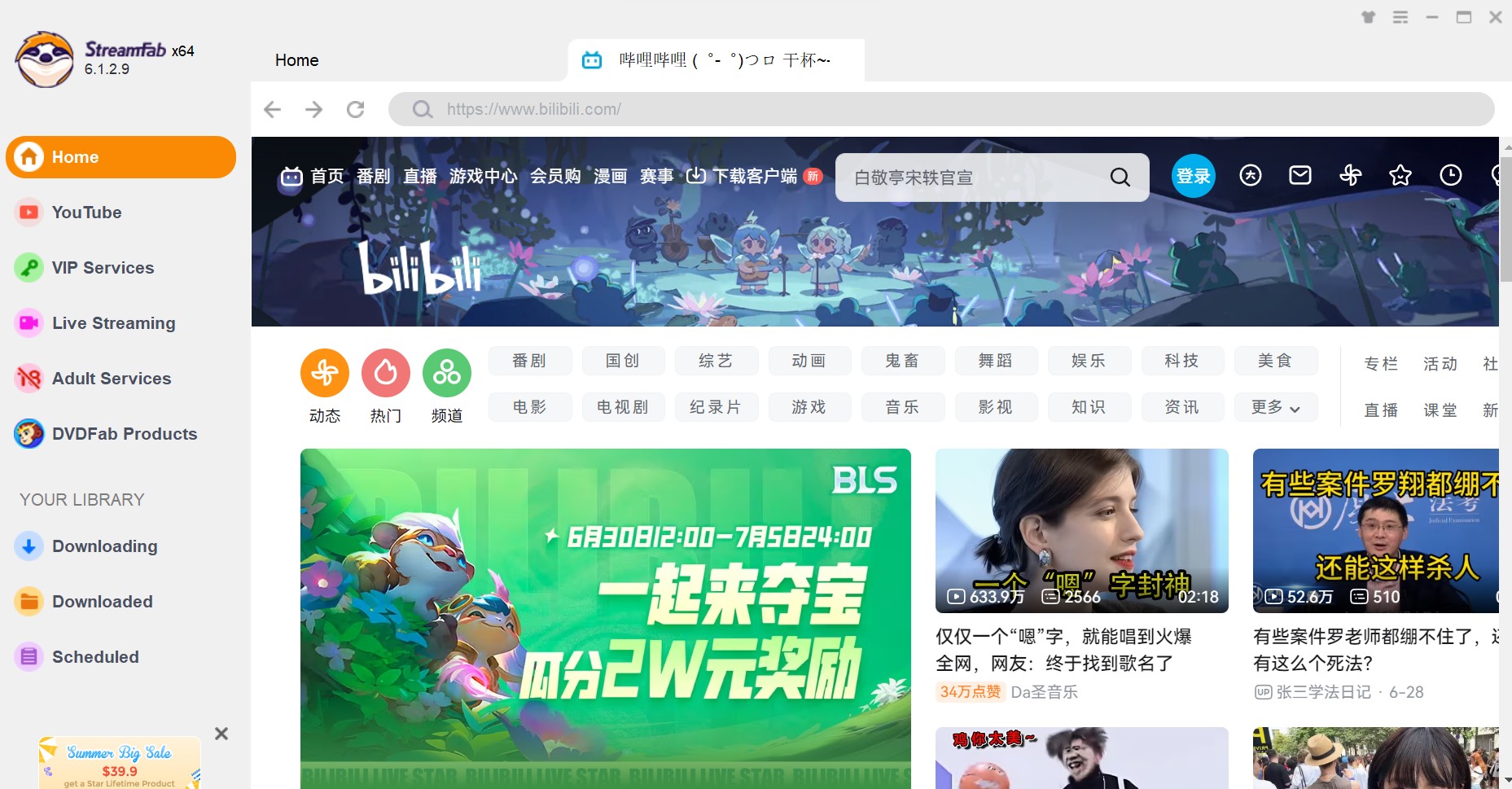
Install the program and open the main interface. You can use the built-in browser to navigate directly to Bilibili.
Locate and analyze your target Bilibili video
Paste the Bilibili URL into the address bar or search for the video title. The software will automatically analyze the video stream and prompt you with a configuration window.
Configure quality and subtitle settings
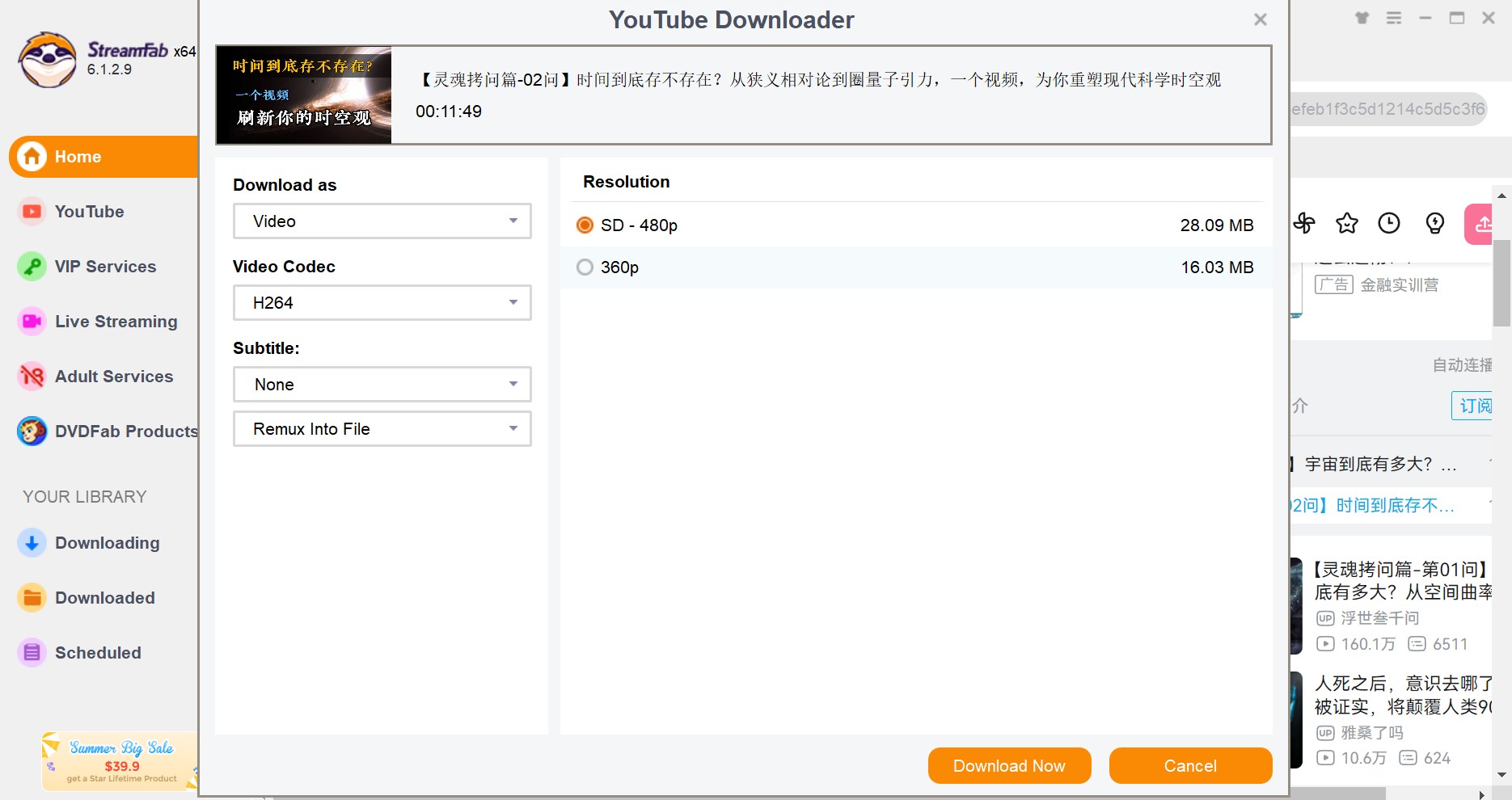
Choose your preferred resolution (up to 1080p/4K) and select the subtitle language. You can choose to remux subtitles into the Bilibili video or save them as separate files.
Start the high-speed download
Click the Download Now button. You can monitor the progress in the Downloading tab, where the software uses multi-threading to maximize your bandwidth.
Check Login and Quality Access
An account that can stream a Bilibili video in 1080p does not automatically mean every downloader can retrieve the same quality. Check the video’s available stream, your account entitlement, region, active cookies or login session, and the tool’s current parser support before changing methods.
I start with those five checks before blaming the downloader. It is faster than cycling through tools when the actual limit is the account session or the stream exposed for that video.
Keep Sound, Subtitles, and Frame Rate
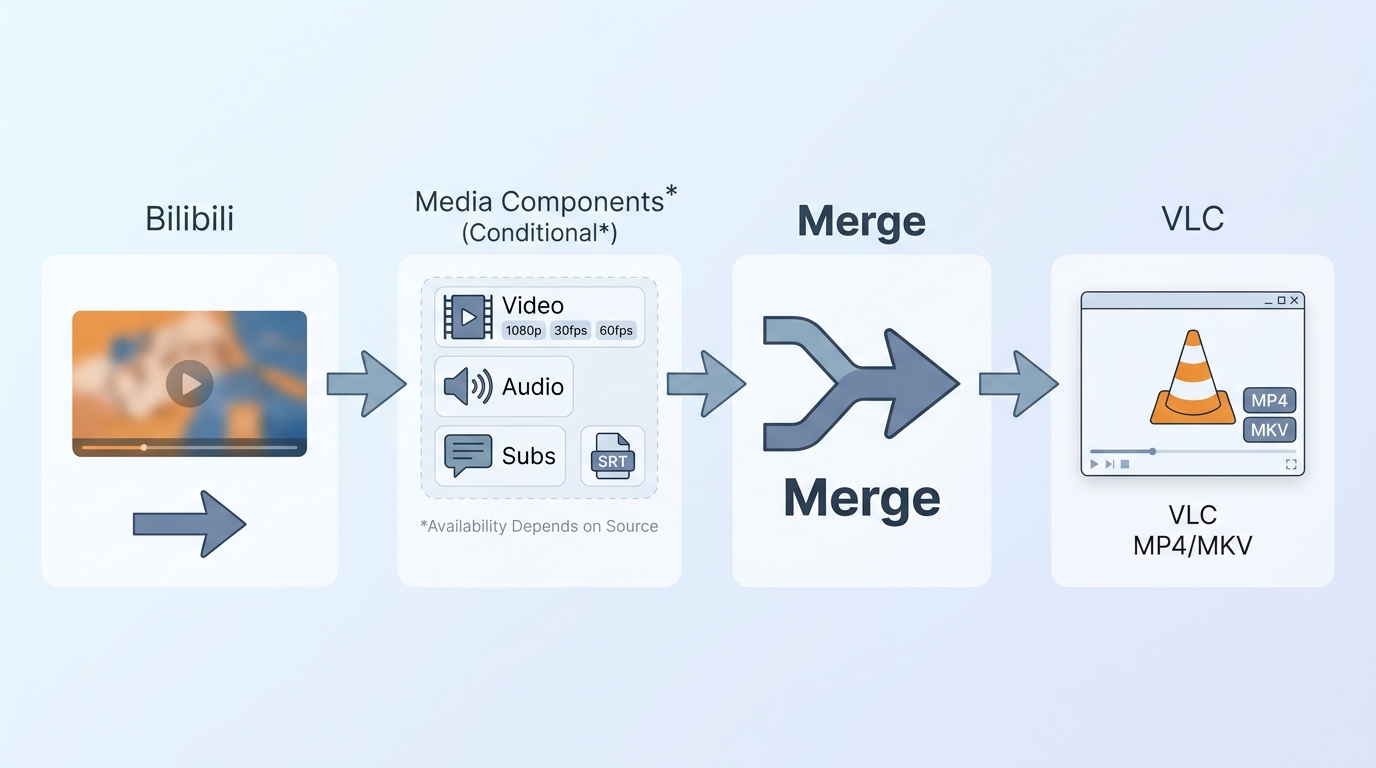
Bilibili may expose video and audio as separate streams. Choose a method that merges or remuxes them into a playable MP4 or MKV; if you need audio separately, the website audio download workflow explains the same file-selection issue in more detail.
Resolution and frame rate are separate settings: a 1080p file can still be 30fps when the source or selected stream does not provide 60fps. Select subtitles as embedded tracks or an external SRT file when available, then check sound, subtitle timing, and frame rate in a media player before relying on the saved copy.
Online Tools and Browser Extensions
Online Bilibili downloaders can be convenient for short, public, standard-quality clips. Their limits often appear with longer videos, access-restricted streams, separate audio, subtitles, batches, and parser changes, so treat them as a light-use option rather than a full archive workflow.
KeepVid for Short, Simple Downloads
KeepVid can suit a simple public clip when you do not want to install software. It is less practical for batches, long videos, subtitle-sensitive files, or streams that require a logged-in session. Its browser-based approach also means support for individual Bilibili links can change.
- Browser-based workflow for an occasional public clip.
- Check the output format offered for the specific link.
- Long videos can be affected by connection quality, browser limits, and changing parser support.
- Not a practical choice when you need a repeatable playlist queue.
TubeOffline for Basic Link Downloads
TubeOffline is another browser-based option for basic Bilibili link downloads. It is best suited to a quick public clip, not a repeat workflow involving playlists, access-restricted streams, or files where you need dependable subtitle and audio handling. Watch for misleading download buttons and confirm the final file before keeping it.
- Basic browser-based link handling for an occasional public video.
- Availability depends on the video, region, and the service’s current parser support.
- Avoid deceptive buttons, unexpected installers, and unnecessary browser extensions.
- Check that the saved file includes the expected video and sound before closing the page.
Legacy Browser Extension Option
The listed BiliBili Downloader Chrome extension was last updated on January 30, 2024, so treat it as a legacy convenience option rather than a dependable current solution. Test it first with a non-sensitive public video, and do not rely on it for long videos, important subtitles, or files you need to keep organized.
- Convenient browser-toolbar access when it remains compatible with the page.
- Test with a public video before using it for a file you care about.
- Compatibility can change after browser, extension, or platform updates.
- Not the preferred route for long-form, access-restricted, or subtitle-sensitive videos.
Using an Online Downloader Safely
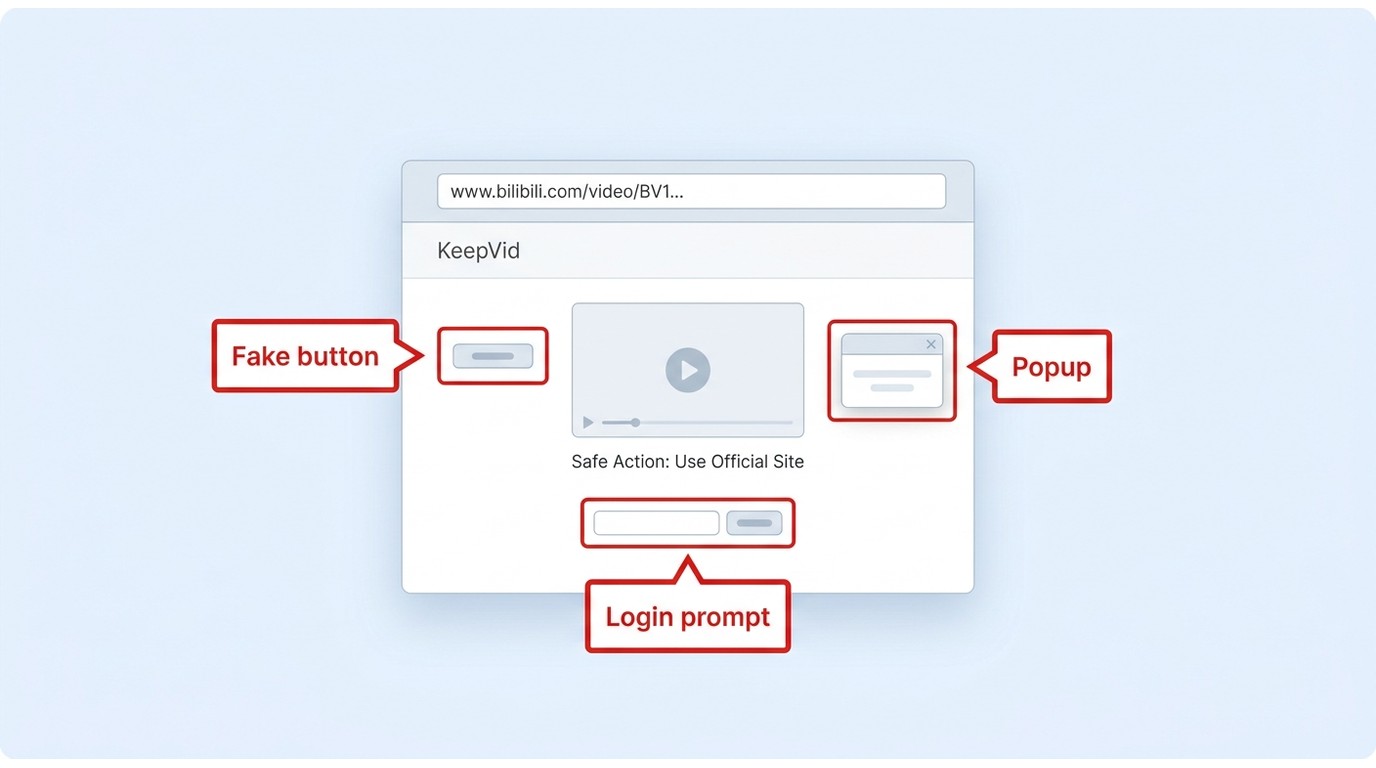
Most online tools follow the same basic flow: copy the Bilibili link, paste it into the service, choose an offered file option, and save the result. Use HTTPS, avoid misleading download buttons and unexpected installers, and do not provide account credentials unless you understand why a trusted service needs them. If the file has no sound or is only a thumbnail, try another method instead of repeatedly downloading the same result.
Navigate to the video page and copy the full link from your address bar.
Copy the link of the video you want to download from Bilibili. Paste the link into the KeepVid input box and click "Download" or "Go."
After the page loads, select the desired format (MP4/WEBM/M4V, etc.). Right-click the download button and select "Save Link As" to download.
Due to Bilibili's copyright and regional restrictions on content downloads, regardless of the tool you use, videos should only be downloaded for personal learning and enjoyment, and not for commercial use or online distribution to avoid copyright infringement.
How to Save Bilibili Videos on Mobile
To download Bilibili on mobile, copy or share the video link from the app, open a reputable browser service or app that supports the link, then save the resulting file. Save only content you are authorized to access, where permitted by platform terms and applicable law.
Android Gallery Workflow
After the file finishes, look in the browser’s Downloads folder first. If it does not appear in Gallery automatically, open a file manager, select the video, and move or share it into Movies, DCIM, or another folder your gallery app scans. Check storage space and play the file before deleting the original download.
iPhone Photos Workflow
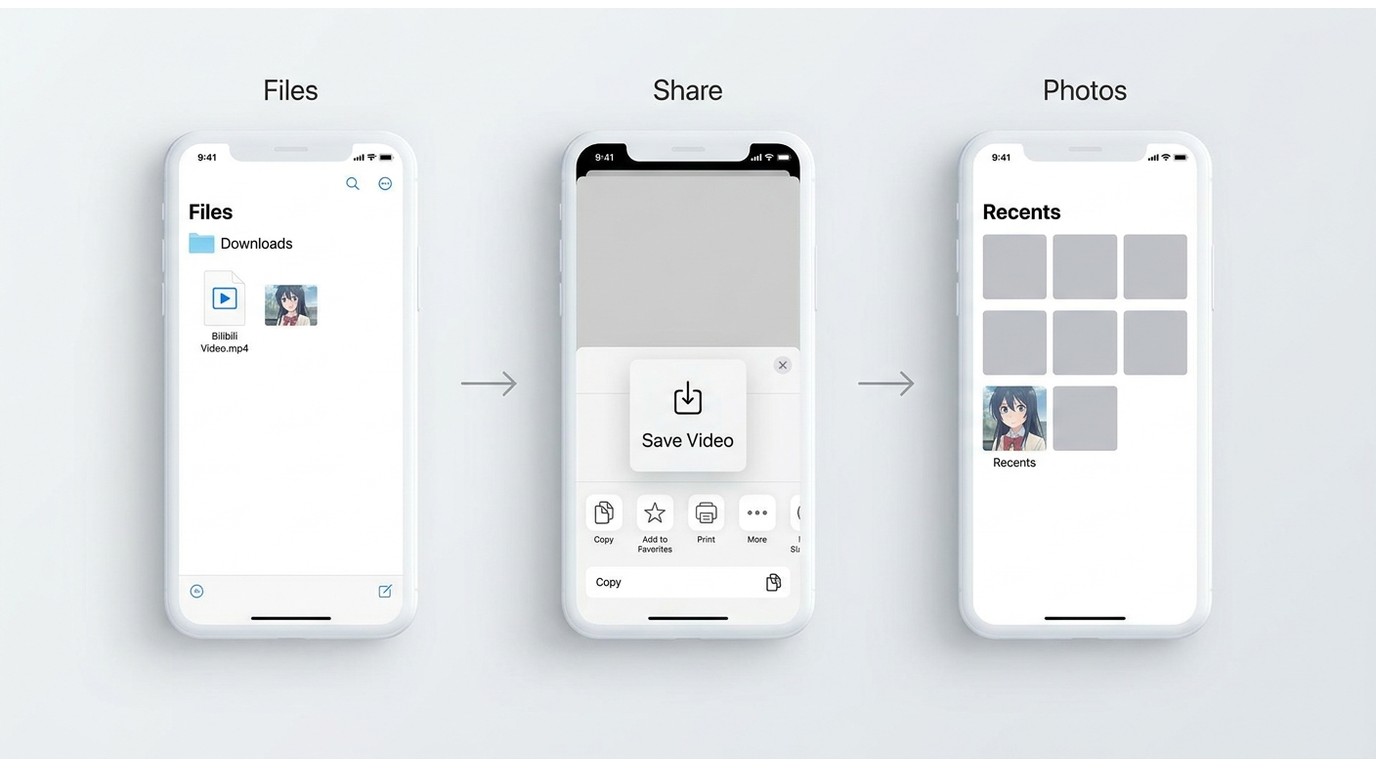
On iPhone, a browser download commonly lands in the Files app rather than Photos. Open Downloads in Files, select the video, use Share, then choose Save Video if that option is available. Mobile-only workflows are best for occasional clips; for hour-long videos or batches, I would use a desktop workflow instead of making a phone manage large files in the background.
FAQs
Can I download an entire Bilibili playlist at once?
Batch support depends on the method. A desktop queue is the practical fit when you need multiple videos, while an online tool is better for the occasional single clip. Before starting a playlist, confirm that the method recognizes the list URL and that you have enough storage for the files.
Can I save a Bilibili video without a watermark?
It depends on the source stream and the method used. A watermark embedded in the original video will remain part of the picture, while an overlay added by a particular tool is a separate issue. Review a short saved sample first rather than assuming every download will be watermark-free.
Is a free online Bilibili downloader safe to use?
No online downloader is automatically safe. Favor HTTPS, avoid deceptive download buttons, unnecessary extensions, unexpected installers, and requests for account credentials. For a file you care about, scan it and confirm it plays as expected before sharing or moving it.
Conclusion
Choose the method by task complexity. An online tool can make sense for an occasional public clip, while a mobile workflow is useful when you want to save a short file to Gallery or Photos. For long videos, playlists, subtitles, or higher-quality local files, a desktop downloader gives you more control over the output and queue.
For content you are authorized to access, where permitted by platform terms and applicable law, start with the workflow that matches your device and the file you need. Check available quality, sound, subtitles, and frame rate before saving. If a desktop queue and controllable local-file output fit the job, StreamFab is one option to consider.

Identify protected and unprotected M4V files, use authorized Apple TV playback, convert compatible files, or choose a separate supported-streaming workflow.
By Erika Leen - Sep 8, 2026
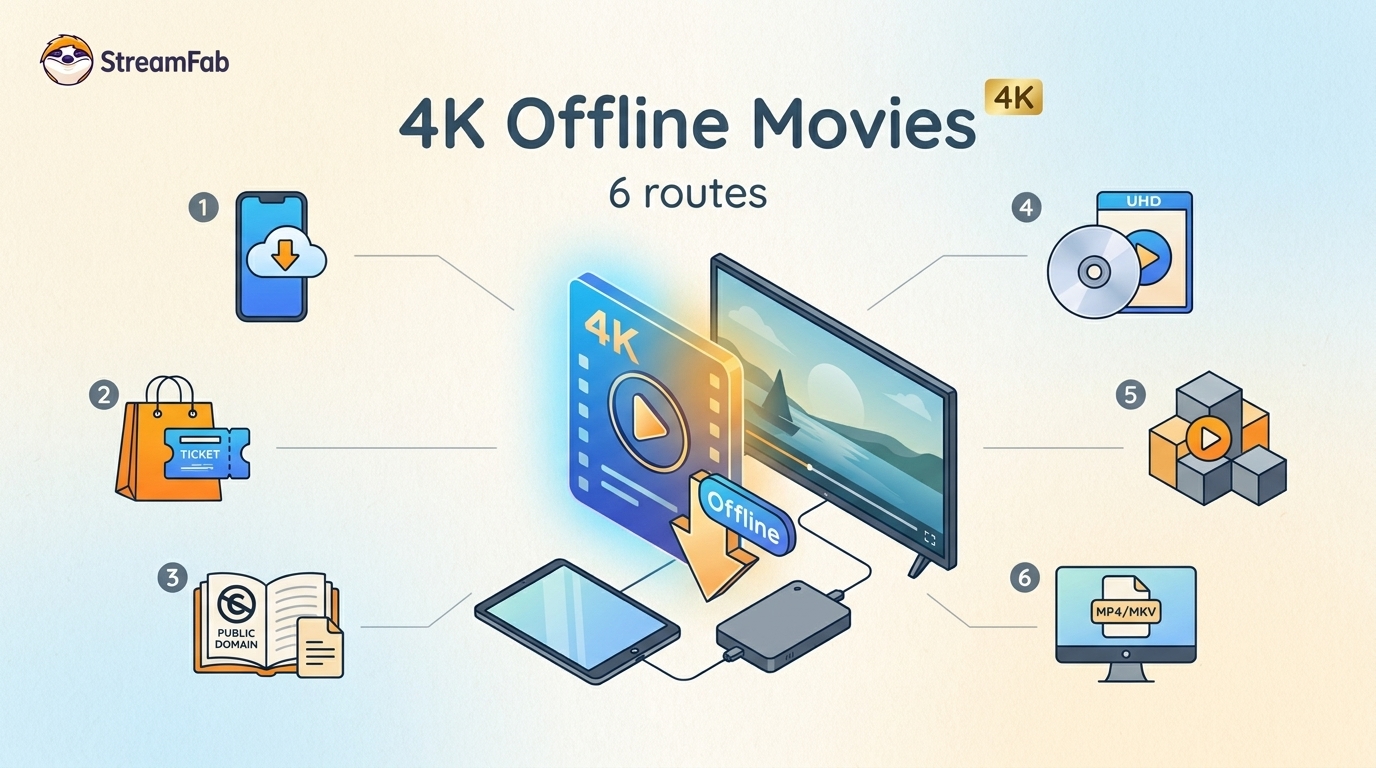
Legal 4K movie downloads do not all provide the same kind of offline access. Most mainstream services offer app-locked downloads, while portable movie files, UHD Blu-ray, public-domain media, and authorized desktop workflows involve different quality, cost, device, and licensing limits.
By Jacob Harrison - Aug 12, 2026
To get straight to the point, you can download a BitChute video as MP4 through its download icon: open the video, then use Save As. For authorized content where permitted, this guide explains when desktop, Android, or browser alternatives make sense.
By Marcia Hatcher - Aug 11, 2026
Looking to convert a link to MP4 in 2026? I've systematically tested top desktop and online converters to bypass Widevine DRM, dynamic tokens, and geoblocking for seamless PC and Android extraction.
By Jacob Harrison - Aug 7, 2026