
Download Freevee Shows in 2026: Now on Prime Video & Saved Offline

Summary: Freevee offers free streaming but restricts downloads and includes mandatory ads, making offline, uninterrupted viewing impossible through official channels. In 2026, how should we download Freevee content in lossless quality without ads? The following content gives you answer.
Table of Contents
Freevee's App Shut Down: Where Shows Live Now
If you went hunting for a Freevee download button this year and came up empty, here is why: Amazon retired the standalone Freevee app in August 2025 and folded its free, ad-supported catalog into Prime Video, where those titles now sit in the "Free to Watch" row. The app you remember is gone; the shows are not.
I travel a lot and lose Wi-Fi more often than I would like, so "can I actually keep a copy on the laptop" is the question I keep coming back to. Short answer up front, then the nuance:
- Former Freevee titles now stream inside Prime Video's "Free to Watch" catalog.
- They stay free and do not require a paid Prime membership, but they remain ad-supported.
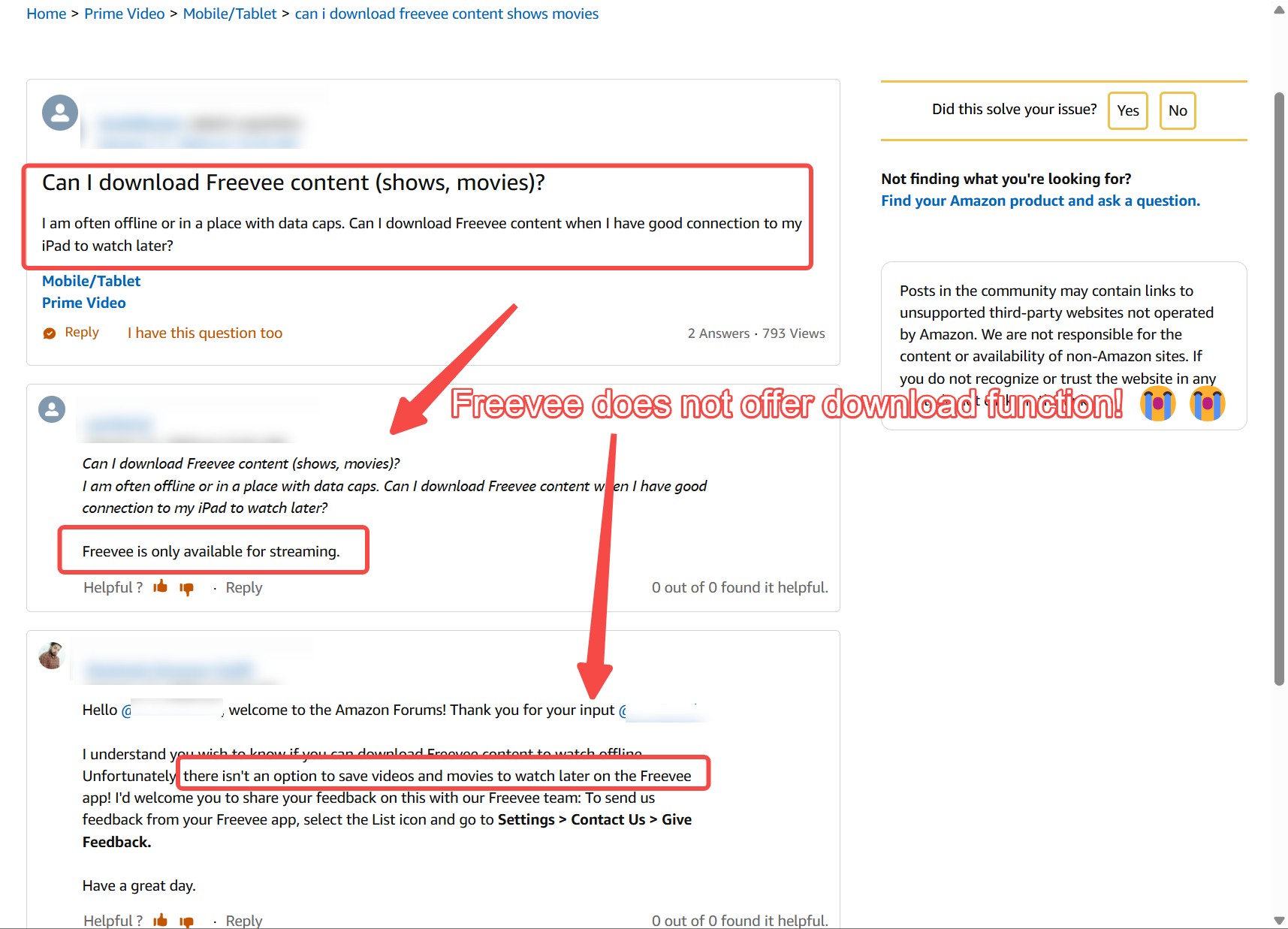
- There is no official way to save these titles as offline files.
- Any offline MP4 or MKV is a separate desktop route for Windows and Mac, not a Freevee feature.
Can You Download Former Freevee Shows Offline
Why There's No Official Offline Save
For former Freevee titles now living under Prime Video's "Free to Watch" row, there is no download button. Paid Prime Video titles get an offline cache, but even that is capped by the official Prime Video download limit per title and device; the free ad-supported ones sit outside that system entirely. Screen recorders are the usual fallback readers ask about, and the honest answer is that recording an ad-supported stream is unreliable, drops frames, and bakes the ads into your file, so it is not a route I would recommend for anything you actually want to keep.
Freevee App vs Saving a Show File
These two searches keep getting tangled together, so it is worth separating them plainly:
- Installing the old Freevee app or APK — the standalone app was retired in August 2025. An old APK will open, but it no longer pulls current content; the catalog has moved.
- Saving a show as an offline MP4 or MKV file — a separate, desktop-only path on Windows or Mac that produces a real local file you can play in any media player.
Freevee Content Stays Free, With Ads
The migration confused a lot of people I know, so to be clear: the former Freevee catalog is still free to stream inside Prime Video, and you do not need a paid Prime membership to watch it. What did not change is the ad load. A paid Prime plan, or the ad-free add-on for Prime Video's main catalog, does not strip ads from these "Free to Watch" titles. In practice, if you are a casual viewer at home on Wi-Fi, official streaming is genuinely enough; the case for a local copy only really shows up when you want a clean, ad-free file for travel or offline playback.
| Approach | Where the content lives / max resolution | Ad handling | Output / offline file | Best for |
|---|---|---|---|---|
| Prime Video "Free to Watch" (official streaming) | Inside Prime Video, streaming-only | Ad-supported, no removal | No offline file | Casual viewing at home on Wi-Fi |
| OBS / Screen Recorders | Up to 1080p (frame drops common) | Ads recorded into the file; manual skipping | Low quality, unreliable capture | No |
| StreamFab Amazon Downloader | Up to 1080p, original audio and subtitles | Ad-free local file for personal offline viewing | Windows and Mac desktop app | Yes (whole-season overnight) |
Save Former Freevee Titles as MP4 on Windows and Mac
Buffering out halfway through a season on a plane is the exact moment you wish you had saved the file first. For content you're authorized to access, where permitted by the platform's terms and applicable law, StreamFab Amazon Downloader is one practical desktop workaround on Windows and Mac: it saves an ad-free local copy in MP4 or MKV of former Freevee titles you open through Prime Video, for personal offline viewing. It is not a mobile solution and it is not a shortcut around paying — it is a way to hold on to something you can already watch, in a format your laptop can play anywhere.
Download videos from Freevee on Amazon Prime Videos. All the downloaded videos are saved in MP4/MKV format, with the highest quality up to 1080p.
High-Quality 1080p With Original Audio and Subtitles
The frustrating part of most fallbacks is watching a dark scene turn into a smear of compression blocks. Saving through StreamFab keeps former Freevee titles at up to 1080p with the original multi-channel audio and exportable subtitles, which for an ad-supported catalog is genuinely as good as the source gets. If you were hoping for 4K here, that ceiling does not exist on this catalog regardless of tool.
Ad-Free Local Playback in MP4 or MKV
The reason I bother with a local file at all is the ads. Streamed inside Prime Video, these titles interrupt on a schedule you don't control; a locally saved MP4 or MKV file plays through, once, in whatever player you already use, with no ad breaks stitched into the timeline. That is the single feature I would not give up if I had to choose one.
Batch and Overnight Season Downloads
The other thing worth knowing before you commit an evening to this: you don't have to babysit episodes one by one. Queue an entire season and let the batch run overnight, and by morning the whole run is sitting in one folder. For a weekend binge on a flight, that is the difference between actually watching and giving up.
Step-by-Step: Saving a Title From Prime Video
The workflow is short. Worth doing when you have a long flight, a road trip, or spotty hotel Wi-Fi coming up; probably not worth doing for a show you'll watch once at home on the couch.
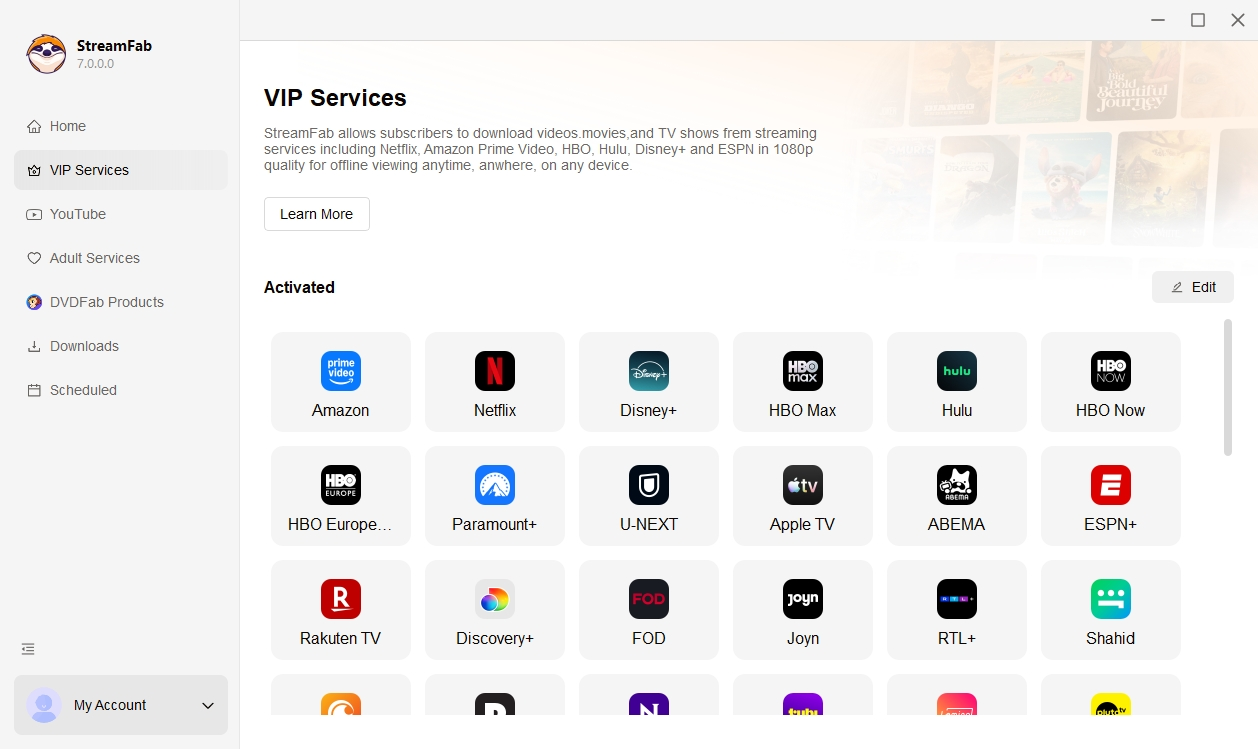
Step 1: Install StreamFab Amazon Downloader on your Windows or Mac computer. In the main interface, click the “VIP Services” section from the left menu, then click the "Amazon" icon. Sign in to your Amazon account in StreamFab's built-in browser.
Step 2: Open Prime Video and find the former Freevee title under the "Free to Watch" catalog (the old Freevee channel no longer exists). Click the title to start playback.
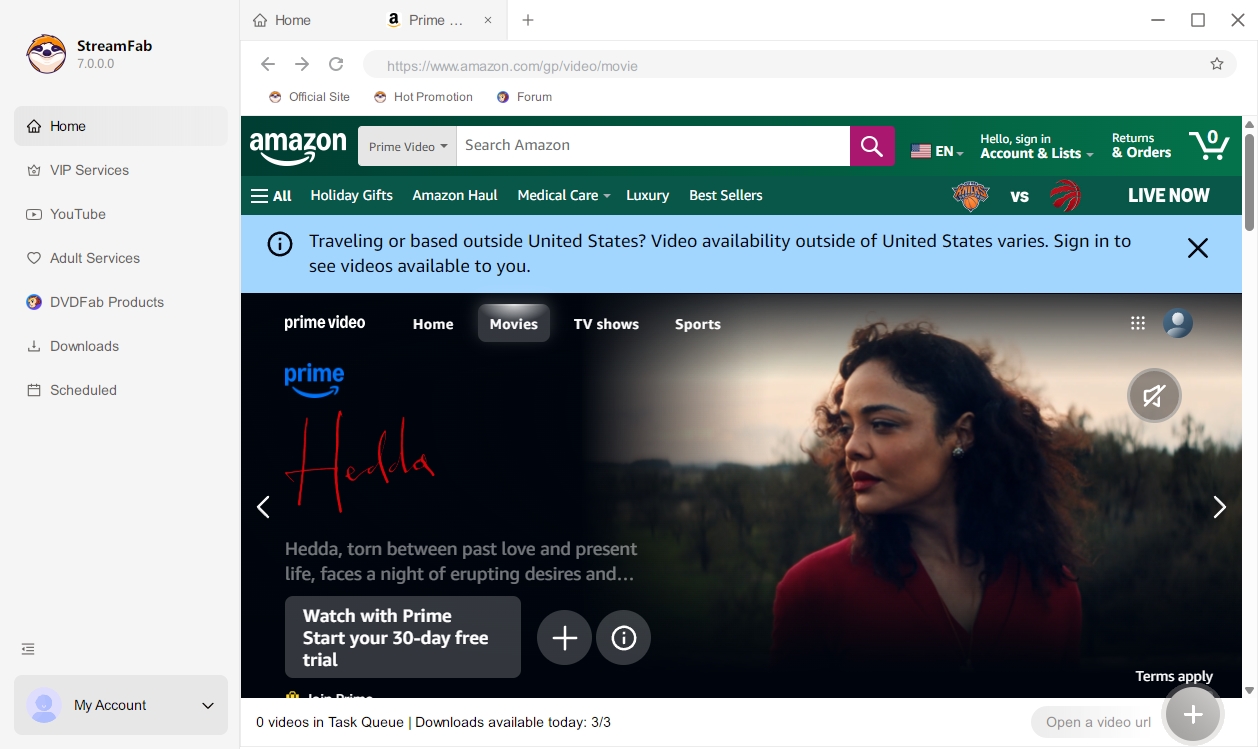
Step 3: Pick your resolution, audio track and subtitle language. The saved file lands in your local drive as an ad-free MP4 or MKV, ready to play in any media player.
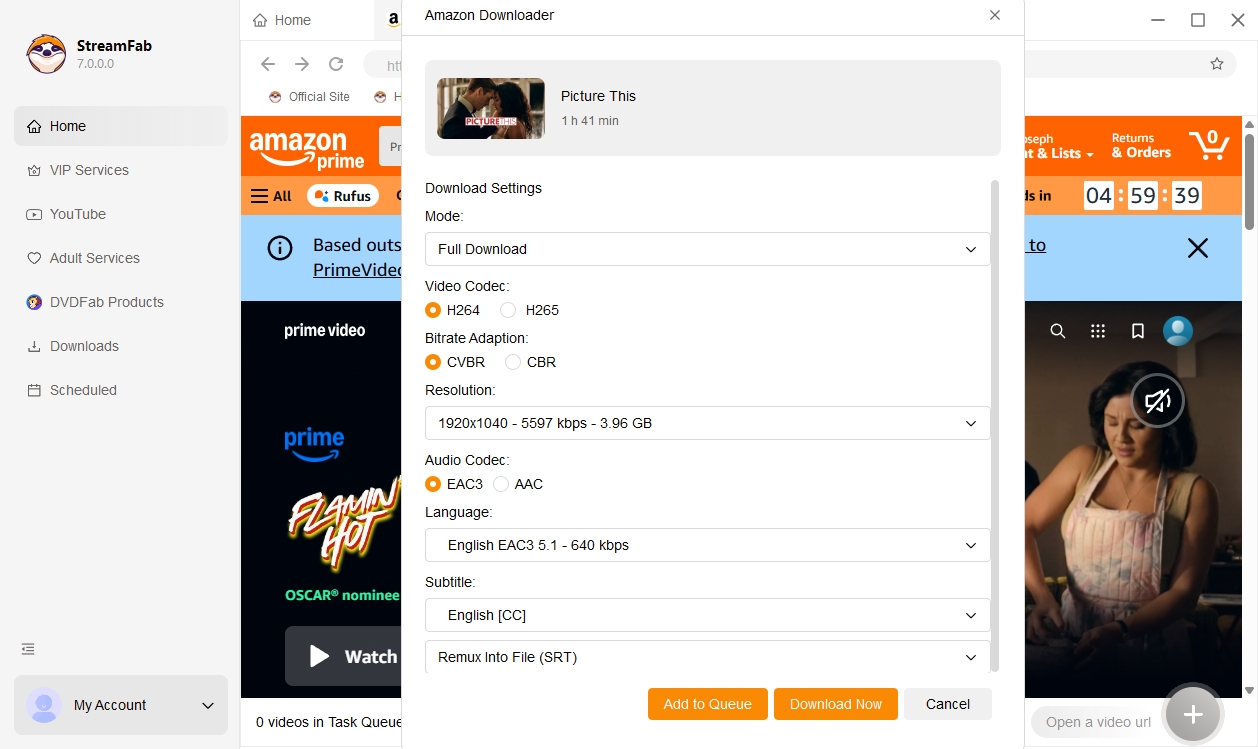
Once the download is finished, open the "Library → Local Files" section to access your title. This whole path only makes sense inside a broader Amazon Prime Video download habit — a one-off save for a single show is more effort than it's worth.
What You Get in Your Saved Files
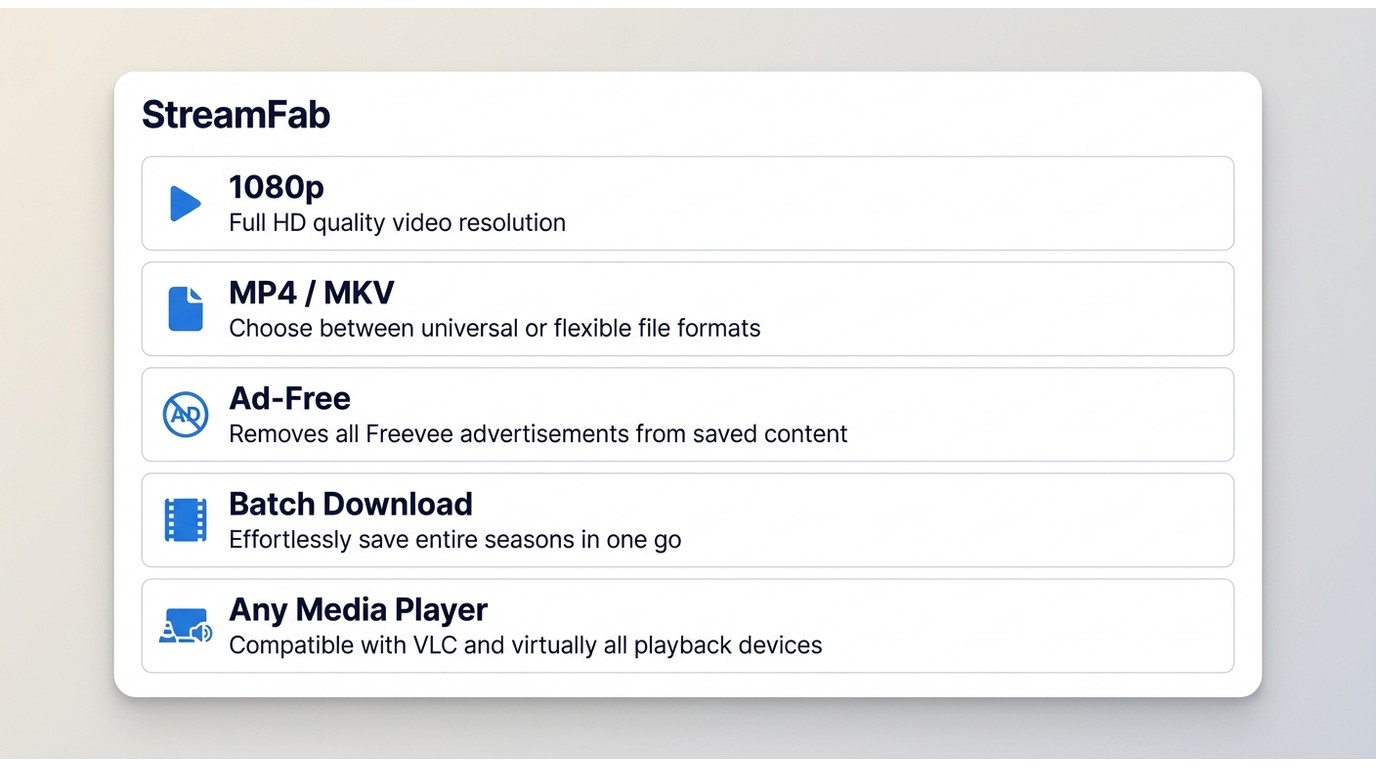
Before you commit to the download, here is what the file actually looks like on disk — useful if you are deciding whether the effort is worth it for a given title.
| Attribute | What you get |
|---|---|
| Container | MP4 or MKV |
| Resolution | Up to 1080p |
| Audio | Original multi-channel audio preserved |
| Subtitles | Exportable subtitles, multiple languages |
| Ad handling | Ad-free in the local file, for personal offline playback |
| Batch | Whole-season queue with overnight scheduling |
| Playback | Any media player on Windows or Mac; no proprietary app needed |
| Storage | Saved to your local Library folder |
My honest take: if you watch a show once and forget it, none of this matters and Prime Video's official stream is enough. The saved-file route earns its keep when you rewatch a season, travel without steady internet, or want a specific episode ready without a login dance.
FAQs
Conclusion
Freevee's app is gone, its catalog now lives inside Prime Video's "Free to Watch" row, and it remains free without a paid Prime plan — but still with ads. For most viewers that is enough. The case for a local MP4 or MKV only shows up when you actually leave the house: long-haul travel, unreliable Wi-Fi, or a season you want to rewatch without ad breaks.
Best for: Windows and Mac viewers who want an ad-free personal copy of a former Freevee title for offline playback.
Not ideal for: mobile-only users, casual streamers happy with ad-supported viewing, or anyone hoping for a one-click permanent library — availability of source titles can still change, and no tool changes that.
Personal Use and Content Rights
Save titles only for personal offline viewing of content you are authorized to access, where permitted by the platform's terms and applicable law. A local file is not a license to redistribute, share publicly, or resell. The file itself is yours to play back offline, but availability of the source title on Prime Video can still change over time, and that is out of your (or any tool's) hands.

Yes, you can directly download Amazon Prime video on Mac through the official macOS app (subject to a strict 30-day limit) or utilize third-party downloders to export permanent local MP4 files. Explore my 2026 technical tests to avoid blackout restrictions.
By Erika Leen - Aug 26, 2026
Amazon Prime Video Channels like Starz, AMC+, and Acorn TV offer extra shows beyond standard Prime. But their downloads face time and device limits. This guide explains the key difference between Prime vs Channels and shows how to safely download Channel videos.
By Erika Leen - Aug 25, 2026

I revisits the most iconic PBS Kids shows of the 2000s, sharing heartfelt recommendations and formative memories of each series,
By Erika Leen - Aug 21, 2026
You can download eligible rented Amazon movies and purchased titles through the Prime Video app, but rentals have limited viewing Windows and app-managed storage. This guide explains the official route first, then a desktop local-file workflow for authorized viewing when format, audio, or playback flexibility matters.
By Nicole Lopez - Aug 11, 2026