
HBO Max Downloads Not Working? 6 Fixes to Try

Summary: HBO Max download failures usually come down to eligibility, account-wide limits, storage, network settings, or an app that needs a clean reset. This guide gives you six checks in the right order, a message-to-fix lookup, a travel preflight test, and a measured Windows or Mac alternative for authorized offline viewing.
If HBO Max downloads are not working, the fastest fix is to confirm that your plan, device, title, account quota, and storage are eligible before resetting the app. An HBO Max download failed message usually points to one of those checks, not a single universal error.
Start with the eligibility sequence below, then use the reset ladder, quota guidance, and preflight playback test. A reliable way to download videos from HBO Max begins with confirming that the app is eligible to create the download.
Why HBO Max Downloads Fail and What Fixes Them
A stalled or failed HBO Max download is usually an eligibility, quota, storage, connection, or app-health problem. Check those causes in order before changing deeper phone settings or assuming the HBO Max app downloads feature is unavailable.

Use this order before changing deeper device settings:
1. Confirm download eligibility. Your plan must include downloads.Use an eligible phone or tablet. Confirm that the title shows a Download icon.
2. Check account limits. Review downloads on every signed-in device.Delete expired or unneeded items, or renew items you still need.
3. Check local storage. Make enough space before retrying the transfer. Confirm that HBO Max can access storage, photos, or videos.
4. Reset the app and connection. Update HBO Max and verify that the connection works.Sign out, restart the device, and sign in again. Clear the app cache where the operating system offers that control.Reinstall only if the earlier reset steps fail.
5. Review download settings.Check Download Over Wi-Fi Only before using cellular data. Turn off a VPN or iCloud Private Relay while diagnosing a network error.
6. Validate travel playback. Renew the title, open it once, enable Airplane mode, switch Wi-Fi off, and confirm playback before departure.
Official downloads are limited to supported phones and tablets. If the Download icon is missing on a computer, the device is not eligible for the mobile feature; laptop offline viewing follows a different workflow.
Fix 1 is the reset ladder: update the app, verify the connection, sign out, restart the device, clear the cache where available, and reinstall only if the earlier steps do not restore downloads.
| Message or symptom | Most likely check | First action |
|---|---|---|
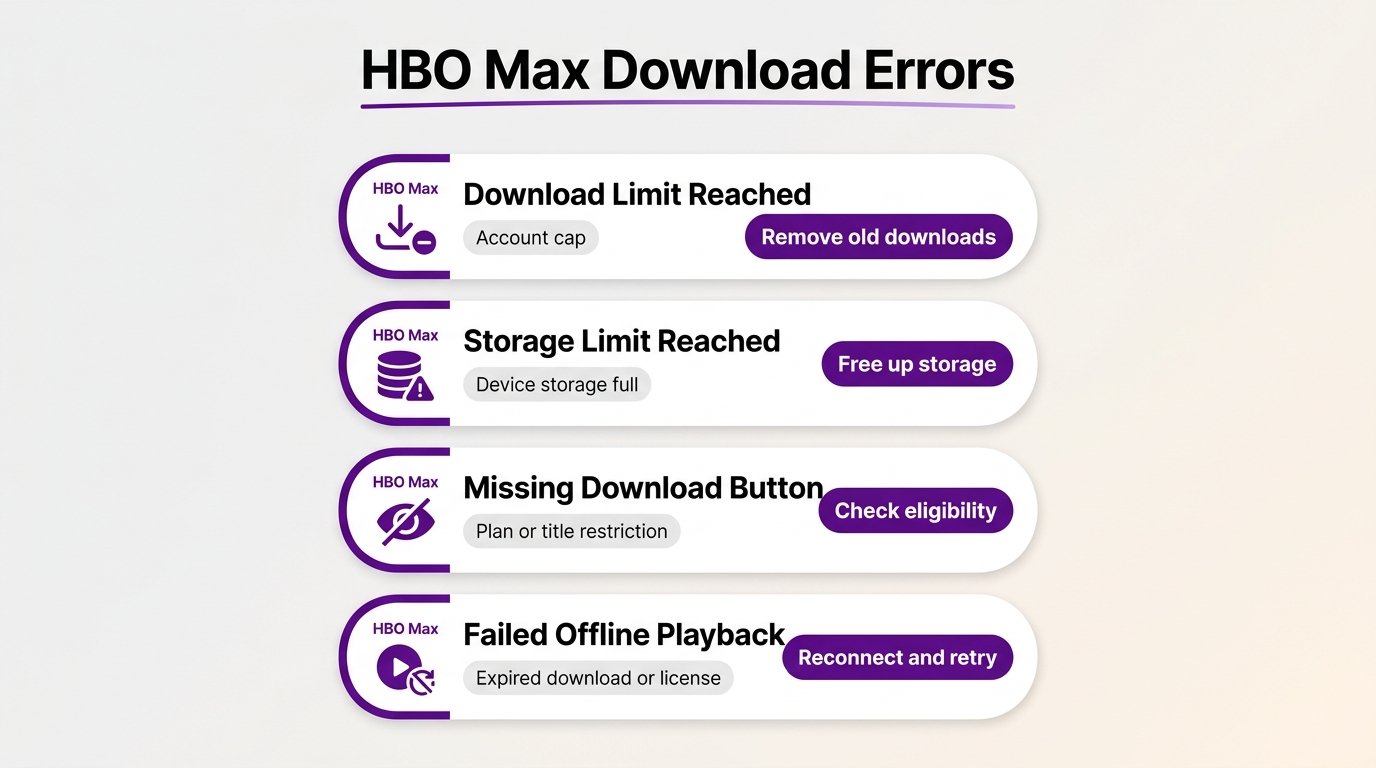
| Download Limit Reached | Account-wide quota across signed-in devices | Review all devices, then delete or renew counted titles. |
| Storage Limit Reached | Not enough free device storage | Free space or lower the HBO Max download quality setting. |
| Missing Download button | Plan, device, or title is not eligible | Confirm plan access, use a supported phone or tablet, and try another downloadable title. |
| Failed offline playback | Expired access, an unrenewed title, or a title no longer available | Reconnect, renew the title if offered, and run the Airplane mode playback test. |
Eligibility and account checks are quicker and more revealing than changing deeper device settings first. They also prevent a local reset from hiding an account-wide limit that still needs attention.
1. Background Downloads Stop or Fail
For a stuck HBO Max download, begin with the official reset sequence rather than assuming the phone blocks every background transfer. HBO Max app downloads can stop when the app version, connection, cache, or session is unhealthy.
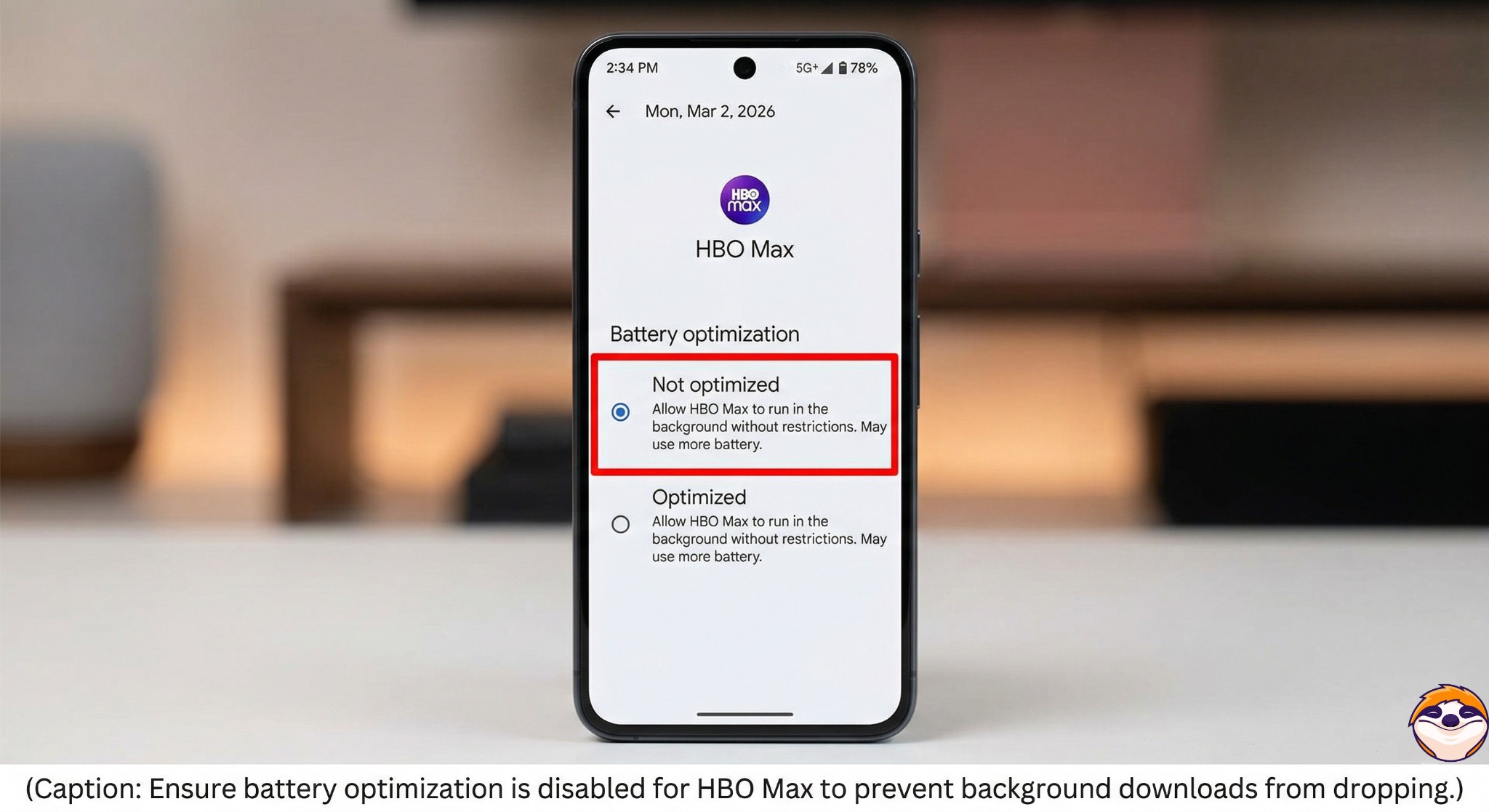
Keep HBO Max in the foreground during the retry and leave the device connected to power if battery-saving controls are aggressive. A device-specific battery restriction can matter, but there is no universal two-hour cutoff that explains every failure.
If the transfer still stalls, run the reset ladder once in order. Reinstalling first is slower and can leave an account-wide quota untouched.
2. Plan, Title, and Download Limits
The HBO Max download limit can cause Download Limit Reached, a missing Download button, or an inability to download HBO Max episodes. Plan eligibility, title availability, series and movie caps, and downloads on other devices all count.
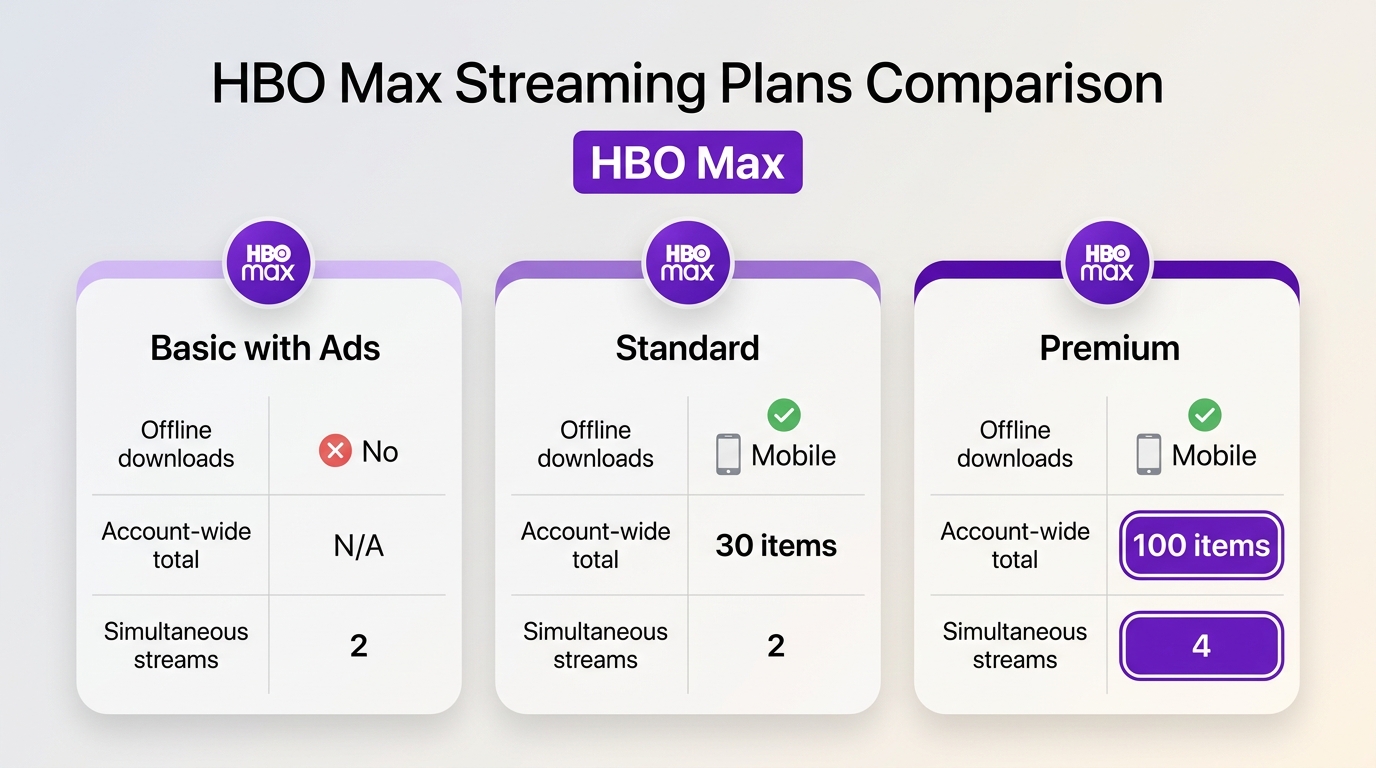
Official US plan and account boundaries, as of July 2026:
| HBO Max plan | Offline downloads | Account-wide total | Simultaneous streams |
|---|---|---|---|
| Basic with Ads | Not included | Not applicable | Up to 2 |
| Standard | Included on supported mobile devices | Up to 30 items | Up to 2 |
| Premium | Included on supported mobile devices | Up to 100 items | Up to 4; sports is limited to 2 |
The account totals are separate from the cap of 25 episodes from the same series and 30 movies. A title can also be unavailable for download even when the plan and quota are eligible.
A blank local Downloads screen does not prove the account quota is clear. A phone or tablet you used earlier may still hold counted items, which can create a ghost-limit situation after a reinstall.
- Inspect the Downloads list on every signed-in phone and tablet.
- Delete items you no longer need, or renew eligible items you plan to watch.
- Sign out of HBO Max, restart the affected device, and sign in again.
- Contact HBO Max support if the account count still appears wrong after the devices have synchronized.
The account quota is not the same as simultaneous streaming. Premium supports up to four streams at once, while sports is limited to two, regardless of how many offline items appear in the account.
3. Storage Permissions Blocking Transfers
An HBO Max transfer can remain at Pending or 0% when the device lacks free space or HBO Max app downloads do not have storage access. Check both before repeating the transfer.
- Open the device settings and find HBO Max under Apps.
- Allow the relevant storage, photos, or videos permission offered by the operating system.
- Free device space if storage is nearly full.
- In HBO Max download settings, lower Download Quality when file size is the main constraint.
The practical clue is whether other apps can save files and whether the HBO Max storage figure changes when a download starts. If neither happens, permission or free space deserves attention before another reinstall.
4. VPN and Apple iCloud Private Relay Interference
An HBO Max download failed network or region message can come from a VPN, proxy, or iCloud Private Relay obscuring the connection. Disable those layers temporarily, then retry on a normal supported connection.
- Disconnect any VPN or proxy.
- On iPhone or iPad, open Settings, select your Apple Account, choose iCloud, and temporarily turn off Private Relay.
- Close and reopen HBO Max, then retry the same title.
If the same message appears on several devices using the same network, switch to another connection for diagnosis. If one device alone fails, return to the reset ladder and local settings.
5. "Download Over Wi-Fi Only" Restriction
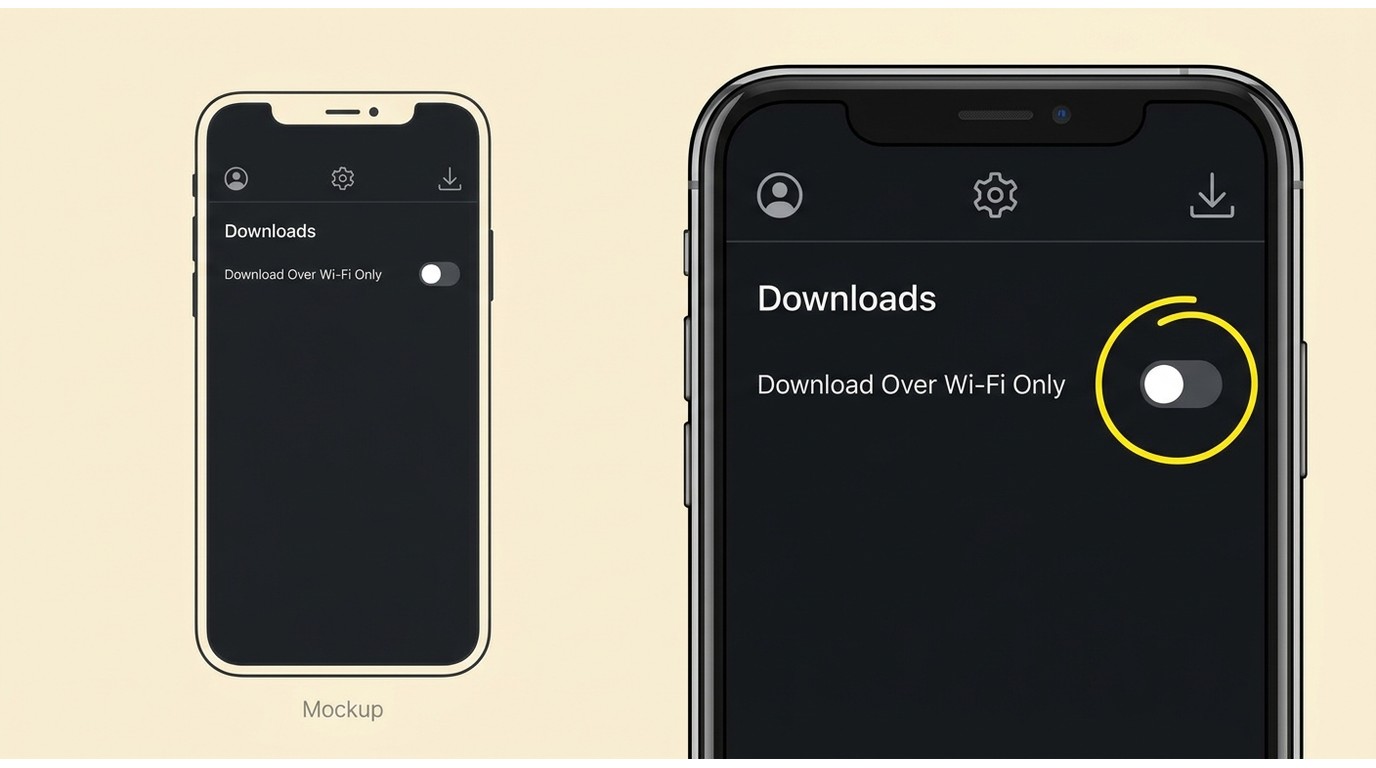
HBO Max download settings can pause a transfer as soon as Wi-Fi disconnects. If Download Over Wi-Fi Only is enabled, cellular data will not continue the job.
- Open HBO Max and select your profile.
- Open Settings, then Downloads.
- Turn off Download Over Wi-Fi Only if you intend to use cellular data.
- Retry the transfer and monitor your mobile data allowance.
This setting is useful for controlling data use, so changing it is a situational fix, not a general recommendation. For large downloads, a stable Wi-Fi connection remains the more predictable choice.
A Desktop Option With MP4 and MKV Output
For content you're authorized to access, where permitted by platform terms and applicable law, StreamFab offers a desktop local-file workflow for personal offline viewing. StreamFab HBO Max Downloader is separate from the official mobile download feature and runs on Windows or Mac.
StreamFab HBO Max Downloader can save supported titles as MP4 or MKV, queue episodes in batches, and let users select available audio and subtitles. Video output can reach up to 4K on supported titles, with H.264 or H.265 and supported HDR formats depending on the source.
It is a better fit for Windows or Mac users planning batch local files with selectable tracks. It is less suitable for occasional mobile downloads or readers expecting a free option; people actively comparing tools can use this best HBO Max downloader review to assess output, limits, and fit.
The broader HBO Max offline viewing options differ in file control and device support, so choose according to the device and viewing frequency you actually use. Results with StreamFab can vary by software version, title, and HBO Max service changes.
| Dimension | Official HBO Max app | StreamFab HBO Max Downloader |
|---|---|---|
| Supported devices | Supported phones and tablets | Windows and Mac |
| Plan and account requirements | An eligible HBO Max plan and signed-in account | Authorized HBO Max access plus the desktop software |
| Official download caps | 30 or 100 account-wide items, plus series and movie caps | Not organized by the app's 30/100 library cap; software usage quotas and account rules still apply |
| Expiration and renewal behavior | Managed inside HBO Max, with renewal and title-availability rules | MP4/MKV files are managed locally and do not use the HBO Max app's renewal timer |
| Output format | Managed in-app download | MP4 or MKV |
| Audio and subtitle selection | Tracks available in the HBO Max app | Select available audio and subtitles for supported titles |
| Batch processing | Title-by-title or episode selection in the app | Queue-based batch processing for episodes |
| Metadata | Displayed in the HBO Max library | Writes title and episode information for local organization |
| Qualified video quality | Depends on plan, title, device, and app availability | Up to 4K on supported titles, with supported H.264/H.265 and HDR output |
| Best fit | Occasional offline viewing on a supported mobile device | Planned batch viewing on Windows or Mac with local-file control |
| Limitations | Device eligibility, account caps, expiration, and renewal rules | Results vary by version, title, and service changes; if analysis fails or error 909 appears, update the software and use the current HBO Max troubleshooting path |
The comparison favors neither route in every case. The official app is simpler for a few mobile titles, while the desktop workflow is designed for planned Windows or Mac use that needs batch files and track selection.
FAQs
Conclusion
When HBO Max downloads are not working, use official eligibility and reset checks first, clear account or storage limits next, and validate offline playback before travel. Consider a desktop local-file workflow only when the official app does not fit the authorized use case.
- Confirm the plan, supported device, title eligibility, Download icon, quota, and storage.
- Run the reset ladder once in order.
- Clear cross-device quota or storage problems, then retry the title.
- Run the Airplane mode playback test before a trip.
- Choose the official app for occasional mobile viewing, or the desktop workflow for planned batch viewing on Windows or Mac.

This guide explains why there is no official HBO Max app for Mac and provides the best workarounds for downloading and watching shows offline on a MacBook. It evaluates top third-party downloaders that save shows in high resolution, and offers a brief alternative for screen recording clips without black screens, helping macOS users build a permanent offline library beyond what the official app allows.
By Jacob Harrison - Aug 6, 2026
Wondering how to rip HBO max video in 2026? This guide covers three practical options for offline viewing, with tips on availability by title, device, and plan.
By Erika Leen - Aug 4, 2026
This article reviews the best HBO Max downloaders of 2026 for Windows and Mac. It compares their video quality, pricing, user experience, etc. Each downloader is evaluated based on testing, helping readers select the best tool for their needs. StreamFab HBO Max Downloader stands out as the top choice with its 4K quality, fast speed, and advanced features.
By Erika Leen - Aug 4, 2026

Learn how to properly configure the HBO Max Kodi addon via the SlyGuy repository in 2026. Troubleshoot Widevine CDM black screens, bypass geoblocking, and discover a 4K offline archiving alternative.
By Nicole Lopez - Aug 4, 2026