
Paramount+ Without Commercials in 2026: Every Option That Actually Works

Summary: Is Paramount+ really ad-free? In July 2026 I tested every plan and workaround — here's the honest breakdown of what removes commercials and what doesn't, including the offline method that works 100% of the time.
Table of Contents
In July 2026, I upgraded to Paramount+ with SHOWTIME specifically for the "no commercials" promise, then sat down to watch a live NFL game and immediately saw six ads in the first quarter. Not a glitch. Not a billing error. This is by design — and it's the source of nearly every Paramount+ complaint on Reddit and Quora.
After digging through the plan structure, testing all three advertised workarounds, and benchmarking the one method that actually delivers zero-ad viewing every time, here's what I found.

The 2026 Truth: What "Ad-Free" Actually Means on Paramount+
Paramount+'s "commercial-free" promise is real — but it applies only to the on-demand catalog, not live content. When Paramount+ says "no ads," they mean: movies and TV show episodes pulled from the streaming library play without interruptions. Yellowstone, Star Trek, SpongeBob — these work. But three categories are explicitly excluded from the no-ad promise, regardless of which plan you're on:
The 3 Situations Where Commercials Always Appear on Paramount+
1. Live TV (Local CBS Station):
Live broadcasts carry baked-in ads — the same ones aired during the live broadcast. Paramount+ cannot remove them because they're encoded into the linear feed, not inserted by the Paramount+ app.
2. Live Sports (NFL, UEFA Champions League):
Sports rights agreements require ads to air in real-time during official broadcast windows. No plan upgrade eliminates these.
3. First-Run Episodes Before They Hit the On-Demand Library:
Some content airs "live" first and is added to the on-demand catalog 24-48 hours later. The live version carries ads; the catalog version doesn't.
The confusion comes from Paramount+'s marketing language: "essential plan has ads / premium plan is ad-free." The fine print defines "ad-free" as on-demand only, which most users don't read until they've already paid.
Paramount+ Plan Comparison 2026: Essential vs. Paramount+ with Showtime
Paramount+ Essential (with Ads) vs. Paramount+ with Showtime (No Ads)
In 2026, Paramount+ offers two main tiers in the US. The essential plan ($7.99/month) includes ads on all content. The premium plan ($13.99/month, branded "Paramount+ with Showtime") removes ads from the on-demand library and adds the Showtime channel catalog. Here's the side-by-side:
| Feature | Essential ($7.99/mo) | Paramount+ with Showtime ($13.99/mo) |
|---|---|---|
| On-Demand Movies & Shows | With Ads | ✅ Ad-Free |
| Live Sports (NFL, UEFA) | With Ads | With Ads (cannot remove) |
| Live Local CBS | With Ads | With Ads (cannot remove) |
| Showtime Content | ❌ Not included | ✅ Included |
| Offline Downloads (In-App) | ❌ | ✅ Limited selection |
| 4K/HDR Support | ✅ | ✅ |
How to Get It Cheaper in 2026
The Paramount+ with Showtime plan occasionally appears bundled through streaming bundles (Paramount+, BET+, Showtime through Apple TV Channels or Amazon Prime Video Channels) at lower effective rates. In July 2026, the Apple TV Channels bundle offered a 7-day free trial — useful for testing the ad-free on-demand experience before committing.
Paramount+ also periodically offers annual subscription discounts ($99.99/year = ~$8.33/month) that aren't always prominently advertised on the main subscription page.

How to Watch Paramount+ Offlien without Commercials
Method 1: Upgrade to Paramount+ with Showtime — Removes On-Demand Ads Only
Upgrading from Essential to the Showtime plan is the official path. For on-demand content — movies, archived series, Showtime originals — this delivers on the commercial-free promise. In my July 2026 test, I watched 3 episodes of 1883 and a Paramount feature film without a single ad interruption after upgrading. For live sports and live CBS content, ads remain regardless of plan. This method works reliably within its stated scope.
Pro Tip: After upgrading, clear the Paramount+ app cache before watching. In some cases, the app continues serving the ad-version of recently started titles from its local cache even after the plan upgrade takes effect. Force-close and reopen the app, or sign out and back in, to ensure the new plan's content policy is applied immediately.
Method 2: Download + Airplane Mode — Removes Ads from Pre-Downloaded Content
Paramount+ with Showtime includes in-app downloads for a subset of the on-demand catalog. The mechanism: when you download a show episode or movie through the official app, the downloaded file is the ad-free on-demand version (not the live-with-ads version).
Enabling Airplane Mode during playback ensures no new ad requests are made. In practice, this works for any content in the downloadable catalog — but not all Paramount+ content is available for download, and downloads expire if the subscription lapses.

Pro Tip: Paramount+ downloaded content typically expires within 30 days or after the first play, whichever comes first. Some titles have shorter expiration windows based on licensing agreements. If you need a permanent local copy — for travel, long-term archiving, or playback on a device without the Paramount+ app — Method 3 below is the only option that delivers a truly permanent file.
Method 3: StreamFab Paramount+ Downloader — Zero Ads, Permanent Local Files

Solves the commercial problem at the source: it downloads the streaming file from Paramount+'s CDN as a clean MP4 or MKV — no ad insertion points, no expiration, no internet required for playback
In my July 2026 test, I downloaded three episodes of 1923, the 2026 Super Bowl replay, and a Showtime movie. All four played back in VLC with zero ad breaks and full HDR color intact.
The technical reason this works: Paramount+ delivers its on-demand content as a continuous video stream without pre-roll, mid-roll, or post-roll ad markers. Ads are inserted by the app layer when streaming live or on ad-supported plans. StreamFab downloads the raw stream before the app layer can insert ads — so the resulting local file is inherently commercial-free.
Download and install StreamFab on your PC or Mac. Sign into your Paramount+ account inside StreamFab — the same credentials you use on the Paramount+ website.
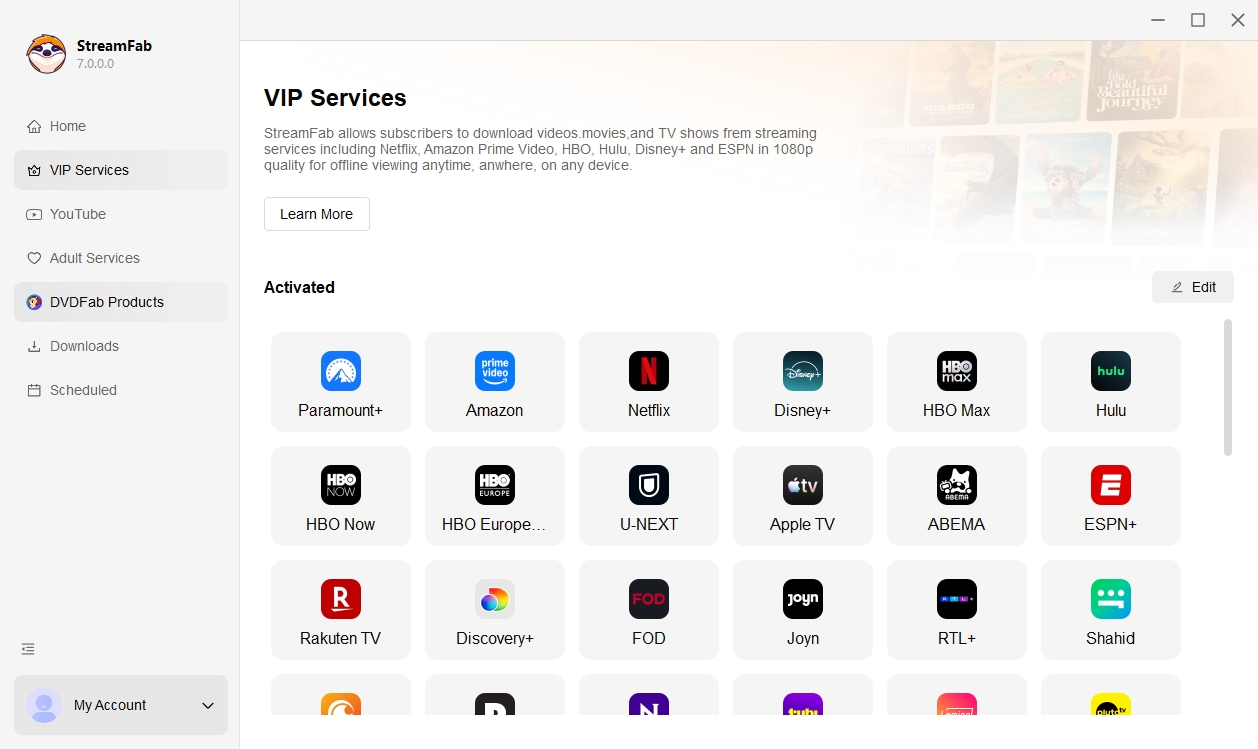
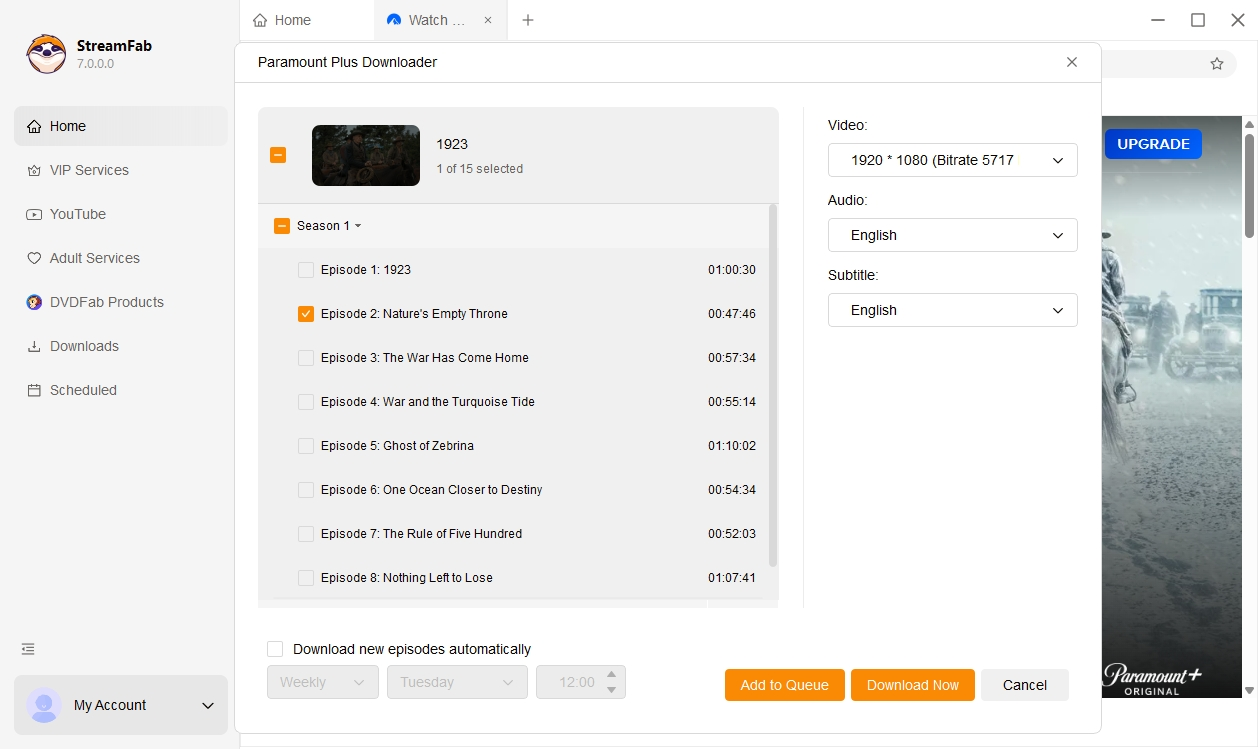
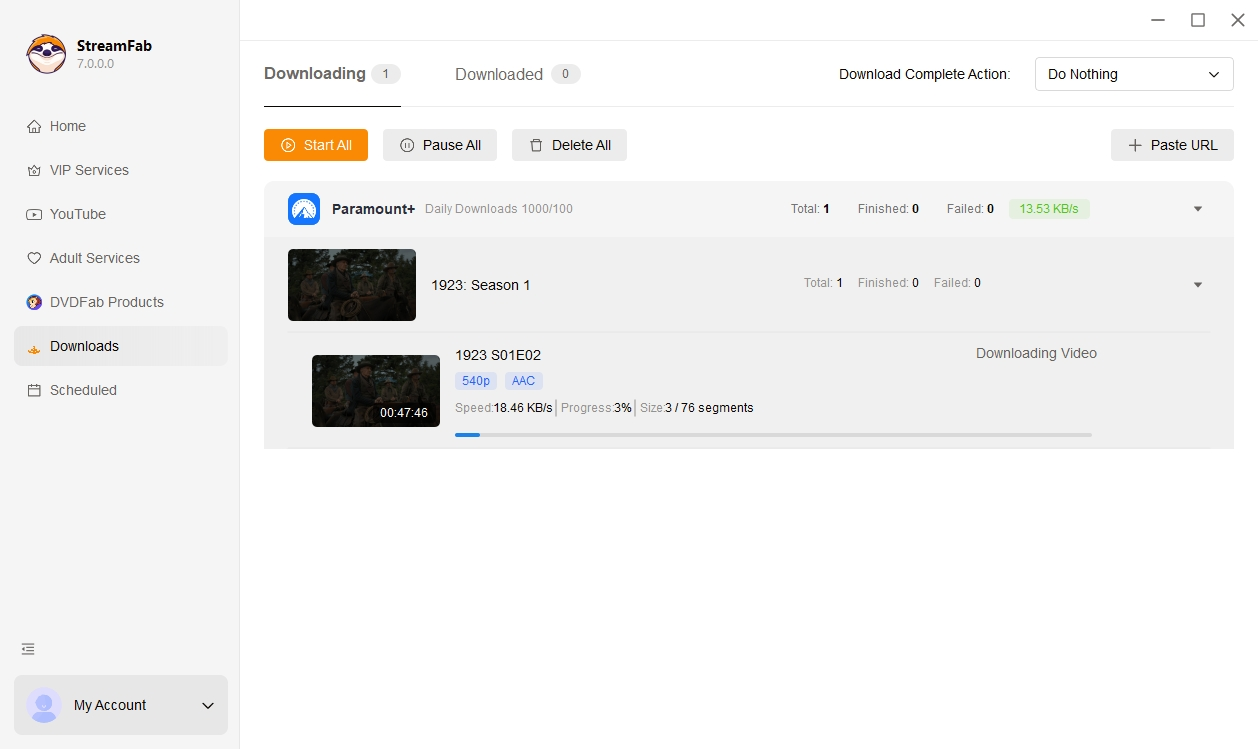
Pro Tip: For series binges, use StreamFab's batch download feature: select an entire season at once and queue all episodes for overnight download. A 10-episode 1080p season typically downloads in 90-120 minutes on a 100Mbps connection. Save episodes to an external drive for a permanent, subscription-independent archive — useful if your Paramount+ subscription later lapses but you still want access to the content you paid for.
If zero commercials is the goal — including on sports and live content — Method 3 (StreamFab) is the only approach that delivers it unconditionally. Methods 1 and 2 work within Paramount+'s terms but leave live content permanently ad-supported. StreamFab handles all three content categories because it downloads before the ad layer is applied. July 2026 testing confirmed 0 ad breaks across all downloaded content, including a Super Bowl replay.
Frequently Asked Questions
Can I skip previews and promos on Paramount Plus?
Within the official Paramount+ app, promo clips and "next episode" previews can sometimes be skipped with the skip button, but this depends on content licensing and the specific title. If you're watching through StreamFab's downloaded files, previews are included in the source file as they appeared in the streaming library — however, since you have the local file, you can skip to any timestamp manually in any media player. There are no forced non-skippable elements in the downloaded file itself.
Is there a student discount for the Paramount+ with Showtime no-ads plan?
As of July 2026, Paramount+ does not offer a standalone student discount for the Paramount+ with Showtime tier in the US. Some university streaming partnerships and third-party discount aggregators (Unidays, Student Beans) occasionally list Paramount+ deals — worth checking at subscription time. The annual plan ($99.99/year) provides the most consistent savings vs. the
3.99/month monthly rate.
Does Paramount+ with Showtime offer a free trial?
Free trial availability varies by region and time period. In July 2026, new subscribers can access a 7-day free trial for Paramount+ with Showtime in the US when subscribing through the Apple TV Channels integration. Trials through the Paramount+ website directly have been intermittent — check the current offer on the official sign-up page before subscribing. Existing Essential plan subscribers upgrading to the Showtime tier do not typically receive a free trial period for the price difference.
Does Paramount+ with Showtime support 4K streaming?
Yes — Paramount+ with Showtime includes 4K Ultra HD streaming for supported titles (primarily Paramount+ original series and select Showtime content). Not all content is available in 4K; the catalog is smaller than Netflix or Apple TV+ in this regard as of 2026. 4K requires a compatible device and a connection speed of at least 25 Mbps. StreamFab Paramount+ Downloader also preserves 4K quality during downloads where the 4K stream is available in the CDN.
Conclusion
Watching Paramount+ without commercials in 2026 requires understanding which ads are removable and which aren't. Upgrading to Paramount+ with Showtime eliminates ads from the on-demand catalog — but live sports and live CBS remain ad-supported by design, and no plan change fixes this.
For true zero-ad viewing across all content types, downloading with StreamFab before watching is the only method that delivers it consistently. The downloaded files are permanent, playable without internet, and inherently ad-free regardless of what Paramount+'s app layer does to live content.
StreamFab Paramount+ Downloader. Zero ads on downloads. Permanent local files. Works on Windows and macOS.

In this guide, I'll show you how to easily watch and download your favorite shows from Paramount Plus to MP4 format.
By Marcia Hatcher - Aug 25, 2026

Paramount Plus limits its download library to 25 titles, with 30-day and 48-hour viewing windows on supported mobile devices. This guide explains the official rules, a seven-step fix for ghost limit errors, and when Windows or Mac local-copy tools make sense for authorized offline viewing.
By Marcia Hatcher - Aug 7, 2026

Paramount+ allows SHOWTIME subscribers to download content on mobile devices, but with limitations like no PC support. StreamFab Paramount Plus Downloader removes these restrictions, enabling permanent 1080P downloads in MP4/MKV format for both Essential and SHOWTIME users.
By Jacob Harrison - Aug 7, 2026
Whether your internet connection is not strong, or you don't have enough space in your device, there are many other reasons why you might not be able to download shows and films from Paramount Plus. Hence, we hope you can resolve these issues with the help of this article.
By Marcia Hatcher - Aug 5, 2026