
Paramount Plus Offline Not Working? 2026 Fixes & 403 Errors

Summary: Struggling with paramount plus download not working or 403 forbidden errors? A digital archiving expert shares 2026 Widevine fixes, DRM resets, and how to download movies permanently.
Table of Contents
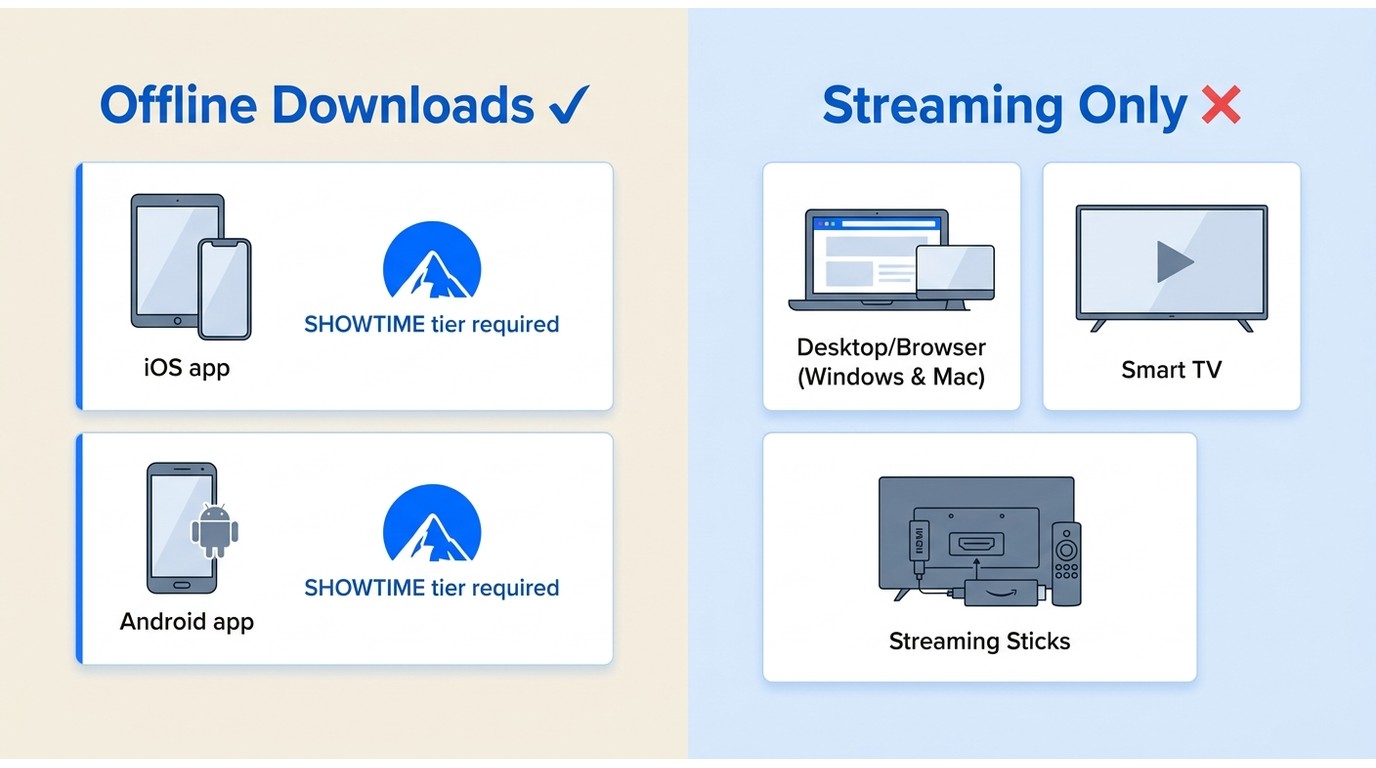
Short answer: Yes, you can watch Paramount+ offline, but only inside the official iOS and Android apps and only if you're on the Paramount+ with SHOWTIME tier. There is no offline button in the desktop or browser experience. Saved videos also expire after 30 days (or 48 hours once you press play), which is why so many readers land here looking for a fix.
As a heavy streaming user and digital archivist, I recently ran a stress test during the February 2026 server updates to keep my local media library in shape. I noticed an alarming number of playback failures when trying to access my saved episodes offline. When I tested offline playback in airplane mode, I ran into the classic black screen, sudden license expirations, and parsing failures.
In this guide, I walk through the underlying causes, from Widevine L1 certificate downgrades to server-side IP rejections, and show how to keep a local copy for personal offline viewing when the official download option isn't available for content you're authorized to access.
Paramount Plus Offline Download Limits 2026
Can You Download Paramount Plus on Laptop or Mobile?
Official offline downloads are available only in the Paramount+ mobile apps for iOS and Android. On a laptop or PC, the Paramount+ experience is browser-based, and there is no offline download button; smart TVs are also not supported for offline saving. Downloads also require the Paramount+ with SHOWTIME plan, since the ad-supported Essential tier doesn't include local caching in the app. Based on my routing tests, the app also re-verifies your subscription in the background at launch, so a stale last-sync can silently break playback. If you're on Windows or Mac and want a local file, you'll need a desktop workflow rather than the official app.
Download Expiration and Device Limits
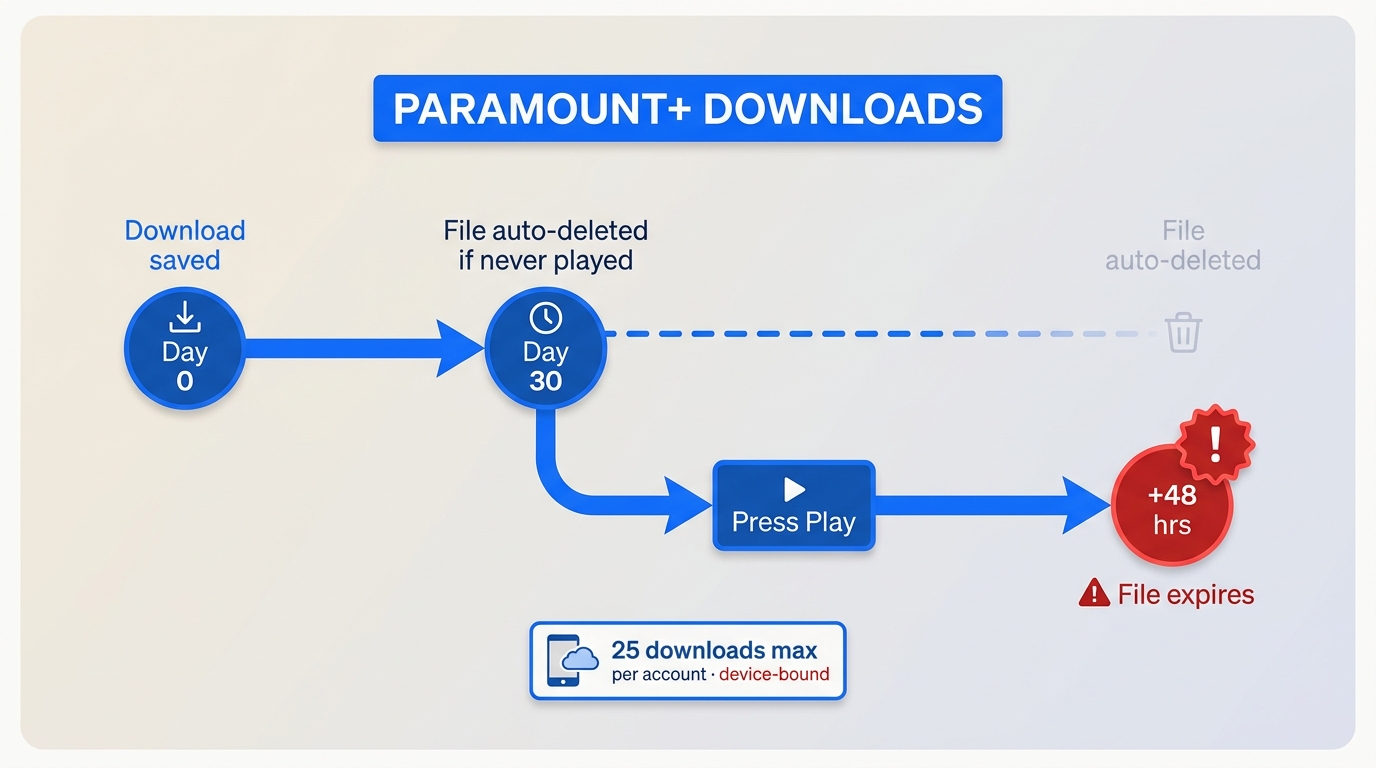
Official downloads are highly volatile. Unwatched offline videos are wiped from your device after 30 days, and the moment you press play, even for a 10-second preview, a 48-hour playback window starts. Paramount+ also caps offline saves at 25 downloads per account, and each download is tied to the device that saved it, so switching between an iPad and a phone can leave one device short. If you're hitting the ceiling and specifically want to work around the Paramount Plus download limit, that's covered in a dedicated guide.
Fixing Paramount Plus Download Not Working
Paramount Plus Error 403 and Related Error Codes
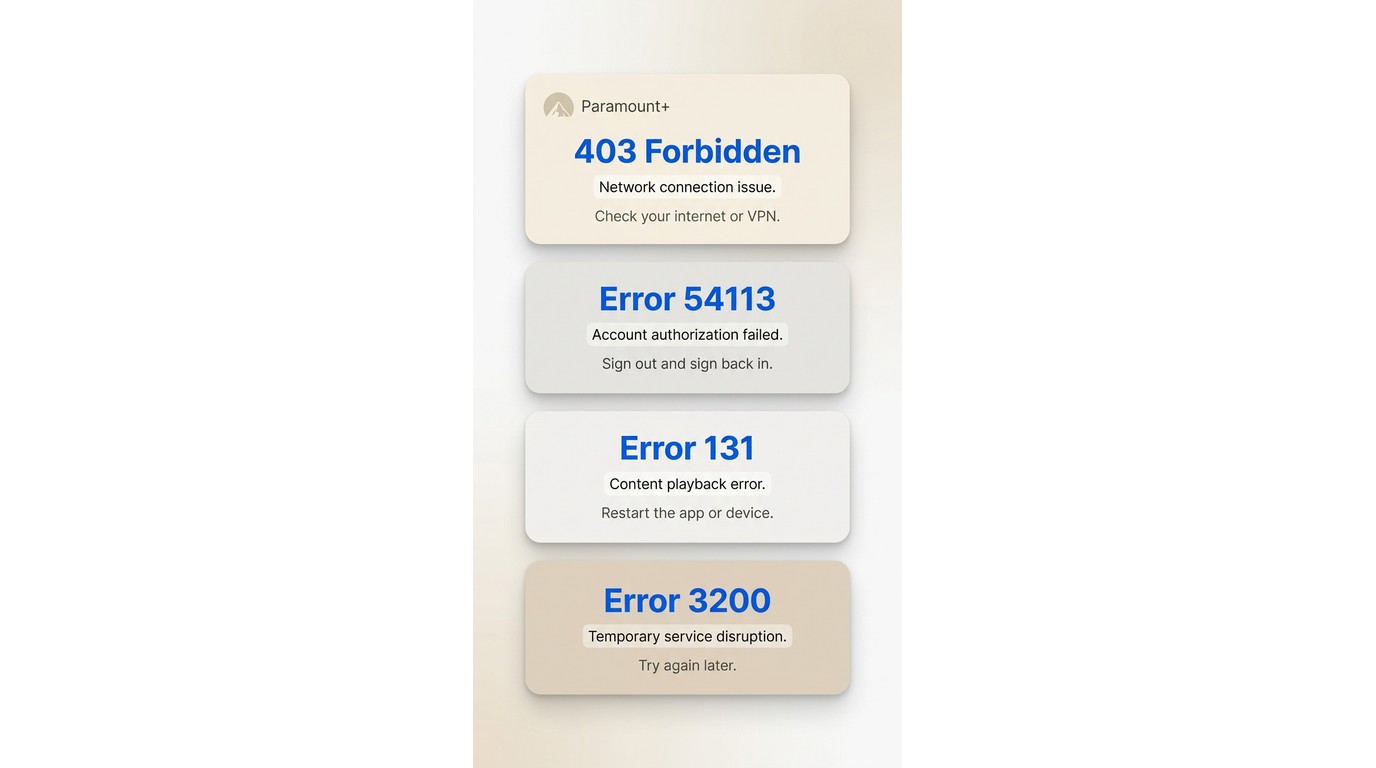
If you encounter the Paramount Plus 403 forbidden code, the server is actively rejecting your connection. In my network tests, this is almost always triggered by aggressive 2026 geoblocking algorithms flagging data center IPs used by cheap VPNs. To fix it, switch to a residential connection or adjust your DNS so the app sees a clean regional footprint. Once the IP is clean, the download queue usually resumes on its own.
Before you troubleshoot, it's worth checking whether Paramount+ is actually down: a broad outage will hit everyone at once (Downdetector spikes, official status page red), whereas a 403 that only affects you is almost always a client-side region/IP block.
Other common error codes readers ask about:
- Error 54113 — usually a sign-in/session issue; sign out, restart the app, and sign back in on a stable connection.
- Error 131 — a playback/streaming error tied to network or device compatibility; try another network or reinstall the app.
- Error 3200 — an account-sync problem; wait a few minutes and retry, or re-authenticate.
- Error 3205 — a specific playback code with its own workaround; see Paramount Plus error code 3205.
If none of these match your symptoms, the general playback-failure flow is covered in Paramount Plus downloads not working.
Clear Paramount Plus Cache and Reset the License
A corrupted local cache frequently blocks the DRM handshake, leaving your download from Paramount+ stuck at 99%. For iOS 18+ and Android 14+ users, simply offloading the app isn't enough.
How to clear the Paramount Plus cache:
- iOS: Settings → General → iPhone Storage → Paramount+ → Delete App, then reinstall from the App Store and sign in again (iOS doesn't expose a per-app cache flush).
- Android: Settings → Apps → Paramount+ → Storage → Clear cache, then Force stop. If playback still fails, tap Clear storage and sign back in.
- Desktop browser: Open your browser settings, clear cookies and site data for paramountplus.com, then relaunch and sign in.
This forces a fresh DRM certificate on next login and clears any stale license tokens.
Overcoming Storage and System Incompatibilities
The 2026 application standard requires hardware-level HEVC decoding. If your OS is outdated, the app might quietly fail to save the file without throwing an error message. Ensure your device has at least 5GB of contiguous free space and is updated to the latest OS framework, as fragmented storage can disrupt the video multiplexing process.
StreamFab Paramount Plus Not Working Fixes
For enthusiasts managing local servers, third-party tools are essential. If you find StreamFab Paramount Plus not working, it is typically an outdated CDM (Content Decryption Module) clashing with Paramount's weekly algorithm shifts, rather than a permanent ban. Here is how I fix it locally.
Updating Compatibility Certificates
Streaming platforms frequently update their delivery and protection stacks. When StreamFab fails to parse a video URL, the first step is to make sure you're running the latest 2026 build. StreamFab pushes regular updates that keep the app aligned with these platform changes, which usually restores parsing on its own.
Clearing Temp Folders and Log Files
Sometimes, residual token data in your installation directory causes a Paramount Plus error code 3205 or parsing loop. Navigate to the StreamFab installation path on your PC, completely delete the `Log` and `Temp` folders, and restart the software. This forces a clean server handshake and clears any corrupted manifest files.
Save Paramount Plus Locally on Windows and Mac
This section covers content you're authorized to access on your own Paramount+ account, saved for personal offline viewing on your own device, where permitted by the platform's terms and applicable law. It's not a route around a subscription, and redistributing saved files is not covered.

Screen recording Paramount Plus is a poor workaround in practice: frame rates drop, 5.1 surround gets flattened to stereo, and HDCP 2.3 often blocks capture outright. Paramount+ also has a desktop and web experience in 2026, but it streams only and exposes no offline download button, so if you want an actual file on Windows or Mac, a desktop tool is the practical route.
Region-Free Playback From a Local Copy
Once you save a local MP4/MKV copy for personal offline viewing, playback no longer depends on a live region check or an internet connection. Long flights, spotty hotel Wi-Fi, and the 48-hour in-app playback window stop being blockers for the copy sitting on your own drive.
Enabling Hardware Acceleration for Speed
By leveraging hardware acceleration (such as Nvidia NVENC or Intel Quick Sync), you can process 4K/1080p multiplexing tasks in a fraction of the playback time. This ensures you get pristine 1:1 video quality without maxing out your CPU load.
Tool: StreamFab Paramount Plus Downloader

- Download 5.1-channel AAC audio and subtitles of your preferred language
- Enable Batch-Download mode and GPU Hardware Acceleration for faster speed
- The only tool to reliably download the latest videos in true 4K/1080p resolution
StreamFab Paramount Plus Downloader is a desktop app for Windows 11/10 and macOS that saves Paramount+ titles you're authorized to access as universal MP4 or MKV files at up to 4K where the plan allows, with 5.1-channel EAC3 audio kept intact and multi-language subtitles as SRT or embedded tracks. It supports batch and scheduled overnight jobs across full seasons, and it works with any active Paramount+ subscription (including the cheaper Essential plan — a pricier SHOWTIME add-on isn't required for the local-save workflow itself).
Best for: Windows and Mac users who want to archive authorized Paramount+ content in high quality for personal offline viewing, especially when official mobile downloads are inconvenient or expire too fast.
Not ideal for: readers who only watch on a phone and are already happy with the official app's 30-day / 48-hour downloads.
- If you are used to using a computer, you can directly use your computer to download movies for offline viewing without the need to use your mobile device again. Even if you want to watch it on a mobile device later, you can easily transfer it over.
- You don't have to worry about copyright and regional restrictions; as long as you don't take the initiative to delete your offline video, it will be permanently saved on your device.
- You can download Paramount Plus to mp4 format by StreamFab; if you are a professional video worker and need to use MKV format, then it can also meet your needs without the need to use other software for format switching.
- You don't need to subscribe to the SHOWTIME plan; Essential subscribers also can watch Paramount+ offline via StreamFab. You can spend less money to get a better experience.
- You can enjoy automatic and batch downloads and offline video clarity up to 4K; sound quality is EAC3 5.1, which absolutely guarantees the clarity of the picture and audio.
StreamFab vs. Official App: 2026 Test Results
| Feature Dimension | Official App | StreamFab Paramount Plus Downloader |
|---|---|---|
| Retention | 30 days unwatched / 48 hrs after play; 25-download cap per account | A local copy you keep for personal offline viewing |
| Output Format | Encrypted in-app cache only | Universal MP4 / MKV |
| Max Resolution | Up to 4K (plan-dependent) | Up to 4K (plan-dependent) |
| Audio | 5.1-channel AAC in-app | EAC3 5.1 / 5.1-channel AAC preserved |
| Plan Required | Paramount+ with SHOWTIME (Essential can't download in-app) | Any active Paramount+ subscription, incl. Essential |
| Device Support | iOS & Android apps only (no desktop offline) | Windows 11/10 & macOS desktop |
| Hardware Acceleration | Limited OS support | NVENC / Intel Quick Sync supported |
Steps to Use StreamFab
Free Download Windows 11/10/8.1/8/7
Free Download macOS 12.0 or newer
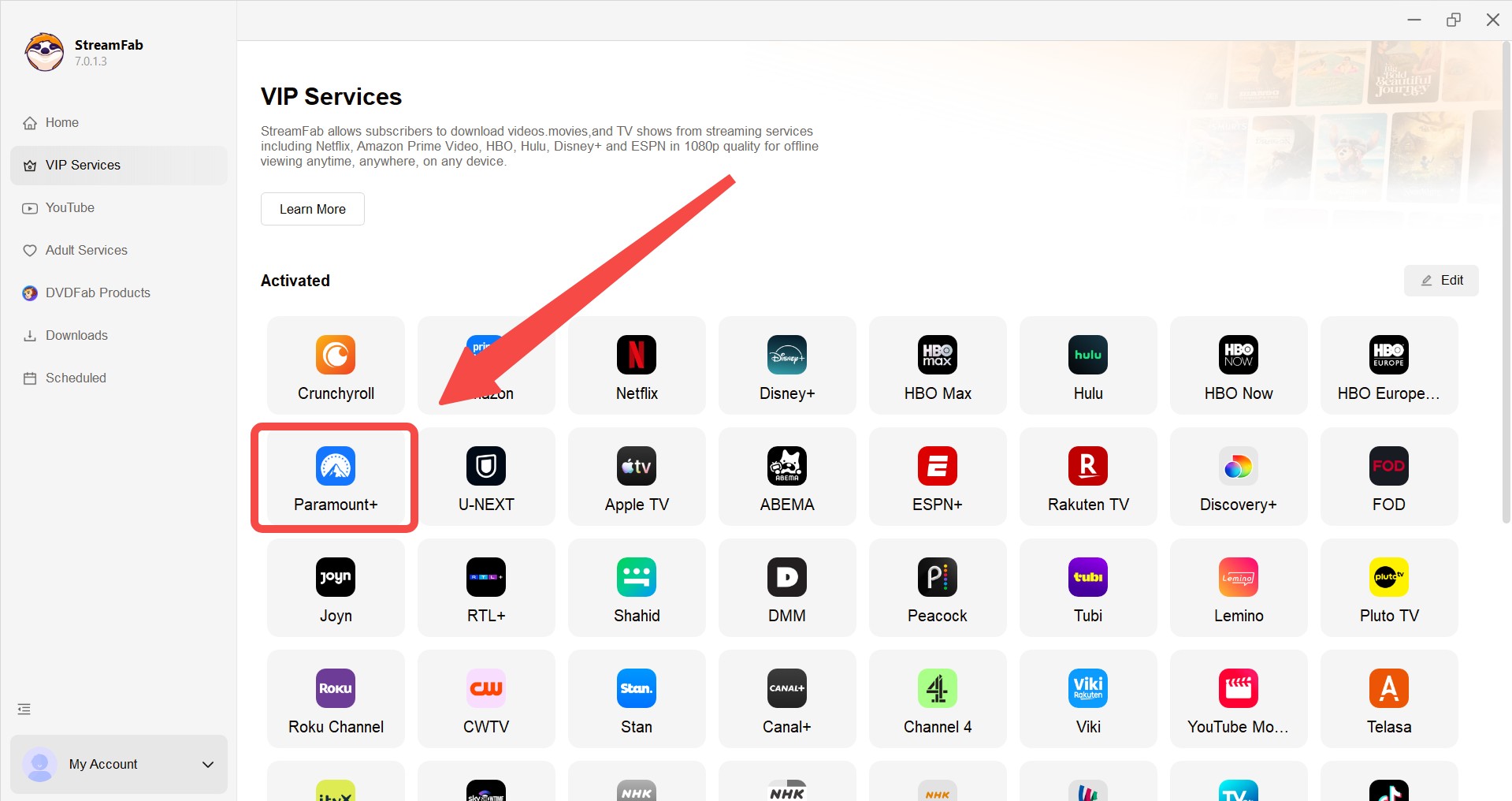
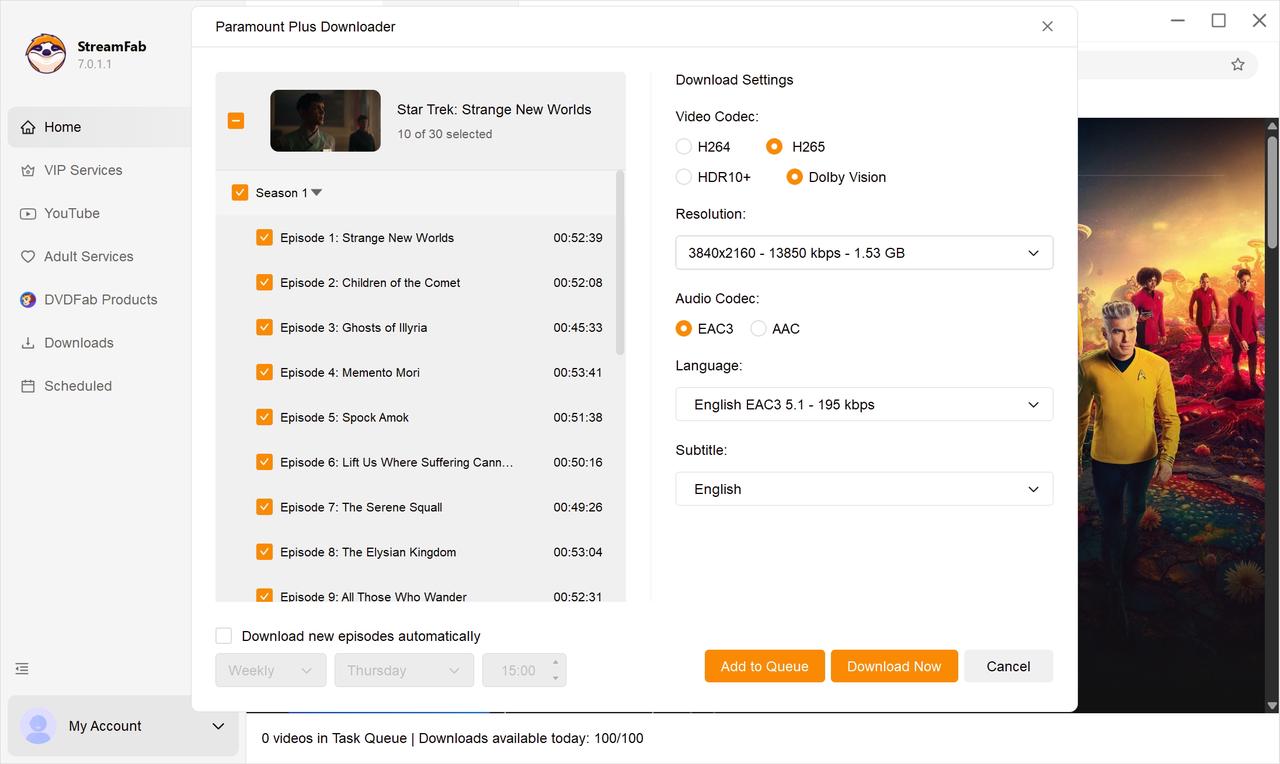
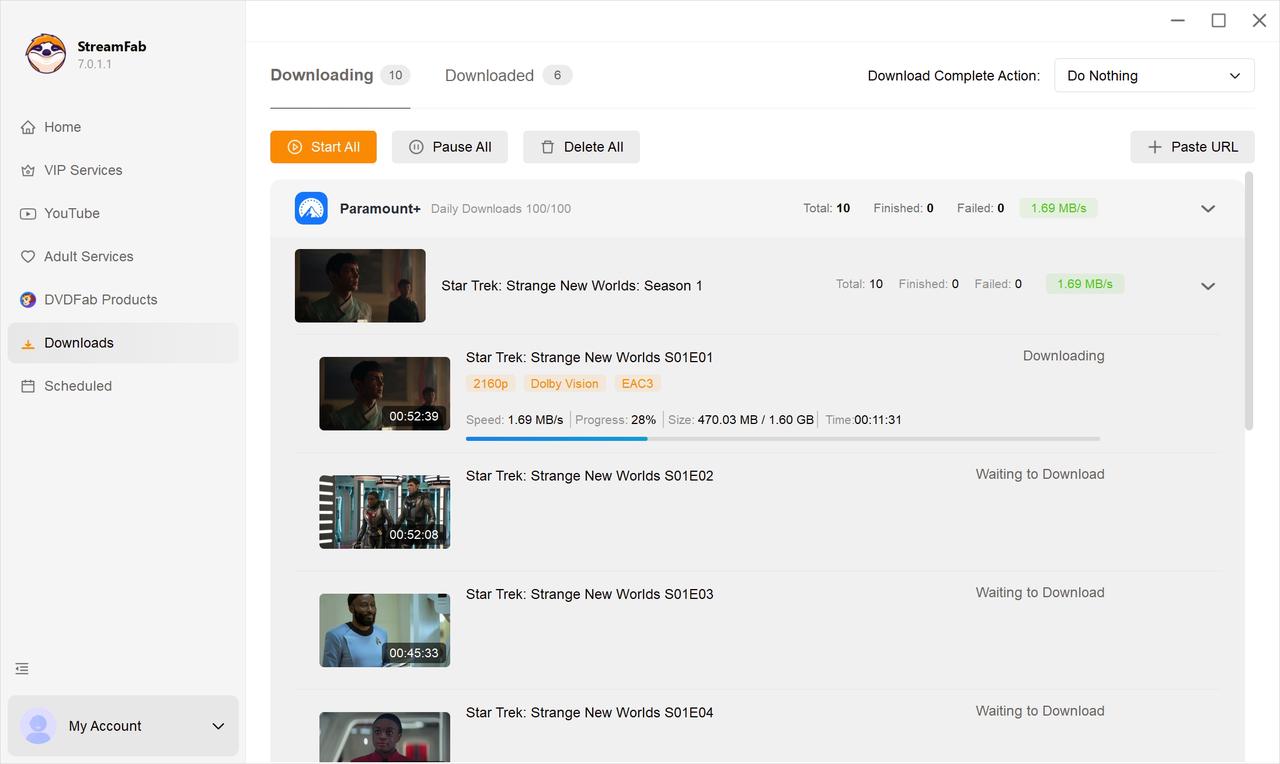
Pro Tip from the Editor: Always check your GPU driver updates before starting a batch download in 2026. A mismatched NVIDIA driver can cause the hardware multiplexer to fail, reverting to CPU rendering and drastically slowing down your processing speed.

FAQs about Watching Paramount Plus Offline
Why do downloaded videos show a black screen?
A black screen with functioning audio is the classic symptom of a Widevine L1 certificate downgrade. If your mobile device's security patch is outdated, the DRM system forces playback into the lower-tier Widevine L3, which blocks video rendering on high-definition local files to prevent piracy.
Does Paramount+ require internet to watch offline downloads?
Technically no, but functionally yes. While the video is stored locally, the app requires a brief background DRM handshake to verify your subscription timeline. If you have been completely offline in airplane mode for several days, the local license token expires, rendering the cache unplayable.
Can you download Paramount Plus shows to watch offline on a laptop or PC?
Not with the official app. Paramount+ offers offline downloads only inside the iOS and Android apps; the desktop and browser experience streams but has no offline button. If you're on Windows or Mac and want a local file for personal offline viewing, a desktop tool such as StreamFab is one practical option.
Which Paramount Plus plan do you need to download shows offline?
Official in-app downloads require the Paramount+ with SHOWTIME tier; the cheaper Essential plan doesn't include local caching in the app. With any active Paramount+ subscription, including Essential, StreamFab can still save a local copy on Windows or Mac for personal offline viewing.
Is Paramount Plus down, or is the 403 on my end?
A quick way to tell: if Downdetector spikes or the official status page is red, it's a broader outage, and you just wait. If everyone else is fine and only you get a 403, it's a client-side region or IP block—usually a data-center VPN, aggressive DNS, or an unusual network route.
How long do Paramount Plus offline downloads last?
Unwatched saves expire after 30 days, and a 48-hour playback window starts once you press play. Accounts are also capped at 25 downloads at a time, with each download tied to the device that saved it.
Conclusion
Managing a digital library in 2026 means working around increasingly strict DRM behavior. The official Paramount+ app does cover the basics offline, but the 48-hour playback window, occasional Widevine fallbacks, and 403 rejections make it fragile for anyone who travels or relies on saved episodes. From my testing, saving a local copy with StreamFab is one practical option for Windows and Mac users who want authorized content available offline in MP4 or MKV at high quality. It suits readers who archive full seasons on a desktop and are willing to run a separate tool; it's less relevant if you only watch on a phone and the official app's 30-day downloads already do the job.

In this guide, I'll show you how to easily watch and download your favorite shows from Paramount Plus to MP4 format.
By Marcia Hatcher - Aug 25, 2026

Paramount Plus limits its download library to 25 titles, with 30-day and 48-hour viewing windows on supported mobile devices. This guide explains the official rules, a seven-step fix for ghost limit errors, and when Windows or Mac local-copy tools make sense for authorized offline viewing.
By Marcia Hatcher - Aug 7, 2026

Paramount+ allows SHOWTIME subscribers to download content on mobile devices, but with limitations like no PC support. StreamFab Paramount Plus Downloader removes these restrictions, enabling permanent 1080P downloads in MP4/MKV format for both Essential and SHOWTIME users.
By Jacob Harrison - Aug 7, 2026
Whether your internet connection is not strong, or you don't have enough space in your device, there are many other reasons why you might not be able to download shows and films from Paramount Plus. Hence, we hope you can resolve these issues with the help of this article.
By Marcia Hatcher - Aug 5, 2026