
EaseUs Video Downloader Review: Features, Working and Alternatives

Summary: EaseUS Video Downloader is a practical desktop option for saving clips from social and general video sites, but it is less suited to protected streaming services. If you are searching for an EaseUS Video Downloader review because you want to know whether it is safe, what it costs, and whether it can grab the videos you need, this guide covers those decisions.

Table of Contents
This EaseUS Video Downloader review explains what the desktop app can save, how its formats and plans compare, and when an EaseUS Video Downloader online search is better served by a different desktop tool. It also covers practical alternatives for social-video and streaming-focused needs.
- What it is: EaseUS Video Downloader saves clips from YouTube, TikTok, Facebook, and Instagram for offline viewing.
- Best for: people who need quick URL-based downloads from video-sharing sites.Not ideal for: Netflix, Prime Video, and similar streaming catalogs, or viewers who need multiple audio tracks and subtitle options.
- Notes: Follow platform terms, copyright rules, and applicable local laws.
Our Quick Verdict on EaseUS Video Downloader
EaseUS is worth considering when your main task is saving publicly available or authorized clips from YouTube, TikTok, Facebook, and similar hosts. It is not the strongest fit for Netflix, Prime Video, Disney+, and other protected streaming catalogs, where a specialized desktop app is generally more appropriate.
Best for: Quick URL-based grabs from YouTube, TikTok, Facebook, and Instagram. Not ideal for: Premium streaming viewers who need selectable audio tracks, subtitles, and broader OTT-service support.
What EaseUS Video Downloader Does
EaseUS Video Downloader is a desktop app for Windows and macOS that saves video and audio from supported online sources. It is aimed primarily at video-sharing hosts, with output quality depending on what the original source makes available.
Supported Sites and Platforms
EaseUS is primarily designed for general video sources such as YouTube, Facebook, TikTok, and Instagram, as well as many other video-hosting sites. It is a better match for social clips, playlists, channels, and similar web video than for protected streaming services.
- Platforms: a desktop app for Windows and macOS.
- Quality & formats: up to 4K when offered, with plenty of standard video/audio outputs.
- Use cases: grab clips, playlists, even channels for offline viewing; you can preview mid-download.
- Limits & compliance: availability varies by site—follow local laws and each site’s ToS.
Supported Formats and Audio Quality
EaseUS can save common video and audio outputs for offline playback. For everyday compatibility, MP4 is the sensible default; MKV can be useful when you want a container with more room for media details. MP3 and WAV are the relevant choices when you need audio rather than video.

| Setting | What EaseUS supports | What it means |
|---|---|---|
| Video containers | MP4, MKV | MP4 is broadly compatible; MKV is useful for flexible media storage. |
| Audio save-as | MP3, WAV | Choose MP3 for smaller files or WAV when an uncompressed audio file is preferred. |
| Resolution | 720p up to 4K when the source allows | The original video determines the available quality; EaseUS does not add resolution beyond what the source provides. |
| Audio bitrate options | 128 kbps, 256 kbps, 320 kbps | Higher bitrates generally create larger audio files. |
EaseUS Video Downloader Pricing and Plans
EaseUS offers a limited free trial before purchase. Its annual plan is listed at about $23.99, while lifetime licenses are frequently discounted to roughly $24.99 to $29 during recurring promotions (as of July 2026).

| Duration | Typical Price | License Details |
|---|---|---|
| Monthly Plan |
|
|
| Annual Plan |
|
|
| Lifetime License |
|
|
Getting Started with EaseUS Video Downloader

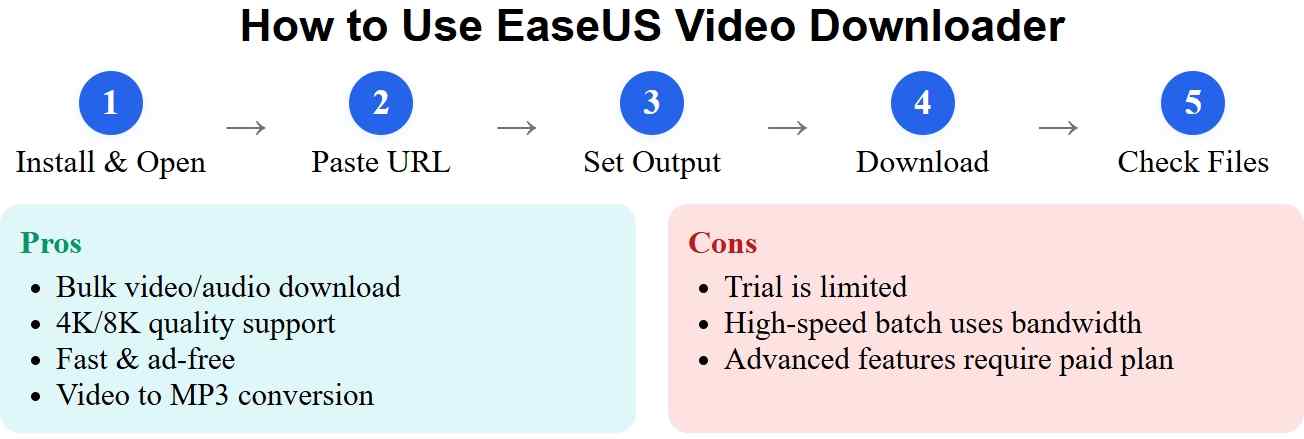
The basic workflow is straightforward: install the desktop app, paste the video URL, then choose an available format and quality before starting the download. Keep the source page open until the task has been added to the download list.
Install and open EaseUS Video Downloader
Start by installing the EaseUS Video Downloader program on your computer.
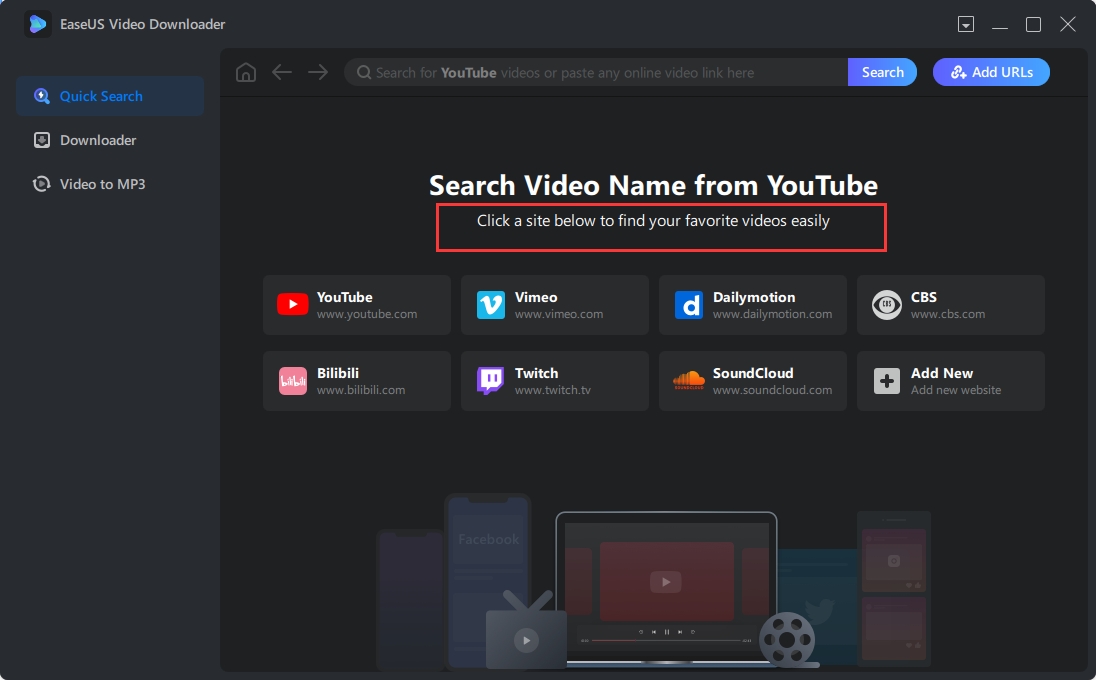
Copy/paste the video URL
Grab the link to your chosen video, paste it into the big search bar on the home screen, and hit Search. Done. Quick and painless.
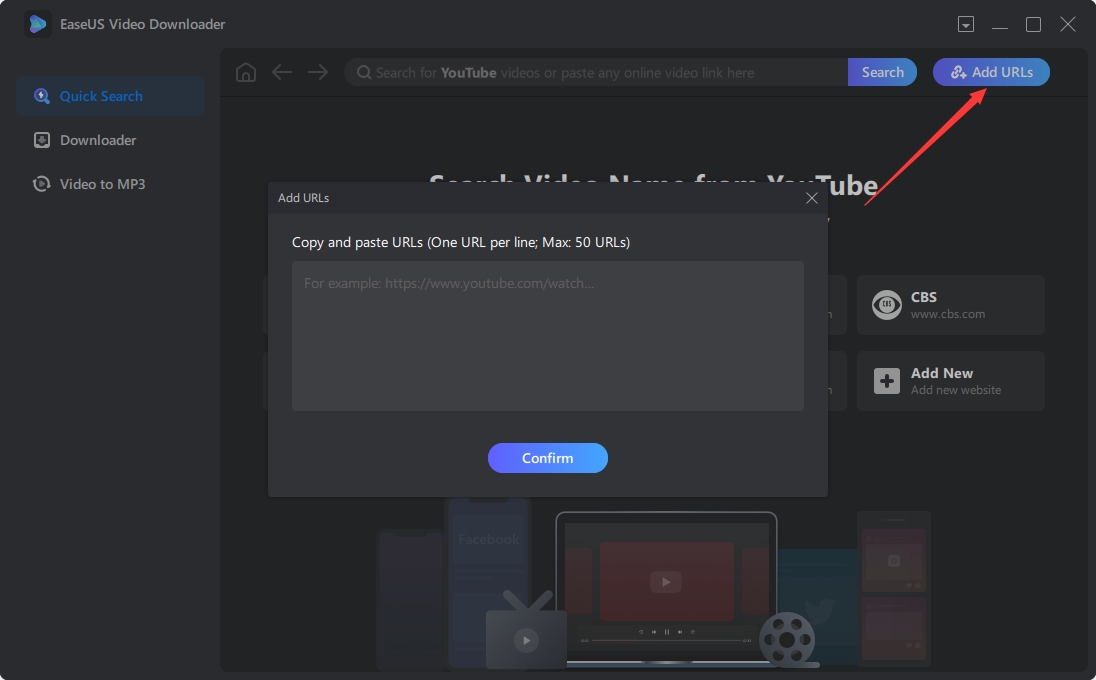
Customize the download
Choose your outputs—video/audio format, resolution, subtitle track, even where to save—then smash “Download” to get rolling.
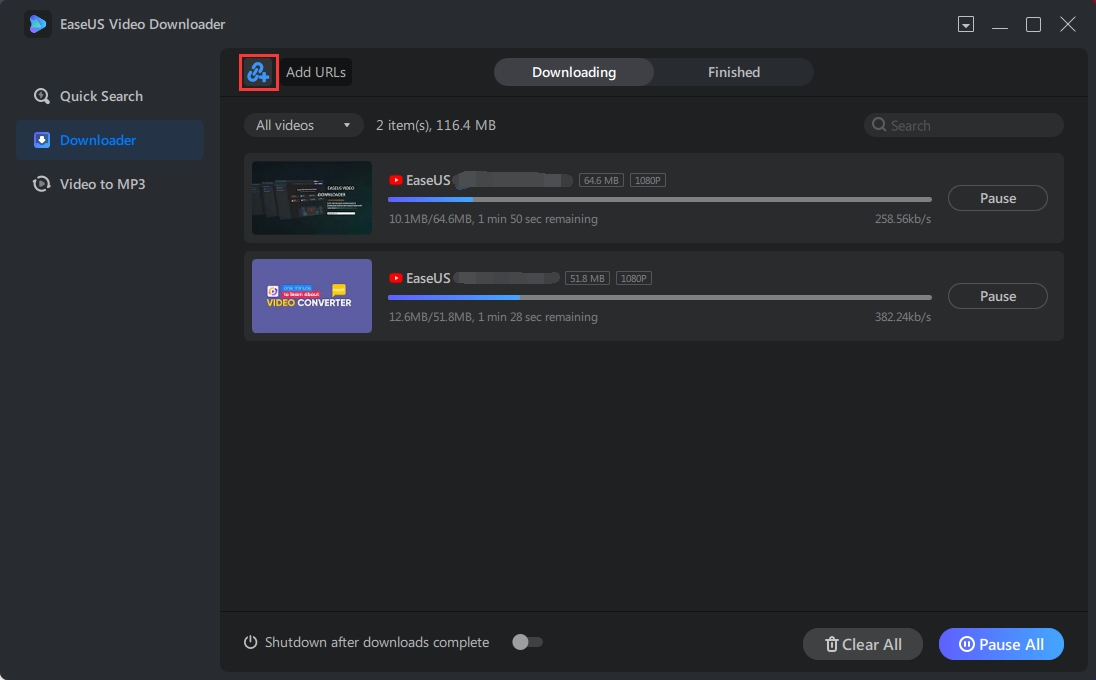
Locate downloads & verify settings
Open the Downloads list and make sure the files, target folder, and quality look right. Peek at audio/subtitle selections if you’re picky.
Basic troubleshooting
- If parsing fails, double-check the URL or clear the task list and retry.
- If your network wheezes, limit simultaneous jobs to keep everything responsive.
Once your chosen video's download is complete, you can store the saved video anywhere to enjoy it anytime.
EaseUS Video Downloader Pros & Cons
Let's have a closer look at what the real users have to say about the program.
- Enables downloading videos in bulk, including videos, audio, playlists, and channels
- Offers various downloading options like 4K/HD qualities
- Allows for converting local videos to MP3 and 10+ formats
- The quick search feature searches videos by name and URL
- EaseUS is less suited to heavily protected streaming platforms than specialized streaming tools.
- The free trial is limited, and high-speed batch tasks can consume significant bandwidth.
- Use it for personal, lawful purposes only, and respect each site’s Terms of Service—boring, but important.
- Some platforms limit downloading; features vary by region and content type.
- If you mainly need streaming-service downloads, StreamFab Video Downloader does a solid job with OTT platforms.
Is EaseUS Video Downloader Safe?
The practical safety question is whether the installer is clean and whether the app matches your intended use. Download it from EaseUS directly rather than from reposting sites, and scan the installer if your security software raises a concern. Community discussion is mixed, so a cautious installation path is more useful than relying on marketing claims alone.
What Real Users Say on Reddit and Trustpilot
Reddit threads on r/antivirus and similar forums lean heavily on one question before install: is the setup file clean? Trustpilot feedback is mixed and tracks two other patterns: buyers timing purchases around recurring lifetime-license discounts, and satisfied users who describe saving high-resolution social clips (including thumbnails and short YouTube grabs) rather than full episodes from paid streaming catalogs. When expectations shift to protected services, the tone turns critical.
EaseUS Video Downloader Alternatives
If you are comparing EaseUS Video Downloader alternatives, start with the type of content you want to save. If the app stops responding, the separate guide to fixing EaseUS Video Downloader when it is not working addresses troubleshooting without turning this review into a repair guide.
Alternative 1: StreamFab Video Downloader

StreamFab Video Downloader is a desktop alternative to the official download features offered by streaming platforms. For content you are authorized to access, where permitted by platform terms and applicable law, it can save a local copy for personal offline viewing from supported streaming and OTT services. It supports MP4 and MKV output, selectable audio tracks and subtitles, and batch or scheduled downloads; available quality depends on the service and subscription plan.
With this all-inclusive downloader, you can download videos from Amazon Prime, Netflix, Disney+, and over 1000+ sites.
Features:
- Ad-free downloads that don’t expire
- Support 60+ OTT services and 1000+ Sites
- Output premium EAC3/AC3 5.1 audios
- Preselect audio tracks and subtitle languages
- Download videos at superfast turbo speed in up to 8K
- Built-in browser for smoother grabbing
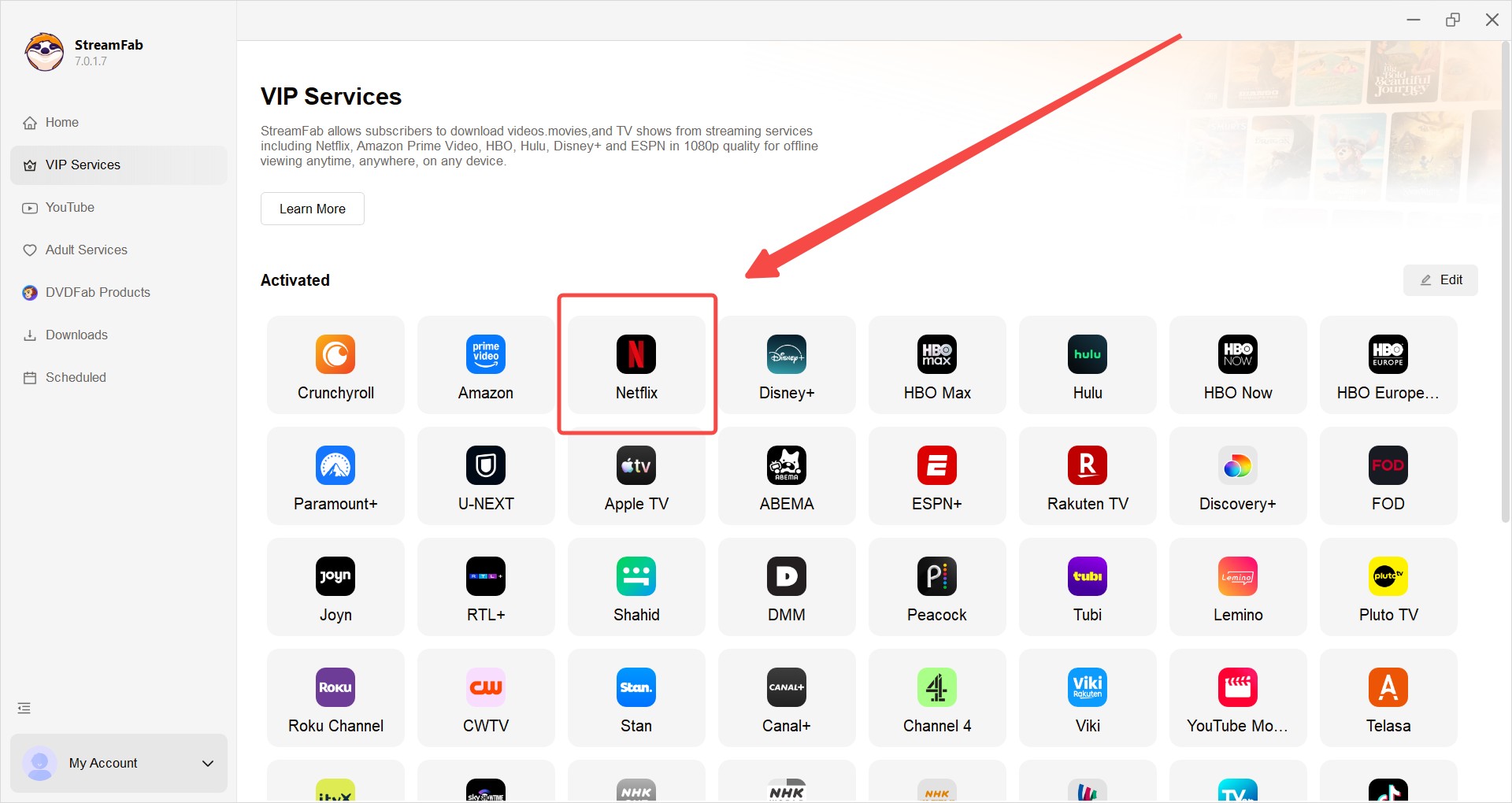
Find the website you need
Open VIP Services to spot the streaming service you want. Prefer shortcuts? Paste the video’s URL straight into the address bar on the Home page and jump right in.
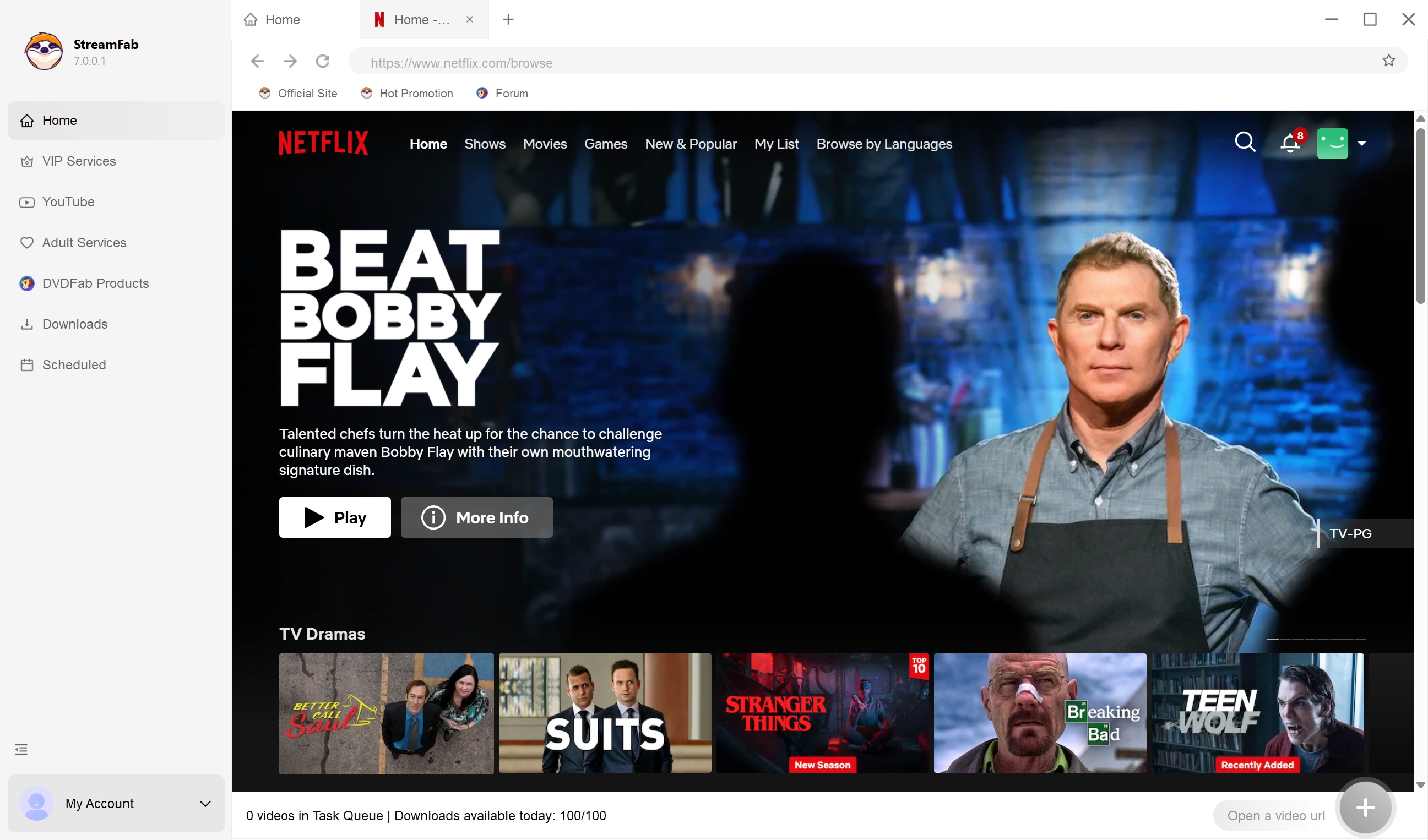
Customize the video next
Pick audio and subtitle languages, and decide how many seasons/episodes to fetch in one go. Tweak other bits if needed—quality, folder, the usual—and you’re set.
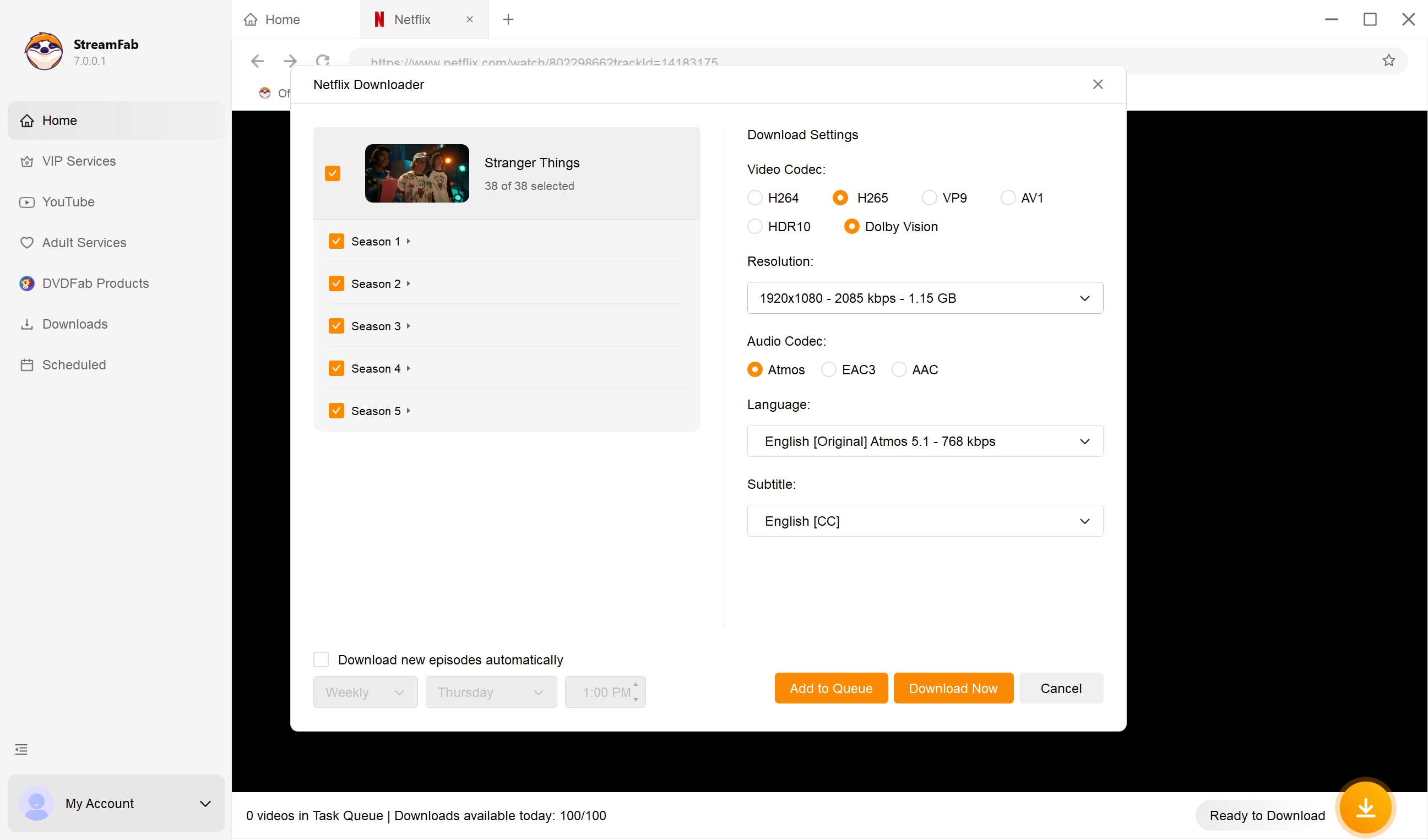
Begin to download the video
Once customized, you have the option to download it immediately or add it to your queue.
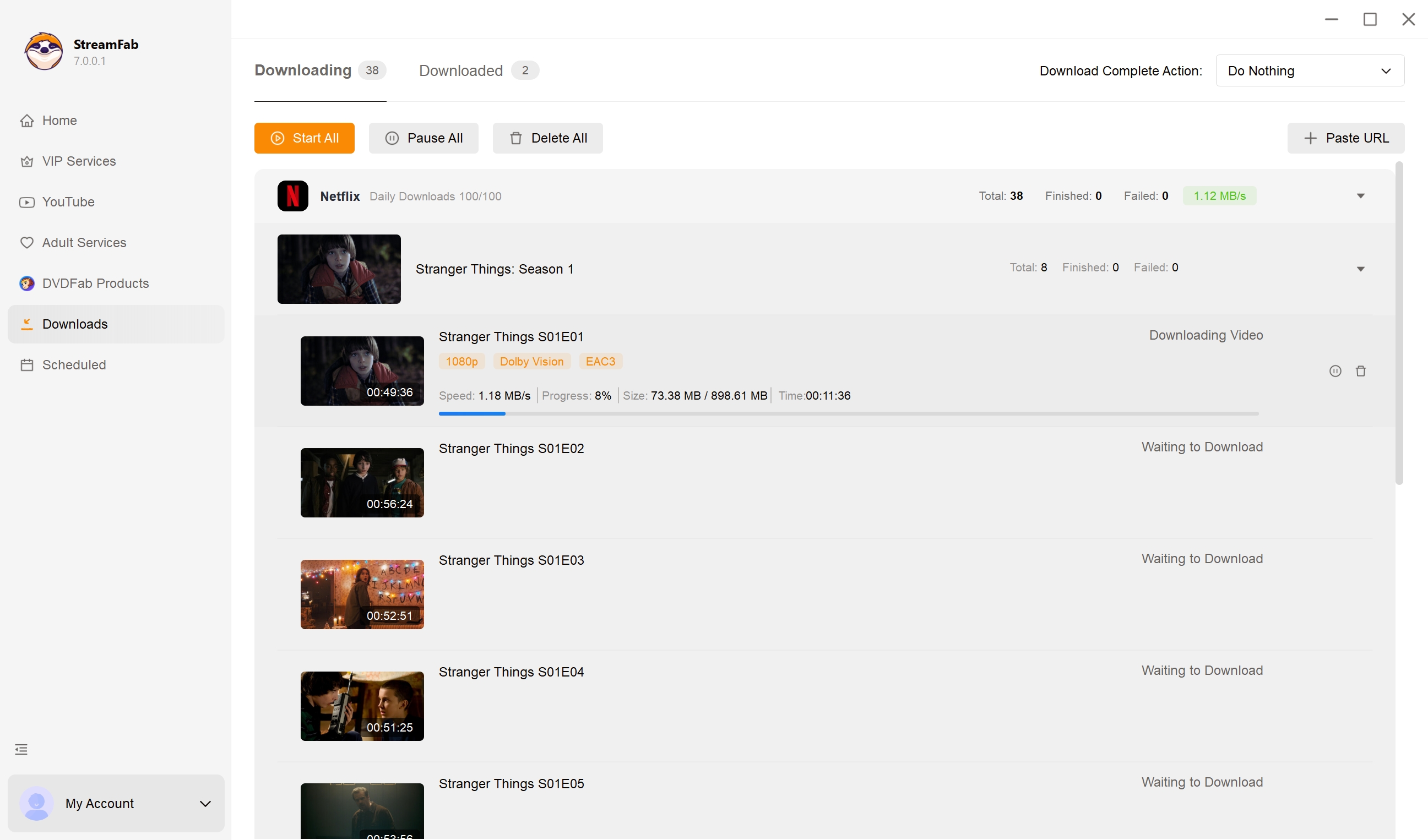
- Choose EaseUS if you mostly grab clips from social/video sites and need quick URL parsing.
- Choose StreamFab Video Downloader if you need 60+ OTT services, multi-audio/subtitles, batch queues, and up to 8K.
Alternative 2: 4K Video Downloader
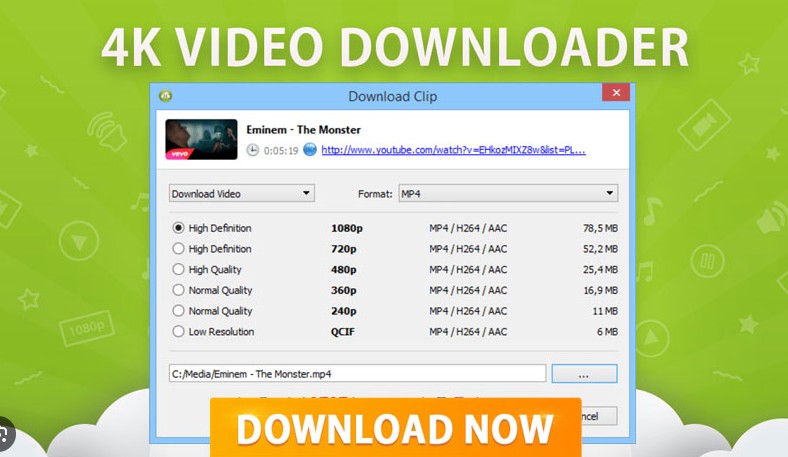
4K Video Downloader is another EaseUS Video Downloader alternative for saving videos in up to 4K resolution in different video and audio formats. It remains a practical fit for straightforward YouTube and social-video downloads, but it is less suited to protected streaming services.
- Downloads videos in up to 4K quality
- User-friendly interface & operation
- Downloads subtitles and metadata information
- Compatible with various video-sharing websites
- The advanced features are available only in paid versions
- Heaps of updates every 5 minutes, 15 minutes, 1 hour, 6 hours, or in a day can be intrusive

Freemake Video Downloader: Limited in 2026
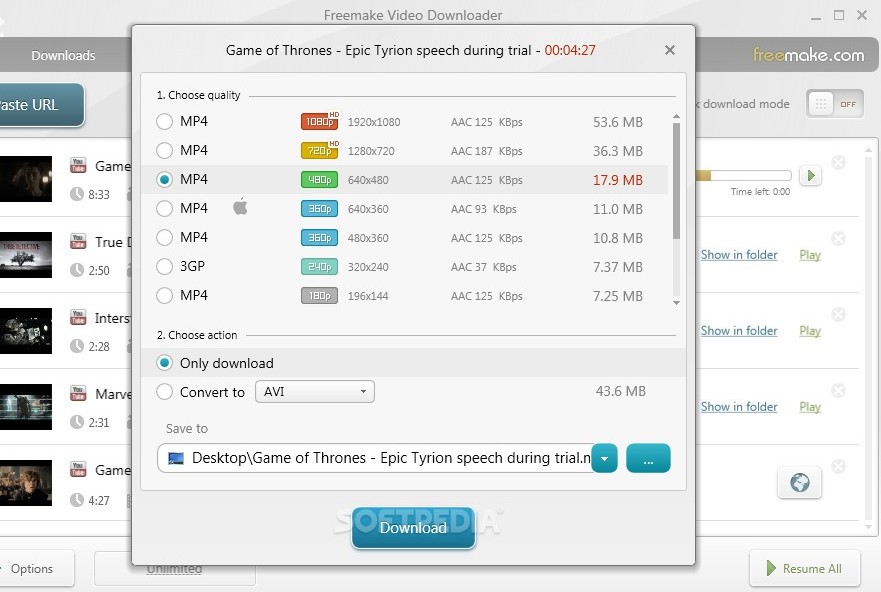
Freemake is no longer a strong equal-footing recommendation. In 2026, its aging parser can struggle with current site changes, while the free version limits clips to three minutes and adds a watermark. Readers dealing with Freemake Video Downloader not working reliably are usually better served by a currently maintained tool.
- Allows over 500 formats
- Proxy setup is available
- Supports downloading from over 10K websites
- Downloads all videos in a channel simultaneously
- Quite slow downloading speed
- The free version adds watermarks to the downloaded videos
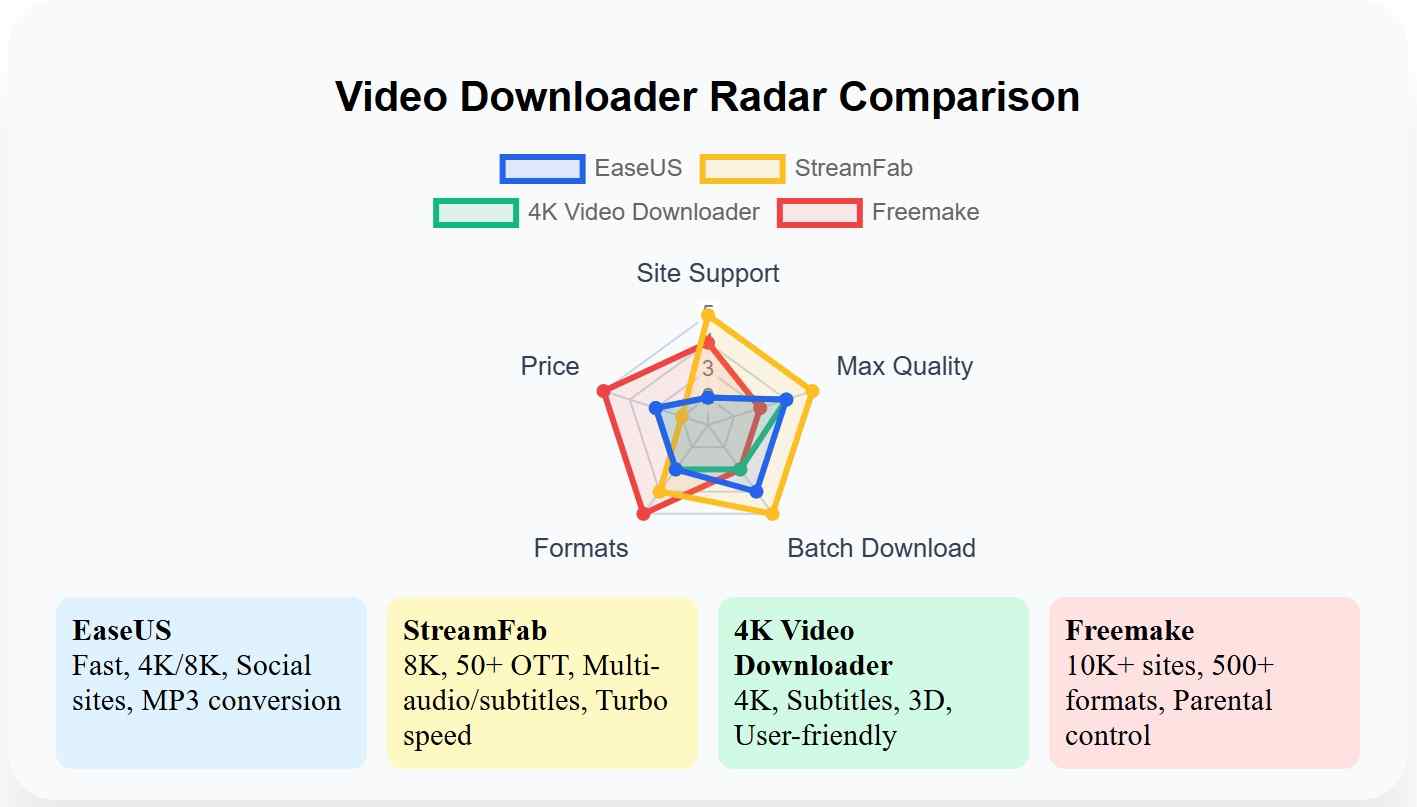
How These Tools Compare
The practical distinction is content type: EaseUS and 4K Video Downloader focus on YouTube and social video sources, while StreamFab targets supported streaming and OTT catalogs. Freemake is discussed above as a limited legacy option rather than a like-for-like recommendation.
| Functions | EaseUS Video Downloader | StreamFab Video Downloader | 4K Video Downloader | Website Support |
|---|---|---|---|---|
| Social sites and general video hosts (YouTube, Facebook, TikTok, Instagram) | Supported streaming and OTT services (Netflix, Prime Video, Disney+, Hulu, and more) | YouTube and other social video sites Max Download Quality Up to 4K when the source allows Up to 4K on supported services and plans (up to 1080p on Netflix and Prime Video) | Up to 4K on supported sources | Download Speed |
| Fast on social sources | Fast, with batch and scheduled queues | Moderate on YouTube and similar sites | Supported Formats | MP4, MKV, MP3, WAV |
| MP4, MKV | MP4, MKV, 3GP, FLV, MP3 | Video to MP3 | Yes | Yes |
| No | Protected streaming coverage | Not suited to protected streaming | Designed for supported streaming and OTT services within platform terms | Not suited to protected streaming |
| Pricing Model | Monthly, annual, or lifetime | Subscription or lifetime | Free tier with paid upgrades | N/A |
Frequently Asked Questions
1. What is the most trusted video downloader right now?
Trust depends on what you plan to save. For social and general video sites, EaseUS holds up well when installed from the official page, while community feedback on Reddit and Trustpilot stays split on the pre-install experience. For protected streaming catalogs, a dedicated desktop app such as StreamFab is a more relevant pick because it handles multi-audio tracks and subtitle selection within platform terms.
2. Is a video downloader website safer than a desktop app?
A reputable desktop app is usually easier to assess: you can verify the publisher, scan the installer, and see what it writes to your system. Many browser-based downloader sites lean on ad networks and redirect chains, so treat any site that pushes unrelated software or unusual permissions as a red flag and prefer a vetted desktop app.
3. What is the best free video downloader for Windows 11?
Treat free tiers as a way to evaluate a tool, not a full replacement for a paid app. EaseUS offers a limited trial before purchase, and Freemake caps free clips at three minutes with a watermark. On Windows 11, the practical free option is whichever tool cleanly handles the specific sites you use most.
4. Can EaseUS Video Downloader save videos as MP3 audio?
Yes. EaseUS supports MP3 audio output with common bitrate choices of 128, 256, and 320 kbps. Pick the bitrate based on the balance you want between file size and audio quality.
Conclusion
Choose EaseUS Video Downloader when you mainly want quick saves from social and general video sites. It is not the best fit for viewers focused on protected streaming services, multiple audio tracks, and subtitle choices; in that scenario, StreamFab is the more relevant desktop option for personal offline viewing of content you are authorized to access. For lighter YouTube and social-video needs, 4K Video Downloader remains a practical alternative.
Note: The analysis of downloading tools provided in this article is strictly for educational purposes and personal, offline viewing of legally accessed content. Users must comply with their local copyright laws and the Terms of Service of respective streaming platforms. We do not endorse the distribution or piracy of copyrighted materia

CleverGet offers separate downloading and recording workflows for Windows and Mac, with different file options. Compare MPD limits, annual and lifetime licenses, and trial use before choosing a workflow. The review also covers StreamFab for recurring episode downloads and explains the personal-use boundaries for local copies.
By Erika Leen - Oct 14, 2026
AnyStream (RedFox AnyStream) shut down in June 2024 and remains gone in 2026. I tested every major replacement — here are the 5 best anystream alternatives, including free options, ranked by real-world performance.
By Erika Leen - Oct 12, 2026
Evaluating the Audials One 2026 free trial? I tested its 720p caps, examined if is audials legal under Fair Use
By Erika Leen - Sep 29, 2026
Are you thinking of purchasing NoteBurner and unsure if it’s worth the investment? In this NoteBurner review, let’s delve into its product lines, particularly the NoteBurner Video Downloader’s pros and cons.
By Marcia Hatcher - Sep 28, 2026