
Quick Review of Cleverget: MPD Parsing & DRM Realities in 2026

Summary: Looking for the Cleverget full version or wondering if the downloader actually works in June 2026? Here is our deep dive into the latest DRM changes, MPD parsing limits, and alternative solutions for offline backups.
In June 2026, major platforms pushed a massive backend update, aggressively revoking old CDM Certificates and enforcing strict Widevine L1 rendering logic. During a recent anime festival, I attempted to archive several 4K streams and immediately ran into the dreaded "Black Screen of Death" and persistent DRM Handshake failures. Many users are wondering if the clever get video downloader can still bypass these new hurdles. Let's break down its actual performance based on my latest network packet analysis.

CleverGet 26.0.0.1 Teardown: 2026 Status
When testing the clever get video downloader against updated CDM certificates in version 26.0.0.1, the results are a mixed bag. It serves as a decent basic backup tool for older, unencrypted content, but it frequently struggles when platforms deploy dynamic SSAI (Server-Side Ad Insertion) slice filtering or new encryption layers. protocols.
MPD Parsing & DRM Limits
For users relying on the cleverget mpd downloader functionality, you must be aware of the recent algorithm shifts. Modern streaming sites now utilize dynamic MPD data streams combined with aggressive Geoblocking. During my tests, when trying to capture regional exclusives, I repeatedly hit the 104 error code. This happens because the software's parsing engine currently fails to dynamically pass the updated VPN signature validations, causing the MPD analysis to drop out entirely.
Mac vs Windows: Features Gap
If you are searching for a reliable cleverget mac client, be prepared for a noticeable feature gap. In the 2026 ecosystem, the development cycle for the Mac version significantly lags behind its Windows counterpart. When a new platform protocol drops, Windows users might see a patch in a week, while Mac users (especially those on newer Apple Silicon architectures) are left waiting, dealing with analysis timeouts for newly released episodes.
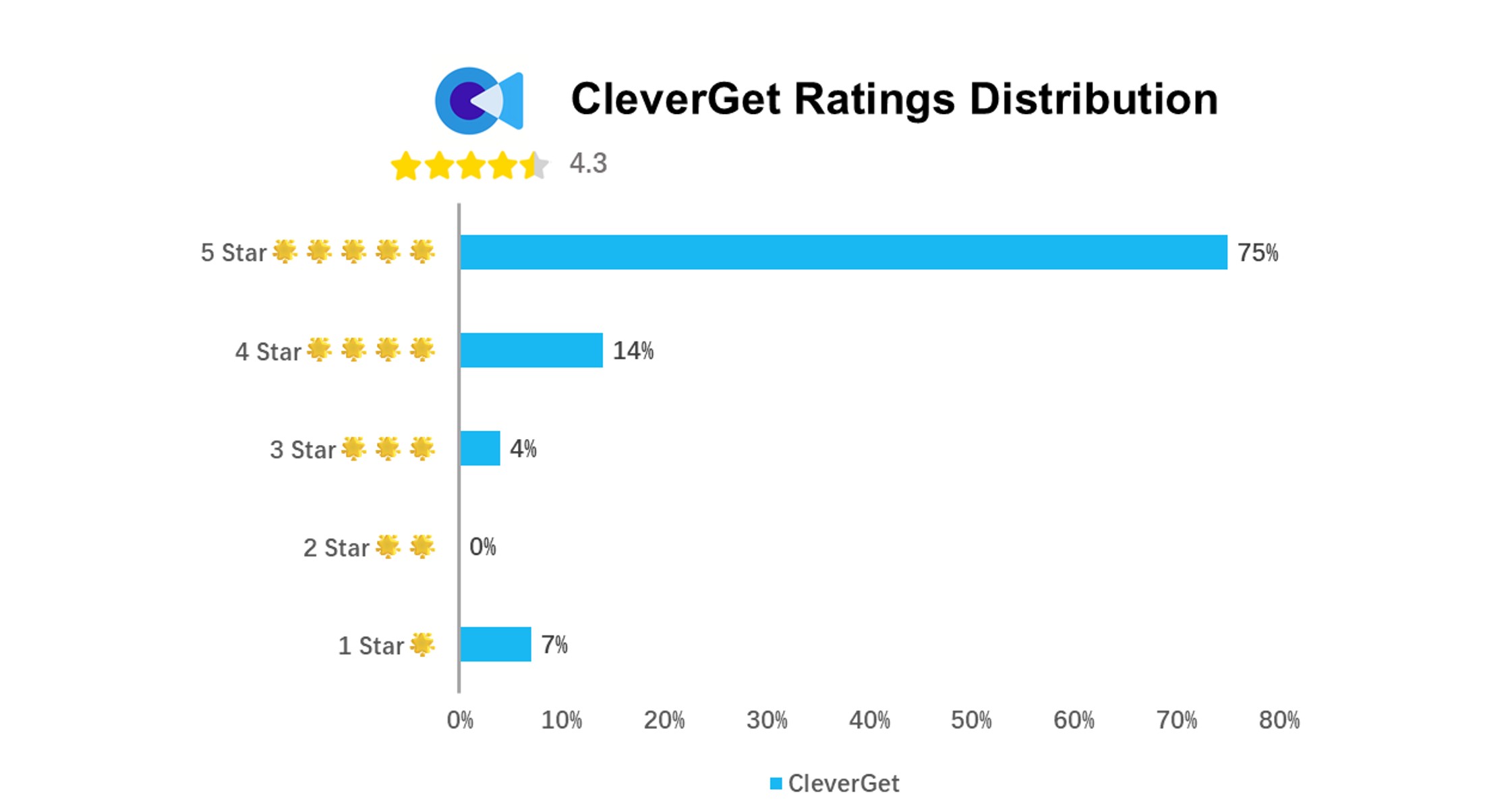
CleverGet on Trustpilot holds a decent user rating, but with only 28 reviews, the sample size is too small to judge long-term reliability against current DRM shifts.
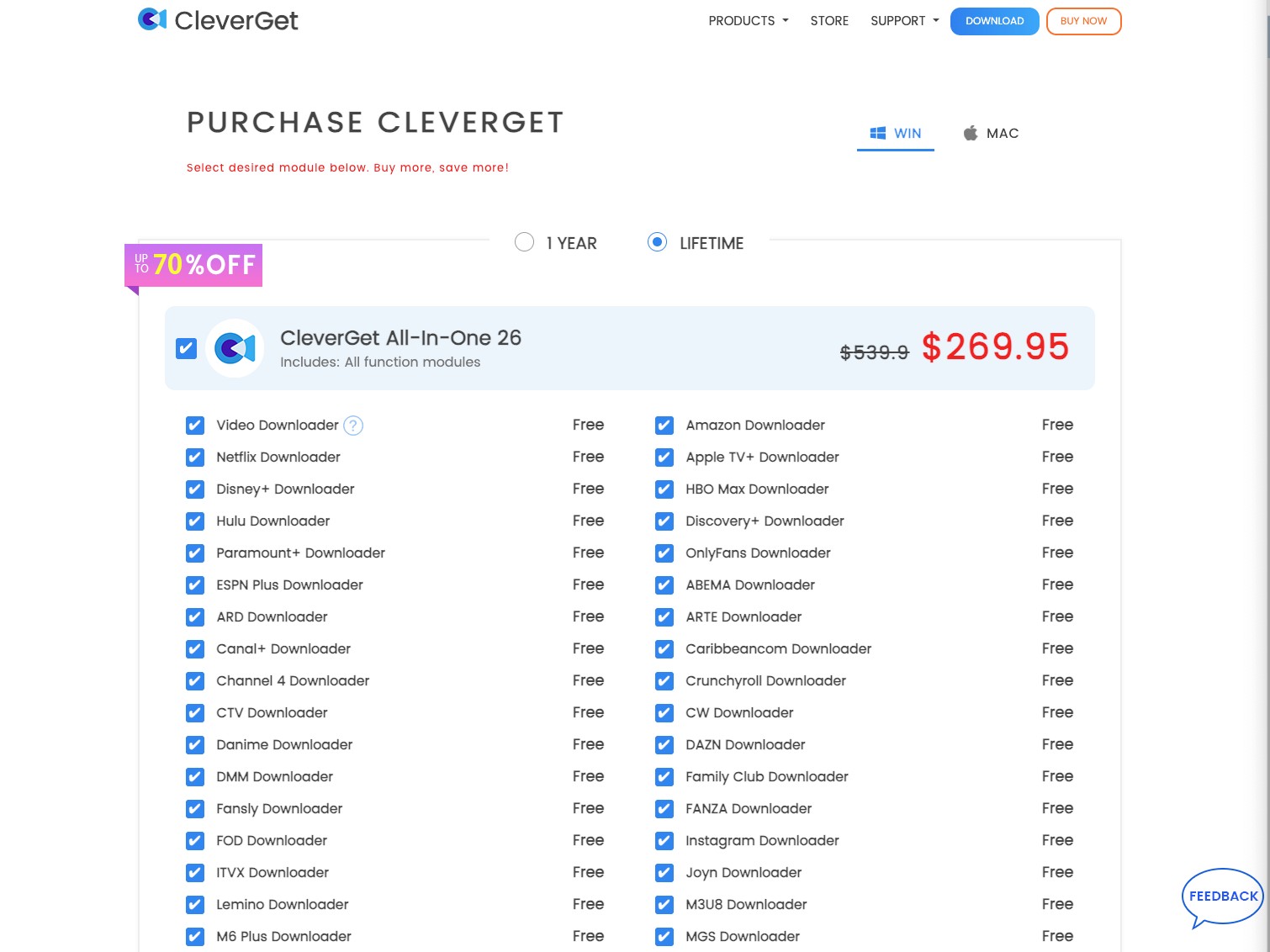
CleverGet Full Version: The $269.95 Value
With an asking price of $269.95 for a lifetime license on a single PC, many enthusiasts question the value proposition, especially when 1080p support for major platforms like Disney remains absent in recent builds. You are essentially paying a premium for a tool that currently struggles with 2026 DRM updates.
Security Warnings: Crack Version Risks
Driven by the high price tag, Reddit and tech forums are flooded with queries for a cleverget crack. I must warn you: searching for the cleverget full version via unauthorized patches is incredibly dangerous in 2026. My sandbox analysis of several "cracked" executables revealed severe security threats.
These modified versions often hijack your system's Hardware Acceleration modules to run background crypto-mining malware. Not only will this cause GPU load spikes, but it completely compromises your local network security.
CleverGet vs StreamFab: Video Downloading Battle
Before looking at alternatives, we must understand why traditional screen recording is obsolete. Screen recording causes massive CPU overhead, visible bitrate degradation, and the loss of 5.1 surround sound audio tracks. To build a high-quality offline library, you need a tool that handles 1:1 bitstream extraction.
StreamFab: Beating 2026 Widevine Updates

In my June tests, StreamFab effectively bypasses the update delays seen in other tools by staying highly compatible with the newest Widevine L1 video protocols. You get faster processing speeds, flawless MPD decryption, and extensive metadata scraping for applications like Plex.

Review the detailed comparison data below. For an extended performance test, read our full Cleverget vs. StreamFab guide.
| Feature Dimension | StreamFab | CleverGet |
|---|---|---|
| MPD Stream Parsing Success Rate | High (Adapts to 2026 Geoblocking logic) | Low (Frequent 104 errors on regional sites) |
| Mac Version Parity (Update Speed) | Same-day sync with Windows | Delayed updates, severe feature lag |
| Download Quality & Audio | Video: Up to 8K/4K/1080P Audio: EAC3 5.1/AAC 2.0 | Video: Up to 8K/1080P (Limited to 720P on Disney) Audio: Standard |
| Time Efficiency (2h Movie + 13 Episodes) | 9min 18s / 6min | 31min / 12min 42s |
| Metadata Generation (Plex Friendly) | Collection, Season, Track name, Cover, NFO | Basic writing application info only |
| Detailed Review | StreamFab Real Person Test | Cleverget Features Evaluation |
4 Steps to Download Videos and Build Your Local Backup
Download the video downloader
Install the software on your device and launch the interface.
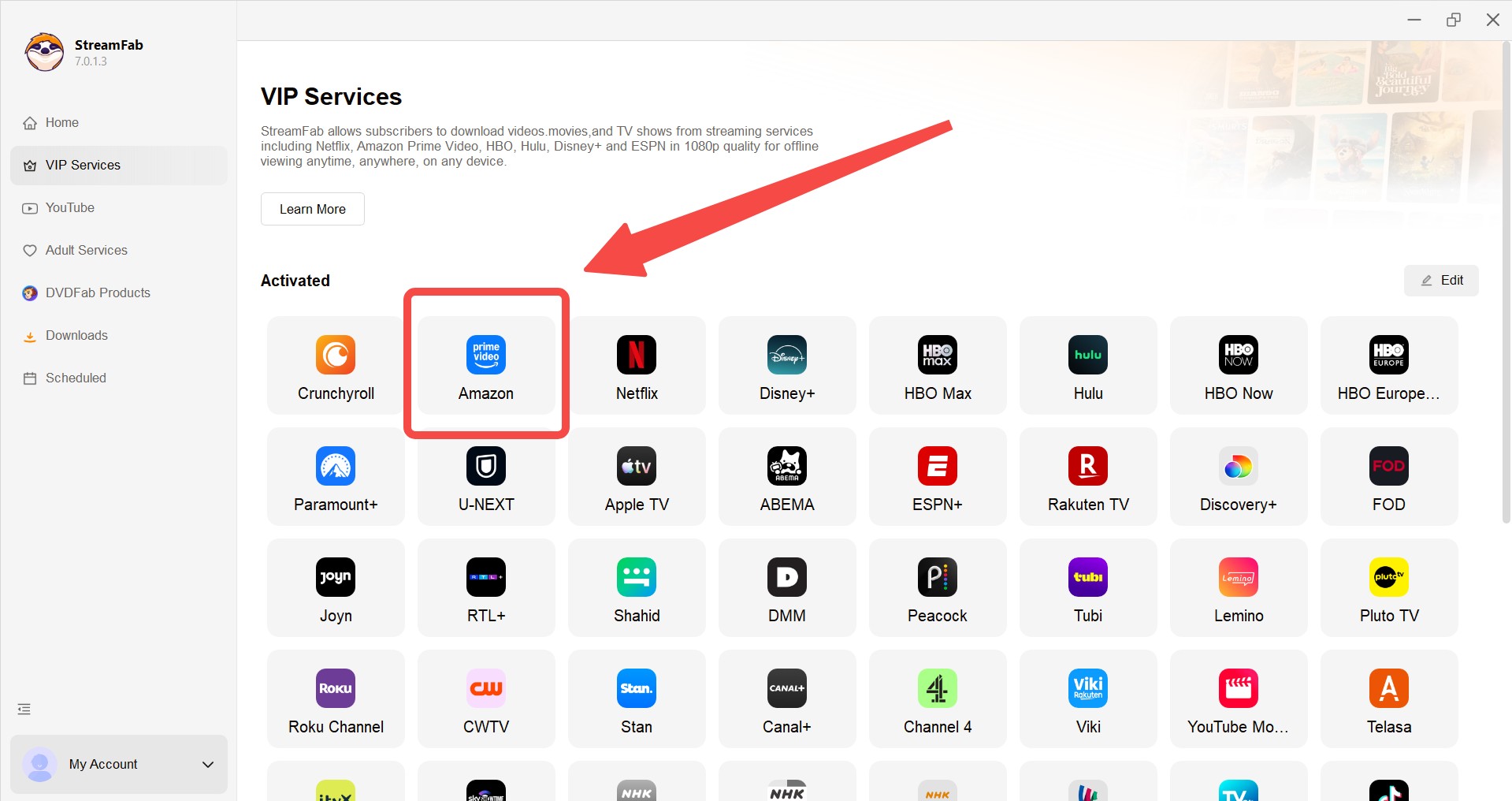
Choose the streaming service
Find your desired streaming website or paste the exact MPD/video URL directly into the address bar.
Customize the file
Wait for the analysis window. Choose your preferred resolution, audio codec, and remux subtitle preferences.
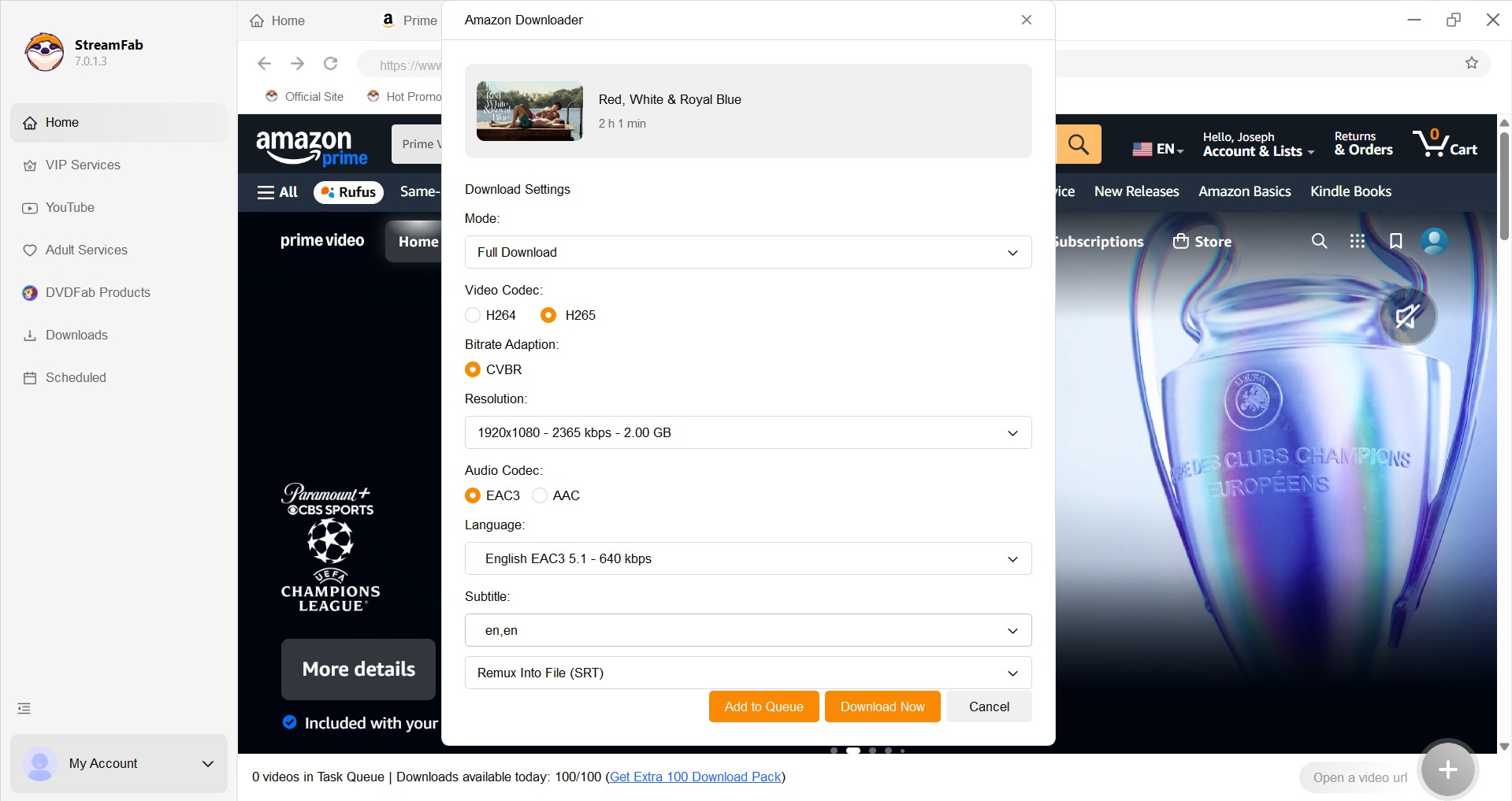
Click the download button
Add the item to your batch queue or download immediately to build your permanent offline library.
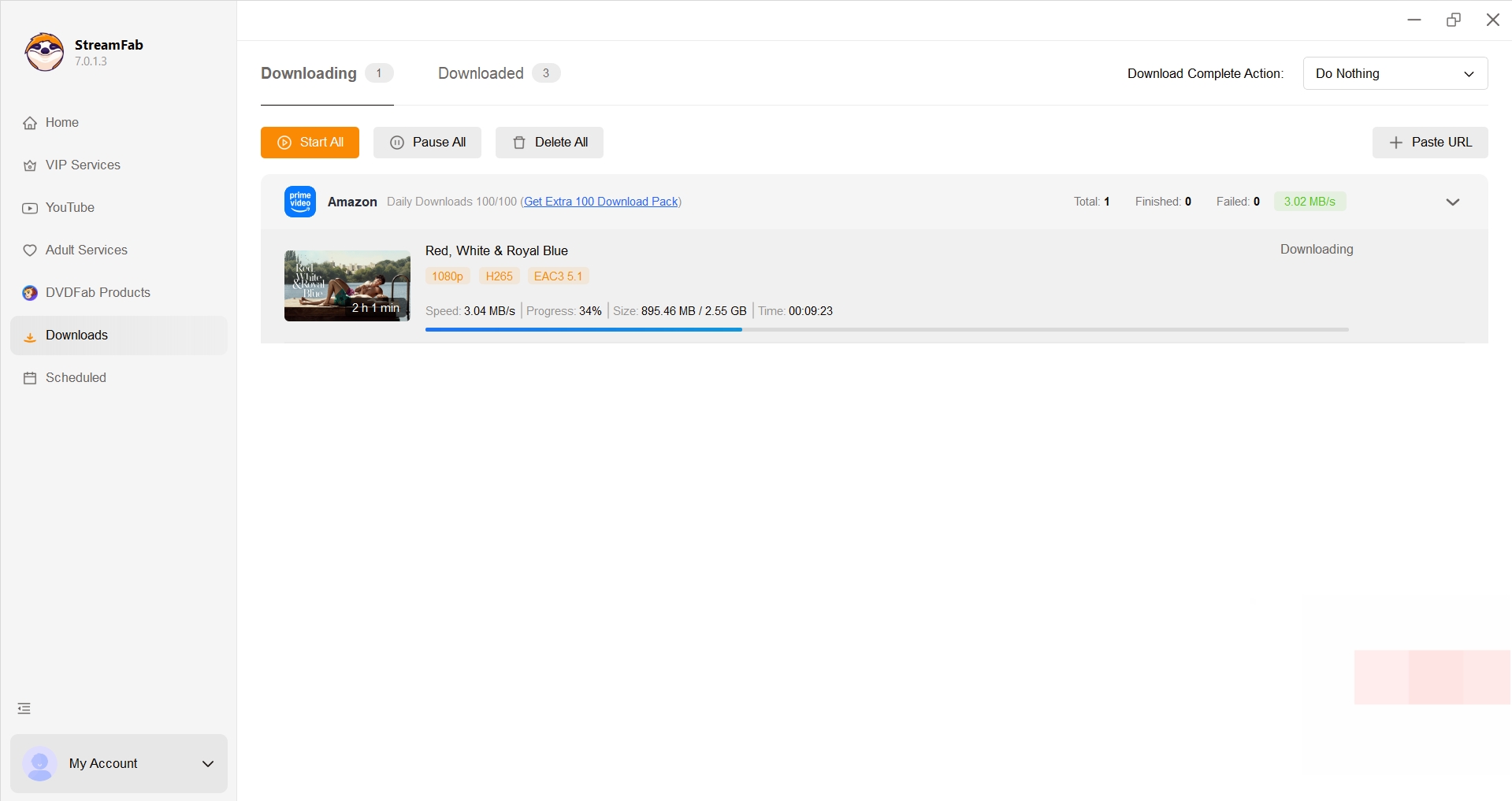

Curious about module-specific performance? Check CleverGet Amazon Downloader vs. StreamFab.
FAQ
Is Cleverget Video Downloader free to use?
No. Although it provides a free trial, you will get limited downloading speed and can only download 3 videos during the free trial. If you want to download more videos in a higher resolution, you have to pay for it.
Is it safe to use Cleverget?
Yes. Cleverget is entirely safe to use as long as you install this software from the official website, instead of some unauthorized platforms.
Does Leawo Video Downloader (CleverGet) have Chrome extension?
No. Leawo Video Downloader (CleverGet) is an individual application that needs to be installed on your device. Leawo and CleverGet did not release any Chrome extensions.
Is Cleverget Mac fully optimized yet?
No. As of June 2026, the Mac client still suffers from a delayed update cycle. When streaming platforms alter their DRM logic, the Windows version typically receives patches weeks ahead of the Mac version, leaving Apple users unable to process newly released episodes.
Conclusion
From the perspective of a digital archiving expert, building a high-quality, permanent offline library requires tools that can seamlessly adapt to 2026's aggressive DRM and Widevine certificate updates. While CleverGet 26.0.0.1 handles older files adequately, its high price tag, struggles with complex MPD parsing, and neglected Mac development make it hard to recommend as your primary daily driver. For enthusiasts who need immediate backups of new episodes with zero quality loss, switching to StreamFab is the much more reliable choice to prevent future analysis failures.
Disclaimer: Please remember that utilizing any stream-ripping software must be strictly for personal, offline viewing of content you have legally accessed. Distributing or sharing decrypted copyrighted material is strictly prohibited.
- The streaming landscape evolves rapidly. I consistently monitor these environments to ensure my technical evaluations remain accurate.
In this June 2026 update, I have verified the latest Widevine L1 enforcement shifts and tested version 26.0.0.1 to reflect its current MPD parsing capabilities.
- I also integrated community feedback regarding Geoblocking errors and addressed the security risks associated with unauthorized software modifications. (Added comprehensive testing data regarding MPD extraction limits and Mac client performance gaps in the current 2026 DRM environment.)

Downloading your favorite Netflix library permanently for your flexible offline watch is not a big deal anymore. Try the Pazu Netflix video downloader to enjoy Netflix streaming with ultimate customizations.
By Erika Leen - Sep 18, 2026
This review exposes the gap between Video Downloader Plus's marketing and its actual performance. Technical tests confirm the extension cannot process encrypted HLS streams found on major sites. Furthermore, the review critiques the lack of a free trial, forcing users to pay blindly for functionality that may not work on complex websites.
By Jacob Harrison - Sep 15, 2026

Explore a comprehensive list of alternative software to MovPilot. Learn about their features, pricing, and user reviews to make an informed decision based on 2026 DRM standards.
By Erika Leen - Sep 15, 2026
How to cancel PlayOn subscription? Will you get a refund after cancelling? This guide tells you everything you need to know about cancelling PlayOn subscriptions.
By Nicole Lopez - Sep 15, 2026