
Paramount Plus Error Code 3205: 6 Fixes to Try

Summary: Paramount Plus error code 3205 is a playback problem that can interrupt a movie, show, or live stream. The quickest way to resolve error 3205 on Paramount+ is to restart the app and device, then isolate whether the issue follows one title, one device, your network, or the service itself.
Table of Contents
What Paramount Plus Error Code 3205 Means
Error code 3205 is a general playback failure. It can be related to the Paramount+ app, a browser, a device, a network setting, a specific title, or a temporary service issue. It does not by itself identify one technical cause.
A Video Unavailable message can appear alongside the code, but the useful next step is comparison: try another title, another device, or another connection before changing several settings at once. That scope check is usually more informative than guessing at a technical label.
What Causes Paramount Plus Error Code 3205?
Paramount Plus error code 3205 can appear on TVs, streaming devices, browsers, and mobile-connected setups. The possible causes below are practical diagnostic categories, not certain explanations for every report.
Start with the simplest reversible possibilities: an outdated browser or app, unstable or filtered networking, stale stored data, or device software that needs an update. These checks take less time than replacing hardware or changing account settings.
1. Unsupported or Outdated Browser
A browser-specific error code 3205 on Paramount Plus can occur when the browser is outdated or an extension interferes with playback. Use a current browser supported by Paramount+, temporarily disable conflicting extensions, and compare playback in a private window or another browser.
Browser problems are worth considering when the same title plays in one browser but not another. Common checks include updating the browser, allowing required site data, and temporarily turning off extensions that alter page content or network requests.
- Browser privacy or content-blocking settings may prevent parts of the player from loading.
- Old browser versions may not handle the current web player consistently.
- Extensions that block ads, scripts, or network requests can be tested by disabling them temporarily.
2. Unstable Internet or Network Filtering
A network problem is more likely when error code 3205 appears across several titles or devices on the same connection. Unstable Wi-Fi, a router issue, VPN use, or restrictive filtering can all be worth testing, but a selective failure does not automatically mean your connection is the cause.
Restart the router, test a wired connection where practical, or compare playback on an alternate connection. If another device works on the same network, focus on the affected device before treating bandwidth as the explanation.
3. Corrupted Cache or App Data
Stale browser cache, cookies, or app data can interfere with playback. Clearing stored data is a common troubleshooting step, although it may require you to sign in again.
In a browser, clear Paramount+ site data, cookies, and cached files, then sign in again. In an app, use its available clear-data option or reinstall the app if the problem continues. The detailed reset paths appear in Fix 2 below.
4. Outdated App or Device Software
An outdated Paramount+ app or device operating system can contribute to playback problems. Install the latest app version and device software offered through the official app store and system settings, then restart the device before trying again.
- The Paramount+ app has an update available.
- The TV, streaming device, browser, or computer needs a system update.
- Stored app data is damaged or out of date.
- The issue is isolated to one title, one device, or one access path.
Fix Paramount Plus Error Code 3205: Six Steps
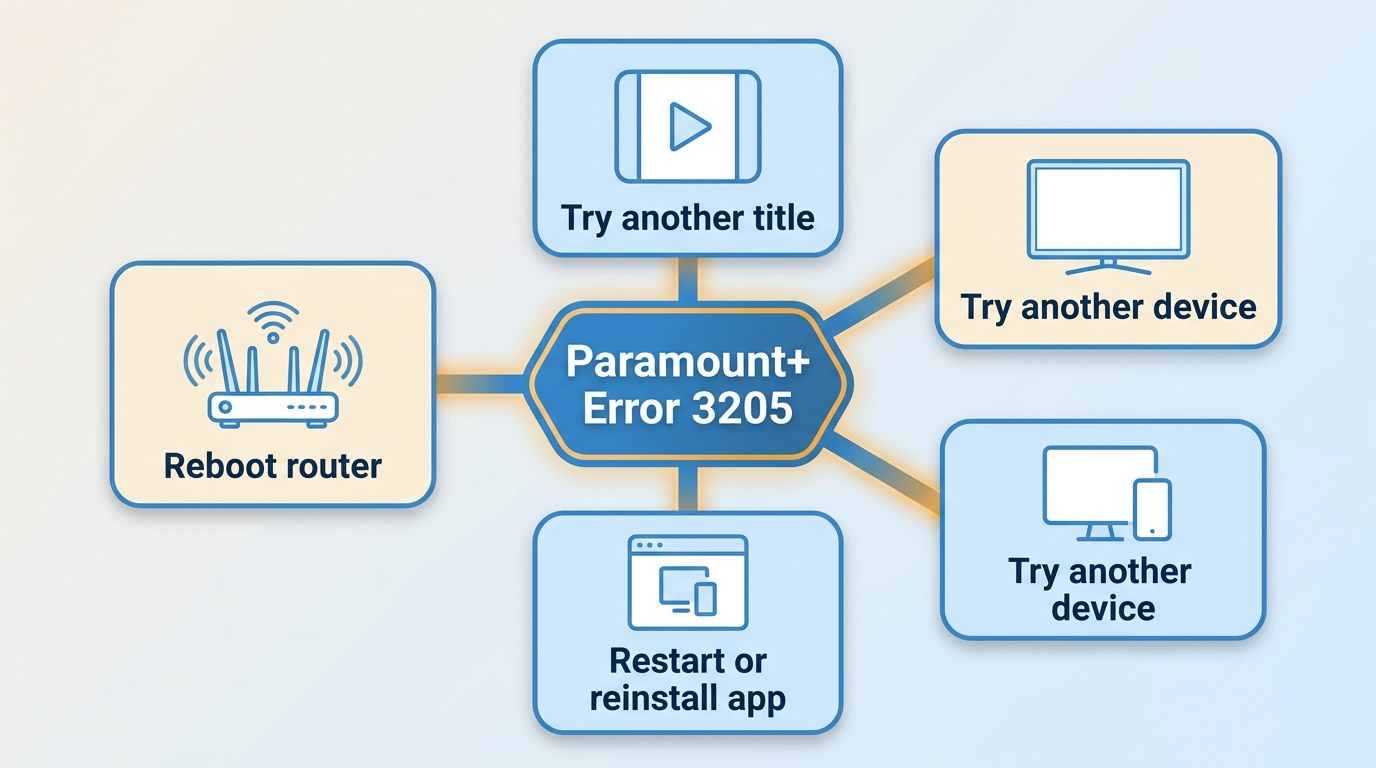
Start by force-closing Paramount+, restarting the TV or streaming device, power-cycling the modem or router, relaunching the app, and retrying the same title. Work through the six steps in order, because reversible resets should come before account changes, hardware replacement, or an optional offline-viewing workflow.
| Where the error appears | What the pattern suggests | Best next test |
|---|---|---|
| One title only | The issue may be title-specific or temporary. | Try another title on the same device before changing network settings. |
| One device only | The app, browser, or device software needs attention. | Clear data, reinstall the app, and install device updates. |
| Paramount+ app but not browser | The app installation or device path may be affected. | Update or reinstall the app, then compare again. |
| Every device on the home network | The network or a wider service issue is more plausible. | Restart the router and test another connection or service status. |
1. Restart the App, Device, and Router
Close Paramount+ completely, then restart the playback device. Unplug the device and modem or router briefly, reconnect the router first, wait for the connection to return, and relaunch Paramount+. Retry the same title before moving to the next step so you can tell whether the reset changed the result.
2. Clear Cache or Reinstall Paramount+
In a browser, clear the Paramount+ site data, cookies, and cached files, then sign in again. On a TV or streaming device, clear the app data if that option is available; otherwise, uninstall and reinstall Paramount+. A reinstall and data reset can require a new sign-in, but they are useful when the error keeps returning on one device.
3. Disable VPN, Ad Blocking, or Restrictive DNS
Browser extensions used to manage Paramount+ without commercials, VPNs, proxies, and restrictive router-level filtering can sometimes interfere with playback requests. Temporarily disable them one at a time, then test on an alternate network if possible. The alternate-network comparison is the clearest way to tell whether filtering is involved.
4. Follow Device-Specific Reset Steps
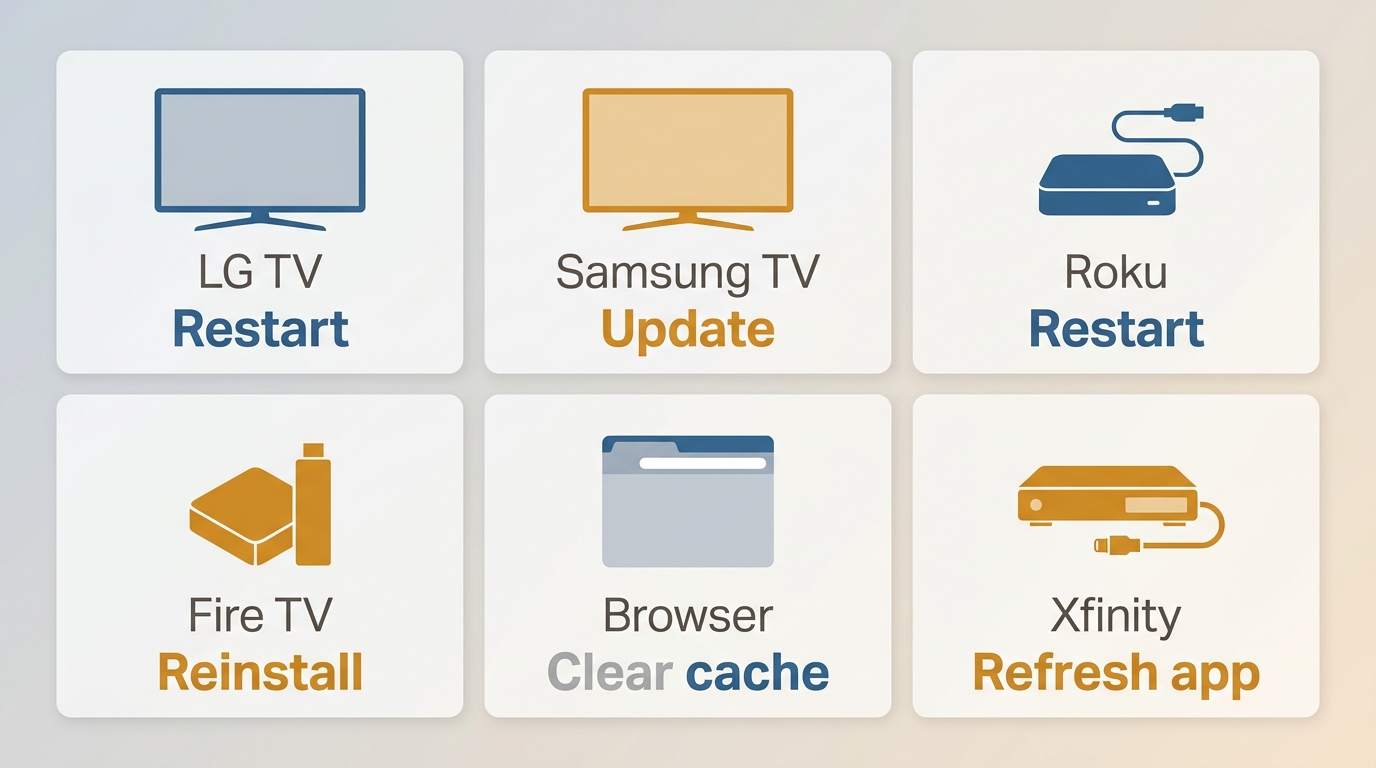
When error code 3205 on TV appears on one device only, use that device's reset path before replacing hardware. On LG and Samsung TVs, restart the TV, update its software, then remove and reinstall Paramount+ if needed.
On Roku and Fire TV, force-close or restart the app, restart the device, and check for channel or system updates. In a browser, clear site data and test another supported browser. On Xfinity Flex or X1, restart the box and refresh the Paramount+ app path. This step is for one-device failures, not errors appearing everywhere.

5. Update Paramount+ and Device Firmware
Install the newest Paramount+ app and device firmware currently offered for your hardware through its official update channels. A newly released app update is especially worth checking when code 3205 affects one TV or one device while playback works elsewhere. Restart after updating, then retry the affected title.
6. Isolate Title, Device, Network, or Service Issues
Try another title, another device, the browser versus the app, and an alternate connection. If available, compare another profile as well. A one-title or one-device pattern is more informative than a generic speed test. If the error persists through those comparisons, check for a wider service issue and contact Paramount+ support with the affected title, device model, app version, time of the error, and the steps already tried.
StreamFab for Authorized Personal Offline Viewing
This is not a fix for error 3205. For content you are authorized to access with an active Paramount+ subscription, for personal use, and where permitted by platform terms and applicable law, StreamFab provides a local-file workflow for offline viewing. It can be relevant if you want to download from Paramount Plus after resolving access issues; readers comparing broader categories can also review best Paramount Plus downloaders.
- Local-file workflow: Save authorized Paramount+ content for personal offline viewing, subject to platform terms and applicable law.
- Video formats: Choose MP4 or MKV output for playback in compatible media players.
- Audio and subtitle choices: Select available audio languages paramount plus to mp4 and download subtitles when those options are offered for the title.
- Batch options: Use batch downloads or scheduled tasks for selected episodes when appropriate.
- Best for: Viewers with an active subscription who want a desktop workflow for personal offline viewing.
Save Authorized Paramount+ Content for Offline Viewing
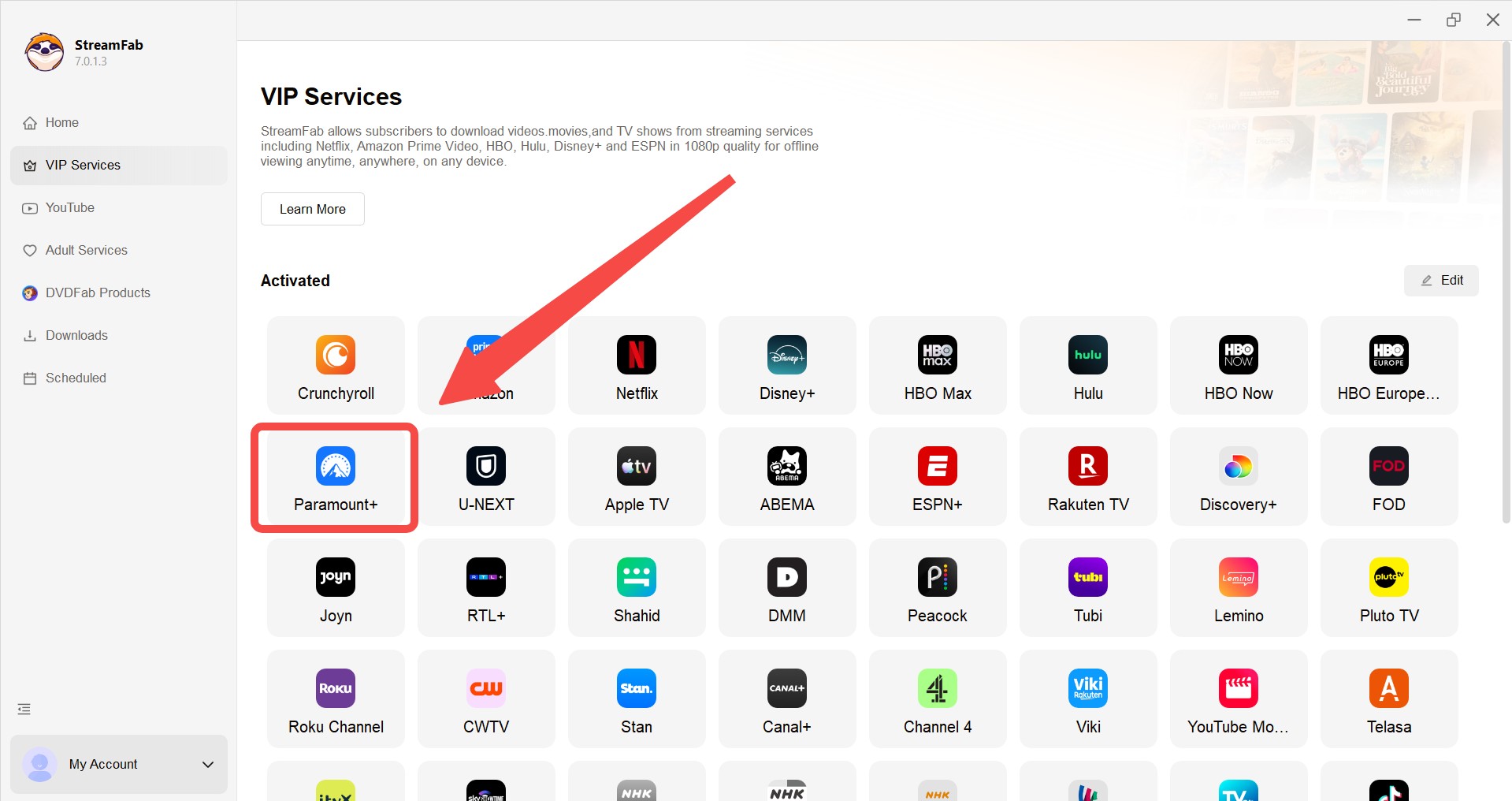
Step 1: Open StreamFab Paramount Plus Downloader, select VIP Services, and open Paramount+ from the supported services.
Step 2: Sign in with your active account, then choose the movie or show you are authorized to access. Select the available video, audio, subtitle, and output settings.
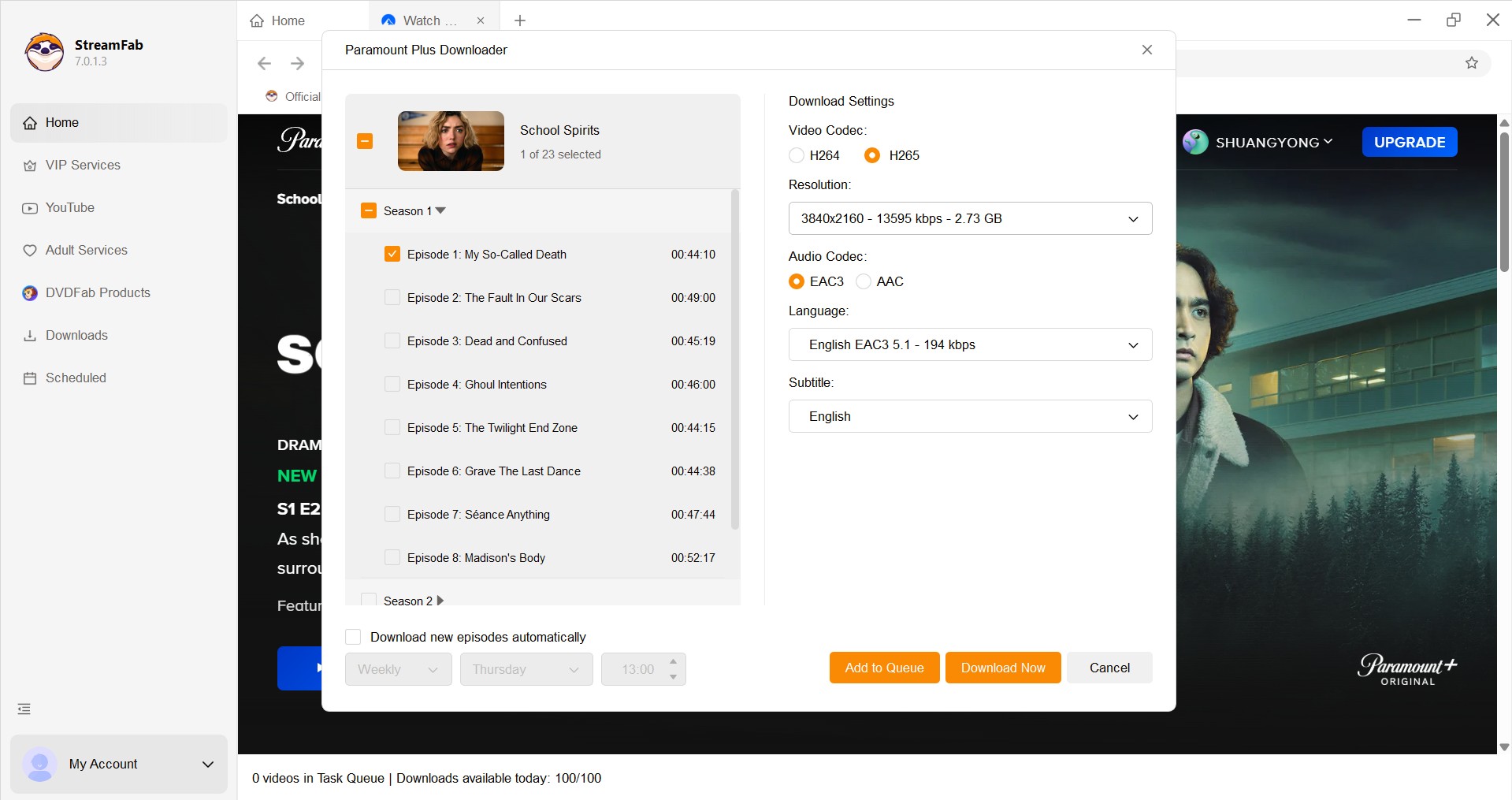
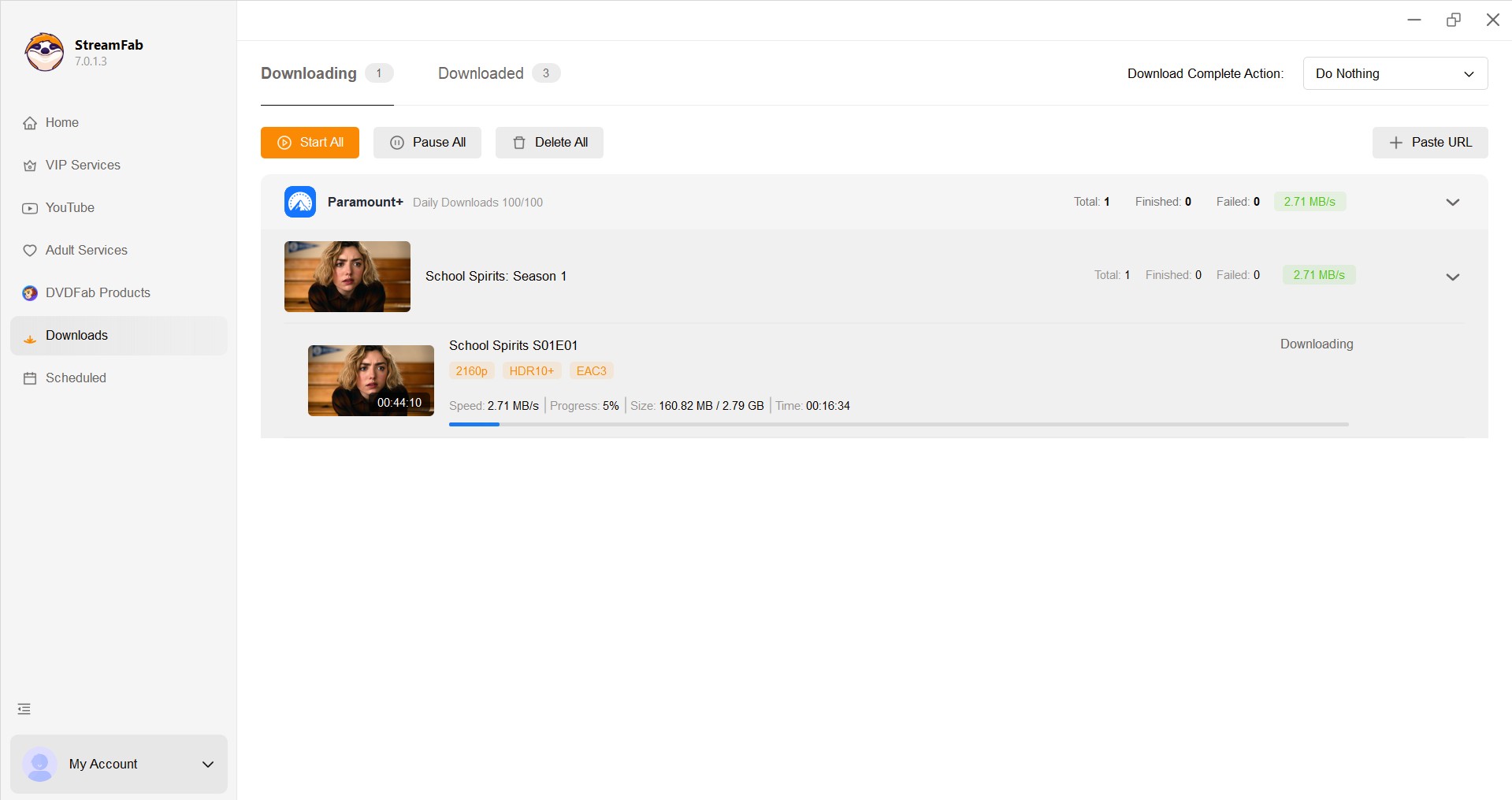
Step 3: Select the episode or episodes, choose subtitles if needed, and click Download Now. For format-specific settings, the Paramount Plus to MP4 workflow explains the MP4 option in more detail.
Frequently Asked Questions (FAQs)
Why does Paramount+ error 3205 affect only one show or one TV?
A title-specific or device-specific failure can occur even when your account and internet connection work elsewhere. Try another title on the same device, then try the affected title on another device. Those two comparisons help narrow the issue before you reset the network.
Can DNS or ad blocking trigger error 3205?
They can be an advanced possibility after the basic restart and update steps fail. Temporarily disable browser ad blocking, VPNs, proxies, or restrictive router filtering, then test an alternate connection. Do not assume one DNS setting is responsible unless the comparison changes the result.
Does error code 3205 mean Paramount+ is down?
Not necessarily. First test another title, another device, and another connection. If playback fails broadly after those checks, a wider service issue becomes more plausible. If it affects one title or device, local troubleshooting is usually the more useful next step.
What should I do if error 3205 keeps coming back?
Update the Paramount+ app and device software, clear app data or reinstall the app, and record whether the error follows a particular title, device, or network. If it still returns after those checks, contact Paramount+ support with the device model, app version, time of the error, affected title, and steps already tried.
Conclusion
Start with the restart sequence, then clear cache or reinstall Paramount+ if the error remains. Use the device-specific reset path when one TV or streaming device is affected, and compare titles, devices, and connections before contacting support. Isolating the failure pattern is more reliable than guessing at a technical cause.
For viewers with an active subscription who want a separate personal offline-viewing workflow, the optional StreamFab section above explains its desktop approach and available file settings. It does not resolve a temporary Paramount+ playback error or change official app limits; information about Paramount Plus download limits is covered separately.

In this guide, I'll show you how to easily watch and download your favorite shows from Paramount Plus to MP4 format.
By Marcia Hatcher - Aug 25, 2026

Paramount Plus limits its download library to 25 titles, with 30-day and 48-hour viewing windows on supported mobile devices. This guide explains the official rules, a seven-step fix for ghost limit errors, and when Windows or Mac local-copy tools make sense for authorized offline viewing.
By Marcia Hatcher - Aug 7, 2026

Paramount+ allows SHOWTIME subscribers to download content on mobile devices, but with limitations like no PC support. StreamFab Paramount Plus Downloader removes these restrictions, enabling permanent 1080P downloads in MP4/MKV format for both Essential and SHOWTIME users.
By Jacob Harrison - Aug 7, 2026
Whether your internet connection is not strong, or you don't have enough space in your device, there are many other reasons why you might not be able to download shows and films from Paramount Plus. Hence, we hope you can resolve these issues with the help of this article.
By Marcia Hatcher - Aug 5, 2026