
Best Fansly Downloader for Android — Save Videos on Mobile [2026 Guide]

Summary: No reliable Android app can download DRM-protected Fansly videos directly on your phone. The tested solution: use StreamFab Fansly Downloader on PC to grab 1080p originals, then transfer via USB, cloud, or Nearby Share. Full workflow takes ~5 minutes.
I tried four different Fansly downloader Android apps before accepting the truth: there is no reliable way to download Fansly videos directly on your phone. Every mobile-only solution I tested either failed on DRM-protected content, crashed mid-download, or turned out to be a repackaged scam.
The method that actually works? Download on your PC with StreamFab Fansly Downloader, then transfer the files to your Android. It sounds like an extra step, but the entire process takes about 5 minutes — and you get original 1080p quality instead of whatever compressed mess mobile tools produce.
This guide covers everything I tested so you don't waste time on dead ends.
- Fansly APK Safety Check — Official app has no download button; MOD APKs are security risks
- StreamFab + Transfer Method — The only workflow that reliably gets 1080p Fansly videos on Android
- 3 Ways to Transfer Files — USB, cloud sync, and Nearby Share compared
- My Verdict — Why desktop-to-mobile beats every pure Android solution
Can You Download Fansly Videos on Android? — Not Directly
If you searched for "fansly downloader android" expecting a one-tap app that saves videos to your phone, I have bad news: that app doesn't exist in any reliable form.
Here's the situation in 2026:
- Fansly's official app has no download button. It's a streaming-only platform — you can watch content, message creators, and manage subscriptions, but there's no "Save to device" option anywhere in the interface.
- Third-party Android apps claiming to download Fansly content exist, but they consistently fail on DRM-protected videos (which is most paid content).
- Online download tools (paste-URL services) work on some unprotected content but choke on anything with DRM encryption.
The core problem is technical: Fansly uses DRM to encrypt its video streams. Mobile apps don't have the processing architecture to handle DRM-compatible downloading the way desktop software does. That's why every serious Fansly video downloader — the ones that actually work on paid, protected content — runs on Windows or Mac.
The practical solution: use StreamFab Fansly Downloader on your PC to grab the files, then transfer them to your Android phone. I'll walk through both parts below.
Why There's No Reliable Fansly Downloader Android App (Yet)
It's not that developers haven't tried. The problem is Fansly's content protection makes mobile downloading fundamentally harder than desktop downloading.
The DRM Problem on Mobile
Fansly encrypts its paid video content with DRM (Digital Rights Management). On desktop, specialized software like StreamFab can interface with the encrypted stream through a controlled browser environment, processing the decryption locally. On Android, apps don't get the same level of system access to handle this.
For a deeper technical explanation of how Fansly protects its content, see our complete guide to Fansly DRM.
What Happens When Mobile Apps Try
I tested several approaches that claim to work as a fansly downloader mobile solution:
| Method | Free Content | Paid/DRM Content | Verdict |
|---|---|---|---|
| Online URL paste tools | Sometimes works | Fails | Unreliable |
| Mobile browser extensions | Inconsistent | Fails | Unstable on mobile |
| Third-party APK apps | Sometimes works | Fails or low quality | Security concerns |
| Android screen recording | Black screen | Black screen | DRM blocks capture |
The pattern is clear: mobile tools can occasionally grab unprotected preview content, but they consistently fail on the paid videos you actually want to save. And Android's built-in screen recorder? DRM blocks the video layer entirely — you'll record audio with a black screen.
What About Fansly APK Downloads? — A Safety Check
Search for "fansly apk download" and you'll find dozens of results. Most of them are not what they claim to be. Here's what you need to know.
The Official Fansly App
Fansly does have a legitimate mobile presence. You can access it through:
- Web app: Visit fansly.com in your mobile browser and add it to your home screen. This is the official recommendation from Fansly.
- Third-party app stores: Verified versions exist on APKPure and similar repositories (not on Google Play due to content policies).
But here's the critical point: the official Fansly app has no video download feature. It's purely for browsing, streaming, messaging, and managing your subscriptions. Installing the app won't help you save videos offline.
"Fansly MOD APK" — Stay Away
You'll see sites offering "Fansly MOD APK" or "Fansly Premium Unlocked APK." These are red flags:
- Security risk: Repackaged APKs can contain malware, keyloggers, or adware. You're giving an unknown app access to your device — potentially including your Fansly login credentials.
- They don't work: Fansly's DRM is server-side. A modified app can't magically unlock download capability that the server doesn't provide.
- Account ban risk: Using modified clients violates Fansly's Terms of Service and can get your account permanently banned.
If you need the Fansly app, get it from the official website or a verified source like APKPure. But understand that no version of the Fansly app — official or modified — includes video downloading.
The Method That Actually Works — StreamFab Fansly Downloader + Transfer to Android
After wasting time on mobile apps, here's the workflow I actually use every week: download videos on my PC with StreamFab Fansly Downloader, then transfer the MP4 files to my Android phone. What mobile apps took 20 minutes to fail at, StreamFab finished in under 3 minutes.

- DRM handling: StreamFab's desktop architecture can process DRM-encrypted streams that mobile apps can't touch
- Original quality: Downloads the source file at up to 1080p with AAC 2.0 audio — no re-encoding, no quality loss
- Batch downloading: Queue up an entire creator's page and download everything at once, in the background
- Format choice: Save as MP4 (universal Android playback) or MKV
- Both platforms: Available on Windows and Mac
Step-by-Step: Download Fansly Videos with StreamFab
Step 1: Install and launch StreamFab Fansly Downloader
Download StreamFab on your Windows PC or Mac. The installer takes about 2 minutes. Launch the application and you'll see the built-in browser.
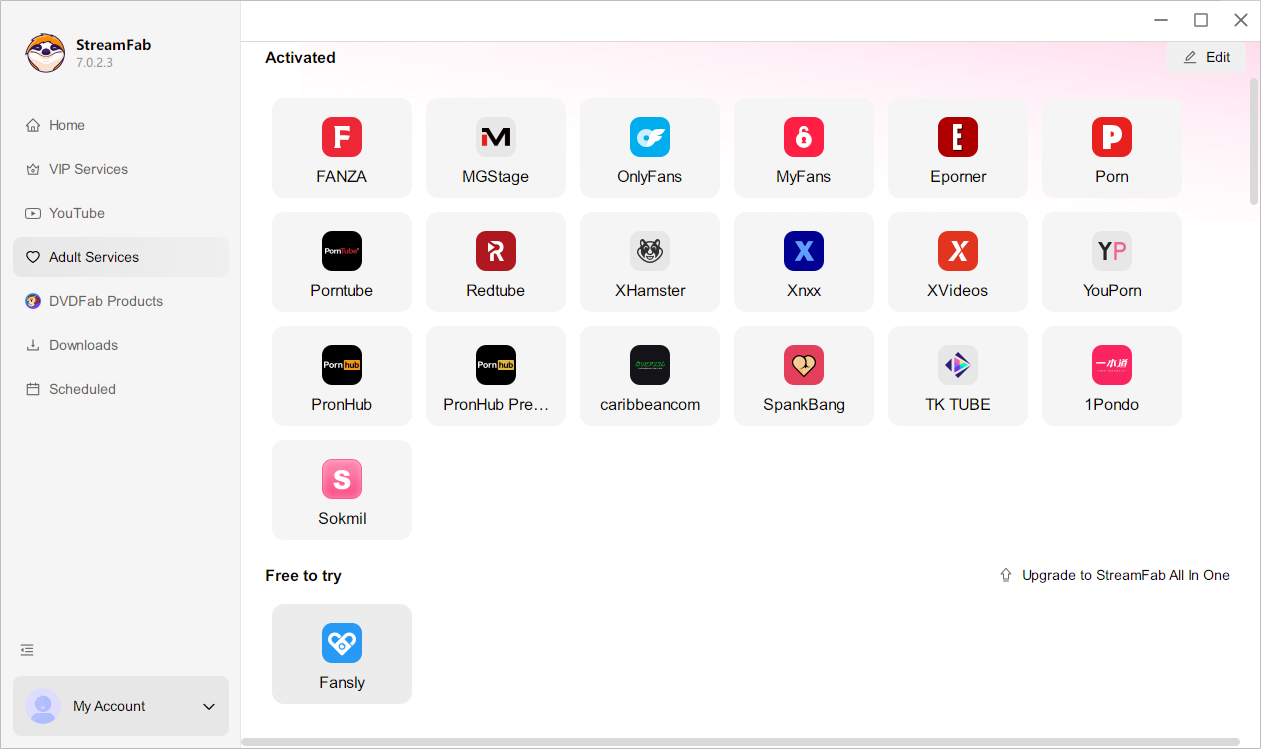
Step 2: Log in to Fansly inside StreamFab
Navigate to Fansly using StreamFab's built-in browser. Log in with your account credentials. The browser uses SSL/TLS encryption — your login is processed locally on your device and never sent to any external server.
Step 3: Browse a creator's page and select videos
Navigate to the creator whose content you want to save. When you play a video, StreamFab automatically detects it and offers download options. Select your preferred resolution (up to 1080p) and format (MP4 recommended for Android compatibility).
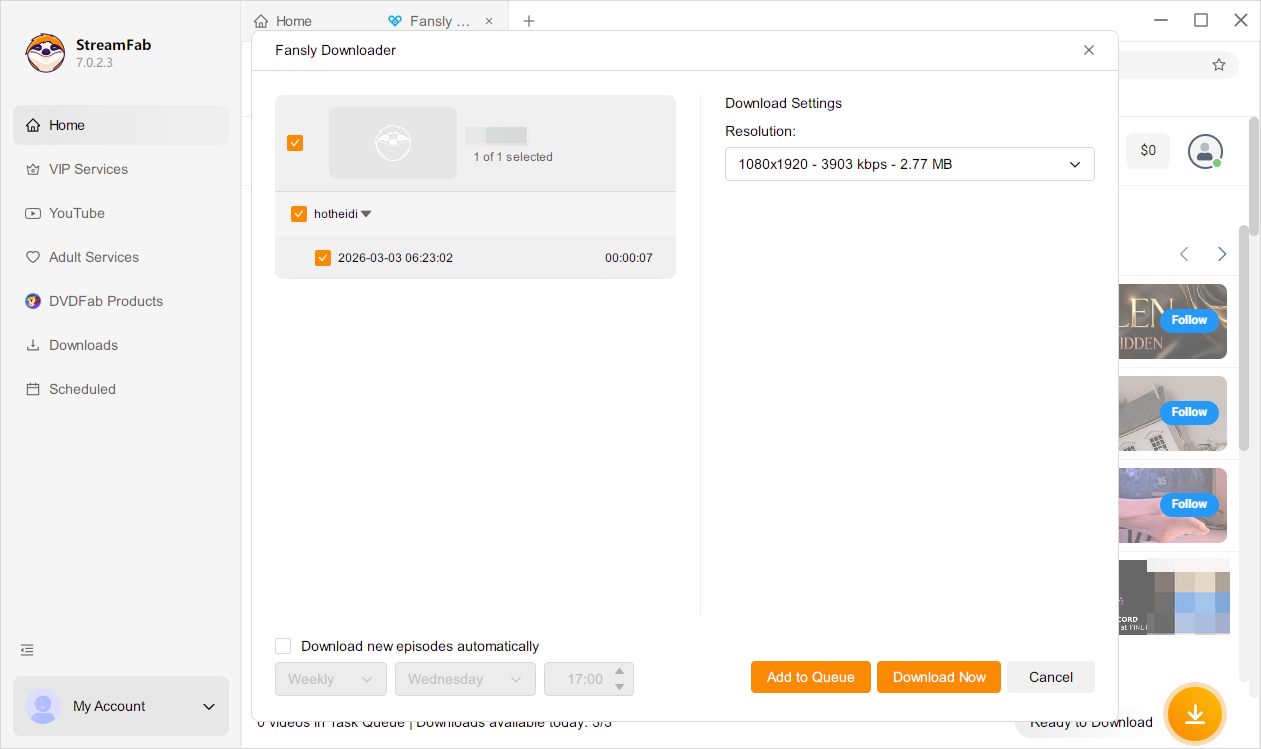
Step 4: Add to queue and download
Add videos to the download queue. You can queue multiple videos from the same creator — StreamFab processes them sequentially in the background. No need to keep the video playing or stay on the page.
Files save to your designated output folder (default: Documents/StreamFab). From here, you'll transfer them to your Android device using one of the methods in the next section.
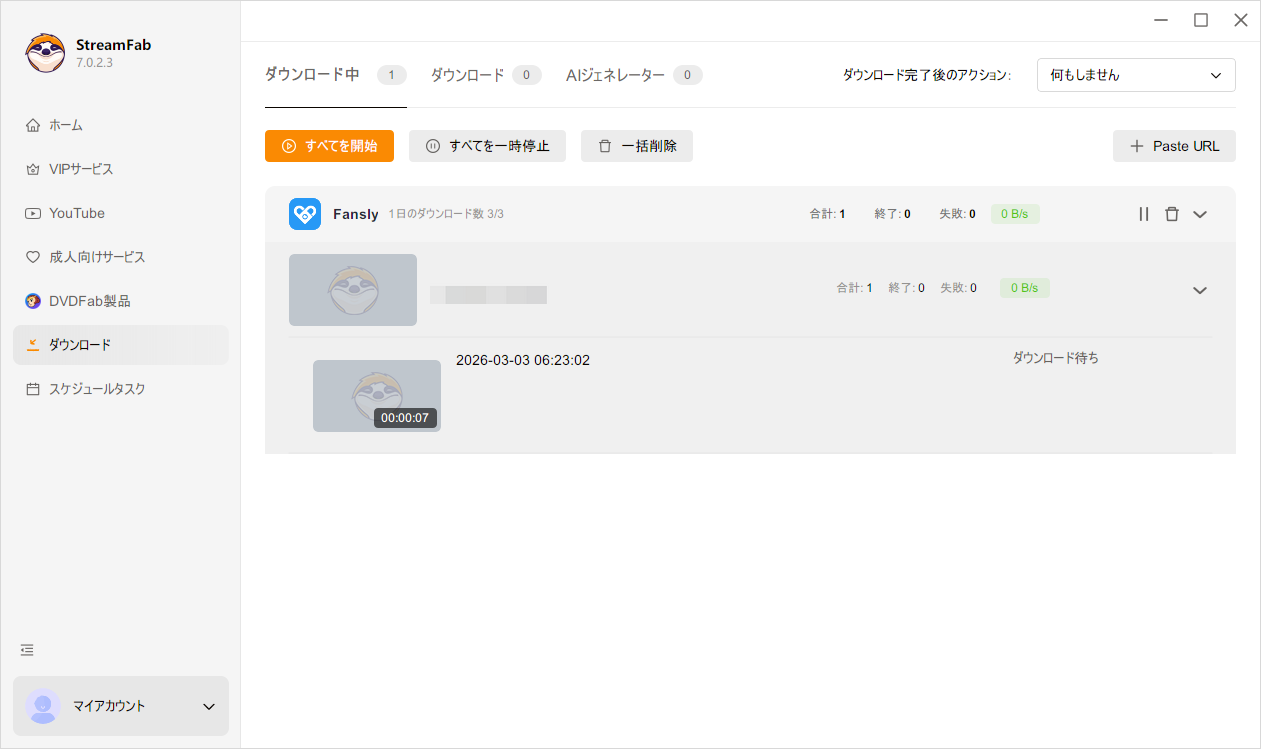
3 free downloads included — full 1080p quality, no feature restrictions during trial.
For the complete PC-side tutorial with screenshots, see our step-by-step guide to downloading Fansly videos. Want to compare StreamFab with other desktop options? We've tested the 5 best Fansly downloaders available right now.
How to Transfer Downloaded Fansly Videos to Your Android Phone
Once StreamFab has downloaded your videos as MP4 files, getting them onto your Android takes 1-2 minutes. Here are three methods, ranked by speed.
Method 1: USB Cable (Fastest for Large Files)
The most straightforward approach — no internet needed, no file size limits.
- Connect your Android phone to your PC with a USB cable
- On your phone, tap the USB notification and select "File Transfer / MTP"
- On your PC, open File Explorer → find your phone under "This PC"
- Navigate to Internal Storage → Movies (or any folder you prefer)
- Drag and drop the MP4 files from your StreamFab output folder
Transfer speed: A 500MB video file takes about 15-30 seconds over USB 3.0. This is the best option if you're transferring multiple large files at once.
Method 2: Cloud Storage (No Cable Needed)
If you don't have a USB cable handy, cloud sync works well for smaller batches.
- Upload the downloaded MP4 files to Google Drive, OneDrive, or Dropbox from your PC
- Open the same cloud app on your Android phone
- Download the files to your phone's local storage
Trade-off: Depends on your internet speed. A 500MB file on a 50Mbps connection takes about 80 seconds to upload + another 80 seconds to download. For 1-2 videos, this is fine. For a big batch, USB is faster.
Method 3: Nearby Share / Quick Share (Same Wi-Fi Network)
Android's built-in file sharing works if your PC and phone are on the same network.
- On your Windows PC, open the file in File Explorer
- Right-click → Share → select Nearby Share (Windows 11) or use the Quick Share app
- Accept the transfer on your Android phone
Best for: Quick, one-off transfers when you don't want to plug in a cable or wait for cloud upload.
| Transfer Method | Speed | File Size Limit | Requires | Best For |
|---|---|---|---|---|
| USB Cable | Fastest | None | USB cable | Large batches |
| Cloud Storage | Moderate | 15GB free (Drive) | Internet + cloud account | 1-2 videos remotely |
| Nearby Share | Fast | None | Same Wi-Fi network | Quick single files |
Other Mobile Options I Tested (And Why They Fell Short)
For completeness, here's what happened when I tried the mobile-first alternatives that show up when you search for download fansly videos android.
Online Paste-URL Downloaders (Faceb.com, TTOK.com)
These services ask you to paste a Fansly video URL into a text box, then claim to generate a download link. In theory, you'd use them right from your phone's browser.
Reality: They occasionally work on unprotected preview content. On any paid, DRM-protected video — which is the content you're actually paying for — they either return an error, produce a corrupted file, or download only the audio track. I tested 3 different paste-URL services on 5 DRM-protected Fansly videos. Zero successes.
Mobile Browser Extensions (StreamFork)
StreamFork operates as a browser extension that adds download buttons to Fansly's interface. On desktop Chrome, it works intermittently. On mobile browsers, the experience degrades significantly.
Reality: Firefox for Android supports extensions, so I installed StreamFork there. It detected some videos but failed to complete downloads on 3 out of 4 attempts. The mobile browser doesn't have the same extension API stability as desktop Chrome. For more on Fansly browser extensions and their current state, see our Fansly downloader Chrome extension review — of 6 tested in 2026, only 2 still function on desktop, and mobile support is worse.
Third-Party Android APK Apps
A few apps on APKPure and similar repositories claim to be fansly video downloader android tools. I tested two that had reasonable download counts and reviews.
Reality: One app managed to download a preview clip but failed on all paid content. The other crashed during the DRM handshake. Neither supports batch downloading. Both required more permissions than they should need (contacts access for a video downloader?). I wouldn't recommend installing unknown APKs that request broad device permissions just to test an unreliable download feature.
Android Screen Recording
Reality: Same problem as desktop screen recorders. Fansly's DRM instructs the phone's GPU to hide the video layer from screen capture APIs. You'll get perfect audio and a completely black video. This applies to Android's built-in recorder, AZ Screen Recorder, and every other recording app I tested.
FAQ
Is there an official Fansly app for Android?
Fansly doesn't have a traditional app on Google Play (adult content policies). The official recommendation is to use Fansly as a web app — visit fansly.com in your mobile browser and add it to your home screen. Verified APK versions exist on repositories like APKPure. However, no version of the Fansly app includes a video download feature. It's strictly for streaming, messaging, and subscription management.
Is it safe to download Fansly APK from third-party sites?
Downloading from verified repositories like APKPure (which uses signature verification and VirusTotal scanning) is generally safe. What's not safe: "Fansly MOD APK" or "Fansly Premium Unlocked" downloads from unknown sites. These repackaged apps can contain malware, steal your login credentials, or install adware. They also don't actually unlock any download features — Fansly's content protection is server-side and can't be bypassed by a modified app.
How can I watch Fansly videos offline on my Android phone?
The most reliable method is a two-step process: first, download the videos using StreamFab Fansly Downloader on your PC (1080p MP4 format), then transfer the files to your Android phone via USB cable, cloud storage (Google Drive), or Nearby Share. Once the MP4 files are on your phone, they play in any video player — VLC, MX Player, or Android's built-in player all work. The whole process takes about 5 minutes.
Will a dedicated Fansly downloader Android app exist in the future?
It's unlikely in the near term. The technical barriers are significant: Android's security model limits how apps can interact with DRM-encrypted video streams, and Google Play's content policies make distribution difficult for this category. Desktop software has the system-level access needed to handle DRM-compatible downloading. For now, the PC-download-then-transfer workflow remains the most practical approach.
Conclusion
I understand the appeal of a simple Android app that downloads Fansly videos in one tap. But after testing every mobile option available, the gap between what they promise and what they deliver is enormous.
Here's the realistic comparison:
- Mobile-only approach: 20+ minutes of troubleshooting across multiple apps, most failing on DRM content, questionable APK security, and — if anything downloads at all — degraded quality.
- StreamFab + transfer approach: 3 minutes to download at original 1080p quality on your PC, 2 minutes to transfer to your phone. Total: ~5 minutes, reliable every time.
The extra step of transferring files from your computer isn't ideal. But it's a 2-minute inconvenience versus an unreliable 20-minute frustration. And you end up with the original 1080p source file on your phone — not a compressed, re-encoded copy from a mobile tool that barely works.
Start with the free trial to see if the workflow fits. StreamFab includes 3 full-featured downloads at no cost — same 1080p quality, same batch processing, no restrictions.
Save Fansly Videos for Your Android — The Way That Actually Works
Download on PC with StreamFab, transfer to your phone. 3 free downloads, full 1080p quality.

Fansly uses Widevine L3 DRM, split audio-video HLS streams, and rotating API tokens to protect paid video content. This guide breaks down the full 5-layer protection architecture, explains why browser extensions and open-source tools fail against Fansly DRM, and covers the one desktop approach that doesn't.
By Erika Leen - Sep 20, 2026
Learn how to download Fansly videos with 4 tested methods. Step-by-step StreamFab tutorial, free alternatives, iOS workaround, and troubleshooting tips.
By Erika Leen - Sep 20, 2026

I tested every major online Fansly downloader in 2026. Result: 40-60% success on free content, 0% on DRM-protected paid videos. This guide ranks all 5 tools, explains why online downloaders can't handle DRM, and covers the StreamFab desktop method that does.
By Erika Leen - Jun 23, 2026
I spent an entire afternoon trying to screen record a Fansly video with OBS. Got a perfectly crisp recording — of a black screen. If you've landed here asking can you screen record on Fansly, I'll save you the frustration: it depends entirely on what tool you use.
By Erika Leen - Jun 23, 2026