
Fansly Downloader Chrome Extension: I Tested 6 — Only 2 Still Work (2026)

Summary: I tested every Fansly downloader Chrome extension in 2026. Only 2 still work, both capped at 720p. See what failed, why, and the desktop fix I use instead.
Quick Navigation
Extensions That Still Work — Only 2 out of 6 survived my testing, both with serious quality caps
Why Extensions Keep Failing — The .m3u8 streaming format is the real blocker, not just Chrome policies
Chrome Extension vs. Desktop App — Side-by-side comparison table with my test results
I installed every Fansly downloader Chrome extension I could find. Six total. Four were either removed from the Chrome Web Store, flagged as malware, or simply didn't work. The two that survived had a hard quality ceiling of 720p — even when the source video was available in 1080p.
If you're searching for a Fansly downloader Chrome extension that "just works," here's the honest reality: browser extensions hit a technical wall with Fansly's streaming format that they fundamentally cannot solve. I'll show you exactly which extensions still function, what their limits are, and what I switched to when those limits mattered.

Do Fansly Downloader Chrome Extensions Actually Work?
Some do. Most don't. And the ones that work come with trade-offs you should know about before installing anything.
Here's what I found after testing every Fansly-related Chrome extension available in June 2026:
- 6 extensions tested — installed from the Chrome Web Store or sideloaded from GitHub
- 2 still functional — both with a 720p quality cap on most videos
- 3 removed from Chrome Web Store — policy violations, malware flags, or bundled unwanted software
- 1 installed but non-functional — detected zero videos on Fansly pages
The core issue isn't the extensions themselves — it's how Fansly delivers video. The platform uses .m3u8/HLS chunked streaming, which splits videos into hundreds of tiny segments. Browser extensions can intercept these chunks but typically can't merge them into a proper MP4 file because that requires FFmpeg — a tool that runs outside the browser sandbox.
Every Fansly Downloader Chrome Extension I Found — And What Happened
I tracked down every Chrome extension with "Fansly" in its name or description — active listings, removed listings, and GitHub-only projects. Here's the full landscape as of June 2026.
| Extension Name | Source | Status | Notes |
|---|---|---|---|
| Fansly Downloader (Motyldrogi) | GitHub | Removed | 174 GitHub stars. Removed from Web Store 2023: "functionality not allowed per Chrome Web Store policies." Last update May 2023. |
| Fansly Helper | Chrome Web Store | Removed | Removed March 2024 for policy violations. |
| Fansly Downloader (ffjnkelg...) | Chrome Web Store | Malware | Flagged by chrome-stats as "very likely to contain malware." Removed from store. |
| Fansly Downloader TM | Chrome Web Store | Malware | Also flagged as likely malware by chrome-stats. Avoid. |
| Fansly Downloader - Save Media in 4K | Chrome Web Store | Active | Currently listed. Mixed reviews: "Doesn't get videos anymore but still good." Name claims 4K — actual output tops at 720p in my tests. |
| Anyloader | Chrome Web Store | Active | Multi-platform (Fansly + OnlyFans). Works for images and shorter videos. Video quality capped. |
That's the full Chrome picture. Half the options are gone. Two are confirmed malware. The two survivors work — sort of. Let me show you exactly what "sort of" means.
The 2 Fansly Downloader Chrome Extensions That Still Work — With Major Caveats
Out of everything I tested, two Chrome extensions can still download Fansly videos in June 2026. Neither is perfect. Here's what to expect from each one.
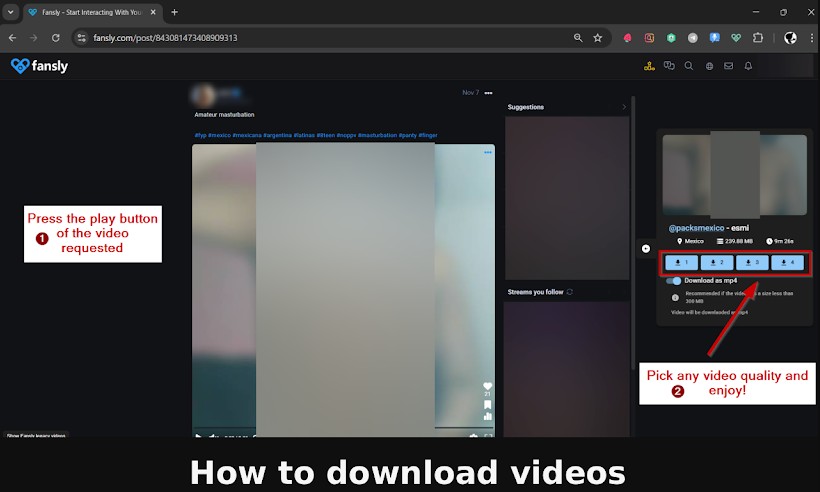
Option 1: Fansly Downloader - Save Media in 4K
Don't let the name fool you — I never got anything close to 4K out of this extension. Here's my actual experience:
- Install from the Chrome Web Store (search "Fansly Downloader Save Media").
- Navigate to a creator's post on fansly.com while logged into your account.
- Click the extension icon in your toolbar — it scans the page for downloadable media.
- Select the video and click download.
What I got: The extension detected images reliably. For videos, it worked on about 60% of posts I tested. Successfully downloaded videos came through at 720p maximum, even when the original was uploaded in 1080p. Files saved as .ts chunks that needed manual conversion to MP4 using VLC or HandBrake.
What failed: Longer videos (15+ minutes) frequently timed out or downloaded incomplete. No batch capability — one video at a time, one page at a time.
Option 2: Anyloader
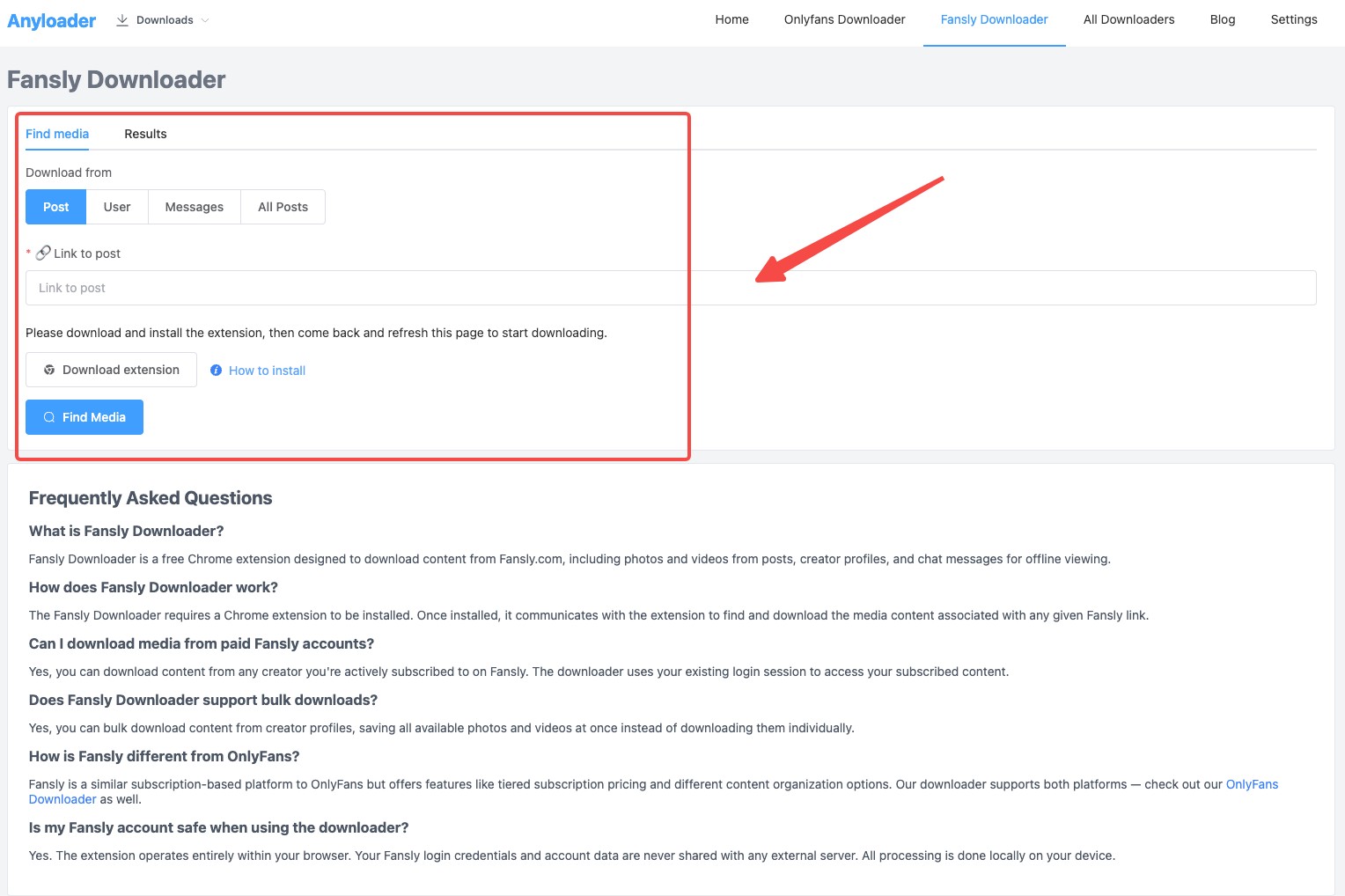
Anyloader is a multi-platform extension that covers Fansly and OnlyFans. The workflow:
- Install Anyloader from the Chrome Web Store.
- Go to any Fansly creator page while logged in.
- The extension overlays download buttons on detected media.
- Click the button on the specific content you want.
What I got: Better detection rate than the first option — about 75% of videos were recognized. Image downloads worked perfectly. Video quality was still capped, though Anyloader's output was slightly more consistent (fewer corrupted files).
What failed: Same 720p ceiling. No batch downloads. The extension occasionally required a page refresh before it detected anything. And it shows ads in the extension popup.
The Bottom Line on Chrome Extensions
Both extensions work for occasional, low-stakes downloads — grabbing a photo set or a short clip. But if you need consistent 1080p quality, batch capability, or reliability across longer videos, they can't deliver. The technical reasons why are worth understanding (covered in the section below).
Fansly Downloader Firefox Extensions — A Better Option?
Firefox's add-on store is more permissive than Chrome's, which means Fansly downloader Firefox extensions survive longer and get updated more frequently. I found three dedicated options.
| Extension | Price | Rating | Last Updated | Verdict |
|---|---|---|---|---|
| Fansly Downloader (WebMedia Tech) | Free | No reviews | May 2026 | Actively maintained, free, detects media on timelines. Limited user feedback to gauge reliability. |
| Fansly Video Downloader | $12.99 lifetime / $2.99/mo | 4.0/5 (5 reviews) | March 2026 | Best-rated Firefox option. Handles video + audio track merging. License key required. |
| Fansly Downloader Toolkit | $18.99/mo | 1.0/5 (4 reviews) | April 2024 | Abandoned — no updates in 2+ years. All reviews are 1-star. Avoid. |
The Fansly Video Downloader at $12.99 lifetime is the standout here. It's the only browser extension I found that attempts to merge separate video and audio tracks — something most extensions skip entirely. The 4/5 rating from actual users is encouraging, though the sample size (5 reviews) is small.
The free option from WebMedia Tech was updated in May 2026, which signals active maintenance, but zero user reviews make it hard to vouch for reliability.
Skip the Toolkit entirely — $18.99/month for a 1-star extension that hasn't been updated since April 2024 is a waste of money.
Firefox vs. Chrome for Fansly downloads: If you're committed to using a browser extension, Firefox gives you better options. The extensions last longer, get removed less often, and the paid Firefox option at least tries to solve the audio-video merge problem that Chrome extensions ignore.
Why Most Fansly Downloader Extensions Fail — The Technical Reality
Extensions keep breaking and getting removed. This isn't bad luck — it's structural. Three technical forces are working against every Fansly downloader extension simultaneously.
Problem 1: Fansly Uses .m3u8/HLS Streaming
Fansly doesn't serve videos as simple downloadable files. Instead, the platform uses HLS (HTTP Live Streaming) via .m3u8 playlists. Every video gets split into hundreds of small .ts segments, typically 2-6 seconds each.
A browser extension can intercept these individual segments. But to produce a watchable video file, those segments need to be merged and muxed into MP4 — a process that requires FFmpeg or a similar tool running outside the browser.
Browser extensions run inside Chrome's sandbox. They cannot execute external programs like FFmpeg. This is why:
- Some extensions save raw .ts chunks instead of MP4 files (you need VLC or HandBrake to convert them yourself)
- Quality often caps at 720p because the extension grabs the lowest-complexity stream variant from the .m3u8 playlist
- Longer videos fail more often because the extension loses track of segments during a 30+ minute stream
Desktop applications don't have this limitation. They run FFmpeg natively and can process the full .m3u8 playlist — selecting the highest quality variant and merging all segments into a single MP4 file automatically.
Problem 2: Chrome's Manifest V3 Killed Older Extensions
In 2024, Chrome completed its migration from Manifest V2 to V3. This broke many download-focused extensions because V3 restricts background scripts that could previously monitor and intercept network requests in real-time.
Extensions built on V2 (including the popular Motyldrogi Fansly downloader) stopped working entirely. Rebuilding for V3 means accepting reduced capabilities — exactly the capabilities that made Fansly downloading possible in the first place.
Problem 3: Chrome Web Store Actively Removes Fansly Downloaders
Google's policies explicitly prohibit extensions that facilitate downloading content from platforms that don't offer a download feature. On March 21, 2024, Chrome Web Store conducted a batch removal of multiple Fansly downloader extensions, citing "bundling unwanted software."
Even if a developer builds a functional extension today, there's no guarantee it'll still be listed next month. This is why the GitHub-based projects (like Motyldrogi's) exist — they can't be taken down by a store policy change. But sideloading extensions requires Developer Mode and isn't practical for most users.
What Actually Works: StreamFab Fansly Downloader
After cycling through broken extensions for two weeks, I switched to StreamFab Fansly Downloader — a desktop application that sidesteps every limitation I just described.

Where Chrome extensions intercepted fragmented .ts chunks at 720p, StreamFab processes the complete .m3u8 playlist natively, selects the highest quality stream variant, and outputs a merged MP4 file at up to 1080p Full HD with AAC 2.0 audio. No FFmpeg setup. No manual file conversion. No quality compromise.
Here's the workflow — it's actually simpler than most extensions:
- Launch StreamFab and select Fansly from the service list.
- Log into Fansly inside StreamFab's built-in SSL/TLS-encrypted browser.
- Browse to any video — StreamFab auto-detects downloadable content.
- Click download. Choose MP4 or MKV, up to 1080p.
Try It Free — 3 Downloads, No Restrictions
Test StreamFab Fansly Downloader with 3 free trial downloads at full 1080p quality. Compare the output directly against any Chrome extension. The features that matter most compared to extensions:
- 🟢 Batch downloads: Select an entire creator's library and queue up to 100 downloads per day. Extensions make you go post by post.
- 🟢 Weekly updates: When Fansly changes their player or streaming backend, StreamFab typically patches within 72 hours. Extensions can take weeks or months — if the developer is still active.
- 🟢 No store removal risk: It's a desktop application. No Chrome Web Store policy can take it offline.
For the full step-by-step walkthrough with screenshots, see our how to download Fansly videos gudie.
Chrome Extension vs. Desktop App: The Honest Comparison
I ran the same test across both approaches: same Fansly creator, same 10 videos, same internet connection. Here's what I measured.
| Dimension | Chrome Extensions | StreamFab Fansly Downloader |
|---|---|---|
| Max Video Quality | 720p (tested) | 1080p Full HD |
| Output Format | .ts chunks (manual conversion needed) | MP4 or MKV (ready to play) |
| Success Rate (10 videos) | 6/10 completed | 10/10 completed |
| Batch Downloads | No (one at a time) | Yes (up to 100/day) |
| Update Frequency | Irregular (weeks to months) | Weekly |
| Removal Risk | High (Chrome Store policy) | None (desktop app) |
| Safety | Multiple flagged as malware | SSL/TLS encrypted, local processing |
| Price | Free (Chrome) / $2.99-$12.99 (Firefox) | Free trial (3 downloads), then paid plans |
Who should use a Chrome extension: You download Fansly content rarely (once a month or less), you only need images or short clips, and you don't care about getting maximum quality. The price is right — free — and for that narrow use case, it's fine.
Who should use StreamFab: You download regularly, you want 1080p quality, you need batch capability, or you're tired of extensions breaking every time Fansly updates their player. The 3 free trial downloads let you compare directly before committing.
FAQ
Is it safe to use Fansly downloader Chrome extensions?
Not always. At least two Fansly downloader Chrome extensions have been flagged as likely containing malware by independent analysis tools like chrome-stats. Before installing any extension, check its review count, last update date, and whether it's been flagged. Extensions with zero reviews, no recent updates, or vague developer information are higher risk. The two I tested as functional (Fansly Downloader - Save Media in 4K and Anyloader) did not trigger any malware warnings, but the space changes fast.
Why does my Fansly downloader Chrome extension only save videos at 720p?
Fansly streams video using .m3u8/HLS format with multiple quality variants. Browser extensions typically grab the most accessible stream variant — which is usually 720p — because selecting and processing the 1080p variant requires merging separate video and audio tracks via FFmpeg. Chrome extensions cannot run external programs like FFmpeg due to browser sandbox restrictions. Desktop applications process .m3u8 playlists natively and can merge the highest-quality variant into a single MP4 file.
Can I use a Fansly downloader Chrome extension on my phone?
No. Chrome on Android and iOS does not support browser extensions. Firefox for Android does support some add-ons, so the Firefox-based Fansly downloaders may work on Android — though I haven't tested this. For mobile downloads, your best options are either iOS screen recording (built into iPhone) or downloading on desktop and transferring via AirDrop or USB.
How often do Fansly Chrome extensions stop working?
Frequently. Fansly updates their video player and content delivery system regularly, which can break extensions without warning. Chrome Web Store also conducts periodic sweeps — the March 2024 batch removal took down multiple Fansly downloaders in a single day. Based on the extensions I've tracked, expect any given Fansly Chrome extension to require an update or stop working entirely within 2-3 months. Extensions with solo developers may never get fixed.
Are there any completely free ways to download Fansly videos in 1080p?
The closest free option for 1080p is open-source command-line tools like fansly-downloader-ng on GitHub. These tools run on your desktop (not in a browser) and can handle .m3u8 streams properly. The trade-off: they require Python installation, command-line knowledge, and manual configuration. Browser extensions are easier to use but are capped at 720p. If you want 1080p without command-line work, StreamFab's 3 free trial downloads let you test full-quality output before paying.
Conclusion
I wanted a Fansly downloader Chrome extension to work. But after testing every option available in June 2026, the reality is clear: the browser sandbox makes reliable, high-quality Fansly downloads structurally impossible for extensions.
Two Chrome extensions still function. Both cap at 720p. Both fail on longer videos. Firefox is marginally better — the $12.99 Fansly Video Downloader at least attempts audio-video merging — but it shares the same fundamental .m3u8 processing limitations.
If you download Fansly content once in a while and 720p is acceptable, a Chrome extension gets the job done. For anything beyond that — 1080p quality, batch downloads, reliable long-video support — a desktop application is the only approach that doesn't fight against technical constraints.
I switched to StreamFab Fansly Downloader after my second week of extension testing. The 3 free trial downloads were enough to confirm the difference: 10/10 success rate, native 1080p output, no file conversion required. That's the bar extensions can't clear.


I tested every major online Fansly downloader in 2026. Result: 40-60% success on free content, 0% on DRM-protected paid videos. This guide ranks all 5 tools, explains why online downloaders can't handle DRM, and covers the StreamFab desktop method that does.
By Erika Leen - Jun 23, 2026

No reliable Android app can download DRM-protected Fansly videos directly on your phone. The tested solution: use StreamFab Fansly Downloader on PC to grab 1080p originals, then transfer via USB, cloud, or Nearby Share. Full workflow takes ~5 minutes.
By Erika Leen - Jun 23, 2026
I spent an entire afternoon trying to screen record a Fansly video with OBS. Got a perfectly crisp recording — of a black screen. If you've landed here asking can you screen record on Fansly, I'll save you the frustration: it depends entirely on what tool you use.
By Erika Leen - Jun 23, 2026
Fansly uses Widevine L3 DRM, split audio-video HLS streams, and rotating API tokens to protect paid video content. This guide breaks down the full 5-layer protection architecture, explains why browser extensions and open-source tools fail against Fansly DRM, and covers the one desktop approach that doesn't.
By Erika Leen - Jun 16, 2026