
Does Fansly Use DRM? How to Download DRM-Protected Fansly Videos

Summary: Fansly uses Widevine L3 DRM, split audio-video HLS streams, and rotating API tokens to protect paid video content. This guide breaks down the full 5-layer protection architecture, explains why browser extensions and open-source tools fail against Fansly DRM, and covers the one desktop approach that doesn't.
- How Fansly Uses Widevine DRM — L3 software-level encryption plus 4 additional protection layers
- Why Download Tools Fail — Split streams, rotating tokens, and API hardening stop every category of tool
- Fansly DRM vs. OnlyFans DRM — Same Widevine core, but Fansly adds tighter API security
- What Actually Works — Only one desktop approach handles all 5 layers reliably
Does Fansly Have DRM Protection? The Short Answer
Yes, Fansly has DRM. Specifically, Fansly uses Widevine DRM — Google's digital rights management system — to encrypt all paid video content on the platform. If you've ever tried to save a Fansly video and ended up with a black screen, a file that won't play, or just an audio track with no picture, that's Fansly DRM protection doing exactly what it's designed to do.
But here's what most people get wrong: Widevine is only one layer of Fansly's content protection. The platform stacks five separate security mechanisms on top of each other, and understanding how they interact explains why every casual download method fails — and why only one type of tool handles Fansly DRM reliably.
I spent three weeks mapping out exactly how Fansly DRM works, testing tools against each layer, and documenting what breaks where. After understanding the full picture, I finally saw why StreamFab Fansly Downloader was the only tool that consistently delivered complete, playable files — it's built to handle all five layers, not just one.
Here's the complete technical breakdown.
How Fansly Uses Widevine DRM — A Technical Breakdown
When someone asks "does Fansly use Widevine DRM?" the answer is yes — but that single fact undersells how layered the system actually is. Fansly DRM protection operates across five distinct layers, each blocking a different category of download attempt.
Layer 1: Authentication — Token-Based Access Control
Before any content loads, Fansly verifies your identity through a token-based authentication system. Every API request carries a session token that rotates frequently — often within minutes. This isn't a simple cookie check. Fansly uses dynamic JavaScript obfuscation for its check keys, meaning the authentication logic itself changes over time.
What this blocks: Any tool that tries to replay captured URLs. By the time you copy a video URL from DevTools and paste it into a downloader, the token has usually expired.
Layer 2: Transport — HLS Segmented Delivery with Split Streams
Fansly delivers video using HLS (HTTP Live Streaming) with .m3u8 manifests. But critically, Fansly splits audio and video into separate streams. The video segments (.ts or .m4s files) arrive independently from the audio segments, each with their own encryption keys.
What this blocks: Simple stream capture tools. Even if you grab the video segments, you get silent footage. Capturing audio separately and merging them correctly requires knowing the exact segment alignment — something most browser extensions can't handle.
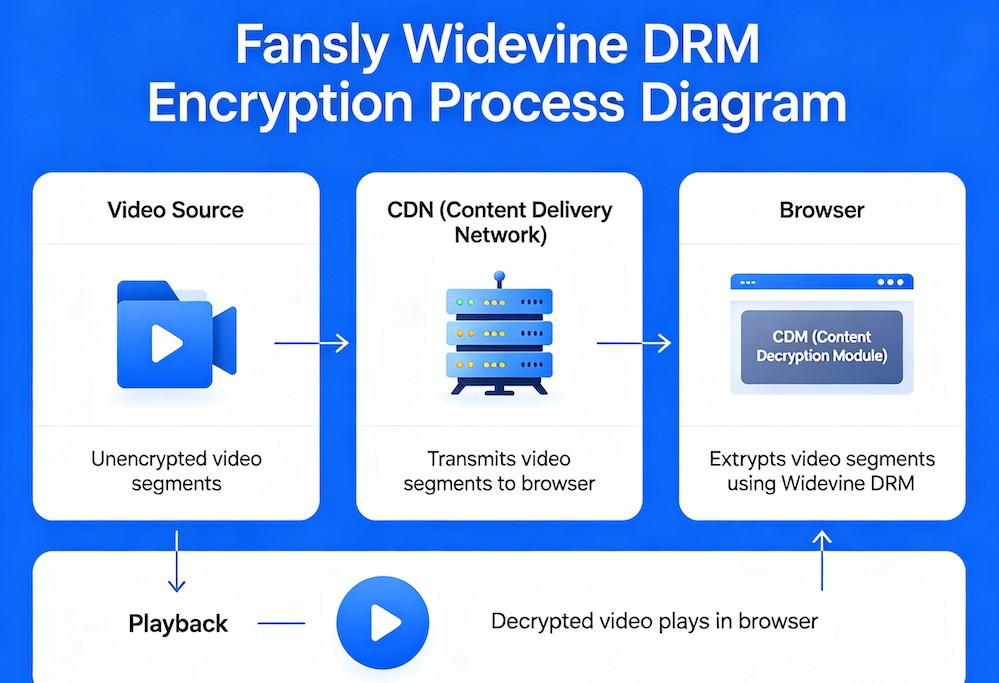
Layer 3: Widevine L3 Encryption — The DRM Core
This is the layer most people mean when they say "Fansly DRM." Fansly uses Widevine DRM at Level 3 (L3), which is the software-based tier of Google's DRM system. Here's what that means in practice:
- Widevine L1 = hardware-backed decryption (used by Netflix for 4K). Keys never leave the device's secure chip.
- Widevine L3 = software-only decryption. Keys are handled in the browser's Content Decryption Module (CDM). This is what Fansly uses.
L3 is weaker than L1 from a pure security standpoint — security researchers have demonstrated L3 key extraction in academic contexts. But for practical purposes, it still defeats every mainstream download tool, browser extension, and screen capture utility that doesn't specifically handle Widevine license negotiation.
Layer 4: Visual Protection — Username Watermarking
Fansly overlays your username as a visible watermark on video playback. This isn't forensic watermarking (invisible, embedded in the pixel data) — it's a straightforward text overlay. It serves as a deterrent rather than a technical barrier, since it identifies who recorded any leaked content.
Layer 5: Platform Controls — Browser-Level Restrictions
The final layer includes right-click disabling, screenshot detection on mobile, and viewport DRM enforcement that forces black-screen capture when standard screen recording tools are running.

Why Normal Download Tools Fail Against Fansly DRM
Once you understand all five layers, it becomes clear why every common download approach hits a wall. I tested each category against Fansly DRM protection, and the failure patterns are predictable.
Browser Extensions: Killed by Split Streams + Widevine
I tested every available Fansly downloader Chrome extension — six Chrome extensions and three Firefox alternatives. The results: only two Chrome extensions still function at all, and both cap at 720p with frequent failures on longer videos.
The technical reason: browser extensions operate inside the browser sandbox. They can detect .m3u8 manifests in network traffic, but they cannot:
- Negotiate Widevine license keys (Chrome's CDM blocks extension access)
- Properly merge split audio and video segments
- Process DRM-encrypted .ts segments into playable files
Extensions essentially grab whatever unencrypted preview data leaks through, which is why they max out at 720p — that's the resolution of Fansly's adaptive bitrate preview layer, not the actual paid content.
yt-dlp and Open-Source Tools: Blocked by API Security
As of mid-2026, yt-dlp still has no official Fansly extractor. Community-built scripts exist, but they break within days of any Fansly API update. The problem: Fansly's dynamic JavaScript obfuscation changes the API authentication flow faster than open-source maintainers can reverse-engineer it.
Even when authentication temporarily works, these tools face the same Widevine wall — they can fetch encrypted segments but can't decrypt them without proper Widevine license handling.
Screen Recording: Works, But With Major Trade-offs
Screen recording is the one method that technically bypasses Fansly DRM Widevine encryption, because it captures the already-decrypted video output. But the trade-offs are significant:
- Quality is limited to your screen resolution and recording software compression
- It's real-time (a 30-minute video takes 30 minutes to record)
- Your username watermark is baked into the recording
- Some recording tools trigger Fansly's viewport DRM, producing black frames
DevTools Network Tab: A Dead End
The "open DevTools, find the .m3u8, download the segments" method that works on some platforms fails on Fansly. The split audio-video architecture means you'd need to identify both manifest URLs, download all segments from both streams, decrypt each set separately, and then mux them together with correct timing. Even developers who attempt this manually report corrupted output, because the decryption keys expire before the download completes.
Why Does Every Method Fail?
It's not any single layer — it's the combination. Token rotation blocks replay attacks. Split streams block simple capture. Widevine blocks decryption. Each layer covers the other layers' weaknesses. A tool that handles Fansly DRM needs to solve all five simultaneously.
Fansly DRM vs. OnlyFans DRM — Same Widevine, Different Execution
Both Fansly and OnlyFans use Widevine L3 for video content protection. But does Fansly use Widevine DRM in the same way OnlyFans does? Not exactly. The implementation differences matter for anyone trying to understand why a tool that works on one platform might fail on the other.
| Protection Layer | Fansly | OnlyFans |
|---|---|---|
| DRM System | Widevine L3 | Widevine L3 |
| Stream Architecture | Split audio + video | Combined A/V stream |
| API Security | Dynamic JS obfuscation + fast token rotation | Standard token auth |
| Watermarking | Visible username overlay | Visible username overlay |
| Screenshot Notification | Mobile only (partial) | No notification |
| Image DRM | None (right-click block only) | None (right-click block only) |
| Tool Breakage Frequency | High (API changes frequently) | Moderate |
The key difference: Fansly's split audio-video architecture plus its aggressively rotating API make it meaningfully harder to download from than OnlyFans, even though both platforms share the same Widevine L3 DRM core.
For download tools, this means Fansly compatibility is the harder problem to solve. A tool that can handle Fansly DRM Widevine encryption plus the split-stream merging and API token management will handle OnlyFans easily — but the reverse isn't true.
Both platforms share the same fundamental limitation of Widevine L3: since decryption happens in software rather than hardware, a sufficiently sophisticated desktop application can manage the license negotiation process to produce decrypted output. That's a structural reality of L3 architecture, and it's why desktop tools exist for both platforms while browser extensions struggle with both.
What Actually Works for Downloading DRM-Protected Fansly Videos
Given everything above, here's the realistic landscape as of mid-2026. I've tested each approach and categorized them by what they can actually deliver.
Approach 1: Screen Recording (Last Resort)
What it handles: Bypasses Widevine entirely by capturing post-decryption output.
What it doesn't: Quality, efficiency, or convenience. You get your screen resolution (not source quality), it takes real-time, and the username watermark is permanent. Works in a pinch, but it's not a real solution.
Approach 2: Open-Source Scripts (Unreliable)
What it handles: Authentication (sometimes), segment downloading (when the API hasn't changed).
What it doesn't: Widevine decryption, split-stream merging, or long-term reliability. If you're comfortable with Python and don't mind re-patching your script every few days, this can work intermittently. For most people, it's more frustration than it's worth.
Approach 3: StreamFab Fansly Downloader (Full DRM Solution)
What it handles: All five protection layers simultaneously.

It's the tool I now use for all Fansly content archiving. StreamFab Fansly Downloader solves the Fansly DRM problem at the architecture level rather than trying to work around individual layers:
- Widevine L3 handling: Manages the full license negotiation process, producing properly decrypted video
- Split-stream merging: Automatically identifies both audio and video manifests, downloads segments in parallel, and muxes them into a single MP4 with correct sync
- Token management: Handles Fansly's rotating API authentication natively, so downloads don't fail mid-stream
- Native 1080p output: Because it decrypts the source stream rather than capturing a preview, you get the actual upload resolution — typically 1080p
- Batch support: Queue multiple videos and let them process unattended
The 3 free trial downloads are enough to verify it handles Fansly DRM on your content. For a deeper look at how it compares to other options, I've written a full comparison of the 5 best Fansly downloaders and a complete step-by-step guide on how to download Fansly videos.
FAQ
Does Fansly have DRM protection on all content?
No. Fansly DRM protection applies specifically to paid video content. Free preview clips, images, and most livestream content are not Widevine-encrypted — though they're still behind Fansly's authentication and token systems. If you can view an image by right-clicking and opening it in a new tab, it's not DRM-protected. If a video shows a black screen when you try to download it, Widevine is active.
Does Fansly use Widevine L1 or L3?
Fansly uses Widevine L3, the software-based tier. L1 requires hardware security modules (like those in phones and streaming devices) and is used by platforms like Netflix for 4K content. L3 handles decryption in the browser's software-based Content Decryption Module. This means Fansly DRM Widevine encryption is technically less secure than Netflix's implementation, but it still defeats all browser extensions and most download tools that don't specifically handle Widevine license exchange.
Can you screen record Fansly videos?
In most cases, yes — screen recording captures the already-decrypted video output, so Widevine doesn't block it directly. However, some screen recording tools trigger Fansly's viewport DRM enforcement, which produces black frames. OBS Studio on Windows typically works, while some Mac screen recorders do not. The resulting quality is limited to your screen resolution, it takes real-time, and your Fansly username watermark will be permanently embedded in the recording.
Is Fansly DRM stronger than OnlyFans DRM?
Both platforms use Widevine L3, so the DRM core is identical. Where Fansly pulls ahead is in its supporting infrastructure: split audio-video streams (OnlyFans uses combined streams), more aggressive API token rotation, and dynamic JavaScript obfuscation for authentication endpoints. In practice, download tools break more frequently on Fansly than OnlyFans because the API surface changes faster. Neither platform uses forensic watermarking or L1 hardware DRM.
Does Fansly DRM protect images?
No. Fansly DRM protection via Widevine applies only to video streams. Images are delivered as standard JPEG/PNG files behind authentication. Fansly uses right-click disabling and CSS overlays to make image saving inconvenient, but these are cosmetic barriers — the image files themselves are not encrypted. On mobile, Fansly may send screenshot notifications to creators for image content, but this is a deterrent feature, not a prevention mechanism.
Conclusion
StreamFab Fansly Downloader is the tool I use because it's the only option I've found that addresses all five layers as a single, automated process — Widevine decryption, audio-video merging, token handling, 1080p output, and batch processing. The 3 free downloads let you verify this against your own content before committing.


I tested every major online Fansly downloader in 2026. Result: 40-60% success on free content, 0% on DRM-protected paid videos. This guide ranks all 5 tools, explains why online downloaders can't handle DRM, and covers the StreamFab desktop method that does.
By Erika Leen - Jun 23, 2026

No reliable Android app can download DRM-protected Fansly videos directly on your phone. The tested solution: use StreamFab Fansly Downloader on PC to grab 1080p originals, then transfer via USB, cloud, or Nearby Share. Full workflow takes ~5 minutes.
By Erika Leen - Jun 23, 2026
I spent an entire afternoon trying to screen record a Fansly video with OBS. Got a perfectly crisp recording — of a black screen. If you've landed here asking can you screen record on Fansly, I'll save you the frustration: it depends entirely on what tool you use.
By Erika Leen - Jun 23, 2026
I tested every Fansly downloader Chrome extension in 2026. Only 2 still work, both capped at 720p. See what failed, why, and the desktop fix I use instead.
By Erika Leen - Jun 16, 2026