How to Record Live Sports Streams: The Ultimate Guide (World Cup 2026)

Summary: Never miss a match — record live sports streams or download replays permanently. Covers all 104 World Cup 2026 games on DAZN, Peacock, Fubo & Hulu.
Table of Contents
Live sports are one of the last things people still watch in real time — and for good reason. A goal, a buzzer-beater, a knockout punch lands differently when you're watching it happen. But schedules don't care about time zones. The FIFA World Cup 2026 has 104 matches spread across three countries and multiple broadcast windows, which means a group-stage game in your region might kick off at 2 AM. Miss it live, and you're racing against a replay window that could close in 24 hours.
This guide covers exactly how to record or download live sports streams so you keep every match, every highlight reel, and every replay permanently — no subscription expiry, no regional blackout, no DRM countdown timer.
Why Saving Sports Streams Locally Actually Matters
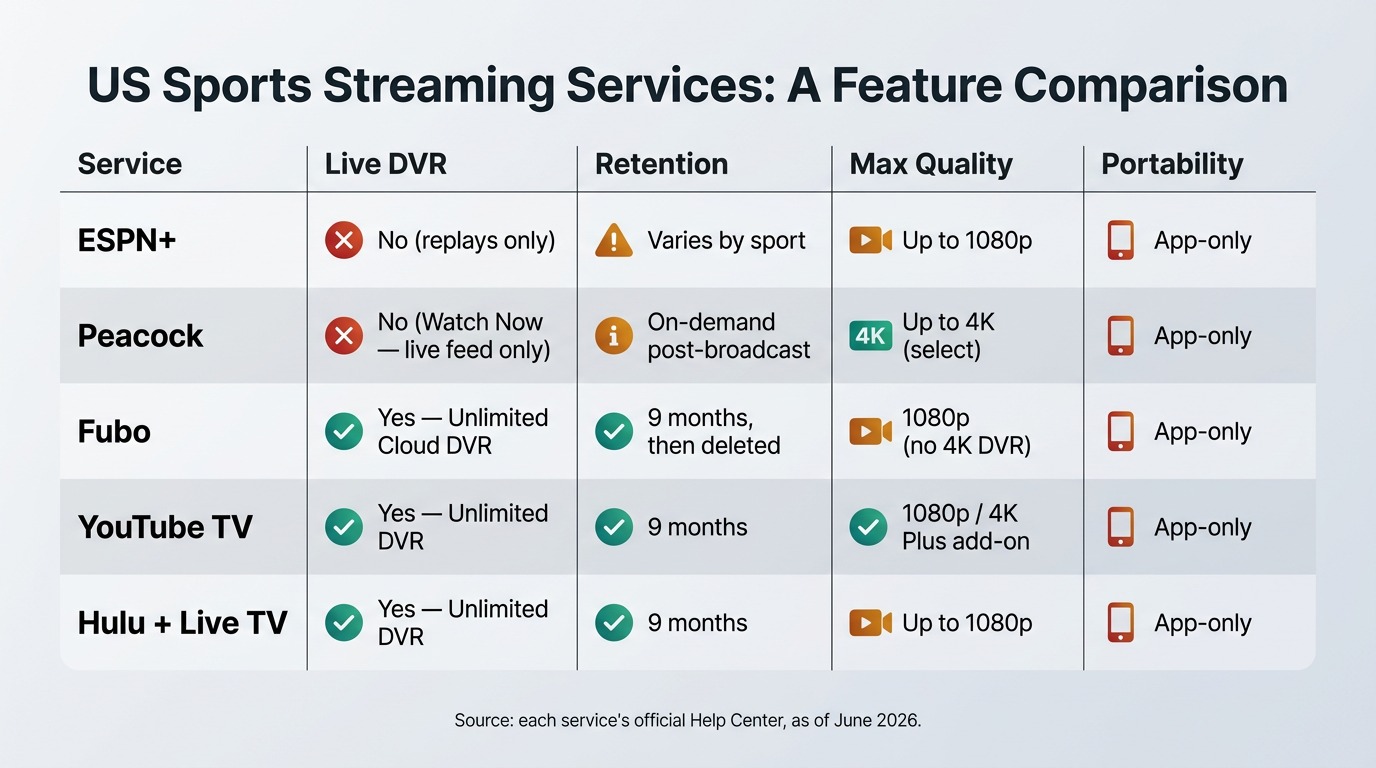
Streaming platforms have trained us to think content is always available. For sports, that assumption breaks down fast. Most live event replays disappear within 24–72 hours. Some platforms pull FIFA World Cup 2026 match replays even faster to comply with rights windows. On top of that, DRM (Digital Rights Management) locks most sports content to the app that delivered it — download it within the app and you get a file you can't play anywhere else, and it expires when your subscription lapses.
There are two practical ways to get around this: record the stream as it plays, or download the on-demand file before it disappears. Both methods are covered here. For a deep dive into recording DAZN specifically — which carries all 104 World Cup 2026 matches internationally — see our dedicated guide on how to screen record DAZN.
Record vs. Download: Which Method Is Right for You?
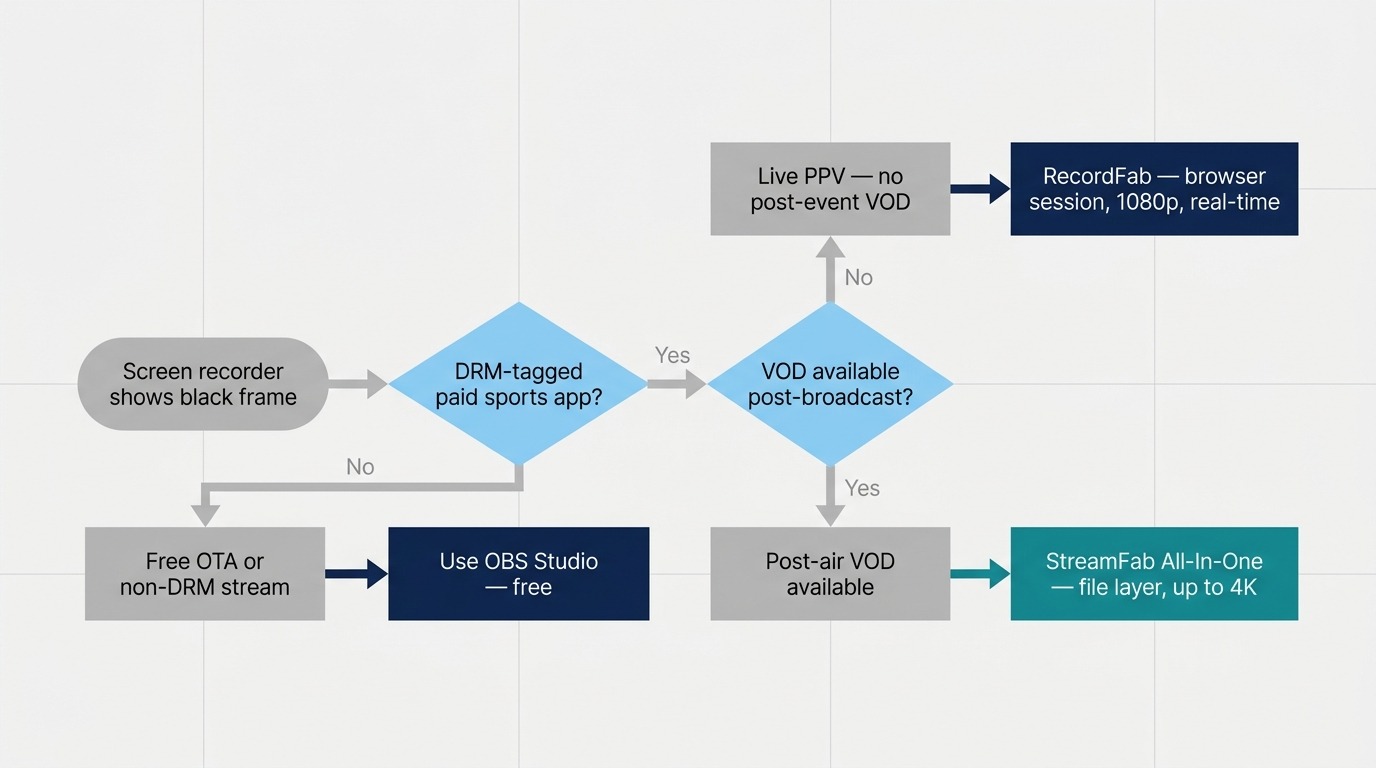
Before picking a tool, understand the difference between recording and downloading:
Recording captures the video as it plays on your screen. It works on any platform, including live broadcasts with no on-demand replay. The trade-off: you need to start it before the stream begins, and it takes at least as long as the content itself (though some tools offer up to 5× speed for post-processing).
Downloading pulls the video file directly from the platform's server after the event ends. It's dramatically faster — a 90-minute match can download in a few minutes — but it requires an on-demand replay to exist and for the downloader to support that platform.
For live FIFA World Cup 2026 broadcasts, recording is the only option during the match itself. For catch-up replays on platforms like DAZN, Peacock, Fubo, or Hulu, downloading is faster and produces a cleaner result.
Method 1: RecordFab — Record Any Live Sports Stream
RecordFab is a screen recorder built specifically for streaming video. Unlike generic screen capture tools, it opens streams in a dedicated browser environment that handles DRM, authentication, and HD playback internally. You don't record your desktop — you record the stream directly, which means you get full-quality video without watermarks or taskbar overlays.
- Best for: Live broadcasts, any platform, any event including real-time FIFA World Cup 2026 matches
- Platform: Windows only (no macOS support)
- Speed: Real-time recording; 5× acceleration available for post-processing, but total time still exceeds the event length

RecordFab can capture any livestream directly — perfect for World Cup 2026 live broadcasts. Note: RecordFab is Windows-only and records in real time (5× speed available for processing, but still more time-consuming than a direct download). For on-demand replays and catch-up content, StreamFab All-in-One downloads files as MP4 in seconds and also supports macOS.
- Install and launch RecordFab on your Windows PC.
- In the built-in browser, navigate to your sports streaming platform (DAZN, Fubo, Peacock, Hulu, or any other site).
- Log in to your account and find the live match or event you want to capture.
- Click the Record button in RecordFab before the stream starts.
- RecordFab will capture the full broadcast at the original resolution. Click Stop when the event ends.
- The file saves as MP4 to your chosen local folder — no DRM, playable on any device.
For recording on platforms that require additional setup steps, our guide on how to record on Hulu walks through the full process with screenshots.
Method 2: StreamFab All-in-One — Download Replays in Minutes
- Best for: Post-match replays, on-demand content, faster turnaround
- Platform: Windows and macOS
- Speed: Far faster than real-time — a full match downloads in a fraction of the runtime
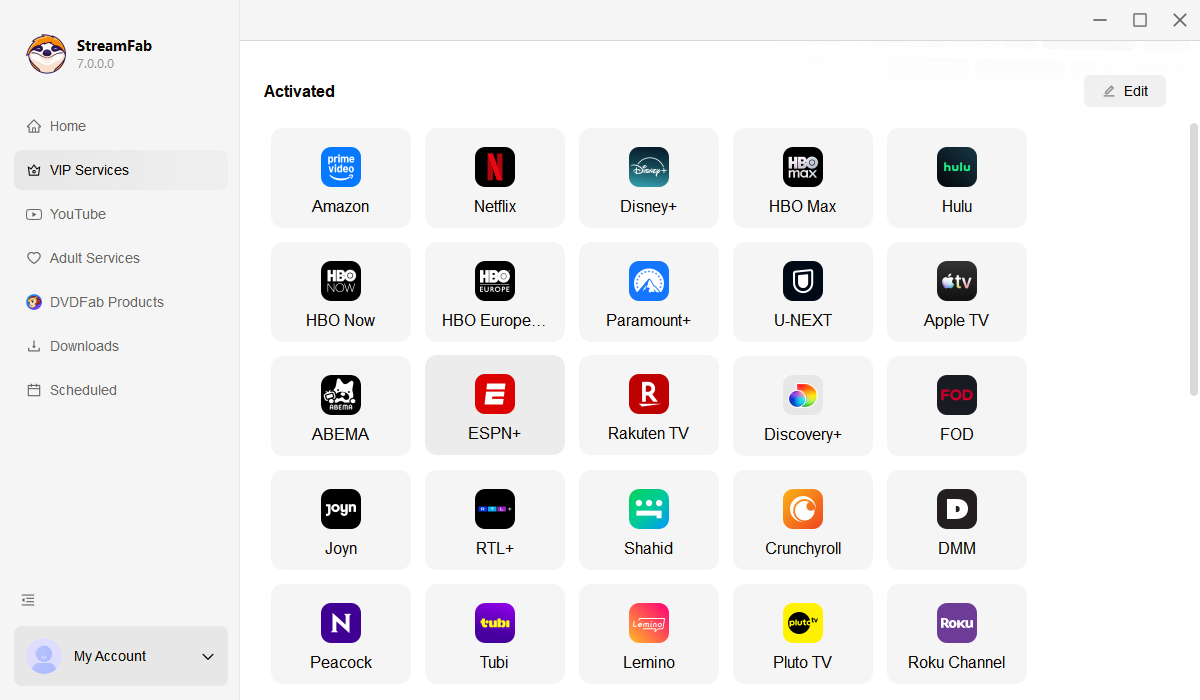
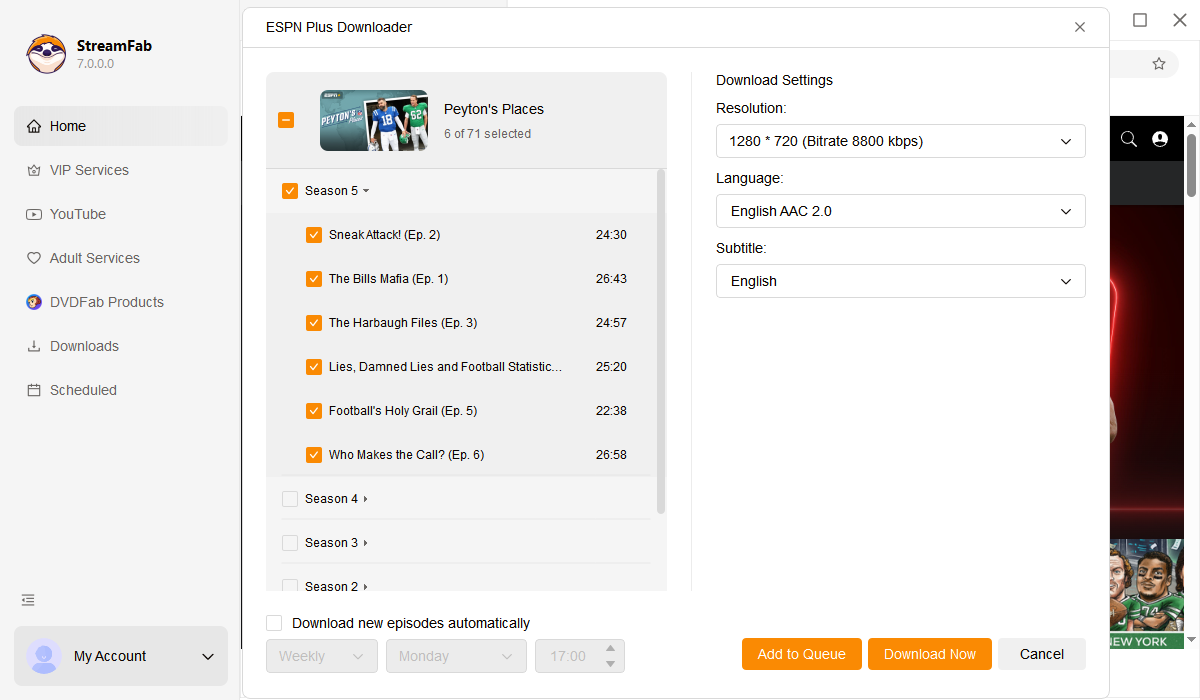
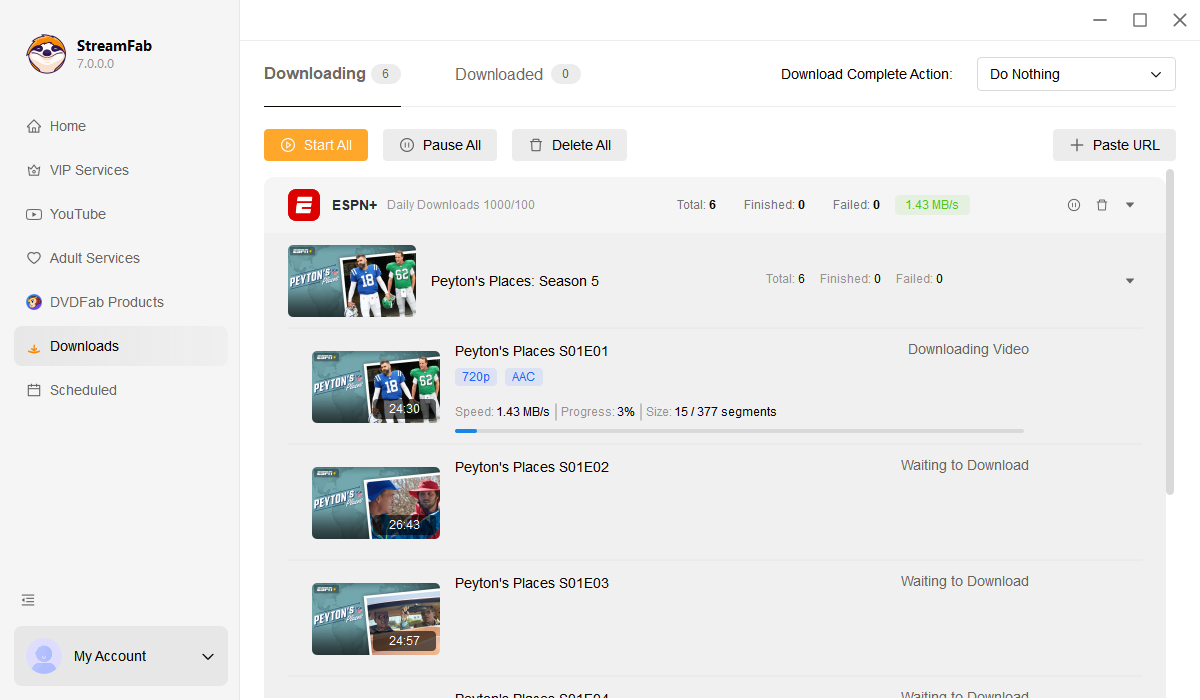
Supports DAZN, Peacock, Fubo, Hulu, and dozens of other streaming services. Once a match ends and the replay appears on-demand, StreamFab fetches the video file directly from the platform's servers, strips DRM, and saves it as a standard MP4. A 90-minute World Cup match typically downloads in under 10 minutes, compared to 90+ minutes of real-time recording.
How to Download a Sports Replay with StreamFab All-in-One

Bonus: Visual Guide for Global & Free-to-Air Platforms
While the list below focuses heavily on major North American platforms, I know many fans use VPNs to access international free-to-air coverage or ad-supported networks for the World Cup. To show you exactly how versatile this software is, I’ve recorded a comprehensive video walkthrough.
Watch the video below to see the step-by-step extraction process in action across Peacock, as well as global broadcasters like ITVX (UK), SBS On Demand (Australia), and Tubi.
FIFA World Cup 2026: Platform by Platform
The FIFA World Cup 2026 is the largest tournament in the competition's history — 48 teams, 104 matches, hosted across the United States, Canada, and Mexico. Broadcast rights are split across multiple platforms depending on your region. Here's which tool to use for each major English-language broadcaster:
DAZN (International)
DAZN holds rights for all 104 World Cup 2026 matches in a large number of markets. Matches are available both live and as on-demand replays. For live matches: use RecordFab (Windows). For replays: use StreamFab All-in-One to download matches as MP4 far faster than real time.
Peacock (United States)
Peacock is one of the primary US broadcasters for World Cup 2026 matches. Replays appear on-demand after matches end and can be downloaded with StreamFab All-in-One. For live capture, RecordFab works with Peacock's player.
Fubo (United States & Canada)
Fubo covers a significant portion of the World Cup 2026 schedule in North America, including group stage and knockout rounds. StreamFab All-in-One supports Fubo for replay downloads. For live match recording, use RecordFab.
Hulu (United States)
Hulu with Live TV carries World Cup 2026 matches through its live TV package. Use RecordFab to capture live broadcasts as they air. Post-match replays can be downloaded with StreamFab All-in-One.
Choosing Between RecordFab and StreamFab
Use this table to pick the right tool for your situation:
| Scenario | Best Tool | Notes |
|---|---|---|
| Live match, no replay available later | RecordFab | Windows only; records in real time |
| Live match, replay will be on-demand | Either (RecordFab live, then StreamFab for replay) | StreamFab replay download is faster and cleaner |
| Post-match replay on DAZN / Peacock / Fubo / Hulu | StreamFab All-in-One | Win + Mac; downloads in minutes |
| Mac user | StreamFab All-in-One | RecordFab does not support macOS |
| Full tournament archive (all 104 WC matches) | StreamFab All-in-One | Fastest way to build a local archive |
Frequently Asked Questions
Can I record live sports streams on a Mac?
RecordFab is Windows-only, so it does not support macOS. Mac users should use StreamFab All-in-One to download on-demand replays after matches end. StreamFab All-in-One is fully compatible with macOS.
Will the recordings expire?
No. Both RecordFab and StreamFab All-in-One save files as standard MP4 to your local drive. There is no DRM, no subscription tie, and no expiry date. The files play on any device, TV, or media player indefinitely.
Can I save all 104 FIFA World Cup 2026 matches?
Yes. With StreamFab All-in-One, you can download match replays from DAZN, Peacock, Fubo, and Hulu as they become available after each game. For matches where a live recording is preferred, RecordFab (Windows) captures the broadcast in real time. Between the two tools, every World Cup 2026 match across every platform is covered.
Is it legal to record streaming sports content?
This depends on your jurisdiction and the platform's terms of service. Recording for personal, offline use is generally treated differently from redistribution. Always check the terms of the platform you use and ensure recordings stay for personal use only.
How much storage space do I need for the World Cup?
A 90-minute match at 1080p averages around 4–8 GB as an MP4, depending on bitrate. All 104 World Cup 2026 matches would require roughly 400–800 GB of storage. An external drive dedicated to the tournament is a practical solution.
Conclusion
Recording live sports streams comes down to one question: do you need it live, or will a replay do? For true live capture — especially urgent during the FIFA World Cup 2026 group stage, where matches in other time zones air at inconvenient hours — RecordFab handles any platform on Windows. For building a permanent local archive of every match, StreamFab All-in-One is the faster, cleaner choice, and it works on both Windows and Mac.
With the World Cup 2026 running through July 2026, now is the time to set up both tools. A RecordFab recording running in the background catches the live match; StreamFab All-in-One downloads the replay at high speed once it's available. Together, they cover every broadcast window, every platform, and every match — from the opening game to the final.

This guide separates modern Apple TV video, Apple Music audio, and legacy iTunes libraries so readers can choose a realistic playback or export path. It covers MP4, M4V, and MKV compatibility, official redownload and iTunes Match eligibility, StreamFab and MusicFab workflows, hardware limits, and the boundaries for authorized personal use in the United States.
By Nicole Lopez - Sep 20, 2026
Identify protected and unprotected M4V files, use authorized Apple TV playback, convert compatible files, or choose a separate supported-streaming workflow.
By Erika Leen - Sep 8, 2026
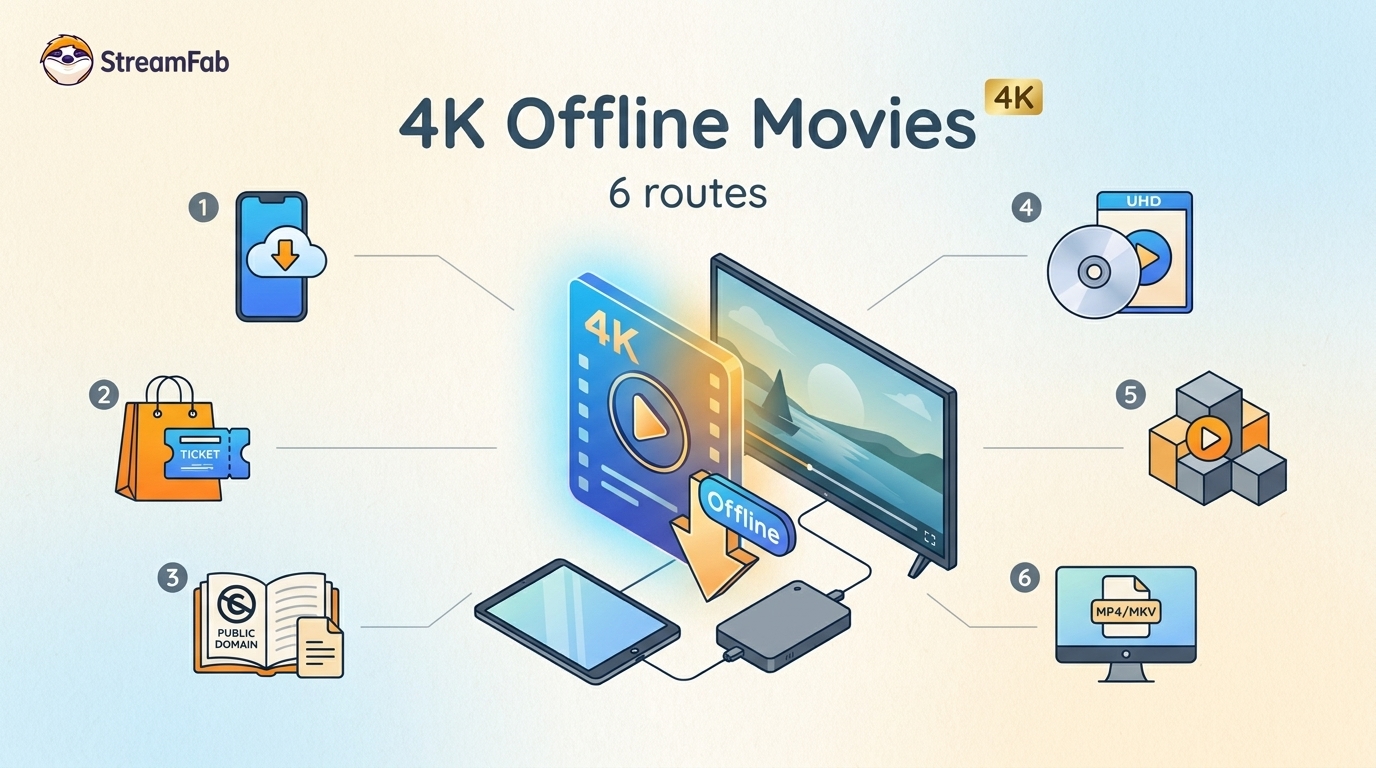
Legal 4K movie downloads do not all provide the same kind of offline access. Most mainstream services offer app-locked downloads, while portable movie files, UHD Blu-ray, public-domain media, and authorized desktop workflows involve different quality, cost, device, and licensing limits.
By Jacob Harrison - Aug 12, 2026
To get straight to the point, you can download a BitChute video as MP4 through its download icon: open the video, then use Save As. For authorized content where permitted, this guide explains when desktop, Android, or browser alternatives make sense.
By Marcia Hatcher - Aug 11, 2026