
NoteBurner Cannot Download? 8 Fixes by Error Code (2026)

Summary: The single biggest time-saver is to identify where it fails (installer, login, URL parsing, conversion, or output) and which error code is on screen before you touch any fix. In my editorial experience troubleshooting NoteBurner across its Netflix, Amazon, and Spotify products on Windows and Mac, most "noteburner not working" reports — including the common "noteburner download failed" message — collapse to one of a handful of stages with a matching error code.
Table of Contents
This guide gives you a stage-and-error-code map first, then eight targeted fixes for NoteBurner download failures, a verification checklist for files that look successful but skip, and — only if the official path keeps failing — a compliant desktop alternative.
Also Read: Is TunePat the Best Video Downloader Solution? (Latest TunePat Review)
Why NoteBurner Stops Downloading
From what I see in support threads and my own retesting, NoteBurner failures cluster around five repeatable stages rather than any fixed statistical split — and knowing which stage you're in narrows the fix to one or two options instead of a full reinstall cycle.
If you're past troubleshooting and just want out, our guide on how to cancel your NoteBurner subscription covers that path.
The stages you'll be diagnosing:
- Installer / update stage — the app won't launch, won't update, or crashes on start
- Account login stage — Spotify/Tidal/Apple Music/Netflix sign-in loops or rejects the session
- URL parsing stage — a track or title link fails to resolve before conversion begins (the classic "noteburner parse url failed" message)
- Conversion stage — progress stalls at 0%, times out mid-track, or throws a numeric error
- Output stage — conversion "succeeds" but the file is missing, silent, skipping, or truncated (the conversion succeeded but corrupted pattern)
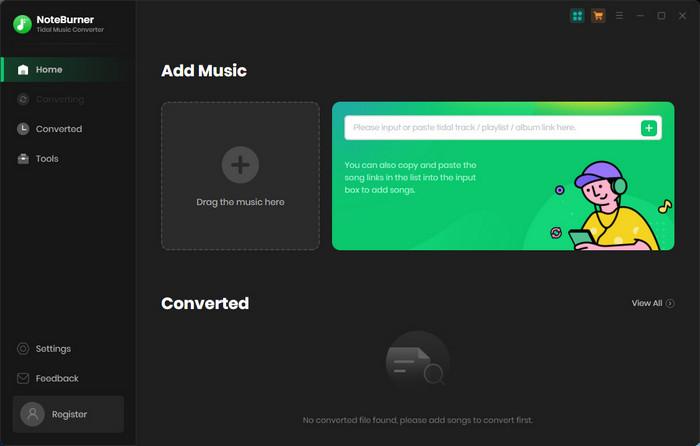
My editorial call: skip the generic "restart everything" advice on the first pass. Read the code on screen (or the last line of the log), map it to the stage below, and jump to the matching fix.
Pinpoint the Failure Stage and Error Code
Before any fix, match what's on your screen to the row below. Every code in this table is one NoteBurner's own support pages or its active community threads currently document; the "first fix" column points to the section further down where I unpack it.
If you don't see a code at all, use the stage column instead — that alone routes most "noteburner cannot download" reports.
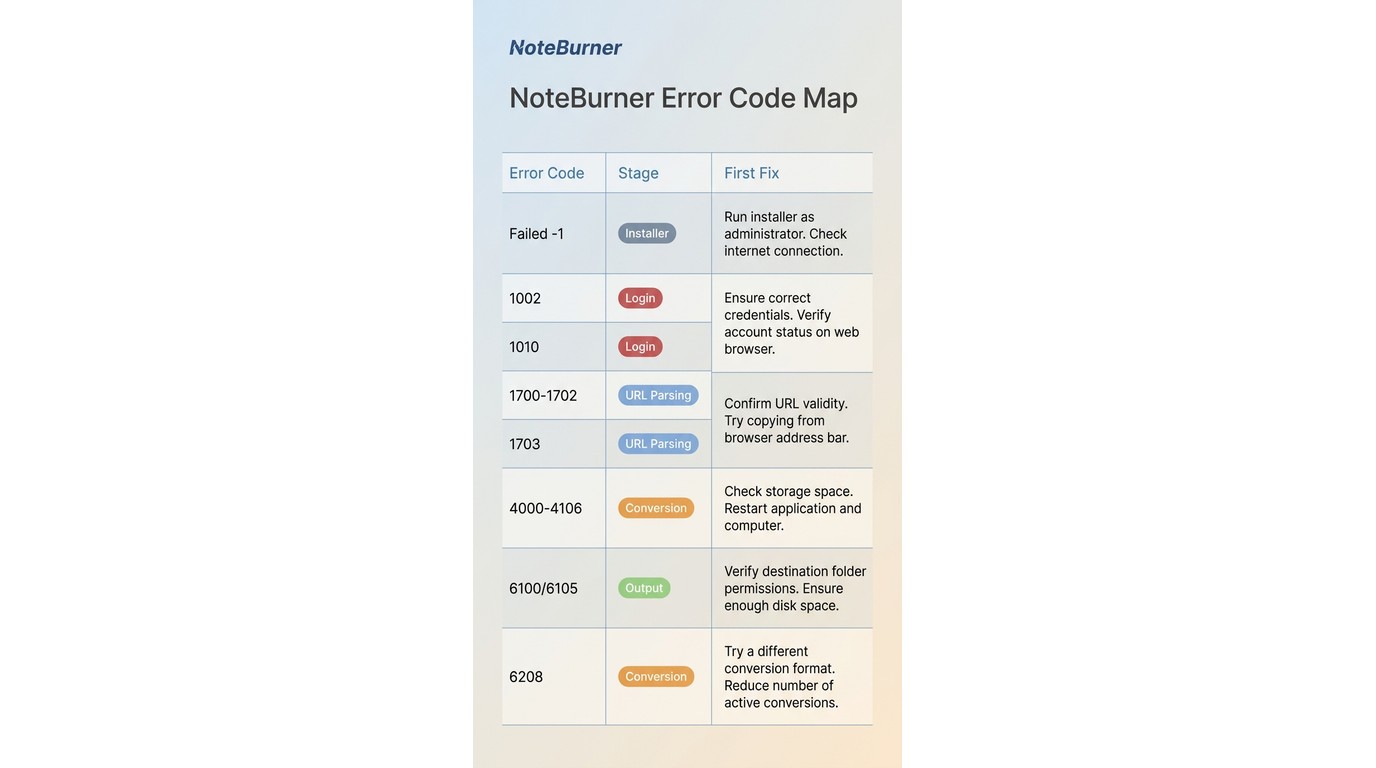
| Error code / symptom | Most likely stage |
|---|---|
| What it means | First fix to try |
| Failed -1 | Conversion |
| Source app blocks the current capture path, often after a platform-side update | Switch between Download and Record modes, then update to the latest build |
| Failed 1000 | URL parsing |
| The track or title link cannot be resolved, usually a bad or region-locked URL | Re-copy the link from the source app and confirm the item plays natively |
Fixes for NoteBurner Download Failures
Work these in order. Each subsection maps back to a stage in the table above, so once you know your failing stage you can jump straight to the fix instead of grinding through every step.
Restart and Switch to a Stable Network
A cold restart clears the temporary cache files that stall background processes on both Windows and macOS, and because NoteBurner talks to streaming servers in real time, an unstable connection alone is enough to trigger parse timeouts (Failed 6208) and 1002-family errors.
Reboot the machine, move to a wired Ethernet or a reliable Wi-Fi network, disable any VPN or proxy temporarily, and relaunch NoteBurner. If the same track fails again in the same place, the network isn't your problem — move on.
Update or Reinstall the Latest Version
If NoteBurner fails to parse links or stalls in conversion, an outdated build is a leading cause — the official support pages route Failed 6100/6105 straight to a clean reinstall. Uninstall NoteBurner completely, download the current 2026 build from the official site, and install fresh.
This resolves most parsing and conversion regressions before you touch anything more advanced, and it's the prerequisite for the mode-switching step below.
Switch Between NoteBurner Download and Record Mode
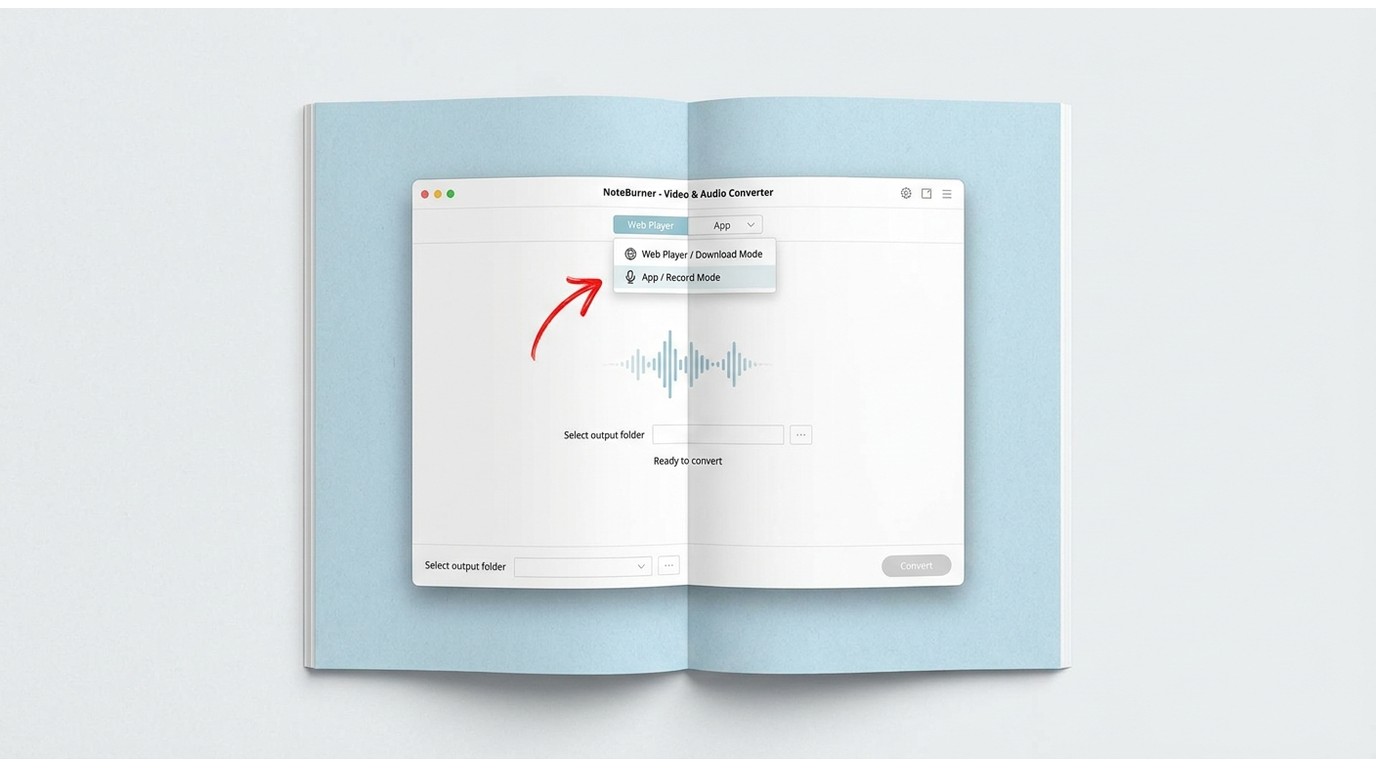
This is the fix the article you probably read first didn't mention, and it's the one I reach for on Failed -1 and Failed 1010/1700-1702. The noteburner download record mode toggle exposes two capture paths on most of its converters:
a Web Player / Download mode that pulls from the browser-based source, and an App / Record mode that captures from the installed source application. When one path breaks after a platform-side update, the other usually still works.
- Try Download mode first when you want the fastest conversion and the source has a working web player.
- Switch to Record mode when Download mode throws Failed -1 or 1010/1700-1702, or when only the desktop app plays the track without issue.
Editorial note: swap the mode before you spend an evening reinstalling drivers. It's a two-click change and it clears a surprising share of "NoteBurner cannot download" reports.
Re-Login and Confirm Native Playback
Failed 1703 and a lot of vague "nothing happens when I click Convert" reports come down to a stale streaming session or a track that isn't actually playable at the source. Before you blame the converter:
- Sign out of the streaming account inside NoteBurner and sign back in to refresh the token.
- Open Spotify / Tidal / Apple Music / Netflix directly and confirm the exact track or title plays end-to-end natively.
- Close other sessions on the same account — some platforms drop simultaneous playback on the converter side without a clear error.
If the track won't play in the source app, no downloader will fix it — that's a source-account problem, not a NoteBurner problem.
Fix NoteBurner Error 1002: Output Folder, Permissions, and Free Space
Before you look at the output destination, note that to fix error 1002 specifically you usually just need to plug in a working audio output device and clear the source app's local cache — that alone clears most noteburner error 1002 reports.
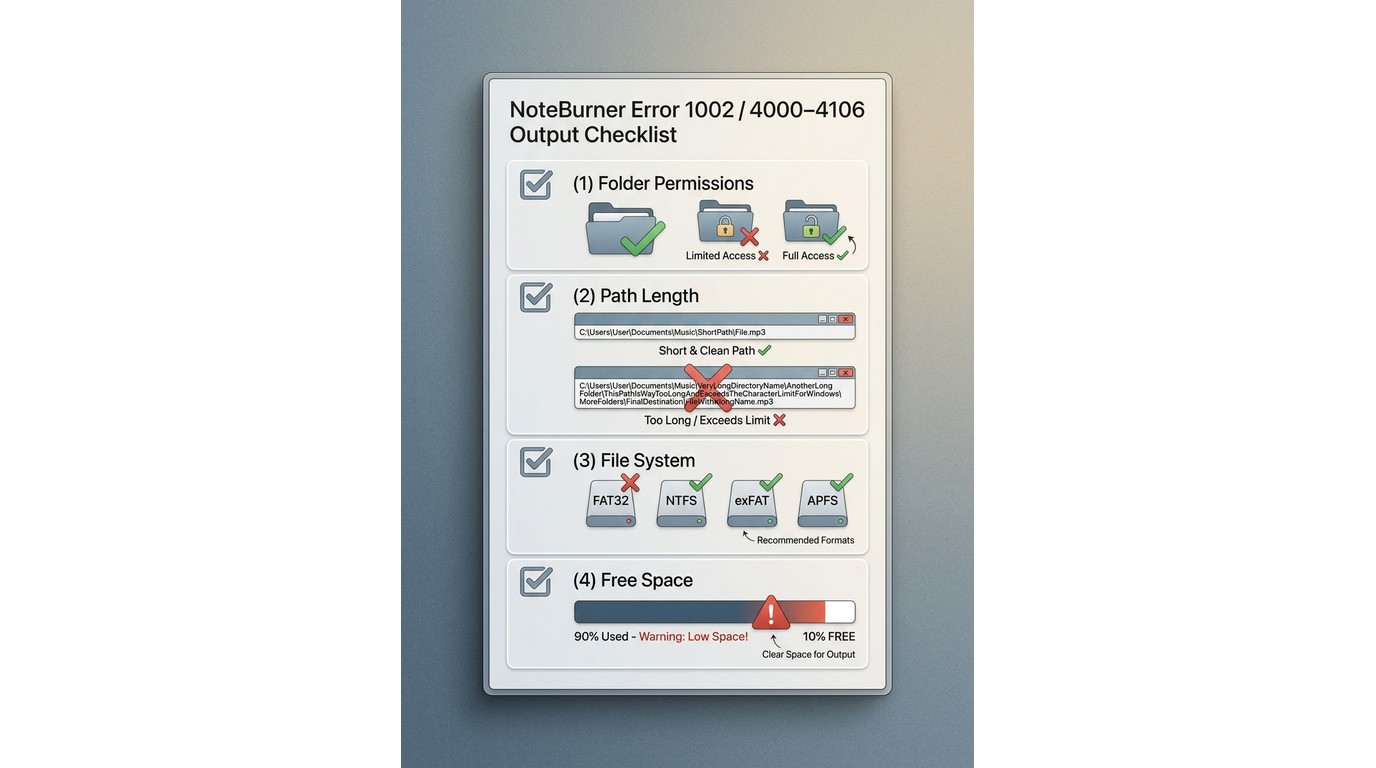 Beyond that, the Failed 4000-4106 family is almost always an output-destination problem, not a conversion problem — and disk space is only one of the causes. Work through all four:
![Free Space from Local Storage — Userful Tips to Handle NoteBurner Cannot Download [2026]](https://r1.dvdfab.cn/upload/drmdownloader/noteburner-cannot-download-yzVm.jpeg)
- Permissions — pick an output folder your user account owns (Documents or a folder in your home directory), not a system-protected location.
- Path length — very long output paths with deep folder nesting can silently fail on Windows; shorten the path.
- File system — FAT32 external drives cap single files at 4 GB, which breaks long video conversions; use exFAT, NTFS, or APFS.
- Free space — high-bitrate audio and 4K video eat storage fast; keep a comfortable buffer on the target volume.
Check Files When Conversion Skips or Repeats
Here's the case most troubleshooting guides skip entirely: NoteBurner marks the job as successful, but the output file skips, repeats a segment, plays the intro again at the end, or drops the last few seconds into silence.
I've watched this happen on stable networks with the latest build, and community threads describe the same pattern — particularly on macOS, where repeated conversion of the same track doesn't fix it.
Don't trust the success indicator alone. Verify the file:
- Spot-check playback at the start, the middle, and the last 10 seconds of the output file.
- Compare the output duration against the source track — a difference of more than a second or two is a red flag.
- Re-convert the affected track at 1x speed (not batch/high-speed) and compare.
- If Download mode produced the bad file, retry the same track in Record mode; if Record mode did, try the other.
My take: a "successful" conversion that fails these checks is still a failure — treat it like any other Failed code and move to the next fix.
When to Contact NoteBurner Support
If you've worked through the stage table, swapped modes, refreshed the login, verified native playback, and cleaned up the output destination, and the same code still shows up, that's when the support team is worth your time. Attach your NoteBurner log files, note the exact error code, the source platform, and whether Download or Record mode was active — that context is what lets support pinpoint the failure instead of asking you to restart your computer.
StreamFab: A Desktop Alternative for Failed Downloads
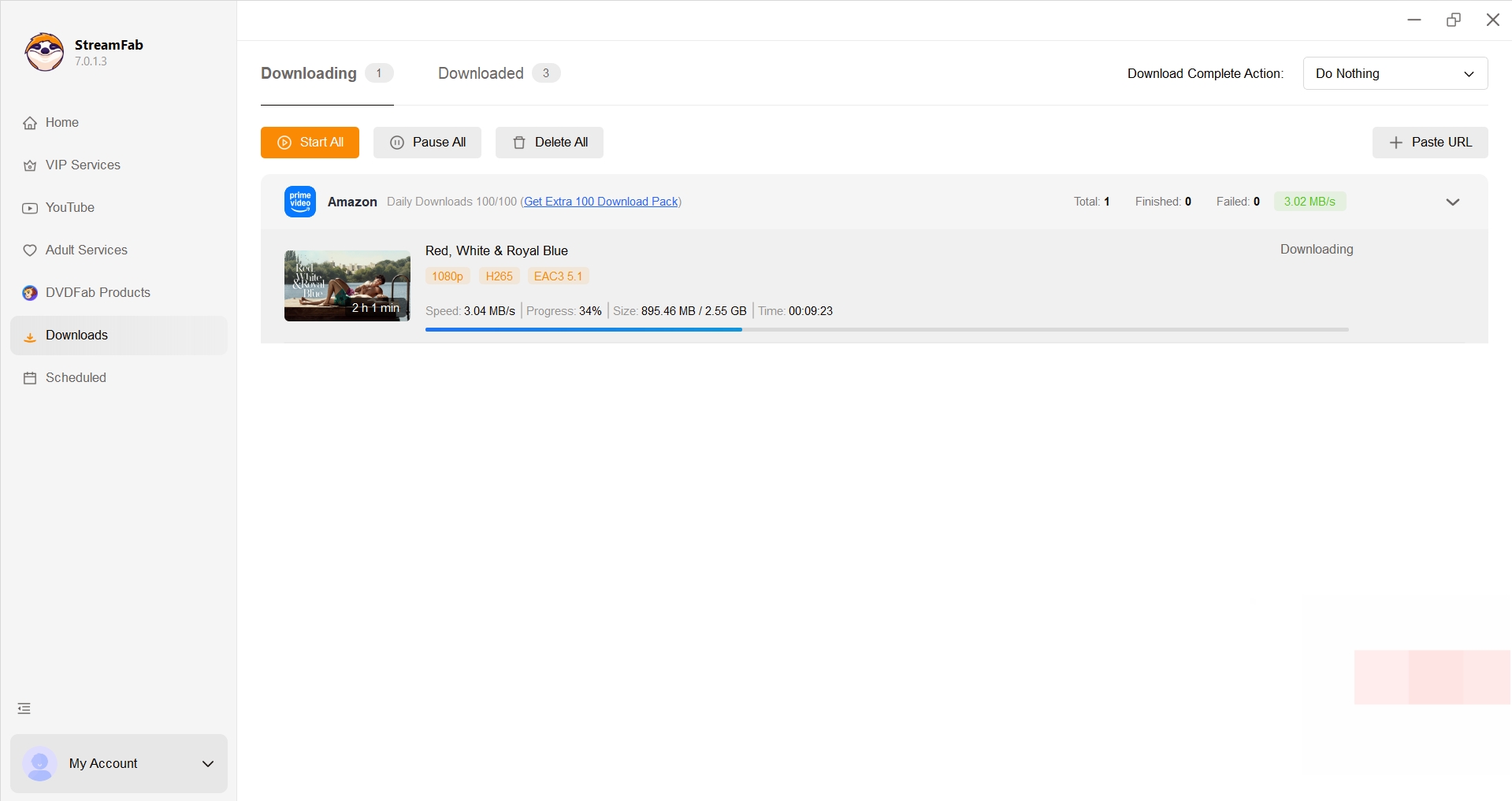
If you've worked through the diagnostic path above and NoteBurner still can't complete video downloads for a specific platform, StreamFab All-In-One is one practical desktop alternative worth considering — specifically for readers who need to save authorized video content for personal offline viewing.
It's not an equivalent replacement for Spotify or other music-conversion workflows; treat it as a scoped option for the video side, not a verdict on NoteBurner's overall reliability.
![StreamFab Video Downloader Software Reviews & Details — Userful Tips to Handle NoteBurner Cannot Download [2026]](https://r1.dvdfab.cn/upload/streamfab/en/noteburner-cannot-download-EuNy.jpeg)
For content you're authorized to access, where permitted by platform terms and applicable law, StreamFab saves a local copy across 1000+ supported sites. If you're still weighing options, our roundup of other NoteBurner alternatives covers the wider landscape.
Best for: readers whose video downloads keep failing after mode switching, re-login, and reinstall, and who want a desktop tool that supports batch jobs and higher-resolution output.
Not ideal for: Spotify/Tidal/Apple Music offline conversion — StreamFab isn't a like-for-like music-converter substitute.
Verified capabilities relevant to that scope:
- Clean interface built around a source-picker workflow, easy for non-technical users
- Supports 1000+ sites including Netflix, Amazon Prime, Hulu, Max, and YouTube
- Automatically removes ads embedded in downloadable video streams
- Batch Mode queues multiple titles in a single session
- Lifetime license options available alongside subscription plans
- Video output up to 4K/8K with EAC3 5.1 audio where the source provides it
How to Save Videos with StreamFab
The short version below covers the core flow; our full step-by-step StreamFab walkthrough handles the Edge cases.
- Go to its official site, download the program to your Windows or Mac, and launch it.
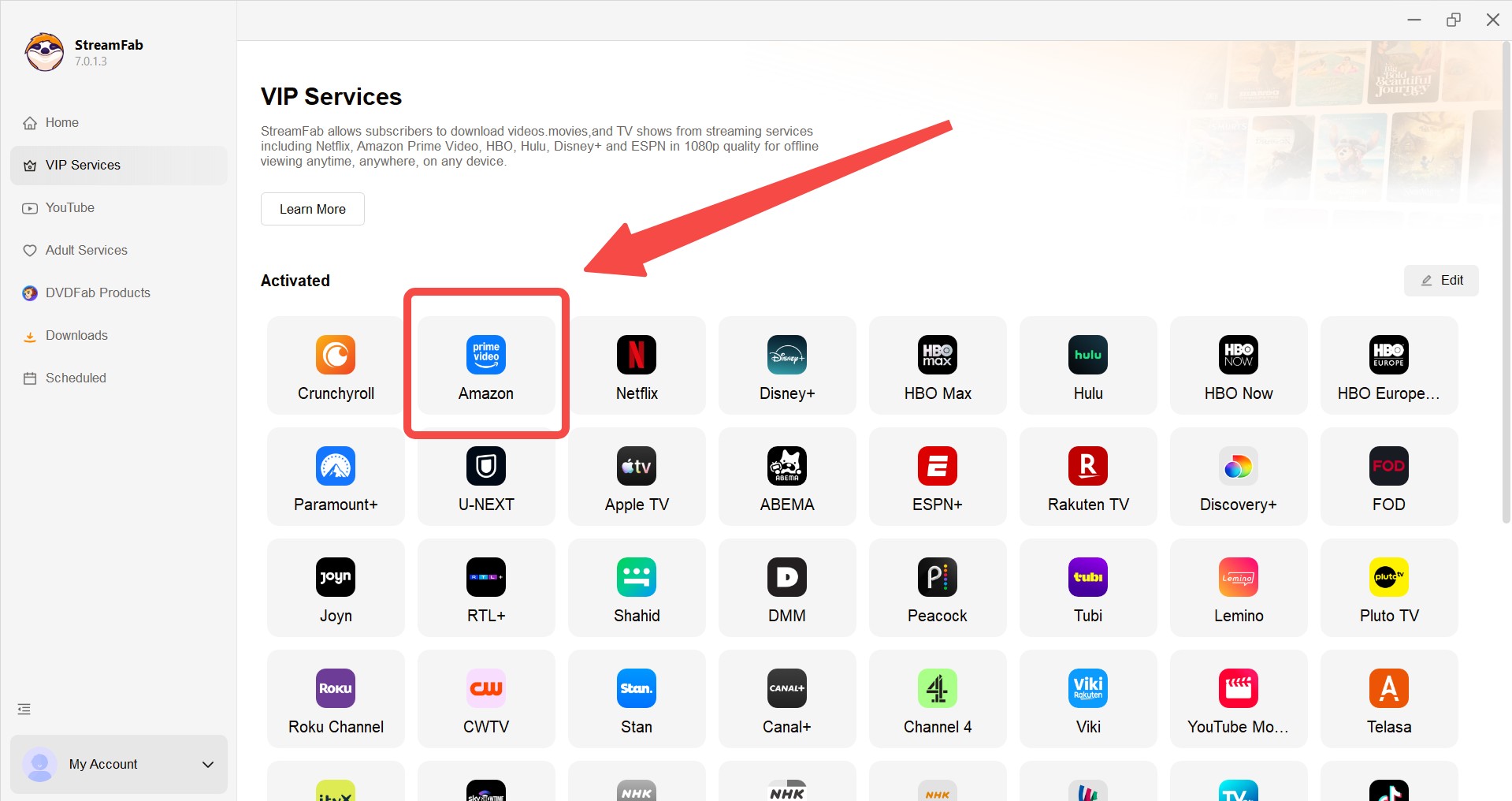
- Select the VIP services tab and choose any streaming service from the list.
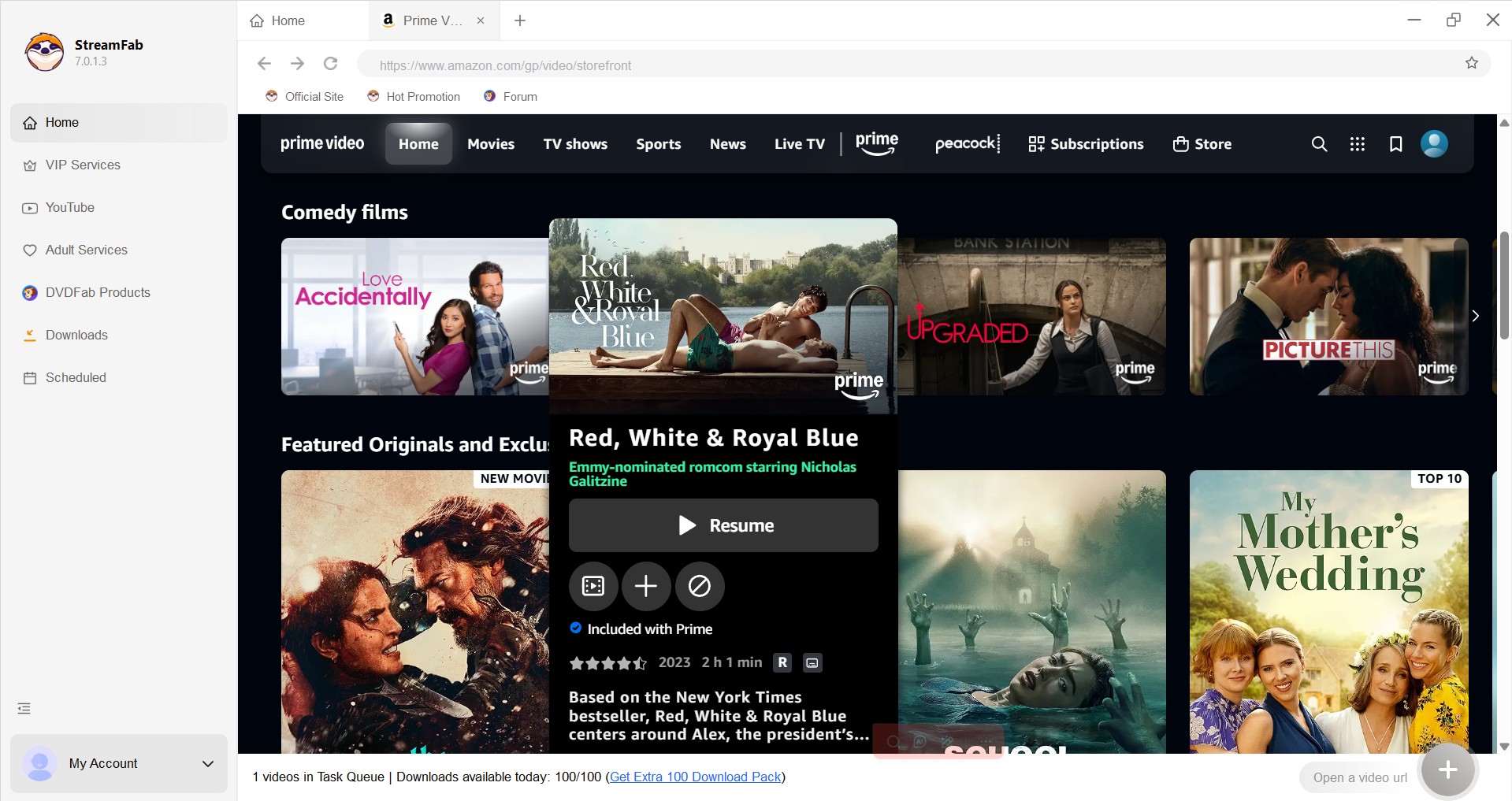
- Sign in with your account and play the video you want to download.
- A pop-up window will appear on your screen. Choose your preferred audio format, subtitle language, and video resolution.
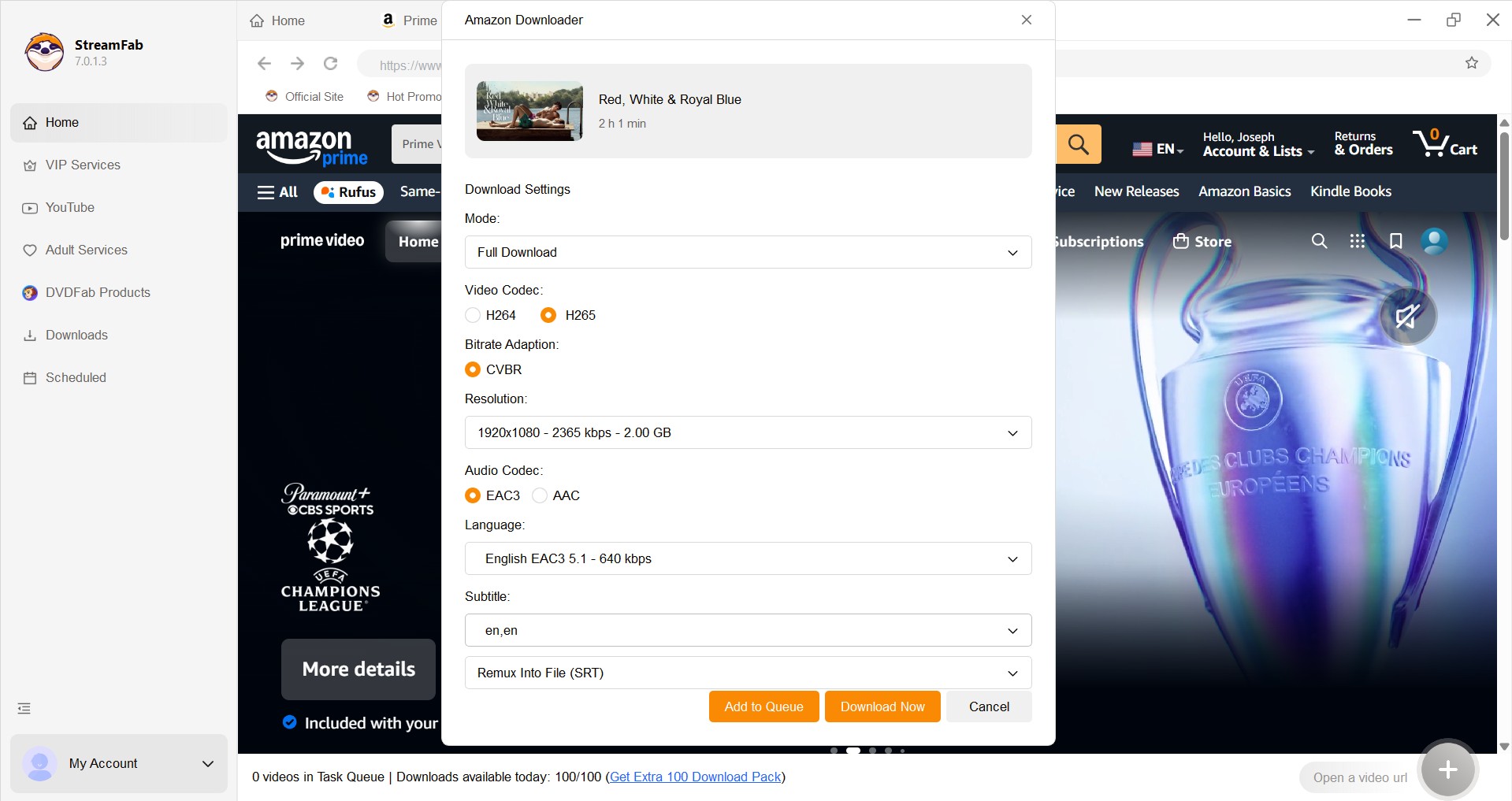
- Click on the "Download Now" button to begin the downloading process. Once complete, it will automatically save to your local storage.
Using Streaming Downloaders Responsibly
I originally reached for NoteBurner to keep a couple of Spotify playlists available on the subway, and my honest observation from that use is that any third-party converter — NoteBurner included — sits in a gray zone that depends on where you live and what you agreed to when you signed up.
Signing a streaming account into a third-party converter can conflict with that platform's terms of service; whether it's lawful in your case depends on your jurisdiction and the platform's rules, not on any claim a downloader makes.
Practical guardrails I follow, and would ask a reader to follow:
- Only convert content you're authorized to access, and keep the output for personal offline viewing or listening — not redistribution or commercial use.
- For anything you want to keep long-term, buy the album, OST, or digital release through the platform's official channels.
- Treat converters as convenience tools that sit alongside a paid subscription, not as replacements for it.
- If you're worried about session risk, isolating converter activity to a secondary account is a common risk-reduction step — but it doesn't guarantee anything, it doesn't override platform terms, and it isn't a way to "stay under the radar." You still can't process content you aren't authorized to access.
None of the above turns a converter into a licensed distribution tool. For a broader take on desktop-downloader safety trade-offs, see our note on whether StreamFab is safe.
FAQs
Can Spotify detect NoteBurner or get my account banned?
The blunt version of "can Spotify detect noteburner": signing any streaming account into a third-party converter can conflict with that platform's terms of service, and no downloader can promise you'll never see enforcement. I don't tell readers converters are "never detected" — that's not a claim anyone can make in good faith. Reducing the surface (a separate account, not sharing sessions across devices) lowers exposure but doesn't override the platform's rules, and it isn't a way to bypass them. Treat the risk as real, not zero.
Is NoteBurner legitimate and safe to install?
On the "is noteburner legitimate" question: NoteBurner is an actively maintained, purchasable product with current downloads and support in 2026 — install it only from the official noteburner.com site, not third-party mirrors. That said, "legitimate software" and "anything you download with it is legal to keep" are two different questions: the app being a real product doesn't grant you rights over the content you convert. Personal-use-only is on you.
Why does NoteBurner only convert the first minute of each song?
This one gets misfiled as a bug all the time — it's actually the noteburner free trial limit. The unregistered version deliberately stops each conversion after roughly the first minute. Nothing on your machine is broken, no error code is being suppressed; a paid license removes the limit. If you're seeing exactly one-minute outputs across every track, don't reinstall — activate.
Why does NoteBurner fail on Mac when the same songs work on Windows?
My observation from Mac-side reports, not a lab test: some macOS conversions come out with trimmed silence, repeated segments, or the intro reappearing near the end, and repeated re-conversion of the same track doesn't clear it even though NoteBurner reports success. If Windows produces a clean file for the same track, the issue is on the Mac output path — verify the file with the checks in the "Check Files When Conversion Skips or Repeats" section rather than re-downloading indefinitely, and try swapping between Download and Record mode.
Conclusion
The fastest way past "NoteBurner cannot download" isn't a longer checklist — it's diagnosing in order: identify the failing stage, read the error code, refresh the account and confirm native playback, then verify the output file before declaring success. Most reports I see resolve at the mode-switch or re-login step, not at reinstall.
If the same code keeps returning after you've worked the fixes above, and the failing content is video you're authorized to access, StreamFab is one reasonable desktop option for that specific case. It isn't a universal upgrade over NoteBurner and it isn't a music-converter replacement — just a scoped alternative when the official path won't complete.

AnyStream (RedFox AnyStream) shut down in June 2024 and remains gone in 2026. I tested every major replacement — here are the 5 best anystream alternatives, including free options, ranked by real-world performance.
By Erika Leen - Oct 12, 2026

Evaluating the Audials One 2026 free trial? I tested its 720p caps, examined if is audials legal under Fair Use
By Erika Leen - Sep 29, 2026

Are you thinking of purchasing NoteBurner and unsure if it’s worth the investment? In this NoteBurner review, let’s delve into its product lines, particularly the NoteBurner Video Downloader’s pros and cons.
By Marcia Hatcher - Sep 28, 2026

Read our in-depth Audials review for 2026. Is Audials safe and legal for Amazon Prime? Discover actual test results, Widevine DRM fixes, and better alternatives.
By Erika Leen - Sep 28, 2026