
How to Download OnlyFans Videos on Android in 2026 [3 Apps + Desktop Method]

Summary: I tried to re-watch a DM video from a creator I was subscribed to on my Android phone while offline — and got a black screen the entire time, no matter what I tried. Turns out OnlyFans uses DRM and playback-layer protection that blocks standard screen recording on Android. After testing three dedicated Android tools and a desktop workflow across dozens of videos I had legitimate access to, here are the methods that actually work in 2026 — with no black screen and no quality loss.
I tested three Android apps plus a PC-based method for saving OnlyFans videos you already have access to — jump straight to all three Android methods here.
Before you download anything, there are compliance and safety basics worth a quick read — see the legal and safety context here.
Have a specific question about detection or legality? The answers are in the FAQ — go to FAQs and detection risks here.
Personal backup of content you can already watch. No redistribution.
Introduction
On r/DataHoarder and r/onlyfans_help, the 2026 consensus is consistent: standard screen recording triggers black screens on Android, most browser-based tricks have been patched out, and users now recommend either a dedicated app from official channels or a desktop-to-Android transfer workflow for anything requiring batch handling.
I searched and prepared 3 third-party methods to help you save OnlyFans videos on Android; some work only with standard streams, while others also handle videos you can already watch with your valid subscriptions. Pick anyone you prefer and try it out.
Here is the VirusTotal result and safety page of the methods I'm about to introduce as proof.
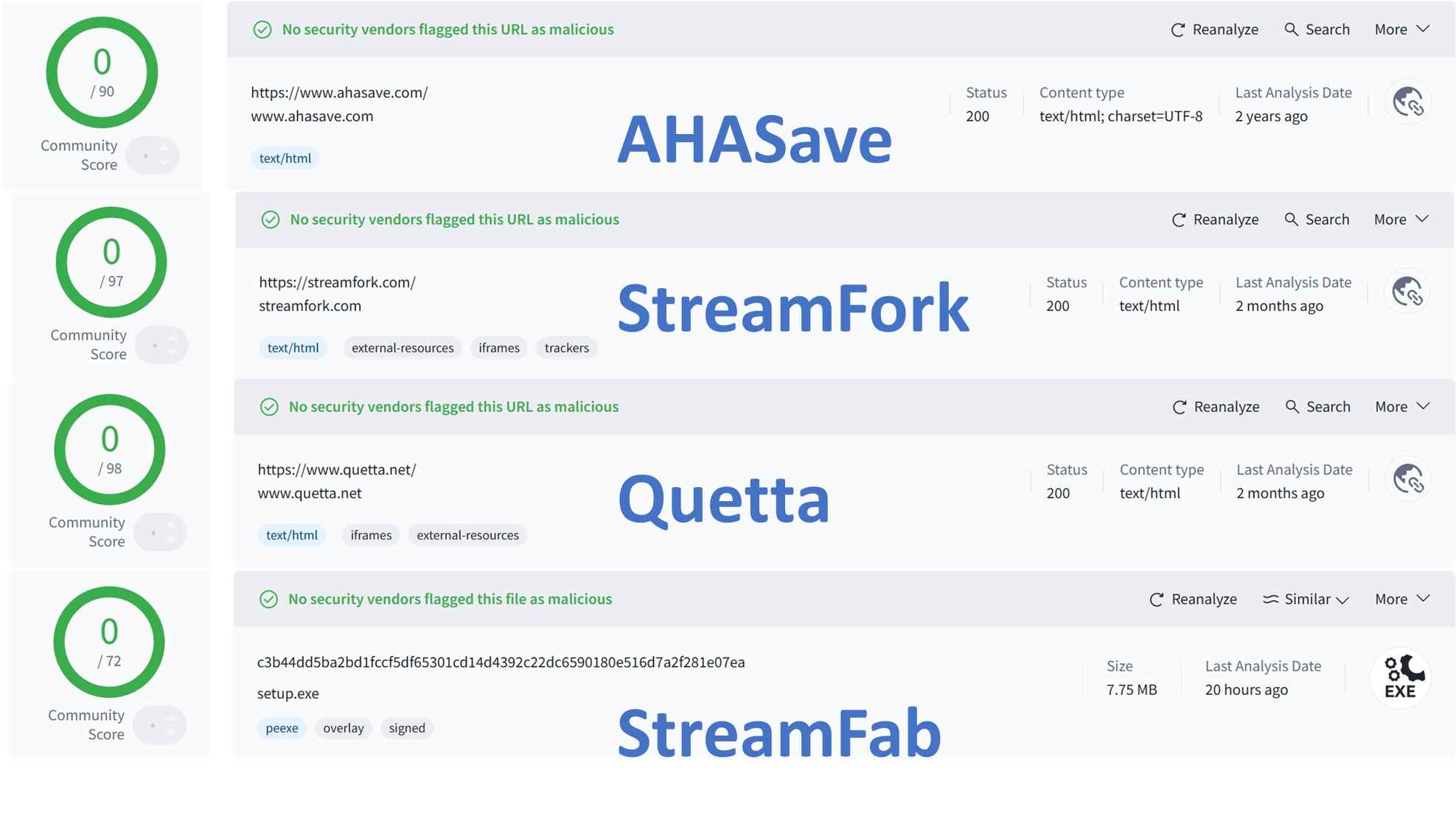
The VirusTotal scan above shows clean results for the tools covered in this guide — all were checked against 70+ antivirus engines before inclusion.

3 Methods to Download OnlyFans Videos on Android Devices
Alright, let’s break down these two methods together. I’ll show you, step by step, how to save OnlyFans videos on your Android phone. If you have lawful access to the content, creating a local copy for personal offline viewing can make playback smoother on Android and reduce privacy concerns in public or shared environments.
In case you don't know how to operate these apps properly, here is a basic workflow example for you.

The diagram above shows the basic download workflow: authenticate in the app’s built-in browser, play the target video, and confirm the save — all three Android methods follow this general sequence.
- Device: OnePlus 13 (OxygenOS 16/Android 16)
- Network: WiFi (500 Mbps), to eliminate speed bottlenecks
- OnlyFans Account: Subscribed to multiple creators, with legal access
- Security: Latest Bitdefender Mobile Security installed; all APKs and apps monitored for suspicious behavior
1. AhaSave Downloader (Works best for standard videos)

AhaSave is a video downloader app for Android. It has a free version, but you may have to be prepared for a lot of pop-up ads. It’s a straightforward way to save some videos for offline viewing on Android, but its success rate is mainly limited to standard playback types. For videos delivered via more complex playback variants, it may not work consistently.
- Support MP3, MP4, M4V formats
- Support a private folder to protect your privacy
- Explore videos via the built-in browser
- No bulk downloads of OnlyFans
- May fail on certain videos that use different playback delivery methods (including some message videos), even when you can watch them in your account.
- Too many ads
First things first, you’ll need to grab the AhaSave All Video Downloader from Google Play.
Open it up and, using that little built-in browser, sign in to OnlyFans. Scroll around, find your video, and hit “Play.”
Here’s the fun bit: as soon as the video starts, AhaSave jumps in, offers to save, and, poof, it shows up in your gallery.
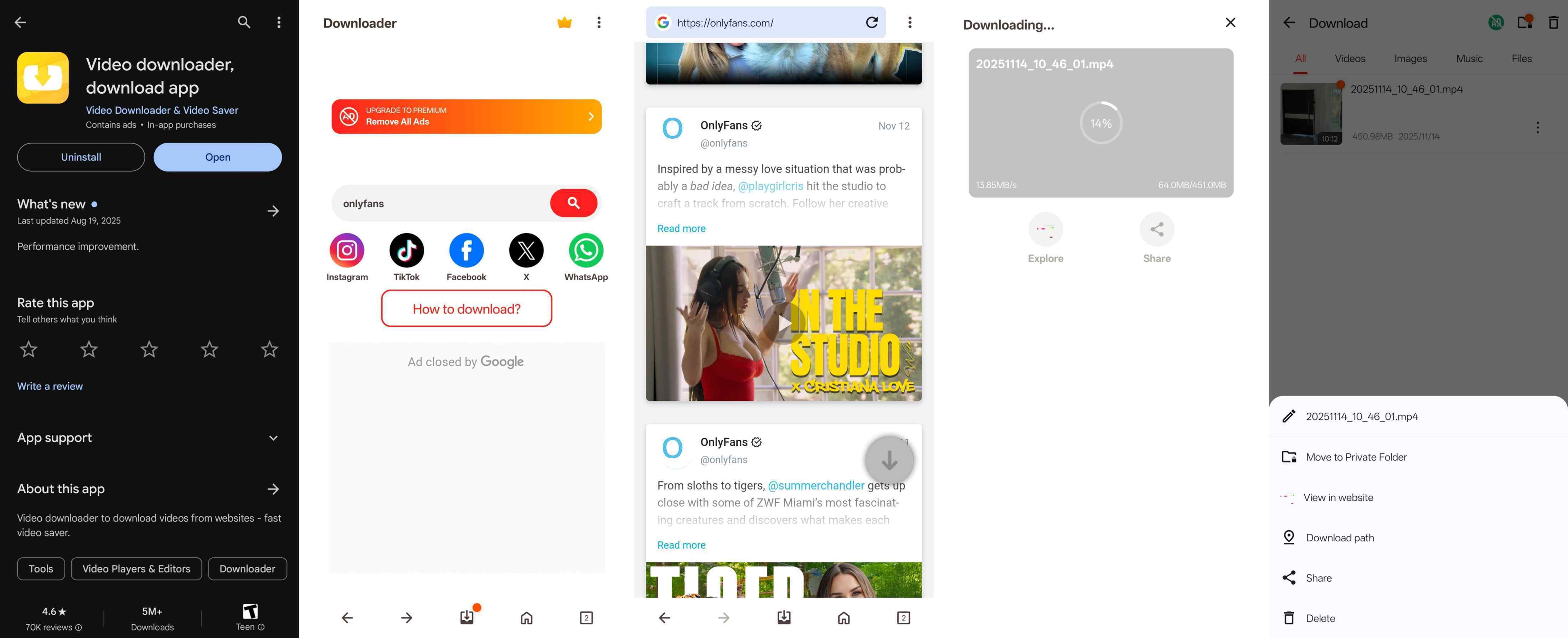
AhaSave detects the video as soon as it begins playing and immediately surfaces the save prompt — confirmed working on standard-delivery content in my OnePlus 13 test.
2. StreamFork (Handles more playback types on mobile)

StreamFork started as a browser extension, but you can only get it as an app through another platform called Expo. So, to use the StreamFork app, you first need to install that thing. For me, the most impressive thing is that it can also handle more types of OnlyFans videos on mobile devices, as long as you already have legitimate access to watch them. It's a bulk OnlyFans downloader, but the batch download function requires a paid subscription.
- Supports saving videos you can legally access on OnlyFans and Fansly for personal offline viewing
- Handle more types of OnlyFans videos, as long as they are already playable in your account
- Support OnlyFans direct message video downloads
- Support for more advanced video types and bulk downloads requires an extra fee
- Support response can be slow
- Registration can be time-consuming
First, install the Expo Go app on your Android phone. Then, open it and scan the QR code to add StreamFork to Expo Go.
Choose the correct entrance, log in to your OnlyFans account through the StreamFork app, and find the video you want. You should see a 'Download' button in the right corner.
Confirm the download, and the OnlyFans video will be saved to your Android image gallery.

StreamFork shows a Download button in the upper right after the app parses the content — tap it to confirm the save to your Android gallery.
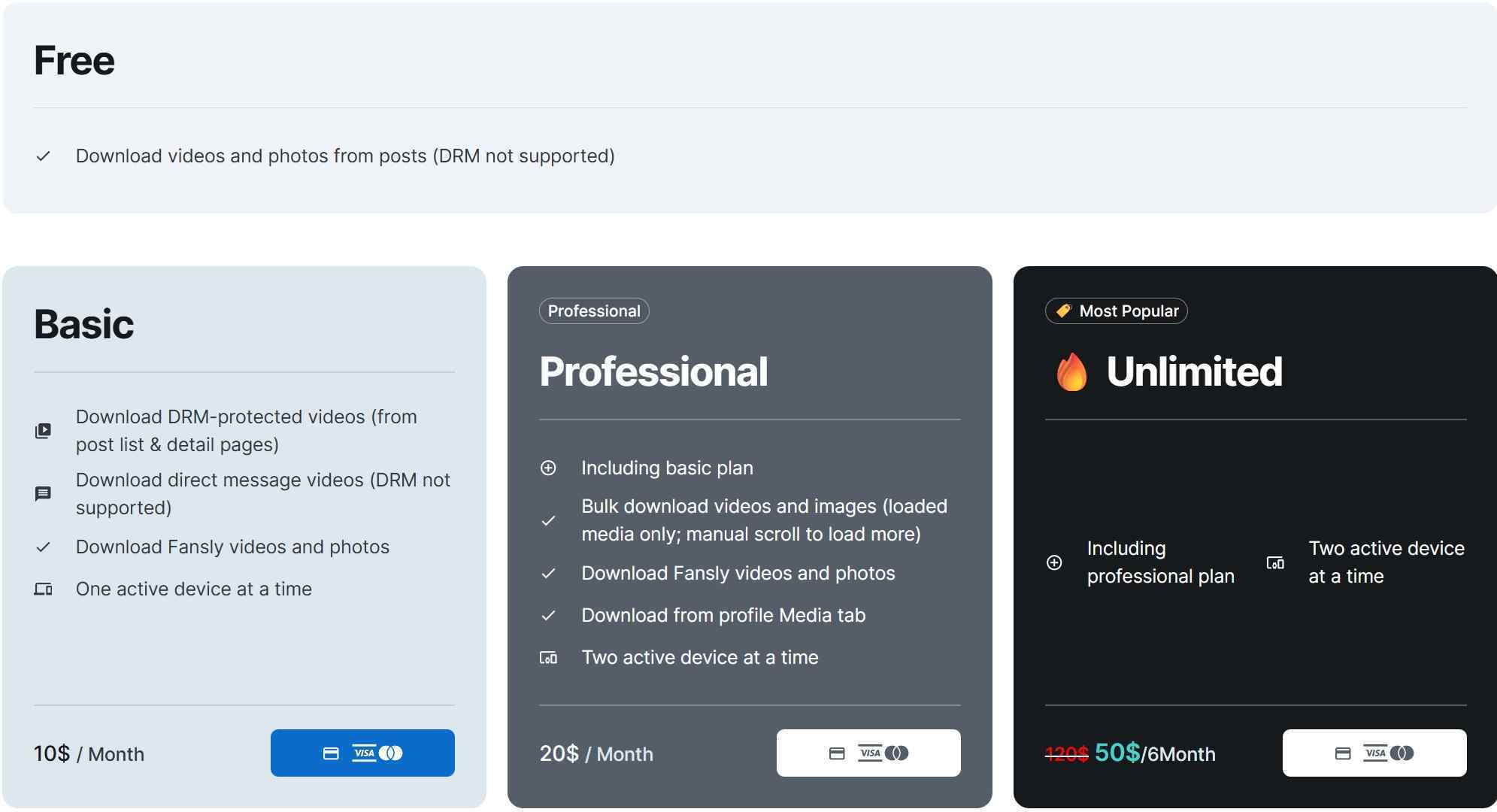
StreamFork’s pricing page shows that bulk download and advanced video type support require a paid plan — the free tier is restricted to standard-delivery content only.
3. Quetta (Latest method for mobile OnlyFans video downloads)

Quetta itself looks just like a browser. But it's worth noting that it has built-in media content sniffing and video download features. Currently, it and its video download function are free to use, but since it has no additional adaptation for OnlyFans, it cannot batch download OnlyFans videos, and its support for DRM-protected OnlyFans videos is also weak.
- Free & safe to use
- Simple operations with built-in download engine
- Support 720p/1080p OnlyFans downloads on Android
- Independent file safe to ensure downloaded OnlyFans videos do not leak
- No bulk download function
- Weak compatibility to DRM-restricted OnlyFans content
Install Quatte from Google Play or its official homepage. Launch it and head to OnlyFans.
Now login and play the video you want for offline viewing on your Android, and there will be a floating download panel. Click on the download arrow.
Now decide where do you want to store the OnlyFans video, the file name, and the folder you want for a tide file management.
After customization, you can download it by clicking on the "Save". If you remove the downloads, you can download them back later as long as the history is still here.
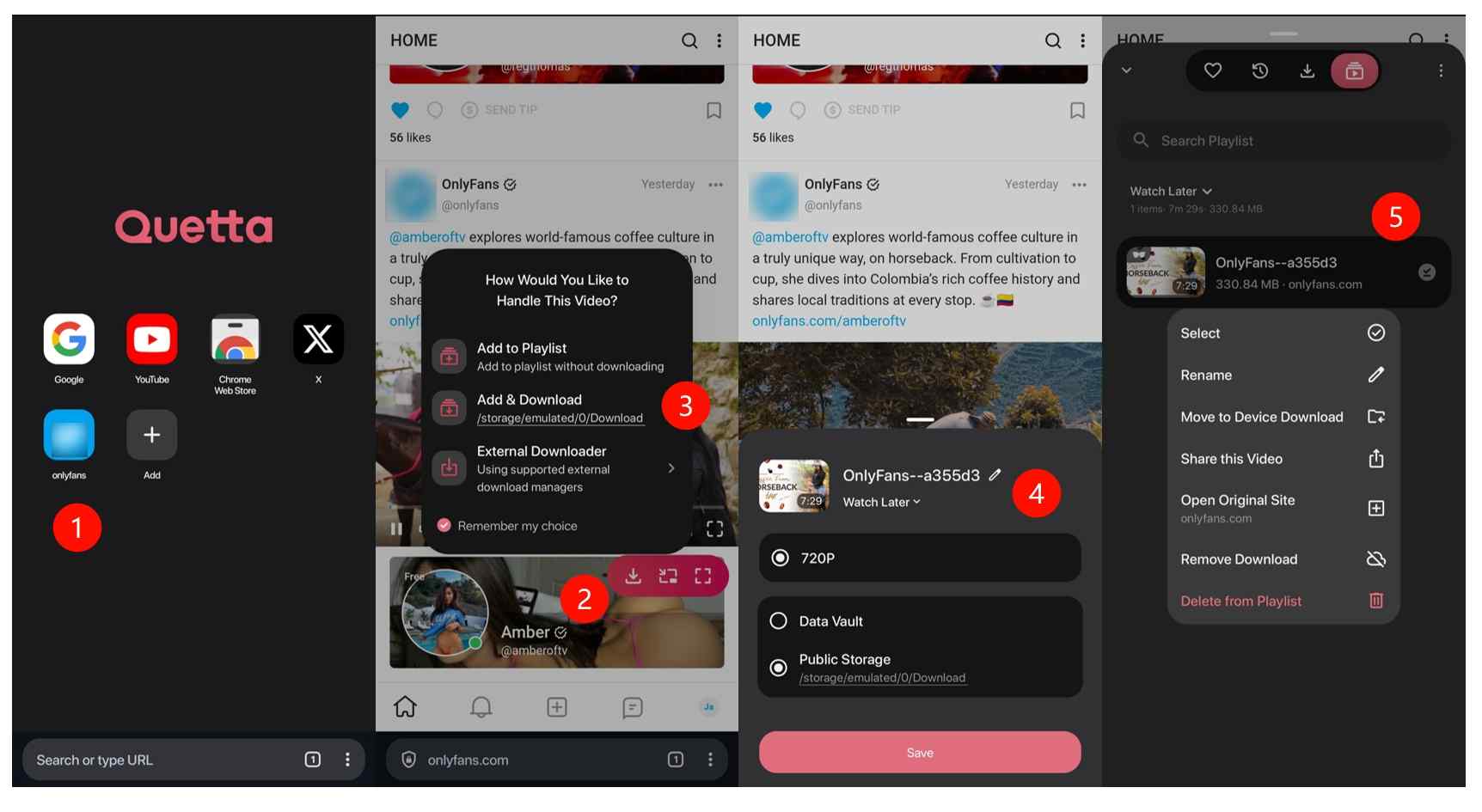
Quetta’s download panel pops up once the video begins playing — you can rename the file and choose a storage folder before confirming, which helps keep your library organized.

In my testing on OxygenOS 16 (Android 16), native mobile methods often trigger security flags or resolution drops. For a reliable personal backup of legally subscribed content, a specialized tool is required to process the stream without quality loss. While mobile-only tools exist, they lack the efficiency needed for high-bitrate archival. If you are using an iOS device, please refer to the specific guide to download OnlyFans videos on iPhone instead.
Alternative Method: StreamFab OnlyFans Downloader
If your goal is to save more playable video types and manage downloads in batches, a desktop-based workflow can be noticeably more stable, and then you transfer files to Android for offline viewing.
StreamFab OnlyFans Downloader is designed to save OnlyFans content you can already watch in your account (including messages and collections) as local copies during a valid subscription, making offline viewing and personal archiving easier.

Owns unique advantages that put it in a different league from Ahasave and other basic OnlyFans downloaders for Android:
- Auto-save new posts from creators you subscribe to during a valid subscription at a set time.
- Batch-save videos from subscribed creators and your Collections.
- Save OnlyFans videos you can already watch, including those sent via messages, as local copies for personal backup and offline viewing.
For me, these three exclusive features make its PC-only limitation a reasonable trade-off. I can just download the content to my computer and then move it over to my Android device. It seems like an extra step, but the efficiency from bulk saving is a massive improvement. I would like to rate it as one of the best OnlyFans downloaders I've used.
| Methods | AhaSave | StreamFork | Quetta | StreamFab |
|---|---|---|---|---|
| Output Format | MP4/MKV/M4V | MP4 | MP4 | MP4/MKV |
| Best resolution | 1080p | 1080p | 720p/1080p | 1080p |
| Download stability | Low | Medium | Medium | High |
| Message video saving | ❌ | ✅ | ❌ | ✅ |
| Batch download | ❌ | ❌ | ❌ | ✅ |
| Auto download | ❌ | ❌ | ❌ | ✅ |
Based on my test set under the same network conditions (Android for AhaSave/StreamFork; desktop workflow for StreamFab). Results may vary.
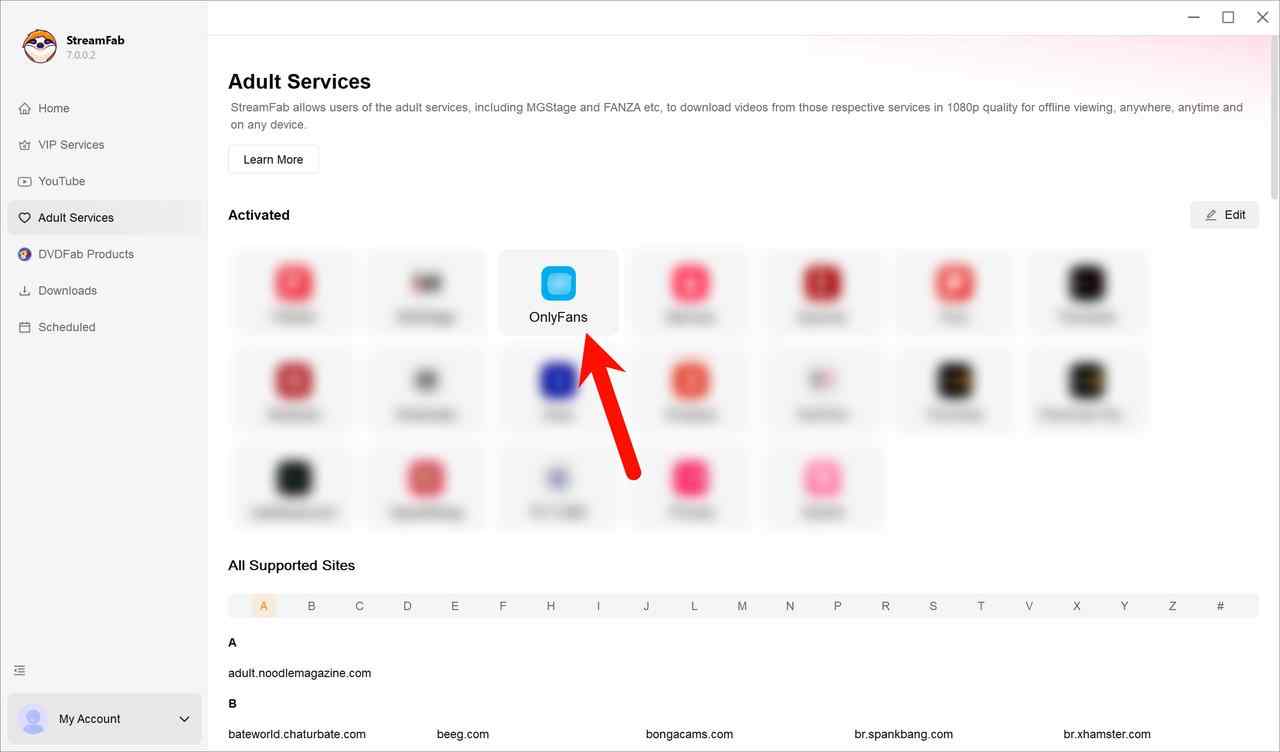
Log in to your OnlyFans account. Then, you can either play the video you want or go to the profile of the creator you want to save.

After logging in, navigate to any creator profile or play a video — StreamFab will automatically begin analyzing available content in the background.
When you play an OnlyFans video, StreamFab will automatically analyze it. You'll get options to select all videos from that creator or just pick specific ones.

StreamFab shows a selection panel with all detected videos from the creator — you can select all at once for batch download or pick specific clips individually.
You can download all the selected videos right away and add them to the queue to manage later.

The download queue shows all selected tasks with real-time progress — you can add more videos while existing downloads are already in progress.
Once the download finishes, you'll find the OnlyFans videos in the folder you picked, all ready to be transferred to your Android phone for personal offline viewing.

The completed download folder shows your videos organized and ready — simply transfer them to your Android via cable, cloud sync, or local Wi-Fi to watch offline.
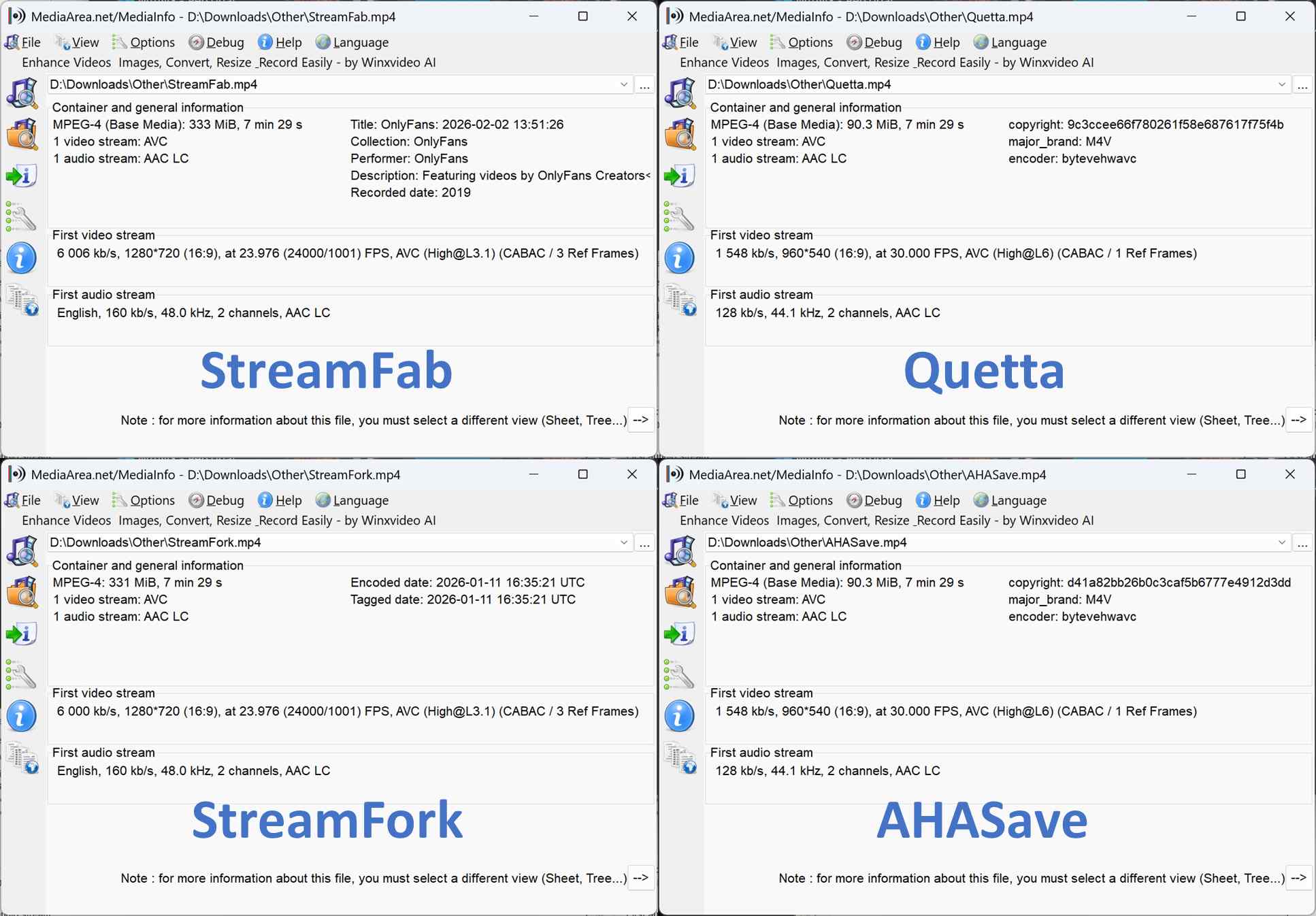
In my test set, the copies were consistent in 720p playback. As you can tell from the screenshots of MediaInfo below, I ranked the Android OnlyFans download solutions here:
- 🥇StreamFab OnlyFans Downloader took first place by providing the best quality and most complete metadata;
- 🥈StreamFork's quality was acceptable, but it lacked metadata for easy local management, ranking it second;
- 🥉Quetta and AHASave were tied for last place due to low bitrate and missing metadata.
MediaInfo analysis confirms that StreamFab’s output carries complete metadata tags and a higher average bitrate — notably better than the AhaSave and Quetta copies, which lacked track metadata entirely.
Legal Notice & Personal Use Guidelines
This guide is intended for privacy-minded offline viewing of content you can already watch during a valid subscription. Use it only in a personal backup context: comply with local laws and follow the platform’s Terms of Service at all times. My rule is simple — only save a local copy of content you can already watch in your account, strictly for personal offline viewing.
You should not share, redistribute, sell, or use any saved videos for commercial purposes or any form of unauthorized use. Adults (18+) only. For security, only install tools from official distribution channels (Google Play or the tool’s official homepage), and avoid unofficial APKs that request elevated device permissions.
Creators are not explicitly notified when subscribers save local copies for personal viewing, but platform behavior can change and redistribution remains firmly off the table from both a terms and community ethics standpoint. When in doubt, review the current platform ToS and consult local regulations.
FAQs
Will OnlyFans detect if I download their videos on Android?
OnlyFans does not currently send creators an explicit download notification when a subscriber saves a local copy. However, platform behavior can change, so you should assume nothing is guaranteed and always respect creators’ rights and the platform rules. For fair use, you are suggested to ask for permission from the creator first if you want to download OnlyFans purchases.
Can I use an OnlyFans modded APK to download the content?
Avoid modded APKs. They come from unverified sources and may include malware, credential theft, or privacy risks. If you care about account safety, stick to reputable tools and official distribution channels.
How can I view OnlyFans on my Android without the browser?
Inside the browsers, there is an option to install a certain website as a standalone app on your Android. So as available on OnlyFans. I made a simple guide with Chrome here.
In Chrome on Android, tap the three-dot menu, then “Add to Home screen” — this installs OnlyFans as a standalone PWA icon that opens without the browser chrome visible.
Is it legal to save OnlyFans videos for offline viewing?
Downloading content you have already paid for and can legally access, strictly for personal offline viewing during a valid subscription, is broadly consistent with personal use principles in many regions. However, platform Terms of Service may restrict it regardless of legality, and laws vary by jurisdiction.
The key boundaries are clear: no redistribution, no commercial use, no sharing with others — only personal, time-shifted viewing of content you have active access to. When in doubt, review the platform's ToS and consult local regulations.
However, the platform uses DRM and playback monitoring, so highly abnormal activity (such as bulk automated access) could potentially trigger account-level review. For personal backup use — saving individual videos you can already watch during your subscription — this is not a realistic risk for normal usage patterns. The platform's primary controls target screen recording detection (which triggers black screens) and redistribution, not personal backup workflows by paying subscribers.
Conclusion
If you’re on the hunt for the best video downloader for Android to handle all your downloads, this guide can help you check out the top tools out there. If you only need a quick offline copy of standard videos, a lightweight OnlyFans downloader Android solution may be enough. If you want better stability, batching, and a cleaner personal archive workflow, a desktop-to-Android transfer approach is often the more reliable long-term option.
Personally, I'm sticking with StreamFab because it's more stable at handling different types of OnlyFans videos I can already watch in my account and packed with more convenient features.

Convert authorized OnlyFans videos to MP4 on Windows or Mac using a desktop workflow or a permitted screen recording. Learn how file formats differ from delivery and access, what StreamFab’s output settings provide, and what four dated Reddit reports describe. Five FAQs cover installation, the trial, subtitles, batch selection, and source quality.
By Marcia Hatcher - Oct 13, 2026
How to download OnlyFans videos on iPhone in 2026: 3 tested methods ranked by success rate, from Aloha browser to iOS screen recording to the PC transfer workflow.
By Erika Leen - Oct 13, 2026
Paid for OnlyFans but can't save it? We tested 4 tools to rip and save OnlyFans content in 2026—no black screen, full 1080p, zero account risk.
By Erika Leen - Oct 13, 2026
Can you screen record OnlyFans in 2026? Fix the black screen on iPhone & PC with these tested methods — from OBS tricks to dedicated download tools.
By Marcia Hatcher - Oct 13, 2026