
Allavsoft Review 2026: Is It Still Worth It After Testing?

Summary: A 2026 hands-on look at Allavsoft, the video and music downloader for Windows and Mac. It still handles basic saves from general, non-DRM sites, but YouTube and Spotify jobs now stall or loop on login, and the interface is dated. This review covers real-world reliability, corrected pricing, safety, and the alternatives worth considering, including StreamFab for streaming titles.
If you searched for Allavsoft, you probably want to save a YouTube playlist or a few Spotify tracks, and you're asking the questions that matter: does it still work in 2026, is it safe, and is it worth paying for? Here's the short answer: Allavsoft still handles basic downloads from general, non-DRM sites, but its reliability on YouTube and Spotify has slipped, so it's a budget pick with real caveats.
I put the Allavsoft video downloader through a fresh round of testing this month, and I'll be straight about where this video and music downloader earns its keep and where it frustrates. Below you'll find a quick verdict, hands-on strengths and weaknesses, a site-by-site reliability matrix, current pricing, safety and legality, a step-by-step, and the alternatives worth a look if it falls short.
Related solutions: Snap Downloader review | ByClick Downloader review|itubego-review
Allavsoft in 2026: Quick Verdict and Who It Suits
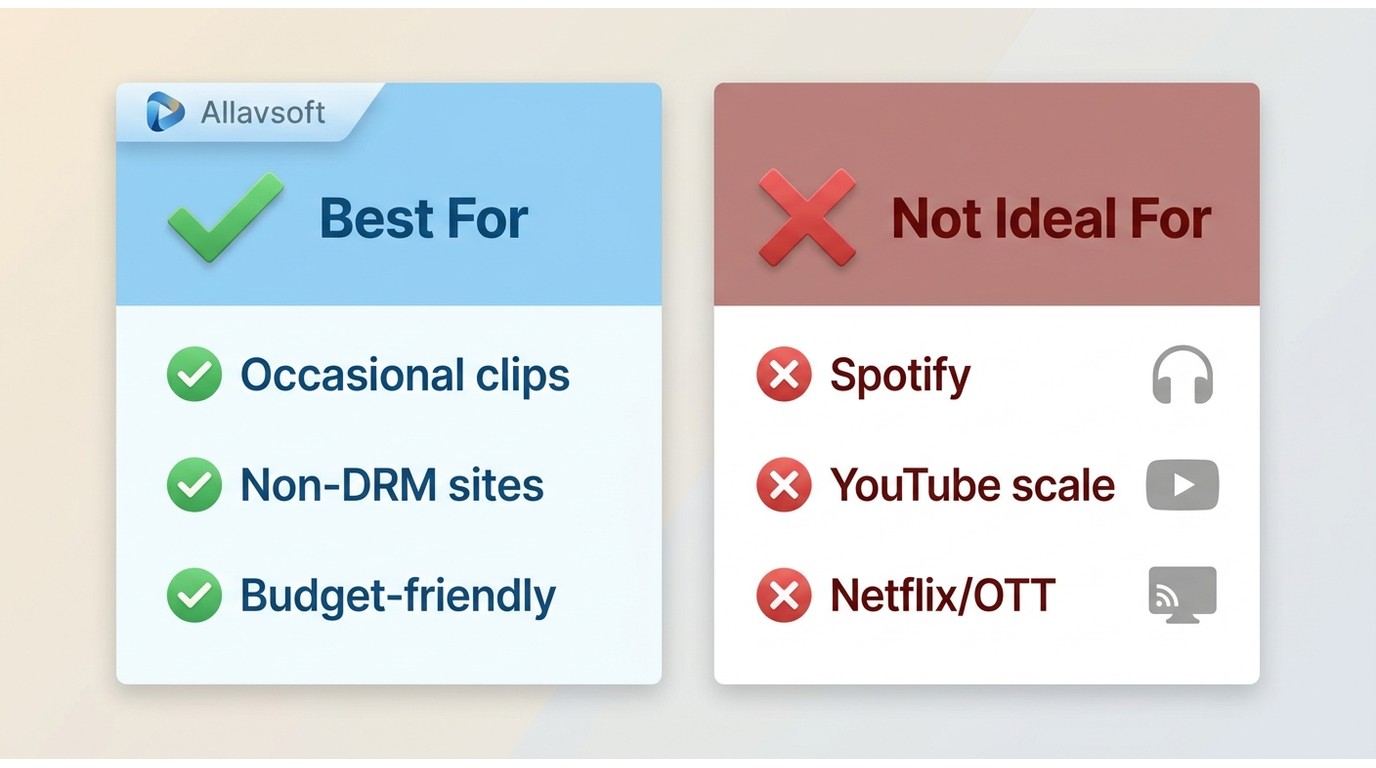
Allavsoft is a competent, low-cost grabber for general video and audio sites, and a weak choice when your targets are Spotify, large YouTube jobs, or streaming platforms. The core copy-paste-download workflow is easy, the output converts to common formats, and the price is modest. What has aged is the reliability: the sites people most want in 2026 are exactly where it now stumbles.
Best for occasional users saving clips from general, non-DRM sites on a tight budget. Not ideal for anyone who needs dependable Spotify or at-scale YouTube saves, or who wants streaming and OTT titles.
Hands-On Testing: Strengths and Weaknesses
Across my 2026 testing, Allavsoft showed a clear split between what it still does well and where it now struggles. Here is the breakdown.
What Allavsoft Does Well
For simple jobs, the appeal holds up. The tool combines grabbing and converting in one pass, previews downloads as they run, and covers a wide spread of general sites at usable quality.
You do not need separate tools for downloading and converting. Allavsoft handles both in one workflow: grab a video and convert it to MP3 in the same pass. The editing options stay basic, but for quick download-and-convert jobs, it delivers.
The built-in player lets you preview downloads in progress, and you can pause and resume without losing progress. It is a small touch that smooths the workflow.
Allavsoft covers a wide range of general sites, including YouTube, Spotify, Vimeo, and 360° VR videos. It advertises up to 8K, but the real ceiling is source-dependent; in my testing, 1080p downloads looked crisp while higher tiers depend on what the source actually serves.
Where It Falls Short
The friction shows up in three places: a dated interface, thin customization, and clunky editing. On top of that, update transparency is limited. Allavsoft is still active, but its official download page shows no version or changelog, and the latest build I could identify, v3.26.2.8837, dates to February 2024.
The interface looks dated. Buttons and layouts resemble designs from over a decade ago, and navigation feels clunky. It works, but it does not inspire much confidence at first glance.
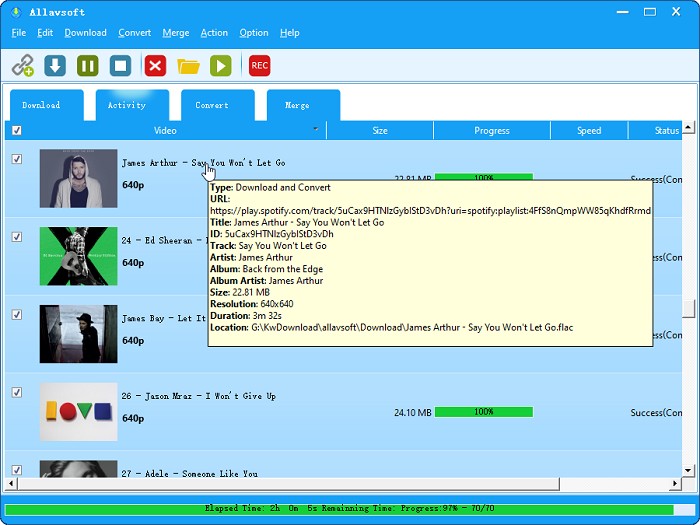
Despite advertising resolutions up to 8K, you only get three presets: "High," "Medium," and "Low." You cannot adjust bitrate or audio channels. Beginners might not mind; advanced users will find this restrictive.
The "cut" function lacks a preview window, so you must enter timestamps manually. I tried it twice, and both attempts were more fiddly than useful. The feature feels more decorative than functional.
Supported Sites, Quality, and Real-World Reliability
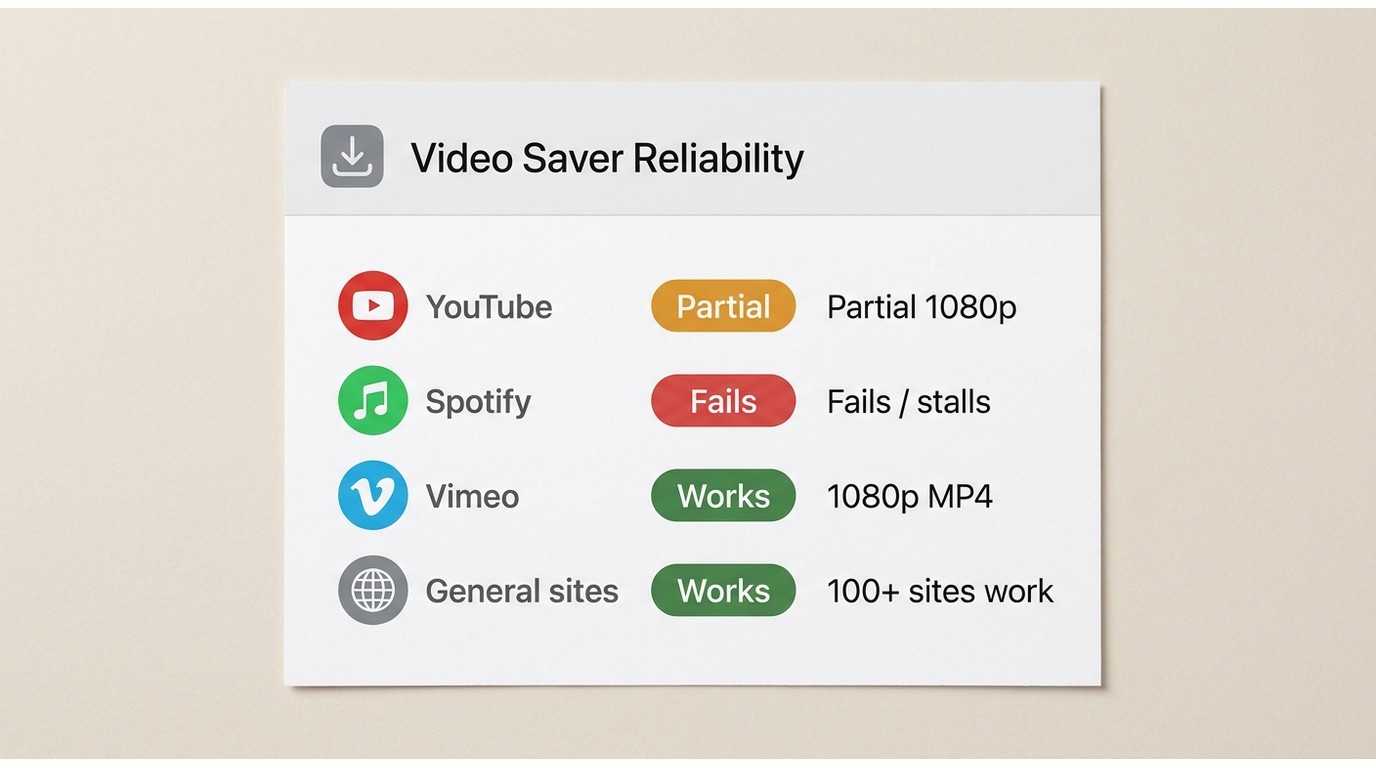
This is where the marketing and the reality diverge. Allavsoft advertises 1,000+ supported sites, but the in-app list surfaces far fewer, and you cannot fully verify the full count against a complete, searchable list. It runs on both Windows and Mac, so an Allavsoft Mac setup behaves much like its Windows counterpart. What matters more than the headline number is which sites actually complete a job, at what quality, and in what format.
| Service (tested) | Login required | Tested result | Max observed quality | Output type | Date tested |
|---|---|---|---|---|---|
| YouTube (public videos) | Often (repeated prompts) | Partial | 1080p | MP4 / MP3, direct download | Aug 2026 |
| Spotify | Yes | Fails or stalls | Audio only | Matched public-source audio, not a direct pull | Aug 2026 |
| Vimeo | No | Works | 1080p | MP4 | Aug 2026 |
| General non-DRM sites | Varies | Works | Source-dependent | MP4 / AVI / MOV and more | Aug 2026 |
The practical upshot: general sites are dependable, but the two services most people search for, YouTube and Spotify, are the least reliable. It is worth understanding why, because the failure pattern is consistent.
Spotify and YouTube: Login Loops and Failures
Reliability here is mixed in 2026. YouTube public-playlist downloads can be interrupted by repeated login prompts, and Spotify jobs often stall or loop on login after the platform's anti-download changes. Testing a public YouTube playlist on Windows 11 in Aug 2026, the job paused twice for a login prompt before it finished a single 1080p MP4. On a 2023 MacBook Air running macOS Sonoma, the same Spotify playlist looped back to the login screen and never wrote a file, even after I updated to the current build and retried.
It also helps to know what you are actually getting. For Spotify, the output is matched public-source audio rather than a direct pull from the service, which is part of why results vary. For me, this reliability profile is fine if you only dabble with the odd public video, and a dealbreaker if you were counting on a steady Spotify or YouTube pipeline. If Allavsoft is not working past a couple of restarts and a fresh install, that is your signal to switch rather than keep fighting it.
Allavsoft Pricing and Free Trial in 2026
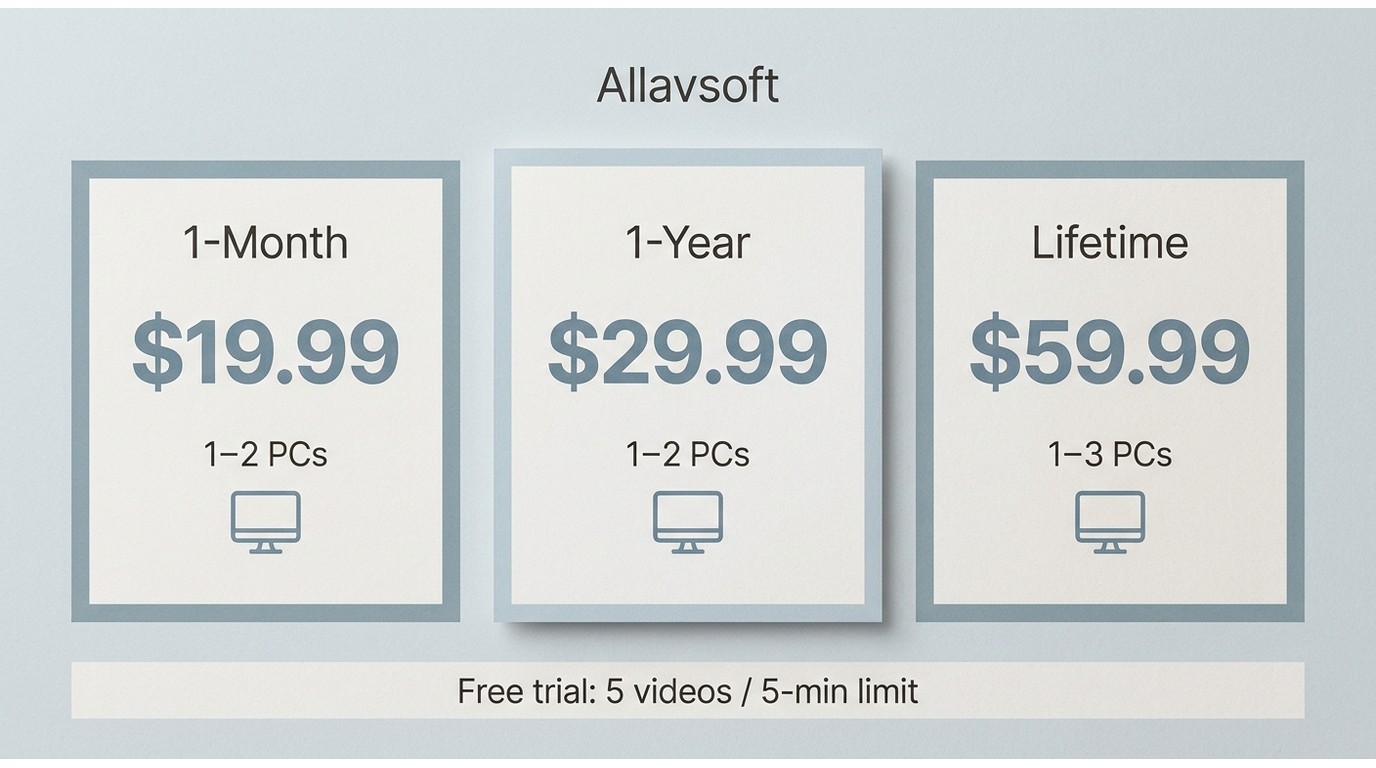
The good news is the price is low; the catch is that the trial makes it hard to test before you commit. Here are the official tiers, with the single date stamp for this article.
| License | Price | Devices |
|---|---|---|
| 1-month | $19.99 | 1–2 PCs |
| 1-year | $29.99 | 1–2 PCs |
| Lifetime | $59.99 | 1–3 PCs |
Official price, as of Aug 2026. The free trial caps you at 5 videos and a 5-minute conversion limit, which is thin for real evaluation. On that Windows 11 machine, a trial download appeared to start but sat at 0% until I restarted the app, so budget time for a genuine test before you pay.
Buy it if you make occasional, simple downloads from general sites and the lifetime license fits your budget. Skip it if your core targets are Spotify, large YouTube jobs, or streaming platforms, because the trial limits and the reliability gaps make a blind purchase risky.
Is Allavsoft Safe and Legal?
Downloaded from Allavsoft's official website, the installer is safe: my antivirus scan came back clean. The real risks are elsewhere. Avoid third-party mirrors and crack builds, which are the usual source of bundled malware, and be cautious about entering Spotify or YouTube credentials into any downloader, since a stalled or looping login can put your account details in play.
On legality, keep it simple: download only content you're authorized to access, and keep those copies to personal use, where permitted by the platform's terms and applicable law. That boundary, not the tool itself, is what keeps you on the right side of things.
Downloading with Allavsoft: Step-by-Step
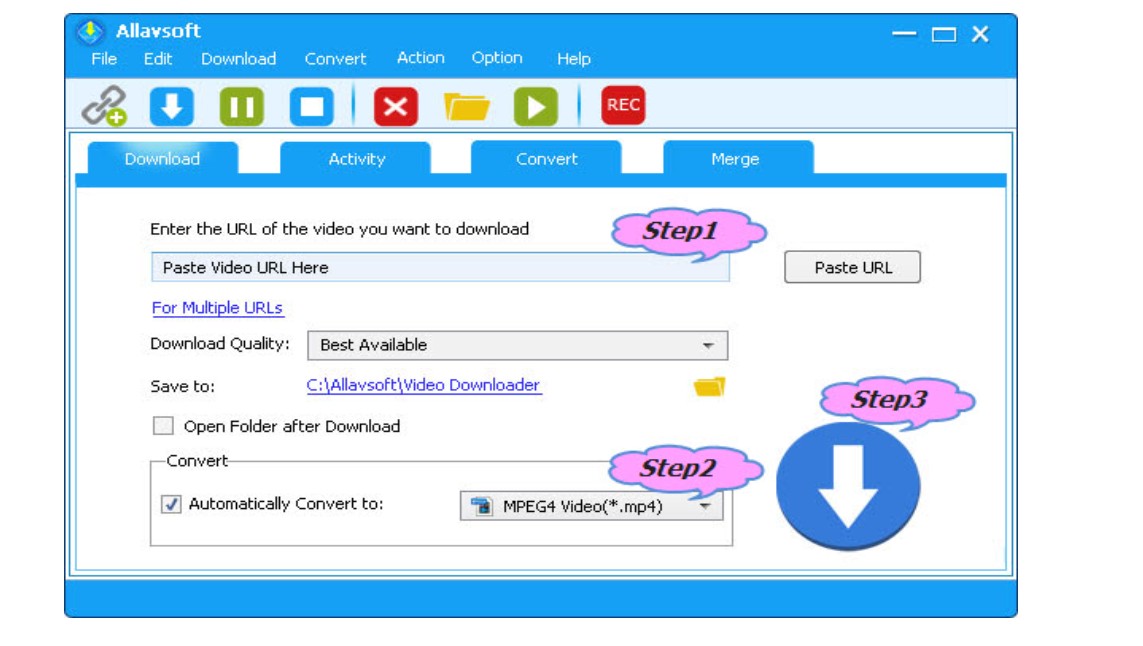
The basic workflow to download streaming video takes three steps and almost no setup.
- Copy the URL of the video you want. I usually open it in YouTube or Vimeo and copy the link from the address bar.
- Paste the link into Allavsoft's input field, then pick your format. MP4 for video and MP3 for audio are my usual picks, though there are plenty of other options.
- Click Download. The software parses the link, pulls the file, and converts it to your chosen format. For a general, non-DRM source this Allavsoft download runs cleanly; for YouTube or Spotify, expect the login prompts covered above.
Allavsoft Alternatives by Use Case
If Allavsoft's gaps line up with your main use, one of these fits better. I've grouped them by the job you're actually trying to do.
For streaming and OTT titles, StreamFab is the desktop option I reach for. It is a Windows and Mac app that saves supported streaming titles as MP4 or MKV for personal offline viewing of content you're authorized to access, where permitted by platform terms and applicable law. In practice that means up to 4K with HDR10 or Dolby Vision on plans that support it, multichannel audio such as EAC3 5.1, plus batch and scheduled overnight downloads across major OTT services like Netflix, Prime Video, Disney+, Hulu, and Max. Because the files are standard MP4 or MKV, they play on any player without a proprietary client.
Best for people who need streaming or OTT titles saved reliably with batch and scheduled jobs. Not ideal for anyone who only grabs the occasional free YouTube clip and doesn't want a paid desktop tool. If you want the long version, my full StreamFab hands-on review walks through the output quality and batch behavior in detail, and our broader tested roundup of streaming video downloaders puts it next to the field.
Tool Required: StreamFab Video Downloader

StreamFab supports 60+ major OTT platforms, including Netflix, Disney+, and Amazon Prime Video. Allavsoft lacks this capability entirely. For users wanting to archive streaming content offline, this difference proves decisive.
For free, technical users pulling public YouTube videos and playlists, a tool like 4K Video Downloader is a lighter fit. Best for one-off public YouTube saves at no cost; not ideal for OTT platforms or reliable batch jobs at scale.
For music specifically, a straightforward audio-recording workflow, capturing playback with a tool like Audacity, sidesteps the login loops entirely. Best for grabbing audio you can already play back on your own account; not ideal for tagged, high-fidelity music libraries or bulk jobs.
Allavsoft vs StreamFab: Feature Comparison
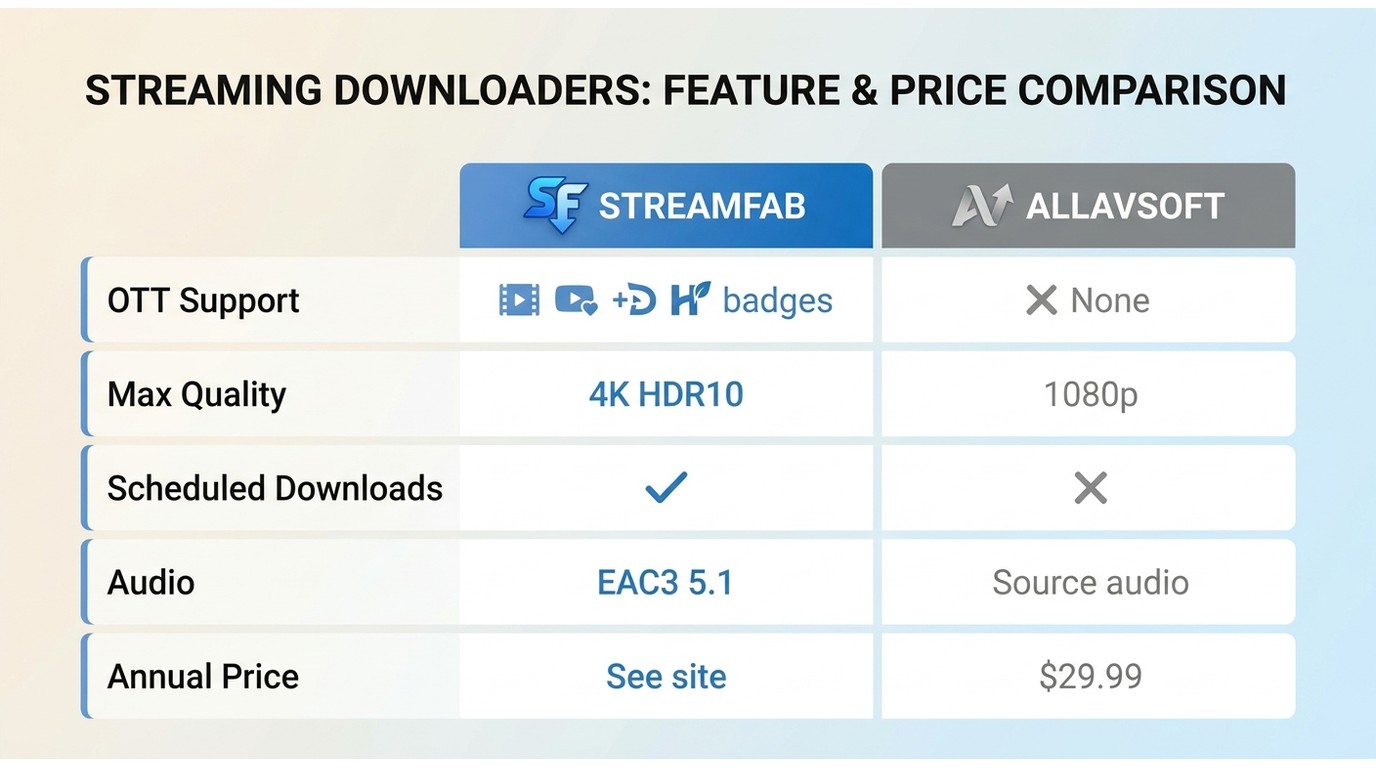
| Feature | StreamFab Video Downloader | Allavsoft |
|---|---|---|
| Supported sites / OTT | Major OTT services (Netflix, Prime Video, Disney+, Hulu, Max, Apple TV+, Paramount+, YouTube, U-NEXT, Abema) plus general sites | No OTT; general non-DRM sites (advertises 1,000+, not fully verifiable) |
| Max quality (observed) | Up to 4K, with HDR10 / Dolby Vision on supported plans | Up to 8K advertised, source-dependent (1080p observed in testing) |
| Audio | Dolby Atmos / EAC3 5.1 / AC3 5.1 / AAC 2.0 | Source / original audio |
| Batch mode | Yes | Yes |
| Scheduled downloads | Yes | No |
| Output formats | MP4 / MKV | MP4 / AVI / WMV / MOV and more |
| Annual price | See the official site for current plans | $29.99 |
| Free trial | 30-day trial, 3 videos per service | 5 videos, 5-minute conversion cap |

Follow these steps to start your free trial of this StreamFab Video Downloader. No registration required during the trial period.
For either tool, start with the free trial. Hands-on testing is the fastest way to learn whether the reliability and format support match what you actually need.
What Reviewers and Users Report
Independent sentiment lines up with my testing. Allavsoft holds a 4.5 out of 5 rating from 315 Trustpilot reviews, and the recurring themes are consistent on both sides. On the positive side, people praise the simple download-and-convert flow and broad support for general sites. On the negative side, the pattern I keep seeing is Spotify and YouTube reliability, a dated interface, and friction around license activation and support response.
Read together, the reputation matches the product: a dependable budget grabber for general content, with real rough edges once you push it toward the harder platforms.
Source: Trustpilot's public listing for Allavsoft, as of Aug 2026. Ratings change over time.
Frequently Asked Questions
Is Allavsoft safe to download and use?
Yes, when you get the installer from Allavsoft's official website; my antivirus check came back clean. Steer clear of third-party or crack builds, be careful entering Spotify or YouTube credentials, and keep downloads to content you're authorized to access for personal use.
Does Allavsoft still download Spotify and YouTube reliably in 2026?
Not consistently. YouTube public-playlist downloads can trigger repeated login prompts, and Spotify jobs often stall or loop on login after the platform's anti-download changes. Run the free trial against your exact targets before you buy.
What should I do if Allavsoft won't download or keeps asking me to log in?
Update to the latest build, confirm the target site is still supported, and expect login prompts on YouTube and Spotify. If the same workflow stays broken across restarts and both Windows and Mac, switch to a maintained alternative rather than troubleshooting in circles.
Allavsoft or StreamFab: which one should I choose?
Pick Allavsoft for basic, budget saves from general non-DRM sites. Choose StreamFab when you need streaming or OTT titles saved as MP4 or MKV with batch and scheduled downloads.
Conclusion
Allavsoft still does one thing well: cheap, simple downloads from general, non-DRM sites, with conversion built in. What it no longer does well is the part most people search for, which is dependable Spotify and YouTube saves.
Best for occasional users saving from general sites on a budget. Not ideal for people who need reliable Spotify or YouTube-at-scale downloads, or streaming and OTT titles. My recommendation: run the trial against your real targets first, and if those targets are streaming services, go straight to StreamFab instead.
Update Log
Aug 2026 update:
- Corrected the annual license to $29.99 and presented all tiers in a pricing table
- Qualified the 8K claim as source-dependent and noted 1080p as the observed test output
- Added a site-by-site reliability matrix and a dedicated Spotify and YouTube analysis
- Added an independent user-review synthesis based on a Trustpilot snapshot
- Promoted safety and legality to a standalone section
- Rebuilt the FAQ and alternatives around real 2026 search intent
This article is updated to keep pace with Allavsoft's reliability and pricing. Last reviewed: Aug 2026.

AnyStream (RedFox AnyStream) shut down in June 2024 and remains gone in 2026. I tested every major replacement — here are the 5 best anystream alternatives, including free options, ranked by real-world performance.
By Erika Leen - Oct 12, 2026

Evaluating the Audials One 2026 free trial? I tested its 720p caps, examined if is audials legal under Fair Use
By Erika Leen - Sep 29, 2026

Are you thinking of purchasing NoteBurner and unsure if it’s worth the investment? In this NoteBurner review, let’s delve into its product lines, particularly the NoteBurner Video Downloader’s pros and cons.
By Marcia Hatcher - Sep 28, 2026

Read our in-depth Audials review for 2026. Is Audials safe and legal for Amazon Prime? Discover actual test results, Widevine DRM fixes, and better alternatives.
By Erika Leen - Sep 28, 2026