
7 Best Amazon Prime Video Downloader Tools Reviewed for Win & Mac (2026)

Summary: Tested in 2026: the best amazon prime video downloader picks for offline viewing on Windows and Mac — with real bitrate data, pros/cons, and a free trial on every tool.
- Overall Comparison: Compare the 7 best amazon prime video downloader tools and choose the one that suits your demands best.
- Choose StreamFab Amazon Downloader for the best quality and efficiency, which supports the most types of Amazon videos, including Prime videos, channels, rentals/purchases, extras, etc.
- Choose KeepStream for Prime Video for an affordable short-term choice, but for use over one year, KS might be a bit expensive.
Attention: The use of all tools mentioned in this article is based on the premise that you have an official subscription and will use them for fair use purposes, including but not limited to private backup of accessible content and personal offline viewing.
Earlier this month, in June 2026, while attempting to archive a newly released Prime series to my home NAS, I ran a fresh benchmark on seven amazon prime video downloader tools to see which ones survive the latest DRM rotation. The results were stark: three tools fell to 480p black screens, two introduced audio sync drift, and only a handful maintained the 8,000+ kb/s bitrate I demand for a true 1:1 preservation. If you are searching for a reliable amazon video downloader or even a capable prime video ripper for personal offline archiving, this hands-on 2026 review will save you hours of trial and error.
In this comprehensive review, I walk you through my real-world tests to see which tools survive the 2026 DRM updates, which ones cause GPU spikes, and how to permanently secure your digital assets as an amazon prime downloader that actually works.

Are These Amazon Video Downloaders Legal & Safe to Use?
Legality depends on your local copyright rules and Prime Video's terms, so there isn't a universal "yes/no." The lowest-risk approach is always Amazon's official offline download feature. All the tools recommended in this article are only applicable to content legally obtained through valid subscriptions.
From a safety perspective, the biggest real-world risk is not the concept of downloading itself, but where you get the software and how it is positioned. Avoid anything presented as a "cracked/mod" build or promising free access or unlocking, and stick to official distribution channels.

In short: they are for local archiving of content that is legally accessed by individuals only and not for redistribution or commercial use.
Comparison Between the 7 Best Amazon Prime Video Downloaders
We have searched and compiled the top-rated amazon prime video downloader tools with their detailed process, pros, cons, and comparative analysis to help you choose the most suitable one. All the content below is written based on our real-person test and reviews, and can be verified as valid information.
1. 2026 Testing Metrics: DRM & Hardware
To accurately evaluate any amazon video downloader for PC, we must move beyond basic feature lists and look at underlying technical parameters. My test environment for this benchmark was a Windows 11 machine equipped with an RTX 4070 GPU, running on a 500 Mbps fiber connection. The core metric I focused on was how these tools handle dynamic Widevine L1/L3 credential requests.
In 2026, if a tool relies on standard screen recording, it often clashes with the browser's hardware acceleration, resulting in a black screen while audio continues to play. Dedicated prime video downloader tools bypass this by simulating a legitimate client handshake, requesting the raw video stream directly from the server. I used MediaInfo to inspect the codec, exact bitrate, and audio channel configurations of each downloaded file to separate genuine 1:1 bitstream extraction from lossy screen captures.
2. Data Overview: Radar Chart and Compare Table
Below is a dynamic radar and bubble chart I compiled based on my testing data and community Trustpilot reviews to give you a clear visual comparison of each amazon prime downloader.
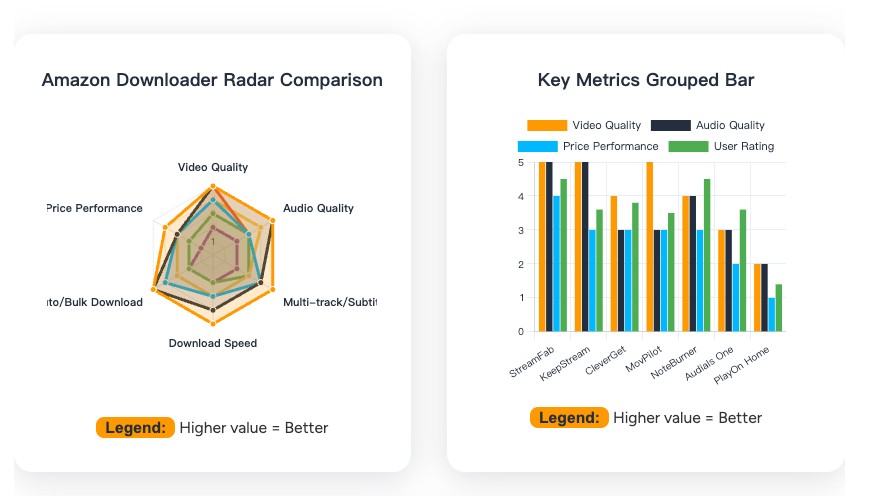
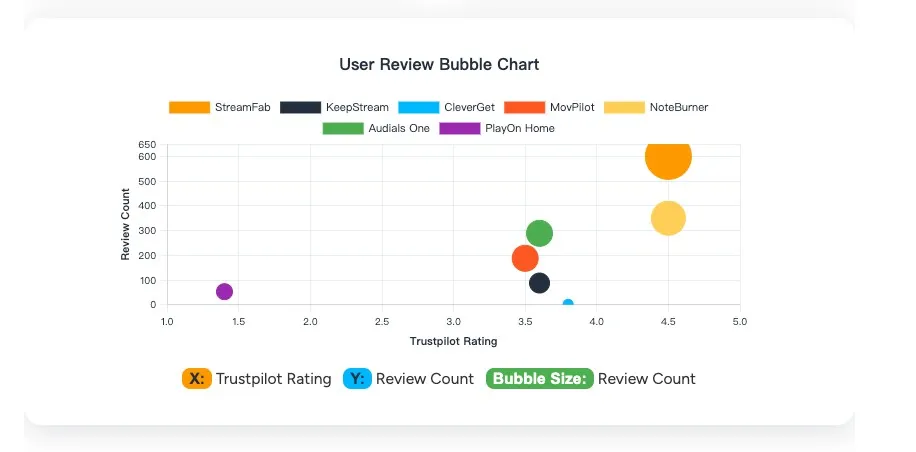
To further clarify the capabilities of these tools across different user intents, I have engineered an adaptive comparison matrix below. This breaks down how each tool performs across standard VODs, 4K limits, live streams, and listing videos.
- StreamFab Amazon Downloader is suitable for those who want to automatically keep up with and download new episodes and who value multi-audio track and subtitle management.
- KeepStream for Prime Video is suitable for people who only occasionally download 1–2 episodes and are budget-sensitive.
- Audials One is suitable for those who can accept real-time recording that takes time.
You can go to the detailed section about the specific prime video downloader from the Table of Content on your right screen to check its performance exactly. I conducted a head-to-head test using Reacher Season 1, Episode 1 to measure the performance.
3. Feature Comparison: Top 4 Amazon Video Downloaders
This table gives you a direct technical comparison across the four most-tested tools — useful if you are deciding between a full-featured amazon prime video downloader and a budget alternative.
| Dimension | StreamFab Amazon | KeepStream | CleverGet | MovPilot |
|---|---|---|---|---|
| Video Quality | Up to 1080p (4K on supported titles) | 1080p max | 1080p max | 1080p (HEVC re-encode) |
| Download Speed | 4–12 MB/s (5x faster than real-time) | 3–7 MB/s | 4–5 MB/s | 2–5 MB/s |
| Batch Download | Full seasons, auto-queue | Supported (limited queue) | Supported (no auto) | Supported (no auto) |
| Platform Support | Windows 10/11, macOS 12+ | Windows 10/11, macOS 12+ | Windows 7+, macOS 11+ | Windows 7+, macOS 10.15+ |
| Price | $99.99/LFT | $99.99/LFT | $41.96/yr or $99.96/LFT | $49.95/mo or $99.95/LFT |
4. How I Tested These Amazon Video Downloaders
For these overall tests, my setup to complete it is:
| System |
|
| Downloaders |
|
| Titles | Reacher Season 1 Episode 1 |
| Configs | All the best options |
Through rigorous testing of Season 1 of Reacher, I analyzed the raw output of the most frequently discussed software on Reddit and technical forums. Here is the technical breakdown of how the top contenders perform on a PC.
Detailed Reviews of TOP 7 Amazon Prime Video Downloaders [Pros & Cons]
Following their official instructions on the proper operations, I tested every one of them on the same title on Prime Video. Now let's check how they claimed and truly performed. Please be sure that they will be used properly for fair use. For more detailed info, please check StreamFab's copyright and usage guidelines.
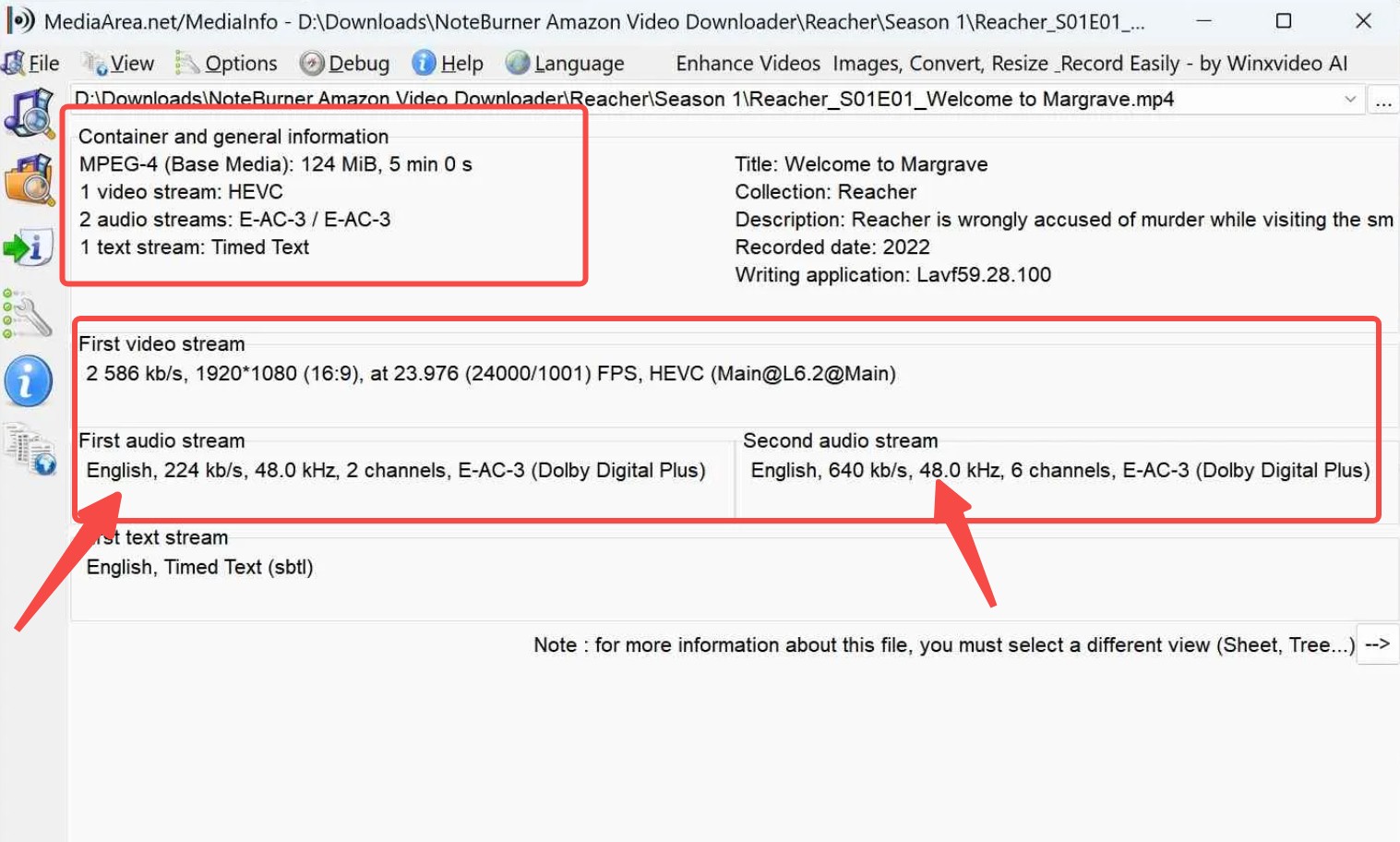
To ensure the objectivity of these results, I used MediaInfo to inspect the metadata of the output files after testing each downloader and attached the screenshot. By analyzing the actual bitrate, codec, and resolution, you can gain a transparent view of the true output quality of each amazon video downloader, rather than relying solely on the parameters displayed within the software's interface.
1. StreamFab Amazon Downloader
In my tests, StreamFab Amazon Downloader maintained the highest fidelity and stability among all prime video downloader tools I evaluated. When Amazon rotates its DRM keys, StreamFab's backend typically deploys a CDM update within 48 hours, preventing the dreaded 480p downgrade that plagues lesser tools.
It allows you to set up an automated queue for new episodes, preserving multiple audio tracks and organizing metadata perfectly for a Plex or Jellyfin server. As the best amazon downloader for serious archivists, it handles Prime videos, channels, rentals, purchases, and extras — more content types than any other tool in this comparison.

Download eligible Prime Video titles you're authorized to access (including episodes, movies, and Prime channels content where available) in MP4/MKV format for personal offline viewing, and manage them in a local library in accordance with Amazon's policies and applicable laws.
| ✅ Pros |
|
| ❌ Cons |
|
| Price |
|
| System |
|
| Review | StreamFab Amazon Downloader Review StreamFab on Trustpilot has 600+ reviews and 4.5 stars |
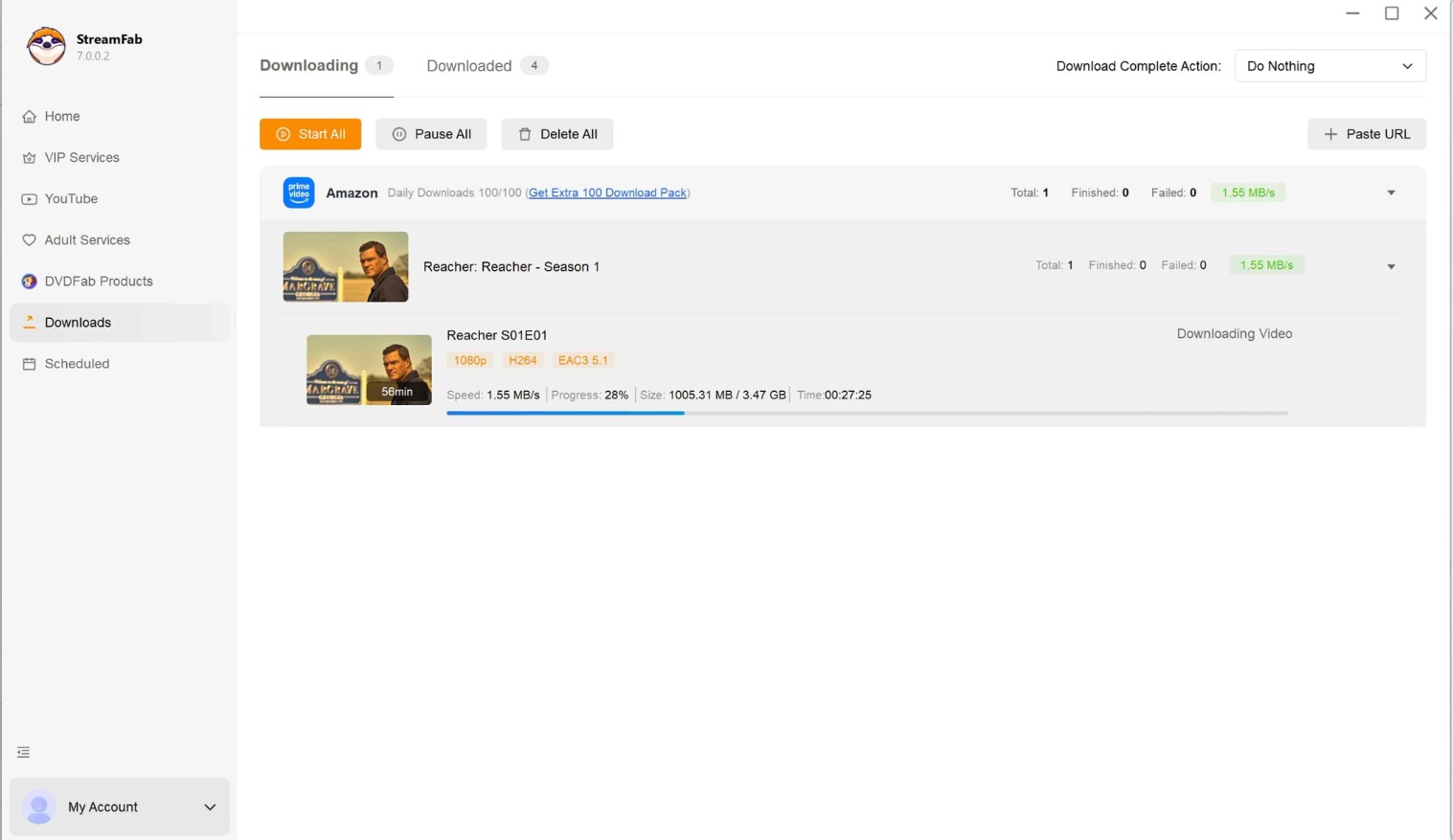
The usage process of the prime video downloader tools introduced in this article is basically the same: log in with an official account, search and play your preferred content, adjust the video quality options, and begin downloading.
This basic process allows you to make personal offline backups of Prime Video content. Therefore, a complete example of the download steps is only shown for one of the best amazon video downloader tools:
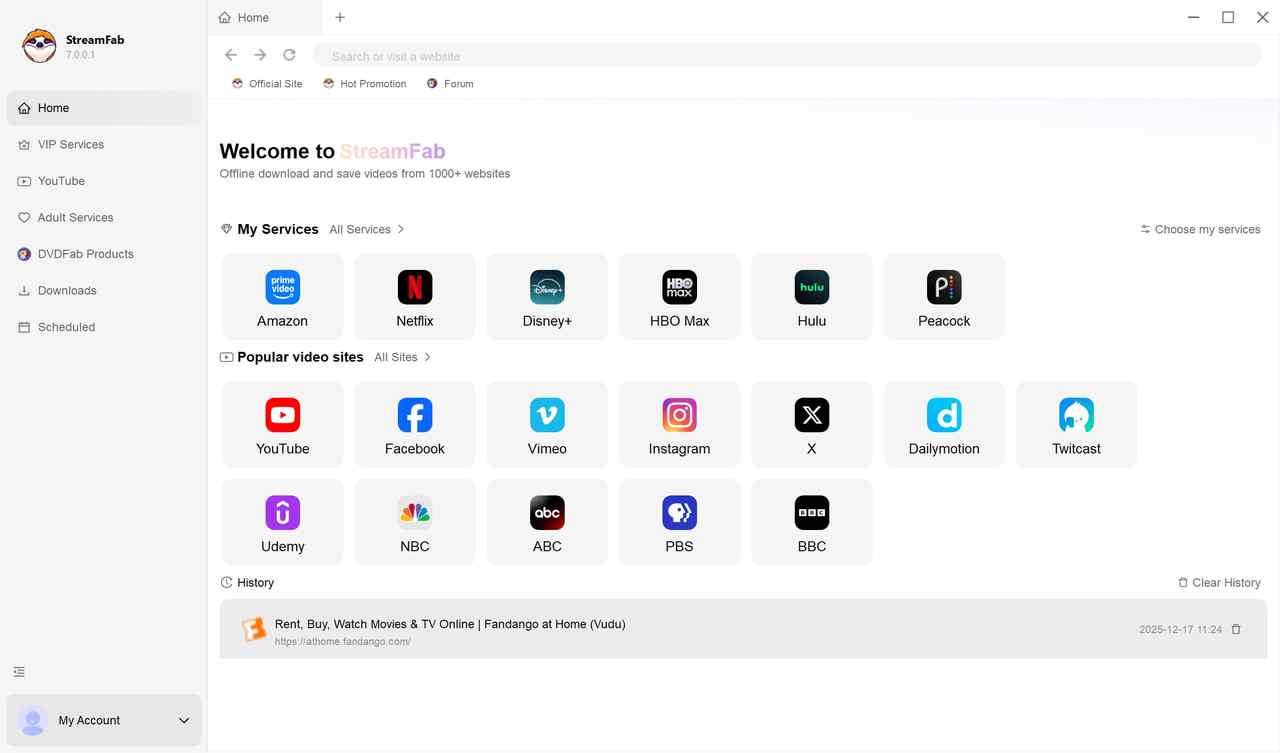
Open the Amazon module and sign in with your own Amazon account (only if required).
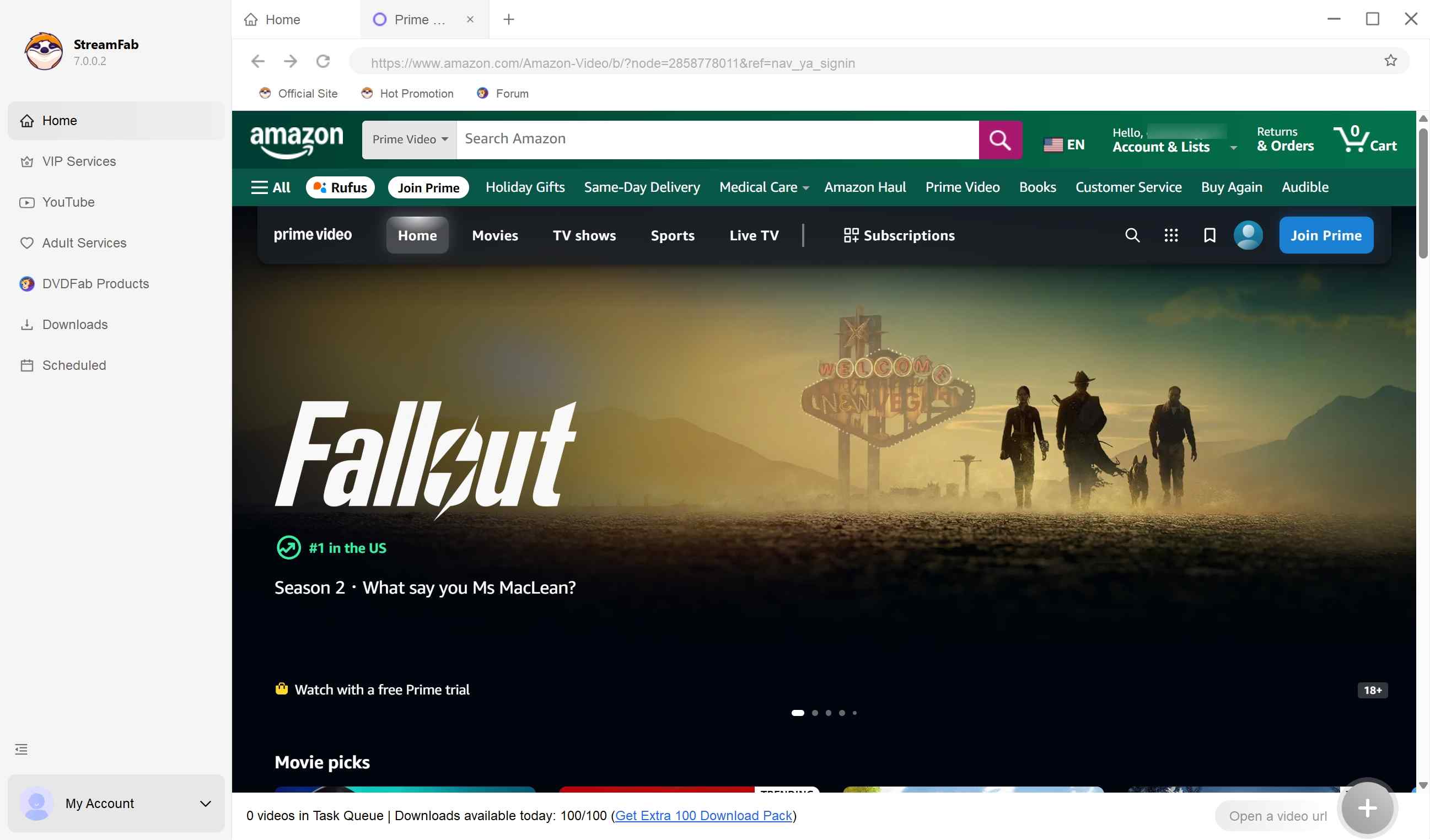
Choose a title you are authorized to access, then review offline-viewing options such as resolution, audio, and subtitles (availability may vary by title/region/plan).
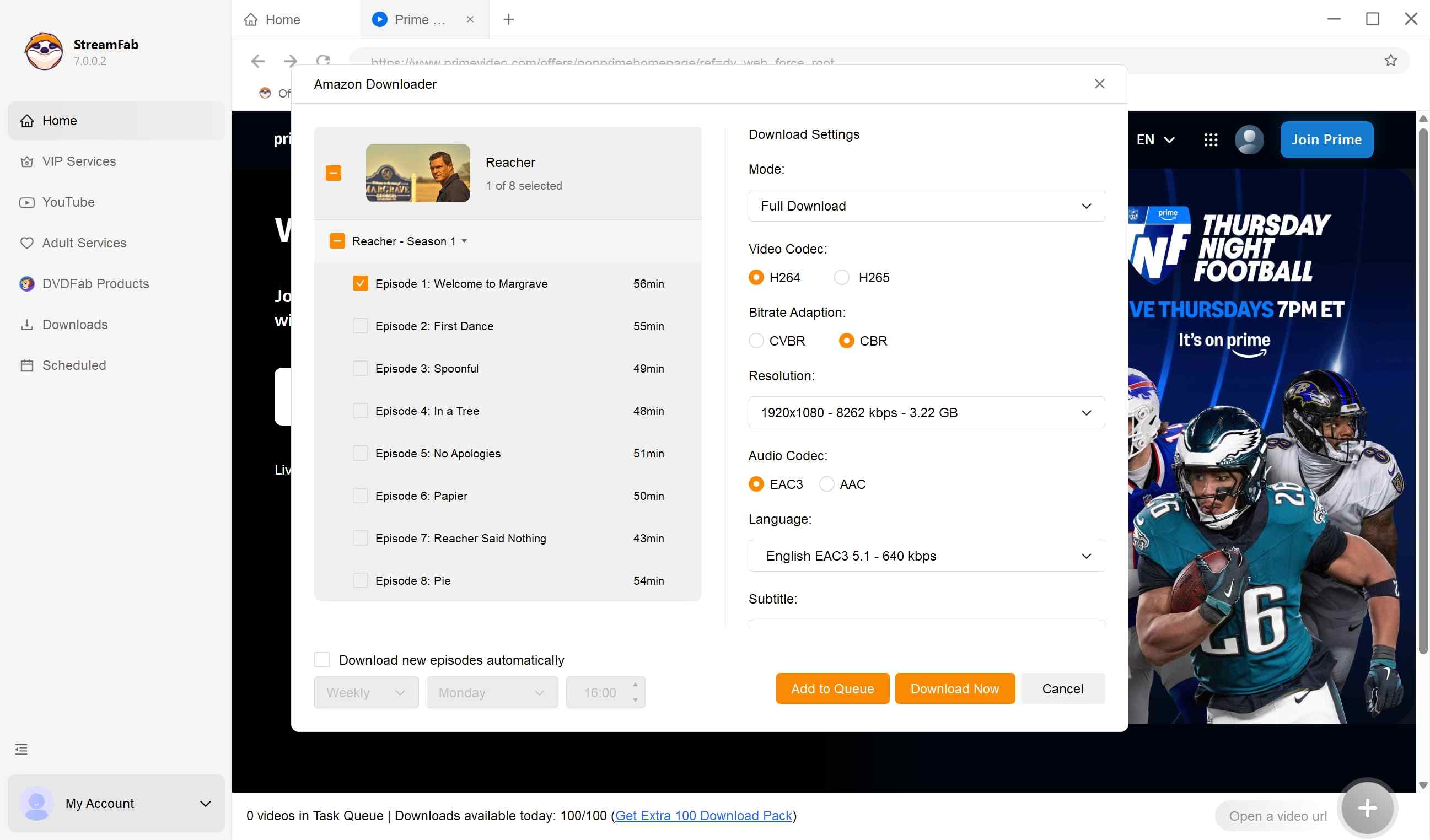
Add the selected title to your offline-viewing queue and proceed in accordance with Amazon's Terms of Use and applicable laws.
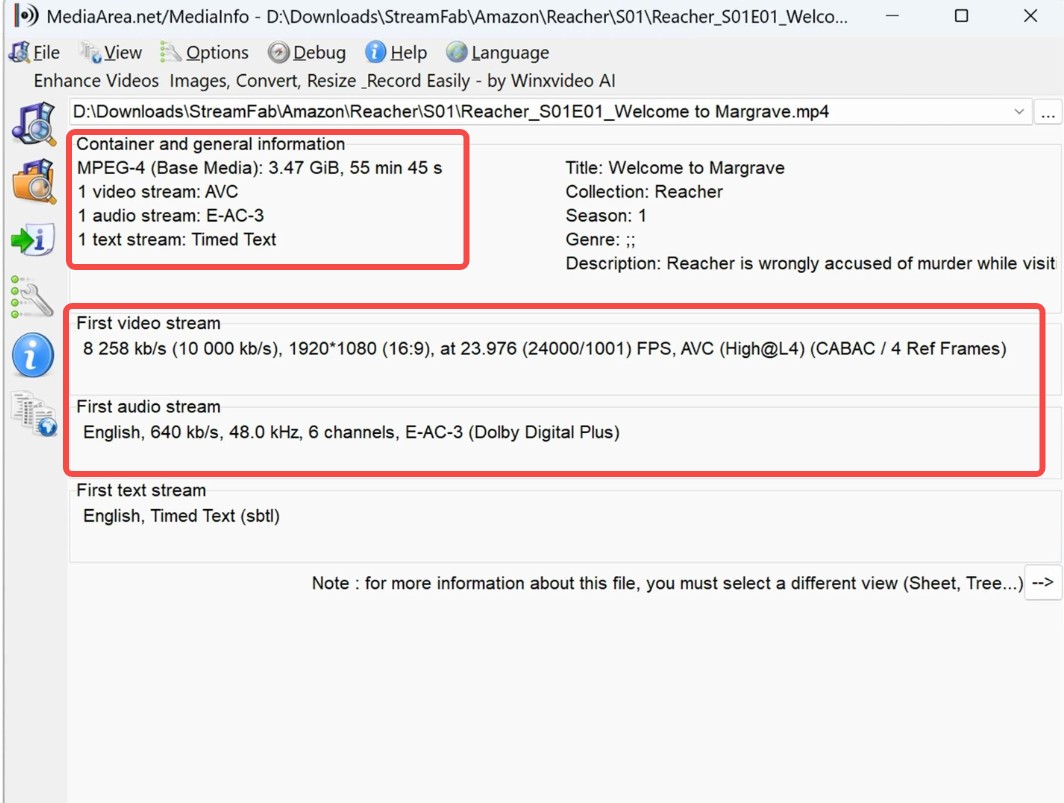
What video quality can you expect to get from StreamFab?
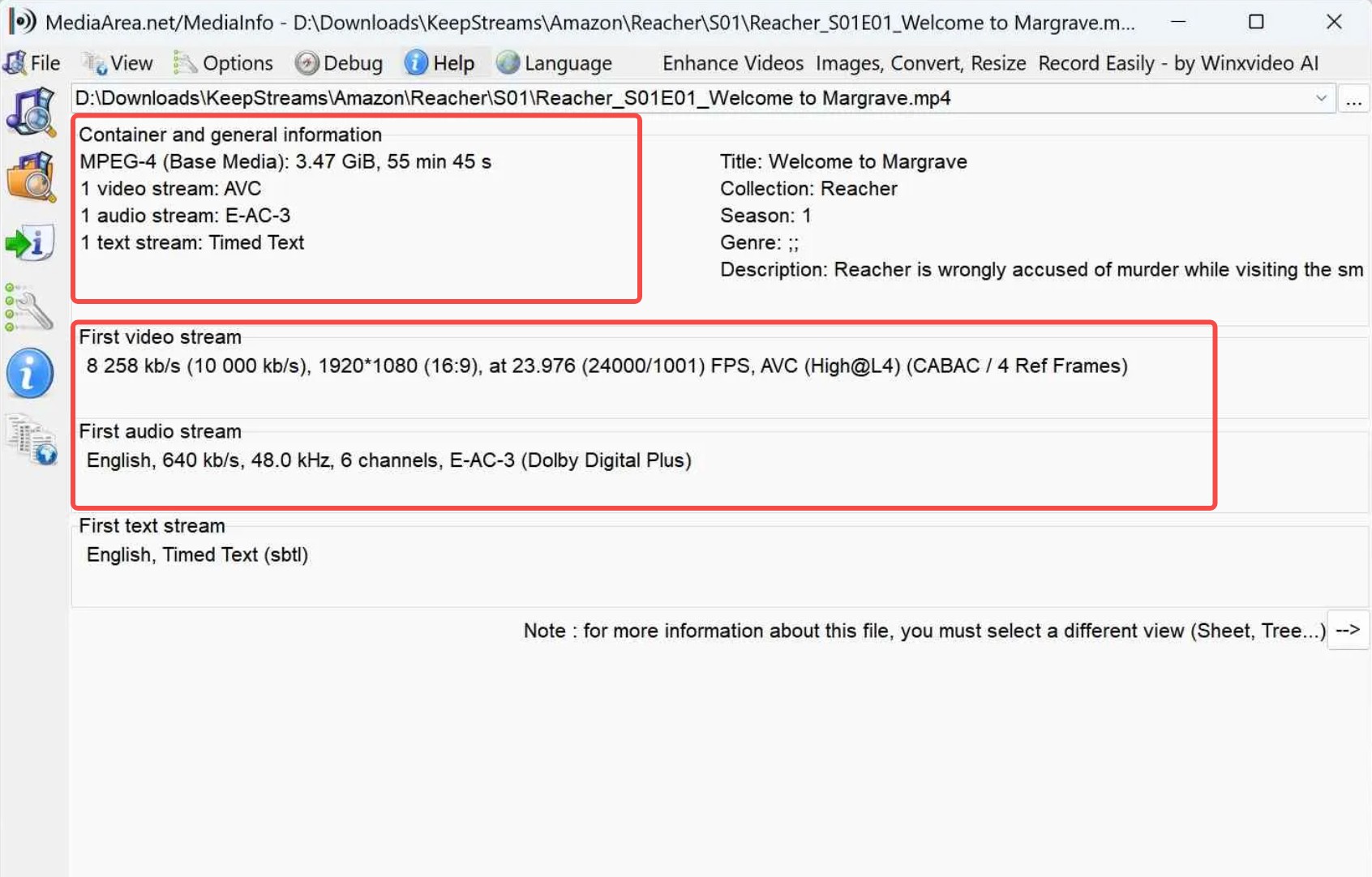
- Video Quality: Looking at the metadata for the Reacher test file, StreamFab successfully delivered a high-fidelity 1080p output with a substantial video bitrate of 8,258 kb/s.
- Audio Specifications: preserved the E-AC-3 (Dolby Digital Plus) 6-channel audio at 640 kb/s, confirming that it maintains true surround sound quality rather than downmixing to basic stereo.
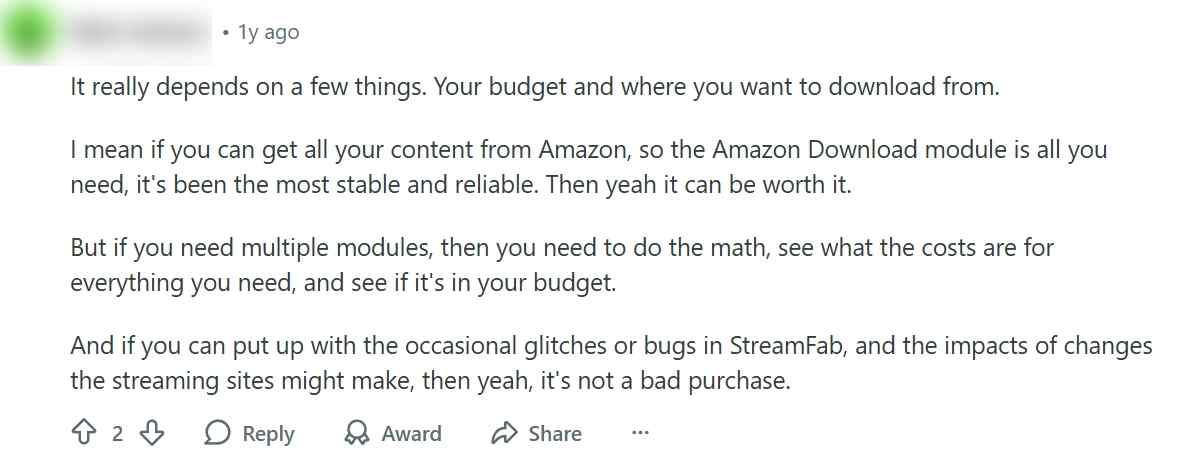
In addition to my experience, below is a Reddit user's review of StreamFab Amazon Downloader that I found while browsing related information. On TrustPilot, it has over 600 reviews and maintains a score of 4.5 out of 5. It is the only amazon video downloader with a large number of user reviews and consistently good ratings.
2. KeepStream for Prime Video
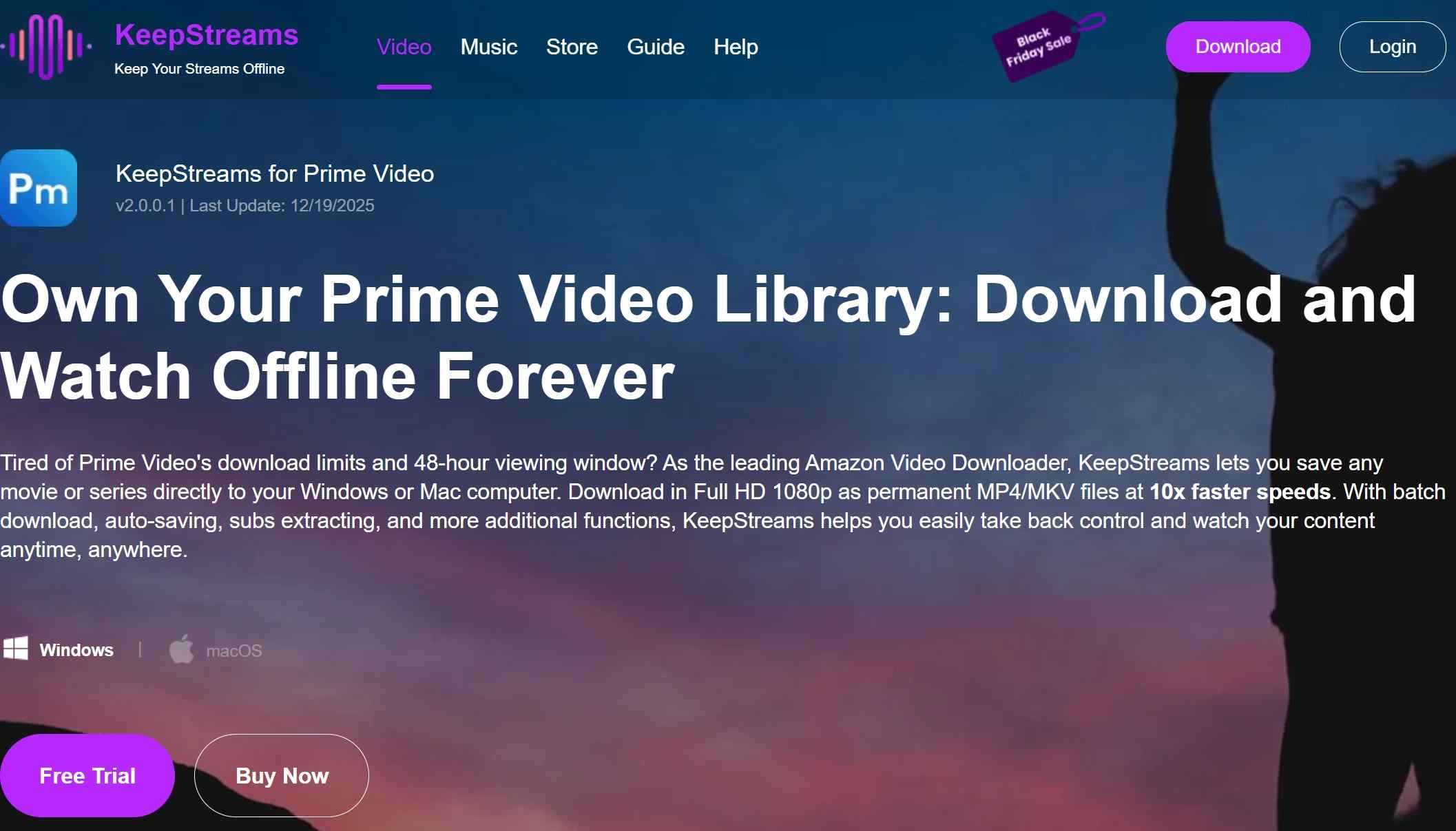
KeepStream utilizes a similar backend logic to StreamFab, successfully extracting the 1080p file with the same high bitrate of 8,258 kb/s. However, during my batch processing test, I observed a significant spike in CPU usage compared to StreamFab. If you are running this prime video downloader on an older laptop, you might experience thermal throttling.
| ✅ Pros |
|
| ❌ Cons |
|
| Price |
|
| System |
|
| Review | KeepStreams on Trustpilot has 88 reviews and 3.6 stars |
What video quality can you expect to get from KeepStreams?
The output is confirmed at 1920x1080 (1080p) resolution with a consistent video bitrate of 8,258 kb/s. This ensures that the high-definition detail of the original Amazon stream is fully preserved.
3. CleverGet Amazon Downloader
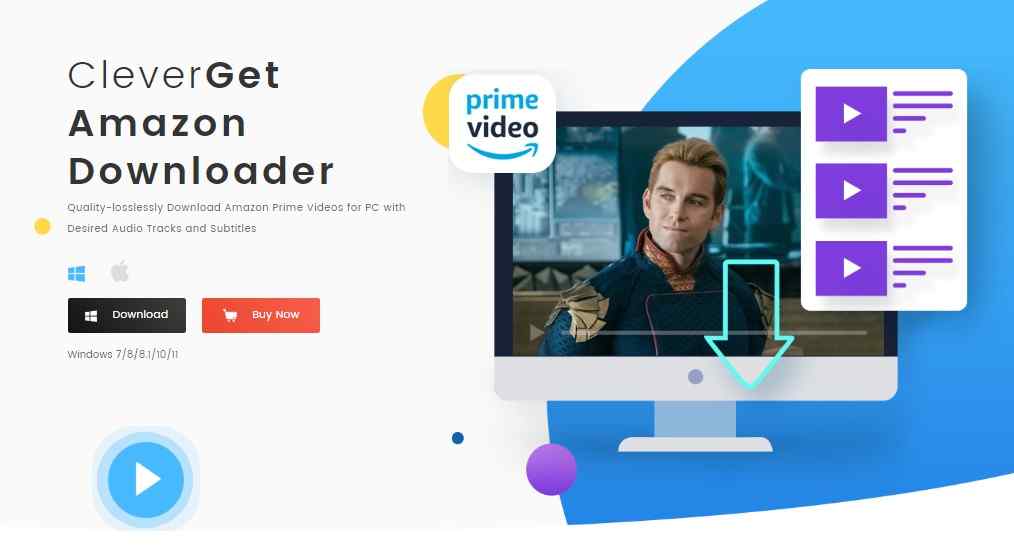
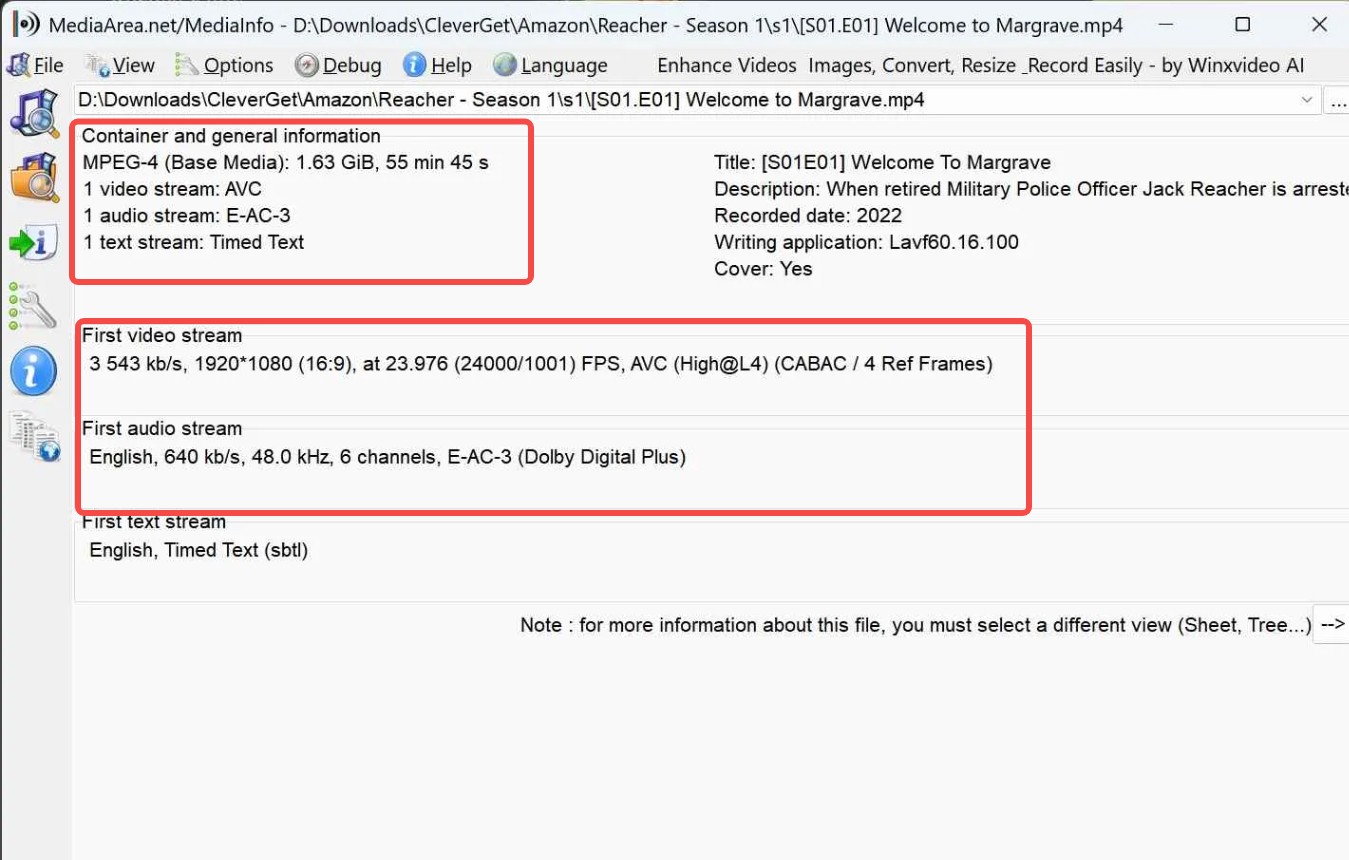
CleverGet features a very clean built-in browser interface, but its encoding logic is different from the top-tier amazon prime video downloader tools. Analyzing the output file, the video bitrate dropped significantly to 3,543 kb/s. While it still registers as a 1080p resolution, the compression artifacts are noticeable in dark scenes or fast action sequences. It sacrifices nearly half the visual data to save storage space.
| ✅ Pros |
|
| ❌ Cons |
|
| Price |
|
| System |
|
| Review |
|
What video quality can you expect to get from CleverGet?
The metadata for the Reacher test file downloaded via CleverGet reveals a significant difference in video bitrates compared to other top-tier downloaders:
- Video Bitrate: The output file has a video bitrate of 3,543 kb/s. While still 1080p, this is considerably lower than the 8,258 kb/s observed in the StreamFab and KeepStream test files. CleverGet sacrifices nearly half the video bitrate compared to the market leaders.
- Audio Quality: It successfully preserved the E-AC-3 (Dolby Digital Plus) 6-channel audio at 640 kb/s, matching the high-quality surround sound audio of its competitors.
- File Size: Due to the lower video bitrate, the resulting file size for the 55-minute episode is much smaller at 1.63 GiB, compared to the 3.47 GiB files from the other downloaders.
4. MovPilot Amazon Downloader
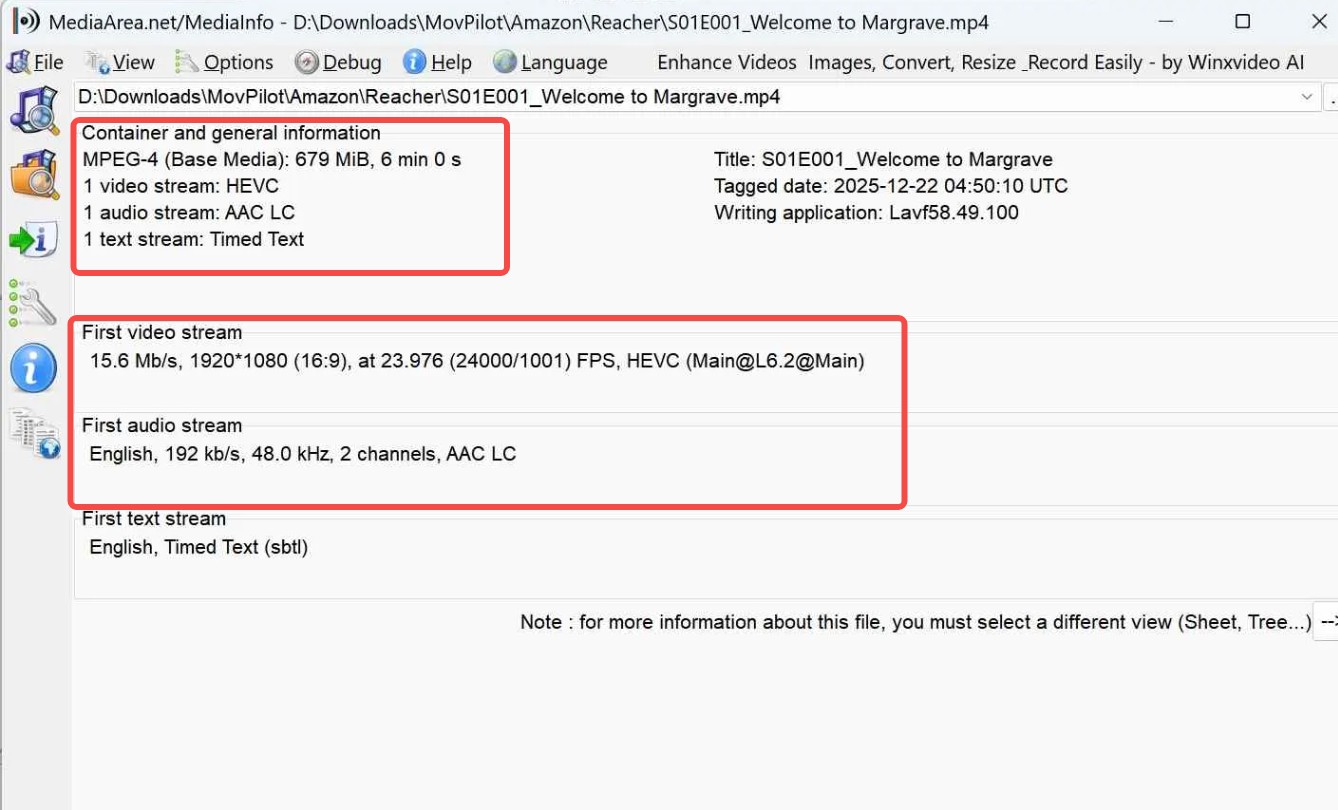
MovPilot Amazon Downloader is a relatively new tool. Compared to StreamFab and CleverGet, it has been released more recently, which contributes to its current instability in functionality. MovPilot forces an HEVC compression that, while efficient for storage, drops the immersive surround sound down to an AAC 2-channel stereo format — a notable limitation for anyone using this as their primary amazon prime video downloader.
When using the MovPilot Amazon Downloader, you can simply enter keywords into the search box to access Amazon video content. Its interface is elegantly designed, offering a straightforward and user-friendly experience for downloading videos of up to six minutes in length in its trial version.
| ✅ Pros |
|
| ❌ Cons |
|
| Price |
|
| System |
|
| Review |
|
What video quality can you expect to get from MovPilot?
The metadata for the Reacher test file from MovPilot demonstrates a different approach to video encoding compared to the other tools:
- Video Quality: It utilizes the HEVC (High Efficiency Video Coding) codec while the resolution remains 1920x1080.
- Audio Quality: Unlike the other downloaders that preserved E-AC-3 surround sound, this file uses AAC LC at 192 kb/s with only 2 channels (stereo). This represents a downgrade in audio immersion compared to the 5.1 surround sound offered by StreamFab or KeepStream.
By default, MovPilot may sacrifice multi-channel surround sound in favor of standard stereo.
5. NoteBurner Amazon Downloader
Noteburner not only provides music conversion but also supports video downloads, with Amazon Prime Video being one of the supported services. Users have the option to pause or resume the download process; however, for newcomers, it offers merely a trial period with only 5-minute downloads.
This limited trial is insufficient for a comprehensive understanding of the tool. Upon purchasing the full version, we encountered frequent errors when processing certain playback-restricted titles, and compared with StreamFab, it also lacks an automatic new-episode workflow that serious prime video downloader users require.
| ✅ Pros |
|
|---|---|
| ❌ Cons |
|
| Price |
|
| System |
|
| Review |
|
What video quality can you expect to get from NoteBurner?
- Video Quality: It uses the HEVC codec at a resolution of 1920x1080 (1080p). The video bitrate is 2,586 kb/s, which is lower than competitors like StreamFab.
- Audio Specifications: NoteBurner successfully captured two English audio streams, both in E-AC-3 (Dolby Digital Plus) format. The first stream is 2-channel (stereo) at 224 kb/s, and the second stream is 6-channel (5.1 surround sound) at 640 kb/s.
The trial version of Noteburner Amazon Downloader is more restrictive in duration compared to some competitors, which is only 5 minutes — not enough to experience the full feature set.
6. Audials One
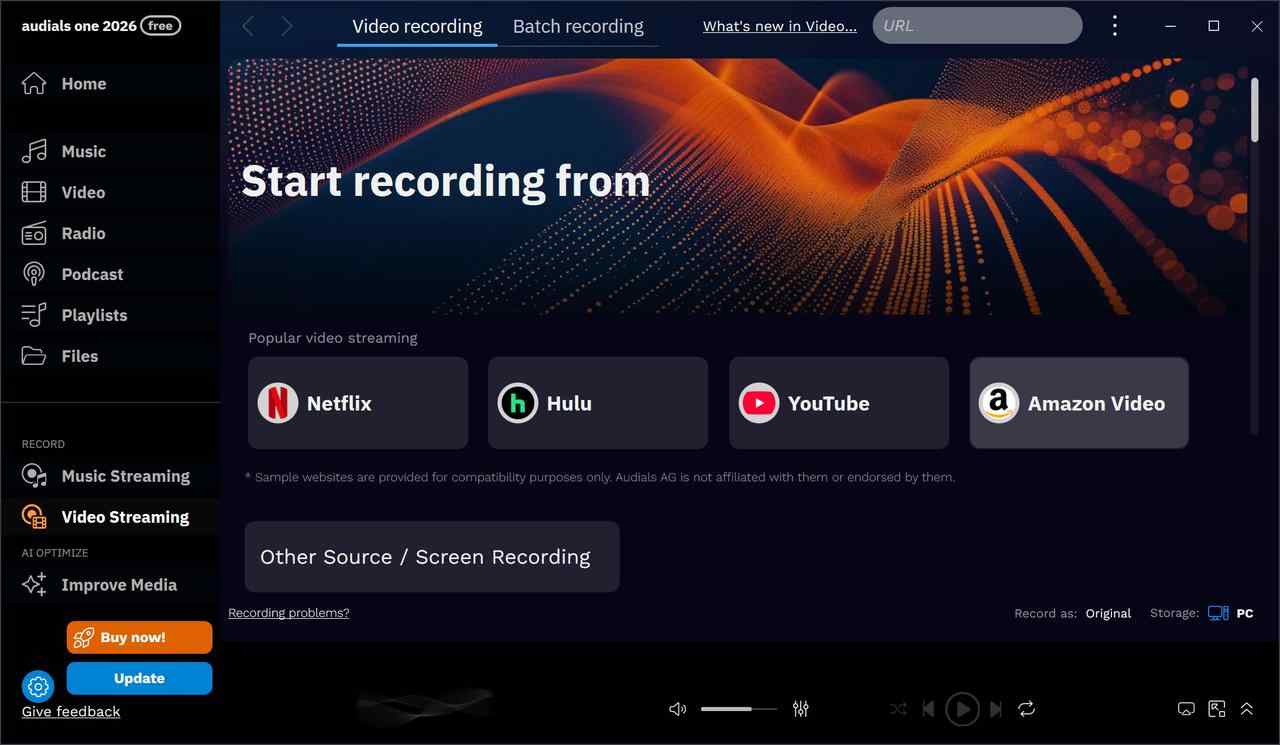
Audials One is a tool widely used by many individuals for downloading from Amazon. Despite being primarily a streaming recorder rather than a dedicated prime video downloader, Audials One can help you record certain Amazon videos into MP4/MKV for later offline viewing (subject to availability and platform rules).
Although it claims to support 2x speed recording, I found some obvious issues when trying out this feature to improve recording efficiency, including but not limited to video-audio desynchronization and noticeable electrical noise. As a result, although it tries to catch up with the efficiency of downloaders, it ultimately loses out on both efficiency and quality.
| ✅ Pros |
|
| ❌ Cons |
|
| Price |
|
| System | Windows 11/10 |
| Review |
|
What video quality can you expect to get from Audials One?
- Video Quality: It uses the VP8 video stream at a resolution of 1920x1080 (1080p) with a frame rate of 23.976 FPS.
- Audio Specifications: This recording features a single Opus audio stream with 2 channels (stereo) at 48.0 kHz. This is consistent with its role as a recorder, which often captures the browser-based stereo output rather than the original multi-channel surround sound.
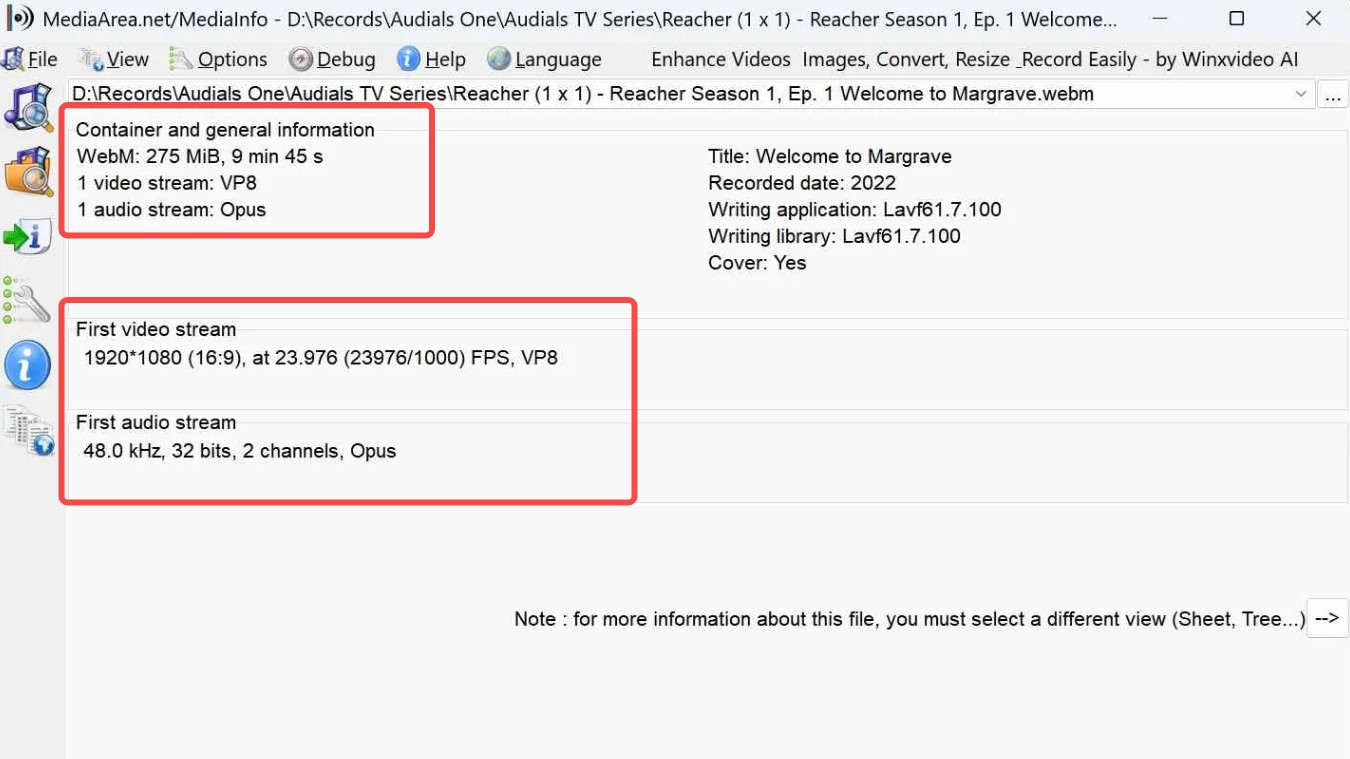
Audials One is best for users who prefer a flexible recording tool that can capture content from almost any streaming source and save it in modern web-friendly formats like WebM with VP8/Opus. However, as a recorder, it may not consistently capture original multi-channel audio tracks compared to dedicated amazon prime video downloader tools.
7. PlayOn Home
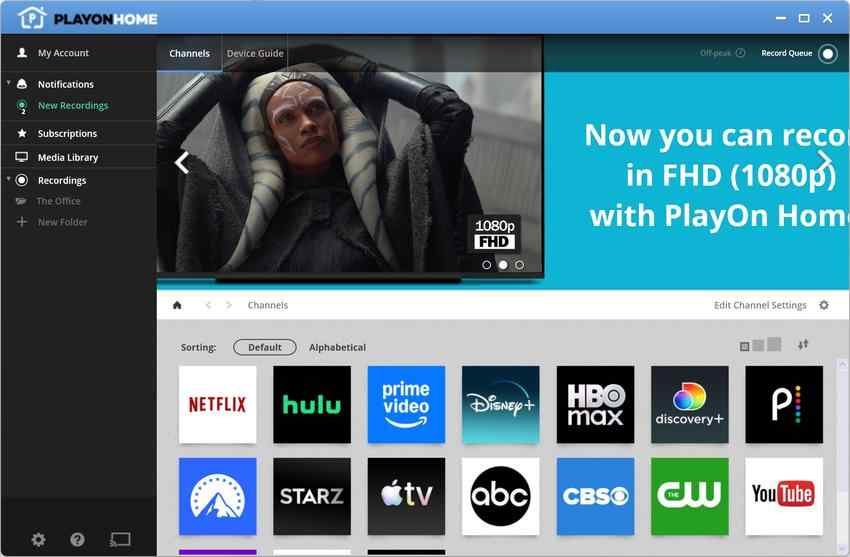
The quality of Amazon videos downloaded via PlayOn Home is not as superior as that of the previous tools; however, another version called PlayOn Cloud excels in its support for mobile devices, including both Android and iOS platforms.
By utilizing PlayOn Home, users can conveniently save Amazon videos on PC. Conversely, the stability of PlayOn Home is notably the weakest among the amazon video downloader tools discussed in this article, which is the primary reason for its placement at the end of our recommendations.
| ✅ Pros |
|
| ❌ Cons |
|
| Price | Too complicated — please check the review below for more info. |
| System | Windows 10/8/8.1/7/Vista |
| More info |
|
What video quality can you expect to get from PlayOn Home?
- Video Quality: The resolution is limited to 640x360 (nHD) with a video bitrate of 2,094 kb/s. This is substantially lower than the 1080p resolution and ~8,258 kb/s bitrate achieved by tools like StreamFab and KeepStreams.
- Frame Rate: The recording uses a non-standard frame rate of 29.970 FPS, whereas the original source is typically 23.976 FPS.
- File Size: The file size for this nearly one-hour episode is 980 MiB. While larger than the trial clips from other tools, the quality density is much lower due to the 360p resolution.
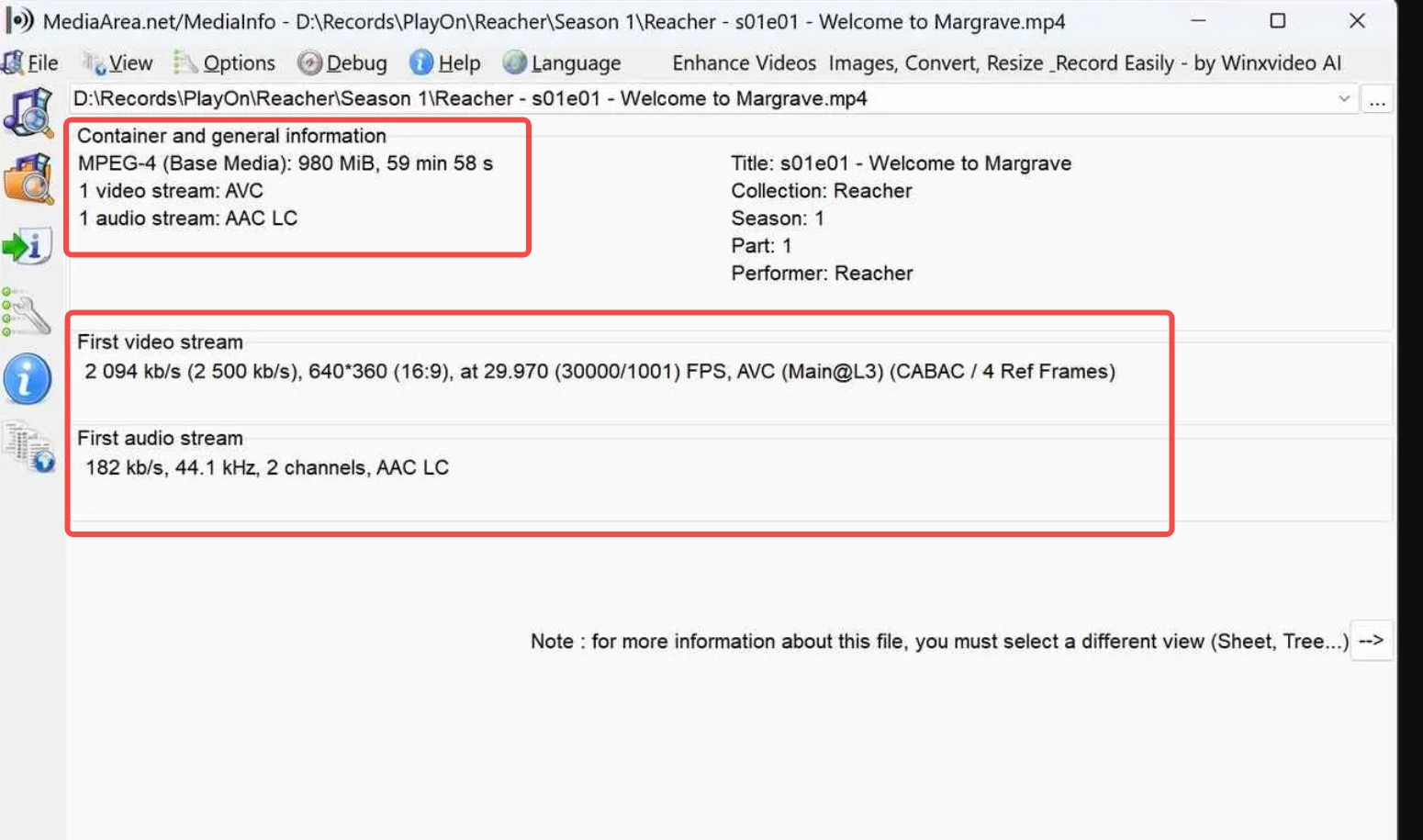
For high-fidelity archiving, PlayOn falls short of the 1080p and surround sound standards of modern amazon prime video downloader tools.
Capturing Streams: Amazon Live Video Downloader
With the platform expanding into live sports (like Thursday Night Football) and live shopping events, an amazon live video downloader must be capable of dynamic SSAI (Server-Side Ad Insertion) slicing and continuous HLS/M3U8 stream capturing. Traditional VOD downloaders fail here because the media file is not finite.
I recommend using recorders like RecordFab that specifically grasp Amazon Live streams, allowing you to intercept the live TS segments and multiplex them into a single MKV file in real-time.
Mobile Solutions: Amazon Video Downloader for Mobile Devices
Finding a true amazon video downloader for mobile applications outside of the official ecosystem is nearly impossible due to sandboxing and iOS/Android DRM frameworks. The official app limits the duration you can keep a file and restricts transferring.
But there is a practical solution: utilize PC software like StreamFab to build the master library, and then host a local Plex server. This effectively turns your NAS into your own private mobile streaming service, allowing you to sync files directly to your phone for offline flights without worrying about expiration dates. It is the closest thing to a free amazon prime video downloader experience without relying on sketchy third-party apps.
FAQs
Why do I not introduce online Amazon Video downloaders?
The reasons are that we found that such online tools are unable to successfully download Prime videos, with a particularly high failure rate. Additionally, most of these websites are filled with phishing advertisements or infested redirections; therefore, we do not recommend this method for any amazon video downloader online search.
Which one is the best Amazon Downloader picked by me?
A practical approach is to choose a tool that helps you manage personal offline viewing for titles you are legally authorized to access while staying within Amazon's Terms of Use and applicable laws. That said, many tools on the market rely on real-time screen recording and re-encoding to rip Prime videos, which is often slower and may lead to quality loss compared with other enhanced workflows.
StreamFab Amazon Downloader is picked by us because it is a genuine amazon prime video downloader with comprehensively better performance, which can preserve the best quality of Amazon videos among these downloaders. If you are looking for a prime video downloader free trial before committing, StreamFab offers 3 full downloads at no cost.
How to Fix 480P Downgrades when Downloading Amazon Videos?
If your downloaded videos suddenly drop to 480p, it means the credentials used by your amazon prime video downloader have expired. You must wait for your downloader's developer to release an update with a fresh key. Always keep your software on the latest version. StreamFab typically deploys CDM credential updates within 48 hours of any Amazon DRM rotation — faster than any other amazon prime downloader in this comparison.
Is there a free amazon prime video downloader that actually works in 2026?
There is no fully free amazon prime video downloader that consistently bypasses Widevine DRM in 2026 without hitting trial limits or quality restrictions. However, every paid tool in this list offers a meaningful free trial: StreamFab gives you 3 complete full-quality downloads, MovPilot gives you 6 minutes per video, and Audials One gives you 10 minutes per recording. The StreamFab trial is the most practical for evaluating a real amazon video downloader free experience because you get complete episodes rather than truncated clips.
Conclusion
The internet is flooded with amazon prime video downloader tools for PCs, with a new one emerging every other day, and picking the best is confusing. But we have walked the extra mile for you by suggesting thoughtful options and offering a detailed guide, pros and cons, and comparative analysis to find the best amazon downloader, whether you are on PC or searching for an amazon video downloader online.
From a download quality and cost-effectiveness perspective, StreamFab Amazon Downloader is worth a try. It leads the field as the most reliable prime video downloader with weekly DRM updates, full-season batch queuing, and the highest verified bitrate output in our 2026 benchmark. But to really know what suits you, you have to try it yourself.
This article is for information purposes only. Use any offline-viewing tool only for titles you are legally authorized to access under your own Amazon account, and always follow Amazon's Terms of Use and applicable laws.

Yes, you can directly download Amazon Prime video on Mac through the official macOS app (subject to a strict 30-day limit) or utilize third-party downloders to export permanent local MP4 files. Explore my 2026 technical tests to avoid blackout restrictions.
By Erika Leen - Aug 26, 2026
Amazon Prime Video Channels like Starz, AMC+, and Acorn TV offer extra shows beyond standard Prime. But their downloads face time and device limits. This guide explains the key difference between Prime vs Channels and shows how to safely download Channel videos.
By Erika Leen - Aug 25, 2026

I revisits the most iconic PBS Kids shows of the 2000s, sharing heartfelt recommendations and formative memories of each series,
By Erika Leen - Aug 21, 2026
You can download eligible rented Amazon movies and purchased titles through the Prime Video app, but rentals have limited viewing Windows and app-managed storage. This guide explains the official route first, then a desktop local-file workflow for authorized viewing when format, audio, or playback flexibility matters.
By Nicole Lopez - Aug 11, 2026