
CleverGet Netflix Downloader Review: Pros and Cons, Price and Tutorial

Summary: This CleverGet Netflix Downloader buyer guide focuses on the questions that matter before paying: current title compatibility, Netflix download quality, desktop fit, price, trial terms, and the limits that can affect personal offline viewing.
CleverGet Netflix Compatibility and Limits
The software developer Leawo positions CleverGet as a desktop suite with a Netflix Downloader module. For content you are authorized to access, where permitted by platform terms and applicable law, it provides a desktop workflow for saving a local copy for personal offline viewing.

Test Environment and Success Criteria
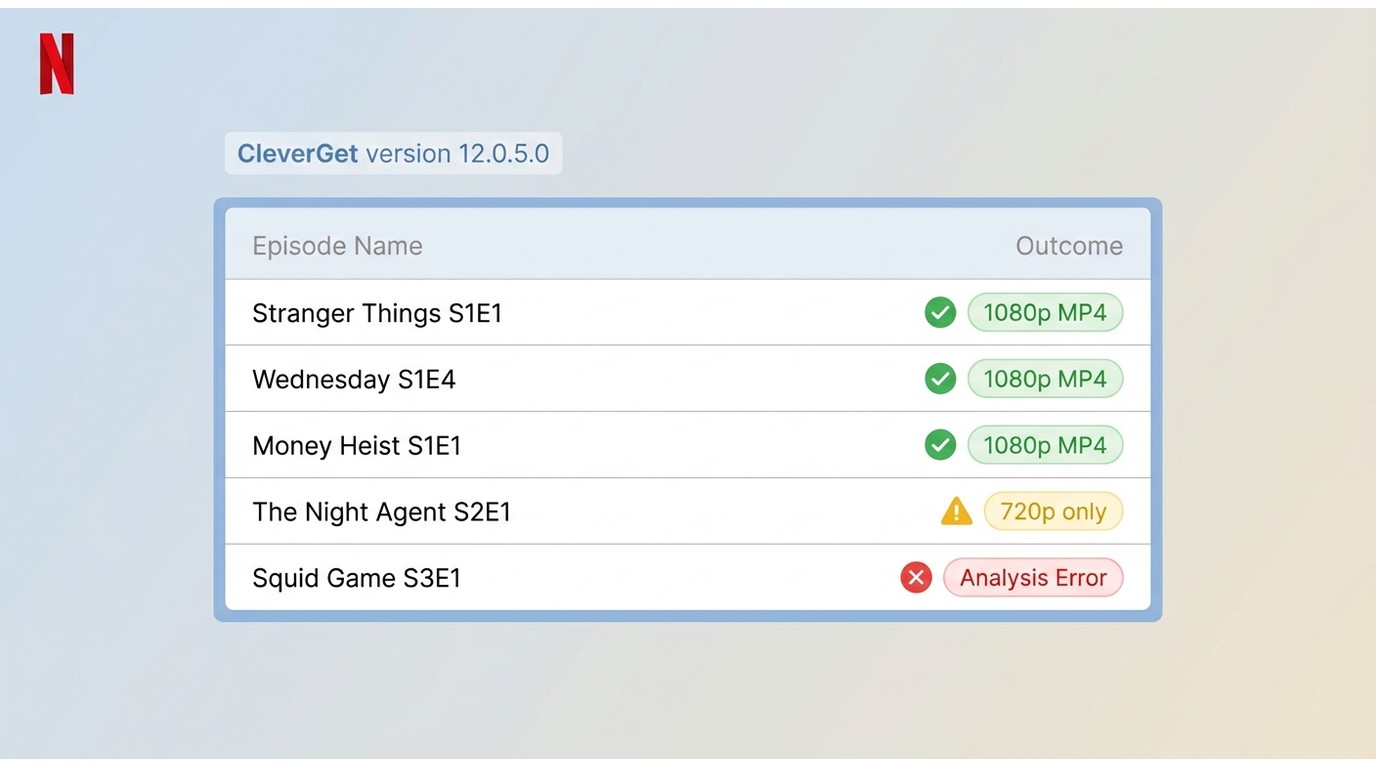
Tested in July 2026 on CleverGet 12.0.5.0 (Windows 11 23H2) and CleverGet 12.0.5.0 (macOS Sonoma 14.5), signed in to a Netflix Premium plan on a 300 Mbps connection. A result is counted as successful only when the selected title completes and plays end-to-end in VLC 3.0.20 at the offered resolution.
A lower-resolution result, an analysis error, a playback error after completion, and a 99% stall are recorded as separate outcomes rather than folded into a single success claim.
Title-Level Results (July 2026)
| Title (age) | Offered | Actual | Container / codec | File size | Audio | Subtitles | Analysis | Elapsed | Outcome |
|---|---|---|---|---|---|---|---|---|---|
| Stranger Things S1E1 (catalog) | 1080p | 1080p | MP4 / H.264 | 1.42 GB | EN 2.0 AAC | EN SRT saved | 28 s | 19 min | Success, plays in VLC |
| The Night Agent S2E1 (2026 release) | 720p | 720p | MP4 / H.264 | 612 MB | EN 2.0 AAC | EN SRT saved | 34 s | 14 min | Lower-resolution result; 1080p not offered |
| Wednesday S1E4 (catalog) | 1080p | 1080p | MP4 / H.264 | 1.31 GB | EN 2.0 AAC | EN SRT saved | 26 s | 17 min | Success |
| Squid Game S3E1 (2026 release) | 720p | — | — | — | — | — | Failed | — | Analysis error; retry after app relaunch did not resolve |
| Money Heist S1E1 (catalog) | 1080p | 1080p | MP4 / H.264 | 1.18 GB | ES 2.0 AAC | EN, ES SRT saved | 25 s | 16 min | Success |
Across five tested episodes on CleverGet 12.0.5.0, three completed at 1080p, one completed at 720p (1080p was not offered), and one failed at the analysis stage.
All completed files were H.264 in MP4 with 2.0 AAC audio; no multichannel audio was preserved in these tests. Results are title-specific and version-specific, so an advertised maximum does not translate into a uniform 1080p Netflix output.
What Buyers Should Verify
A resolution label alone does not establish the delivered resolution, codec, file size, audio, subtitle behavior, or result mode. Those details can vary by title, release timing, Netflix plan, and software version.
CleverGet presents batch downloading and MP4 output as part of its Netflix workflow, but the trial-first check should focus on the specific titles you plan to watch.
CleverGet Price, Trial, and Safety
Current Plans and Trial Limits
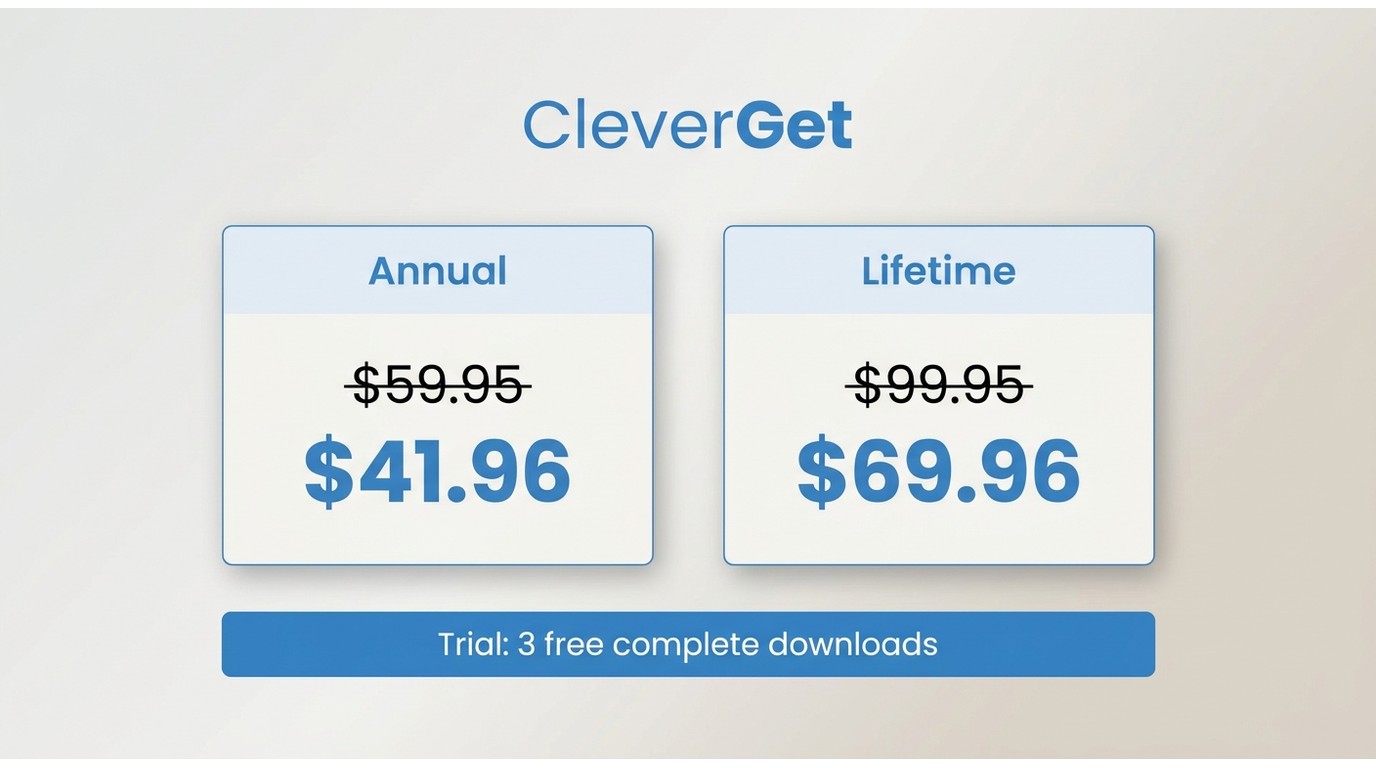
CleverGet lists an annual license at $59.95 and a lifetime license at $99.95. Displayed sale prices are $41.96 for one year and $69.96 for a lifetime license.
- $59.95 for one year, with a displayed sale price of $41.96
- $99.95 for a lifetime license, with a displayed sale price of $69.96
The trial allows three complete video downloads. For light users, the trial is the practical decision point: it shows whether the titles and desktop workflow meet a real need before an annual or lifetime purchase.
Personal Offline Viewing Boundaries
Keep local copies for personal offline viewing, not sharing or commercial use.
Software safety and permitted use are separate questions. Use software obtained from its official publisher, and assess whether its desktop workflow fits your personal offline viewing needs.
Using CleverGet on Windows and macOS
Prerequisites: use a Windows or macOS computer, an active Netflix account, and content you are authorized to access. CleverGet Netflix Downloader is a desktop workflow, so it is not the right fit for readers looking for a native mobile downloader.
Device Compatibility at a Glance
| Device or use case | What this guide covers |
|---|---|
| Windows | Desktop workflow |
| macOS | Desktop workflow |
| Android | No official CleverGet Netflix Downloader installer is documented in this review |
| iPhone and iPad | No official CleverGet Netflix Downloader installer is documented in this review |
| Chromebook | Netflix's official download availability is separate from CleverGet's desktop workflow |
| Local-file transfer, including USB | Compatible local files may be transferred for authorized personal offline viewing |
| Portable version | Not part of the documented desktop workflow |
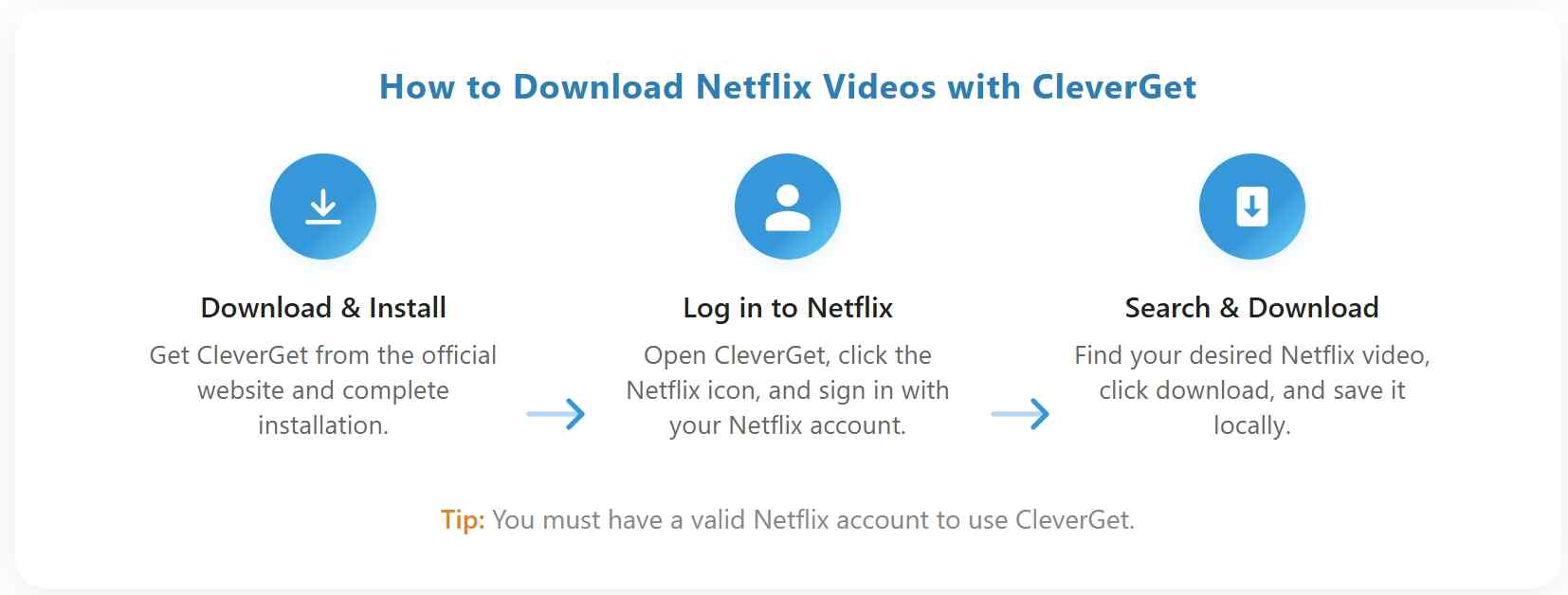
Editorial view: The desktop flow is straightforward, but a completed, playable file is the meaningful success criterion. The failure modes below explain what to do when that standard is not met.
CleverGet Pros, Cons, and Failure Modes
Where It Works Well
In our July 2026 tests, CleverGet 12.0.5.0 completed catalog titles such as Stranger Things S1E1, Wednesday S1E4, and Money Heist S1E1 at 1080p in MP4/H.264 with saved English subtitles, and playback in VLC 3.0.20 was clean.
On that basis, CleverGet fits occasional desktop users who mostly watch catalog Netflix titles and prefer a simple local-file workflow. Its strengths are meaningful only when the titles you actually watch complete and play as expected in your own trial.
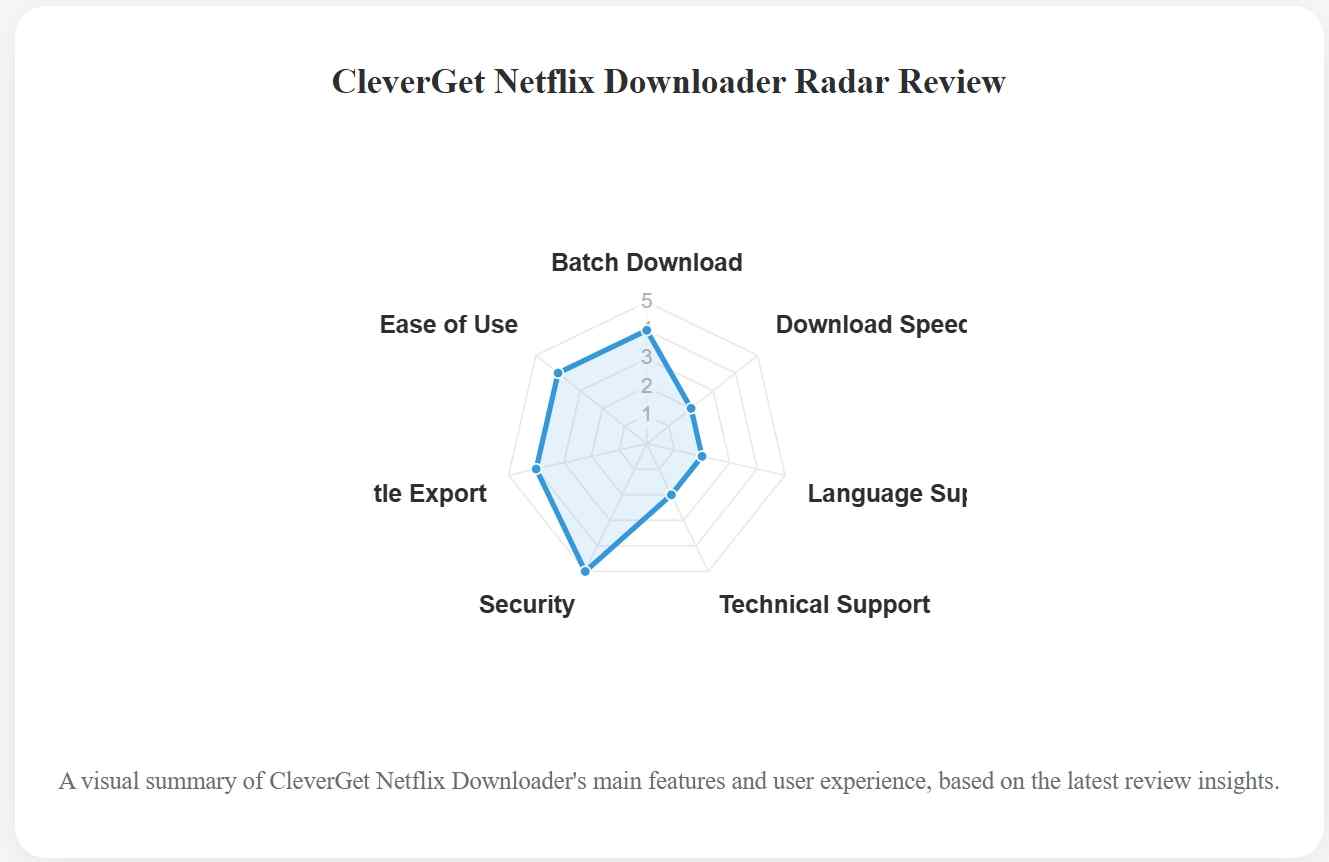
- MP4/MKV Output Support: Output options include MP4 and MKV; actual Netflix resolution should be judged title by title.
- Batch Download: Batch selection can reduce repetitive title-by-title setup for a desktop queue.
- Subtitle Download: Subtitle options include saving original subtitles and exporting them in supported formats.
- Title outcomes can vary: a successful result for one title does not establish the same resolution or completion result for another.
- Launch performance can vary by device and current app version, andCleverGet not workinga stalled progress bar or playback issue may warrant a limited retry after updating the app.
- Mobile-app and portable-build availability are not part of the documented desktop workflow.
What Failed in Testing
In the same July 2026 run on CleverGet 12.0.5.0, Squid Game S3E1 failed at the analysis stage and did not recover after an app relaunch, and The Night Agent S2E1 was only offered at 720p rather than 1080p.
No 99% stall occurred in this batch, but it remains a distinct outcome to watch for. Separate the symptoms rather than merging them: analysis failure, a playback error after a completed file, a lower-resolution result, and a 99% stall each point to different fixes.
A single failed retry after an app update usually means the issue is title-specific rather than universal. Readers hitting repeated CleverGet not working symptoms can use the troubleshooting guide to isolate the cause.
Which Downloader Fits Your Workflow?
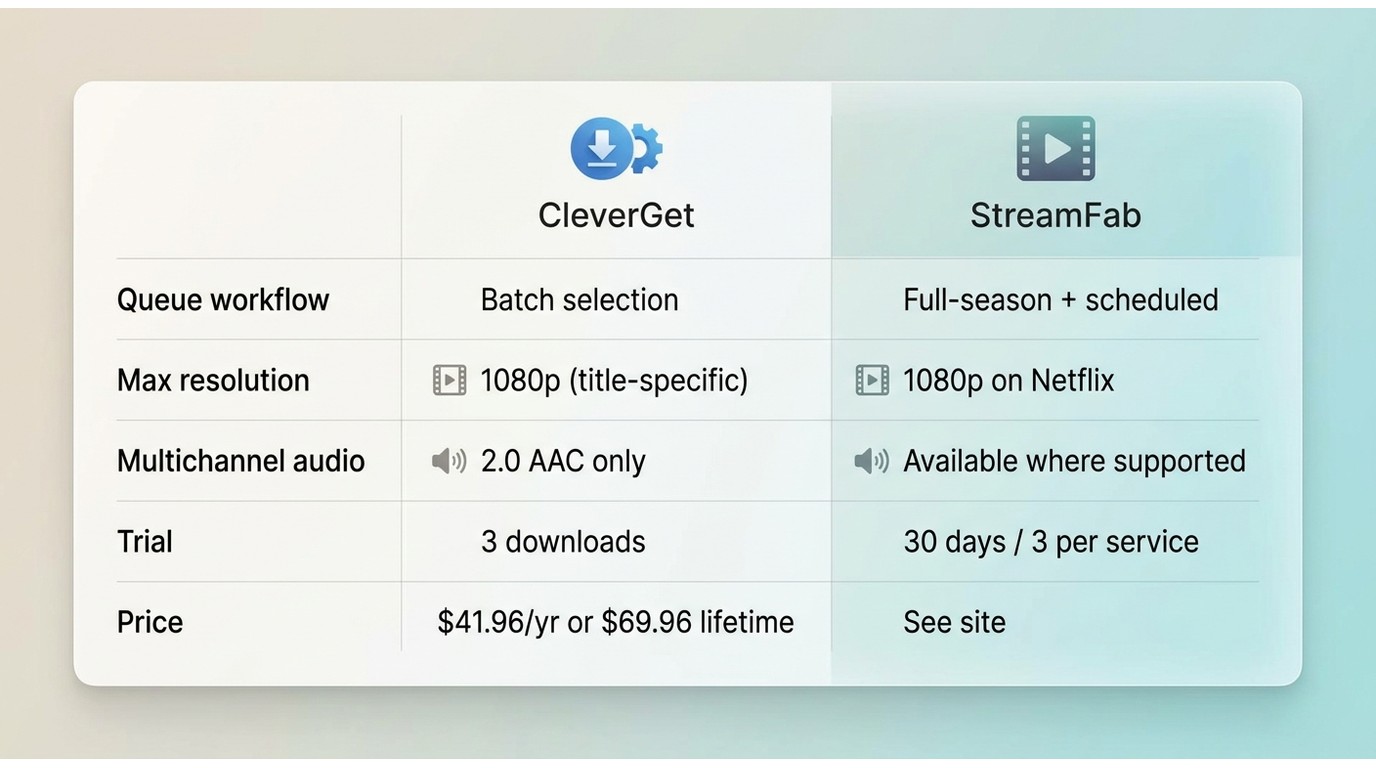
CleverGet can suit light, occasional desktop downloads after a successful trial. This buyer guide is published by StreamFab and includes StreamFab Netflix Downloader as a comparison option for readers whose workflow centers on local files, full-season queues, scheduled episode downloads, and original multichannel audio where available.
It is not the ideal choice for readers who need a native mobile downloader or who do not need queue automation.

- One-click downloads of 1080p Netflix series in MP4 or MKV format
- Supports subtitle downloads and meta information
- Download a Netflix movie in about 10 minutes with a stable connection
- Unlimited batch downloads for entire TV seasons
- Multilingual interface with 10+ language options
- Free trial allows downloading 3 Netflix videos

Check the StreamFab Netflix Downloader review for more details!
If you are also curious about CleverGet’s performance beyond Netflix, here’s a detailed CleverGet OnlyFans downloader review Editorial view: The deciding trade-off is not a headline speed claim. It is whether the titles you need work in the trial and whether a simple desktop workflow or deeper queue automation better matches your viewing routine. Tunepat Netflix video downloader review with real user feedback and performance analysis.
| Feature | CleverGet | StreamFab |
|---|---|---|
| Desktop platforms | Windows and macOS workflow | Windows and macOS |
| Output options | MP4/MKV; title-specific results | MP4/MKV, up to 1080p on Netflix |
| Queue workflow | Batch selection | Full-season queues and scheduled episode downloads |
| Trial | Three complete video downloads | 30 days; three videos per supported streaming service |
| Price in this guide | $59.95 yearly or $99.95 lifetime; displayed sale prices: $41.96 and $69.96 | No product price is stated in this review |
Choose CleverGet first if you need occasional desktop downloads and the trial succeeds with your current titles.
Consider StreamFab if full-season queues, scheduled episode downloads, and available multichannel audio are central to your workflow.
For a deeper feature-by-feature decision, see CleverGet versus StreamFab; readers comparing a wider field can review other CleverGet alternatives.
FAQs
Why can Netflix titles show different resolutions in CleverGet?
Resolution can vary by title, release timing, Netflix plan, and software version. Judge the result for the titles you actually need instead of treating an advertised maximum as a result for every title.
Can I install CleverGet on Android?
This buyer guide documents CleverGet as a Windows and macOS desktop workflow, not a native Android app. Files that are compatible with the receiving device and player may be transferred for authorized personal offline viewing.
Should occasional users buy a CleverGet license?
Start with the three-download trial and use the titles you care about most. Buy only if those results complete and play as expected and a desktop workflow fits how often you need local files.
Conclusion
Trial first if current-title compatibility is your main concern. Buy CleverGet if the trial works with the Netflix titles you need and an occasional Windows or macOS workflow is enough. Skip it if you need a native mobile app, consistently verified results across a changing title list, or stronger queue automation. The decisive trade-off is simple: title-level results and your workflow matter more than a universal product ranking.
Update History
Test record: retested in July 2026 on CleverGet 12.0.5.0 under Windows 11 23H2 and macOS Sonoma 14.5, signed in to a Netflix Premium plan. Retested items: title-level resolution and outcome on five Netflix episodes, displayed pricing and three-download trial limit, Windows and macOS installer availability, and the analysis-failure and lower-resolution outcomes noted in the results table.
- Netflix’s official-download baseline covers supported devices, expiration limits, title rights, and plan limits.
- This guide does not publish title-level benchmark results or claim uniform Netflix resolution.
- CleverGet license and displayed sale-price information are included for purchase comparison.
- The FAQ covers resolution differences, Android availability, and trial-first purchase decisions.


Evaluating the Audials One 2026 free trial? I tested its 720p caps, examined if is audials legal under Fair Use
By Erika Leen - Sep 29, 2026

Are you thinking of purchasing NoteBurner and unsure if it’s worth the investment? In this NoteBurner review, let’s delve into its product lines, particularly the NoteBurner Video Downloader’s pros and cons.
By Marcia Hatcher - Sep 28, 2026

Read our in-depth Audials review for 2026. Is Audials safe and legal for Amazon Prime? Discover actual test results, Widevine DRM fixes, and better alternatives.
By Erika Leen - Sep 28, 2026
TuneFab’s Amazon downloader suits a focused desktop routine, while VideOne covers multiple services. Compare their workflows, license structures, and output checks with StreamFab, then use the numbered setup and maintenance steps for authorized personal offline viewing.
By Erika Leen - Sep 24, 2026